
Community listing page, reviews here may not be monitored by the author.
OptiElitePlusz

No reviews yet
Highly optimized for both ARM Mobile devices and Low-End PCs

Community voices
Reviews
No reviews yet. Be the first to review this project!
Get it on
Available Platforms
 CurseForge
Modrinth
CurseForge
Modrinth
About
Project Details
For authors
Embed Badge
If you're the author of this project, you can embed a live badge anywhere that supports HTML or Markdown. It updates automatically whenever ratings change.
Use HTML for any page that supports it, or Markdown for README files and Markdown-based descriptions.
Identifiers
Platform IDs
About
Description

⚡ OptiElitePlusz
📢 IMPORTANT PROJECT NOTICE: OptiMobilePlusz has officially been rebranded to OptiElitePlusz starting from v1.3.4! Along with the new name, this update officially introduces deep, native optimizations for low-end desktop PCs and laptops, while remaining 100% committed to providing the ultimate performance boost for mobile players.
🚀 The Elite Performance Engine for Low-End PCs, Laptops & ARM Mobile Devices
OptiElitePlusz is a high-performance optimization mod for Minecraft 1.21.11 (Fabric). It is specifically engineered to maximize FPS, eliminate micro-stutters, and guarantee thermal stability on weak, budget, or older hardware—ranging from low-spec desktop PCs to mobile systems running through PojavLauncher or Zalith Launcher 2.
By utilizing advanced Fabric client hooks, lightweight runtime modules, and dynamic GUI-driven profiles, the mod auto-tunes your game engine on the fly. No complex manual tweaking required—just raw, optimized performance.
📊 Performance & Hardware Profile
- 💻 Target Hardware: Low-spec Desktop PCs, older Laptops (integrated GPUs), Snapdragon / ARM-based Android setups, and low-power handhelds.
- 🎯 The Result: Massive and stable FPS gains through adaptive thread throttling, intelligent chunk prioritisation, advanced entity culling, dynamic LOD scaling, and streamlined rendering pipelines.
- 🎒 Best Used For: Low-end desktop setups, memory-constrained environments, mobile-first play, and heavy modpacks where frame stability matters more than unoptimized visual fidelity.
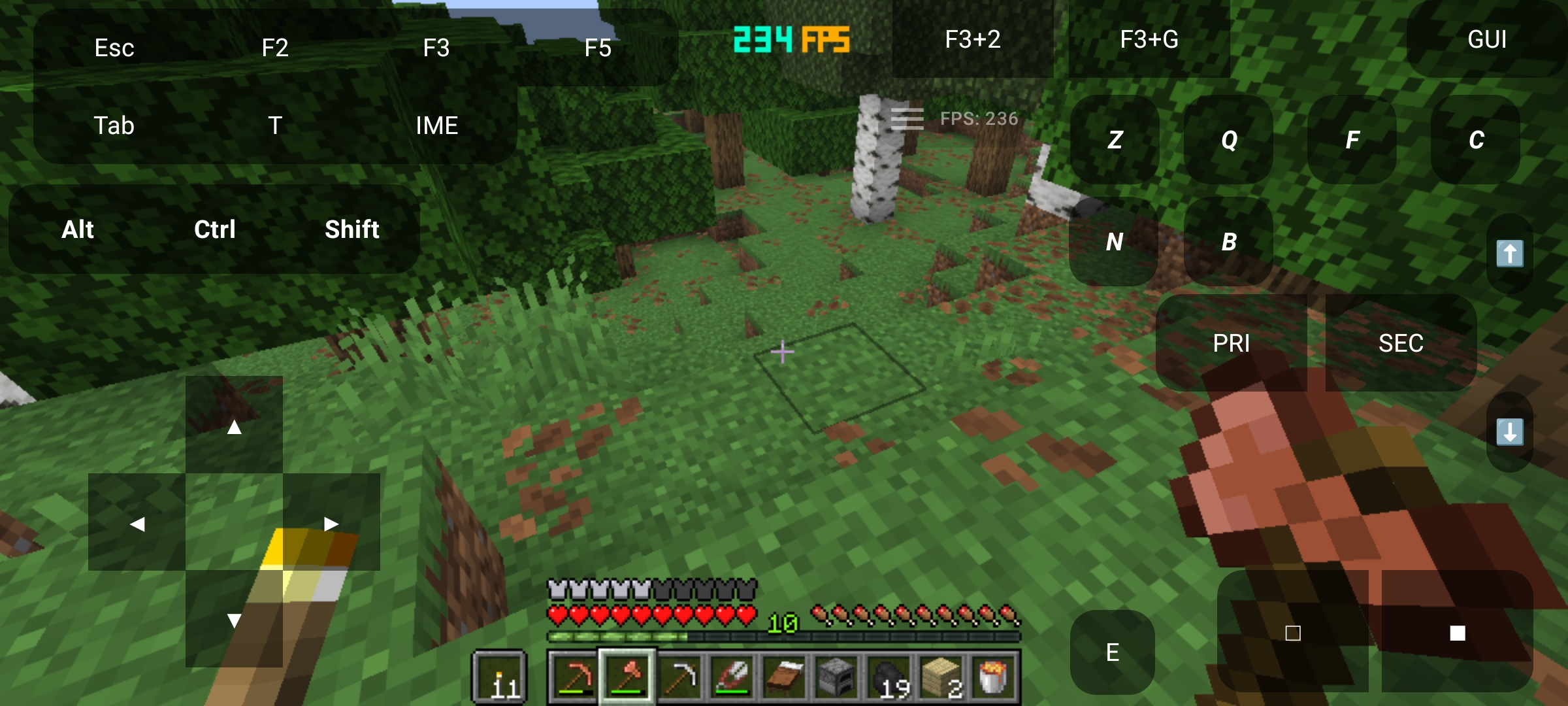
📈 Real-Time In-Game Benchmarks (No other optimization mods used!)

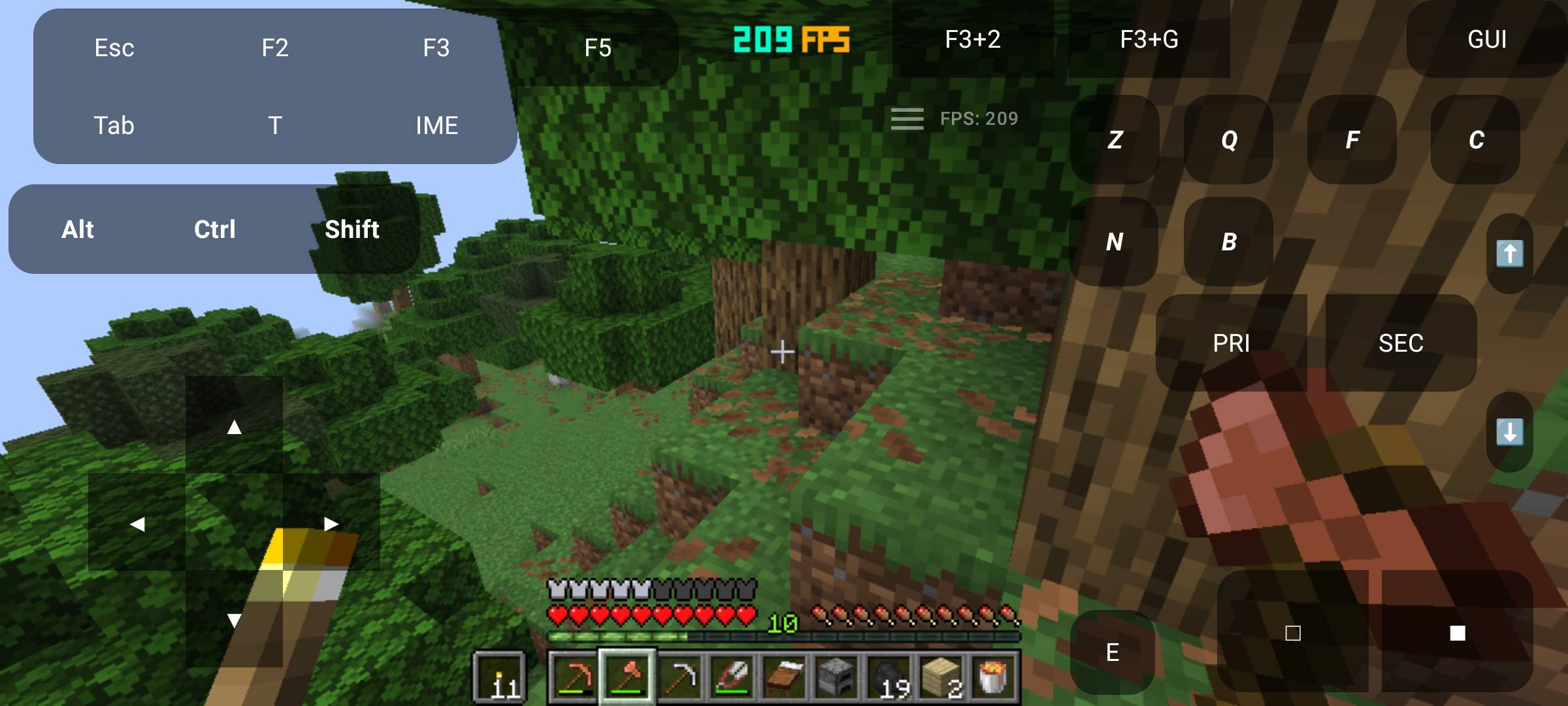
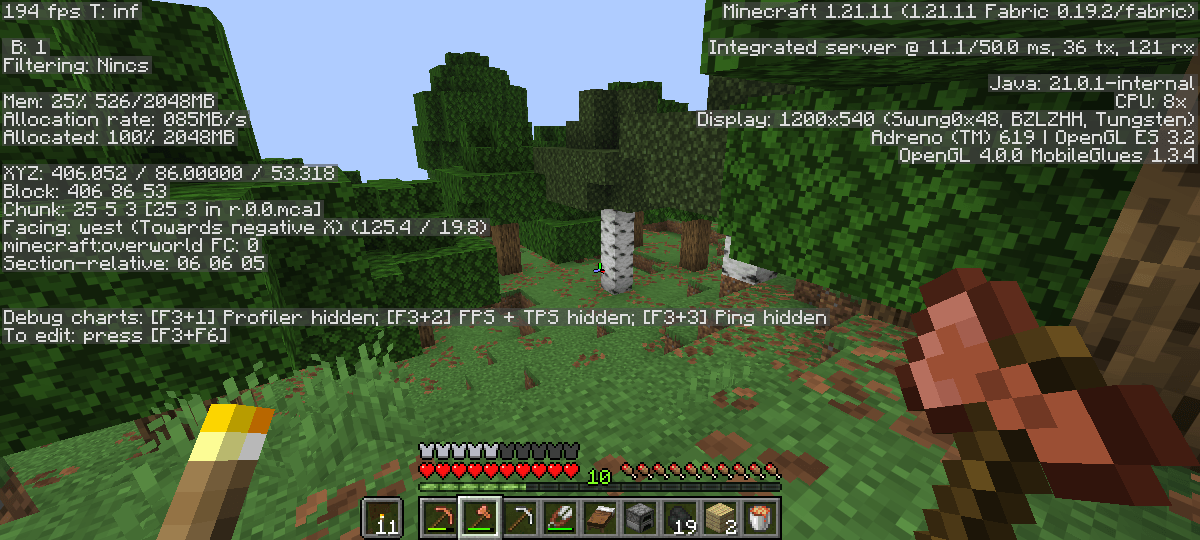
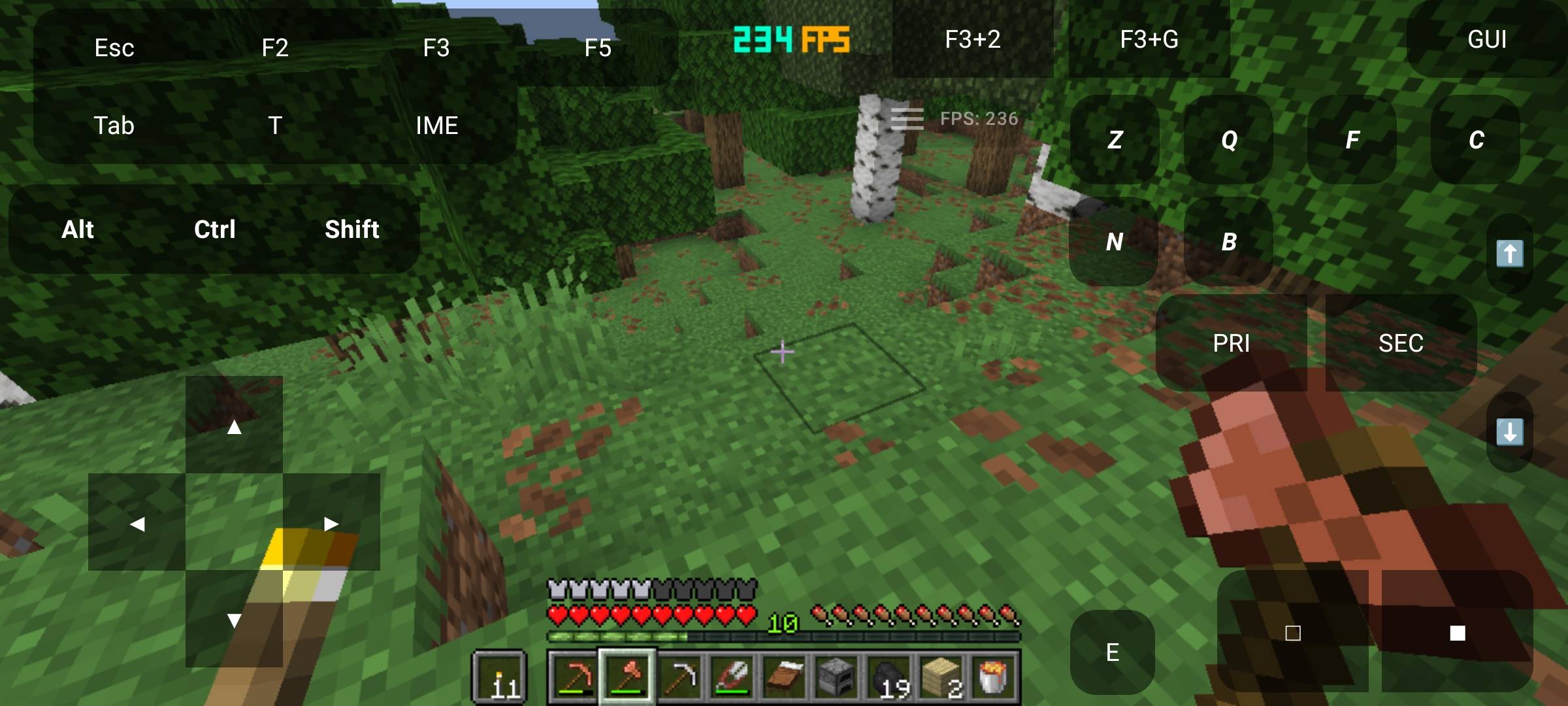
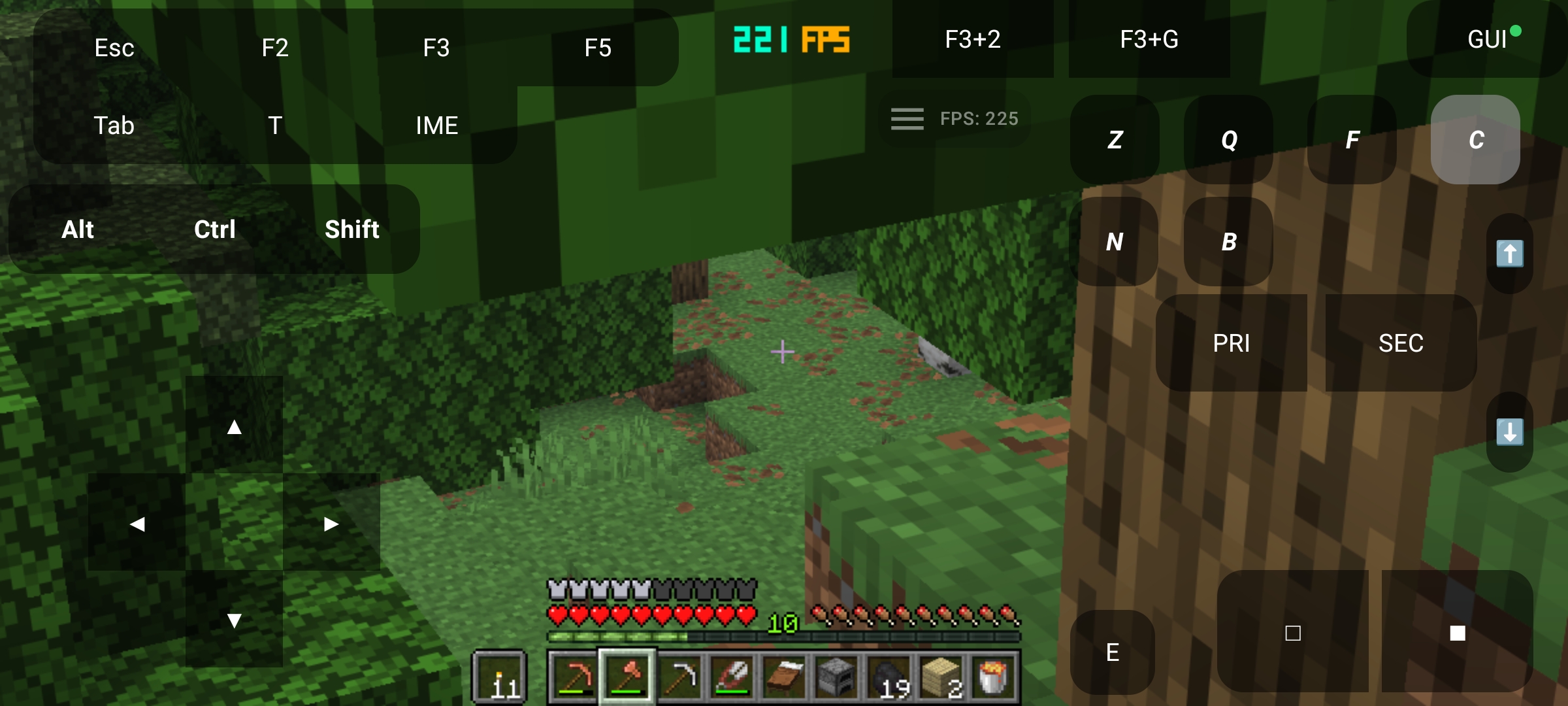
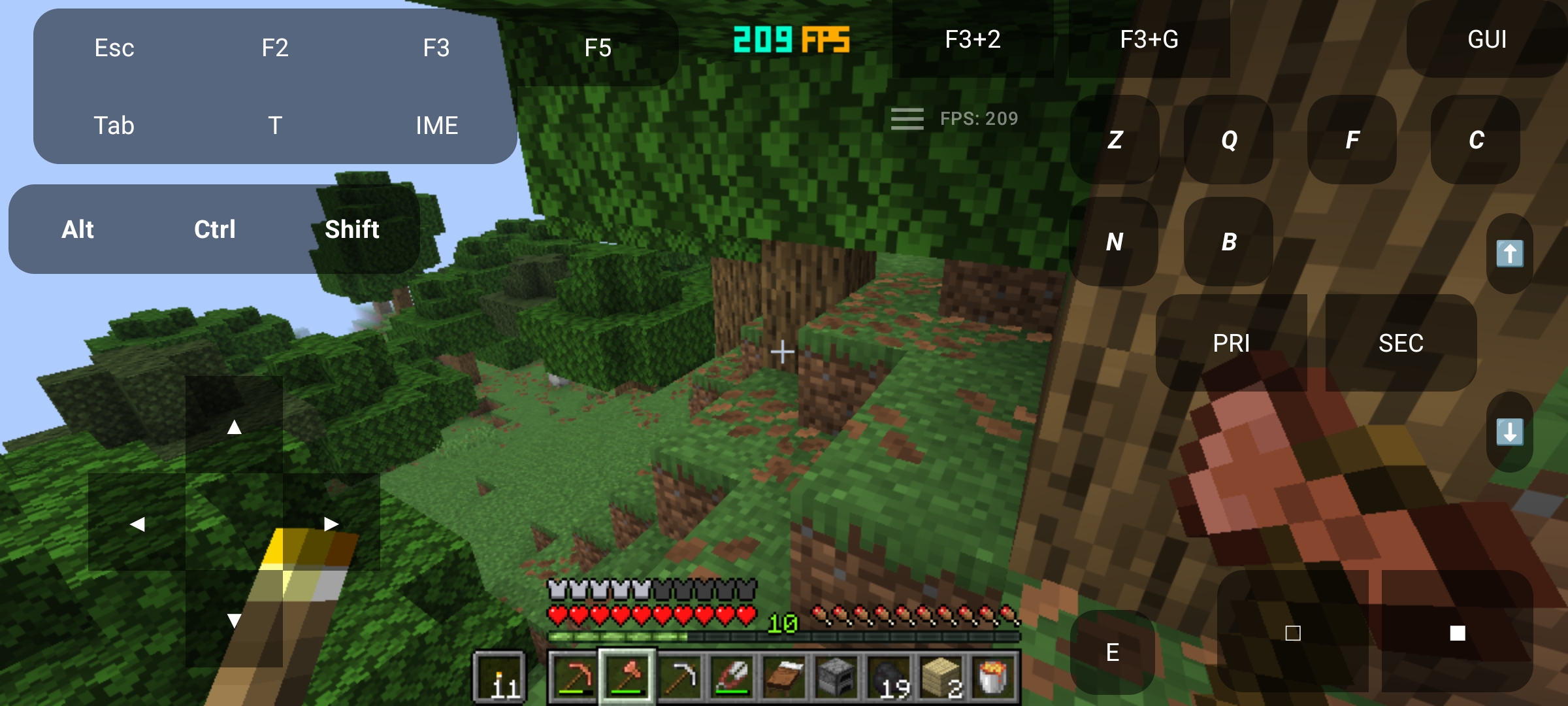
Over 230+ FPS achieved purely with OptiElitePlusz on a mid-range mobile device (Snapdragon 695) in a dense forest biome—with zero other optimization mods installed.
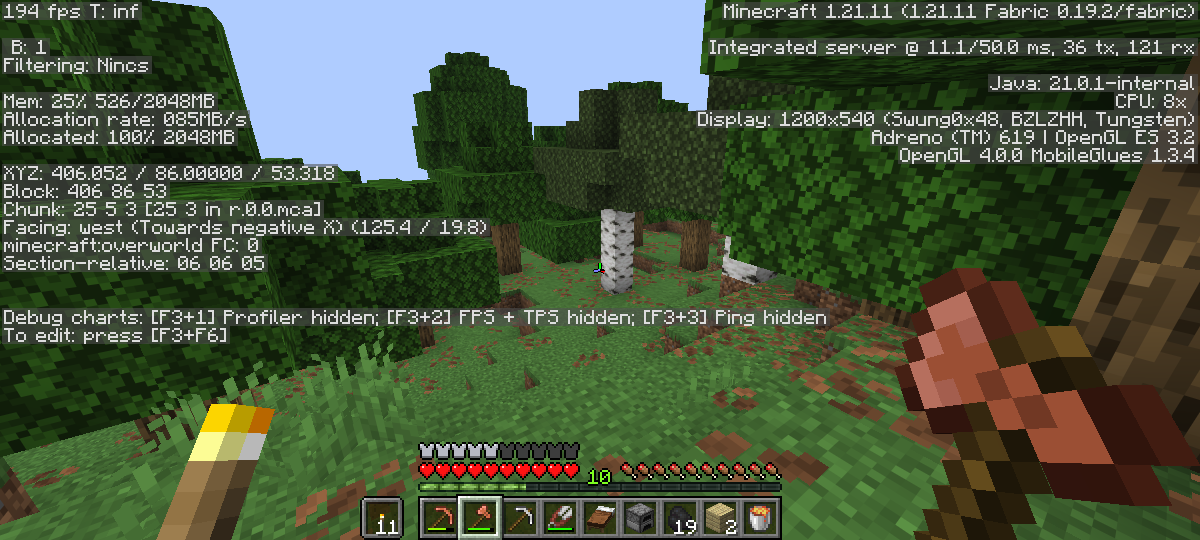
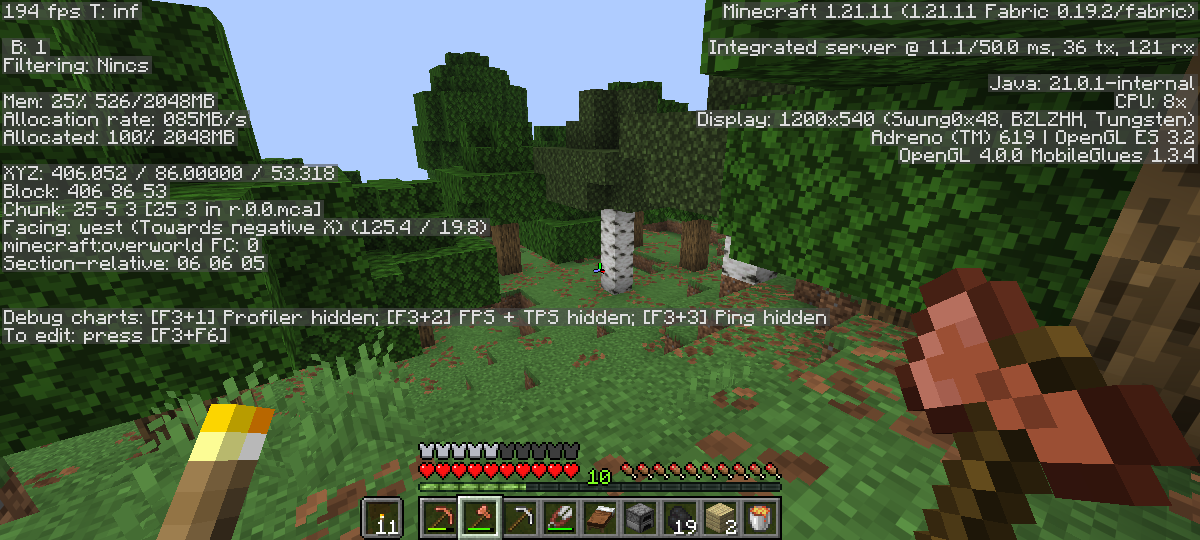
Extreme memory efficiency and zero lag spikes: running Minecraft 1.21.11 Java Edition smoothly while allocating only ~526MB of RAM (25% footprint).
🚀 Key Features and Improvements
🎛 Adaptive Performance Engine (PC & Mobile)
- Adaptive Engine: Automatically switches between
EXTREME,PERFORMANCE,BALANCED, andULTRAprofiles based on your live, real-time FPS. - Frame Budget Manager: Dynamically triggers during heavy lag spikes, reducing expensive rendering workloads to keep your frame times consistent.
- Architecture Detector (NEW v1.3.1): Intelligently detects whether the game is running on a standard x86 Desktop PC or an ARM Mobile platform, automatically applying tailored system thread and garbage collection parameters for that specific hardware type.
🧠 Advanced Rendering & World Optimization
- Smart Entity Culling: Dynamically hides distant entities to heavily reduce CPU and GPU overhead on both desktop and mobile screens.
- LOD Manager: Scales entity rendering distances down seamlessly during intensive gameplay or weak FPS periods.
- Render Throttle: Automatically manages non-essential visual effects and view bobbing to keep your hardware running cool and fast.
- Scene Simplifier: Switches complex graphical behaviors to a lightweight, resource-friendly profile when under heavy stress.
- Texture Streaming: Throttles asynchronous texture loading to prevent performance drops during rapid world exploration or high-speed chunk loading.
- Particle Limiter: Intelligently drops particle counts based on your active performance state.
📦 Chunk, Audio, and Background Handling
- Adaptive Chunk Loading: Dynamically alters chunk simulation behavior based on player movement and hardware capabilities.
- Background Tick Throttler: Skips heavy background world processing when the game loses focus, is minimized, or when switching tabs on a PC.
- Sound Budget Manager: Allocates and limits non-essential audio processing threads to free up critical CPU cores.
- Thermal & Lag Protection: Provides soft warnings when your hardware enters a heavy throttling or high-heat zone.
🎮 Enhanced UI & Universal UX Features
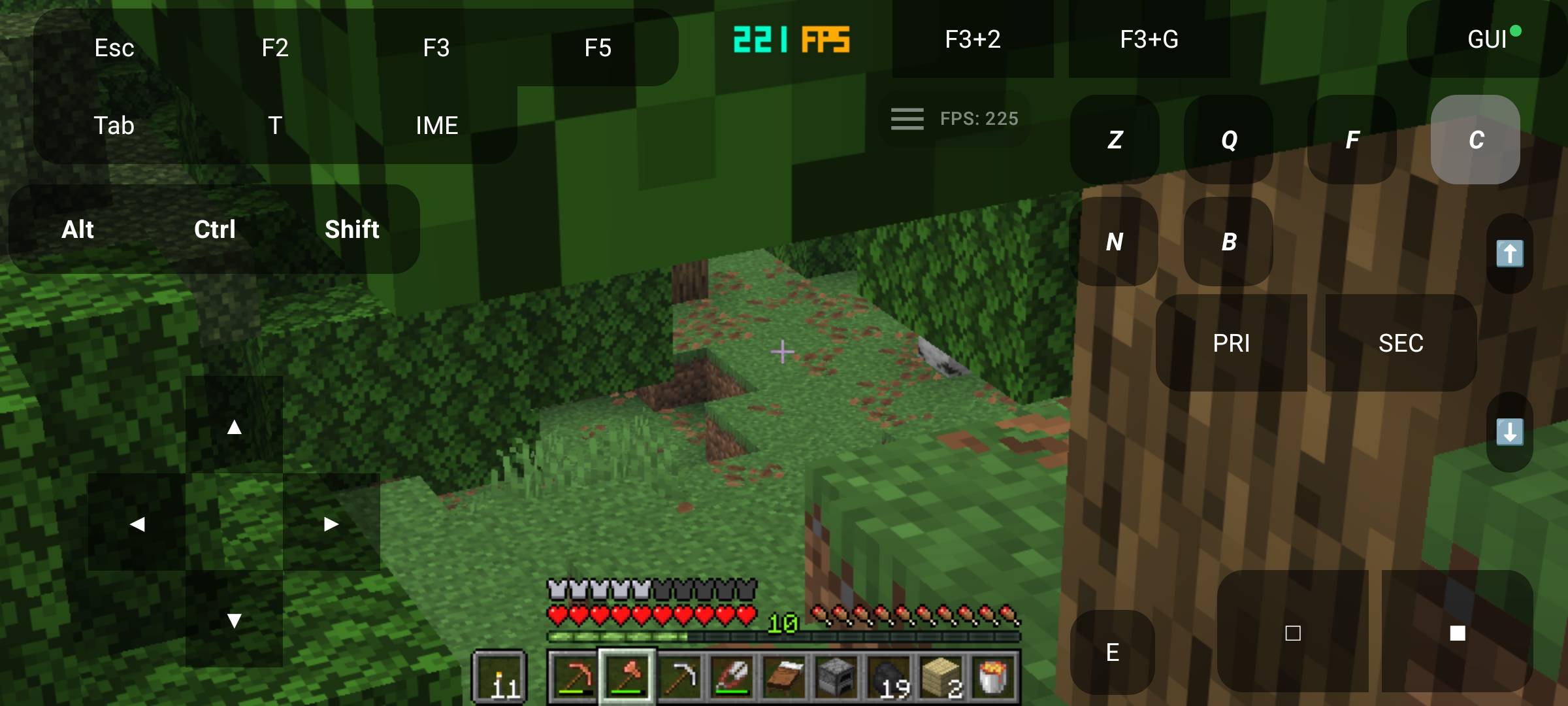
- High-Performance Smooth Zoom: Built-in smooth camera zoom via hotkey (Default:
C). Fully optimized for both desktop mouse precision and mobile touch controls—completely eliminating the need for extra zoom mods! - Pixel-Style FPS Counter: A clean, color-coded FPS display tailored for high visibility on any monitor or screen size.
- Detailed Performance Overlay: Real-time diagnostics showing your active budget state, particle multipliers, and live runtime performance hints.
- Preset Manager: Quickly cycle through
battery/power-saver,balanced, andcompetitionprofiles via an intuitive in-game interface. - Config GUI: Toggle and tweak every single feature easily without ever touching a config file.
🛠 Installation
- Install Fabric Loader for Minecraft 1.21.11 and ensure Java 21 (or higher) is active.
- Download the latest
-RELEASE.jarfile. - Drop the file directly into your
modsfolder. - Launch the game and configure your presets using the in-game options menu.
⚙️ Controls & Performance Profiles
| 🎮 Hotkey / Preset | ⚙️ Function & Recommended Settings |
|---|---|
Zoom Hotkey (C) |
High-Performance Smooth Zoom. Optimized for both desktop mouse and mobile touch controls (No extra zoom mods needed!). |
| FPS Overlay | Enabled by default. Displays real-time performance data (Can be toggled in the config GUI). |
battery / power-saver |
Maximum hardware stability, aggressive culling, background throttling, lowest resource usage. Perfect for phones and laptops on battery power. |
balanced |
The recommended safe default for standard, smooth, and balanced gameplay. |
competition |
High-performance hardware tuning with active hardware telemetry enabled. |
📁 Runtime Data & Footprint
- All configuration profiles are securely saved directly into the standard Fabric config directory.
- Presets and optimization snapshots are cached locally for lightning-fast game loading.
- The mod maintains an extremely lightweight memory footprint, making it fully compatible with other standard optimization mods.
🤝 Join the OptiElitePlusz Development Team!
Are you a passionate Minecraft modder who loves performance optimization? OptiElitePlusz is growing fast, and I am looking for talented Fabric / Mixin developers to join the team and help push mobile and low-end PC optimization to the absolute limit!
🛠️ What I am looking for:
- Strong knowledge of Java and the Fabric Loader ecosystem.
- Experience with Mixins (Bytecode manipulation) and Minecraft rendering internals.
- Understanding of performance profiling, memory management, or ARM/Android hardware limitations (a huge plus!).
- Reliability and a clean, maintainable coding style.
💡 Why join the project?
- Work on a unique, fast-growing project with a dedicated and active user base.
- Solve complex, deeply technical optimization challenges.
- Get officially credited as a contributor/author on our project pages.
📩 How to Apply:
If you want to help maintain and evolve the ultimate performance engine for PojavLauncher, Zalith, and low-end PCs, please reach out!
Send me a private message here on CurseForge with:
- A brief introduction of your previous modding experience (or GitHub profile).
- Your Email Address, so I can review your application and get in touch with you directly to discuss the details!
📜 License & Legal
<details> <summary>⚖️ Click to expand / collapse the EULA License Agreement</summary>
OptiElitePlusz – End User License Agreement & Terms of Use
Ownership and Source Code: OptiElitePlusz (hereinafter: "Mod") is the exclusive intellectual property of the creator (AidStudio). The Mod is published under a SOURCE AVAILABLE model. Decompilation, reverse engineering, unauthorized modification, or incorporating any part of the Mod's code into other projects is strictly PROHIBITED.
Distribution Restrictions: Re-uploading, hosting, or distributing the Mod files (.jar) to any external website, hosting provider, or social platform without the creator's explicit prior written permission is strictly forbidden. The Mod may only be downloaded through official CurseForge and Modrinth pages.
Modpack Usage: The Mod may be freely included in any modpack (public or private) without prior permission, provided that:
- The creator's name (AidStudio) and the original/current name of the Mod are clearly credited.
- A direct link to the Mod's official CurseForge or Modrinth page is included in the modpack's description.
Content Creation: The Mod may be featured in videos, reviews, and live streams (YouTube, Twitch, TikTok, etc.), provided that the official CurseForge/Modrinth download link is clearly included in the content description.
Limitation of Liability: The creator is not responsible for any specific gameplay performance drops, software conflicts, or hardware issues resulting from the use or misconfiguration of the Mod.
</details>
⚡ OptiElitePlusz
📢 IMPORTANT PROJECT NOTICE: OptiMobilePlusz has officially been rebranded to OptiElitePlusz starting from v1.3.4! Along with the new name, this update officially introduces deep, native optimizations for low-end desktop PCs and laptops, while remaining 100% committed to providing the ultimate performance boost for mobile players.
🚀 The Elite Performance Engine for Low-End PCs, Laptops & ARM Mobile Devices
OptiElitePlusz is a high-performance optimization mod for Minecraft 1.21.11 (Fabric). It is specifically engineered to maximize FPS, eliminate micro-stutters, and guarantee thermal stability on weak, budget, or older hardware—ranging from low-spec desktop PCs to mobile systems running through PojavLauncher or Zalith Launcher 2.
By utilizing advanced Fabric client hooks, lightweight runtime modules, and dynamic GUI-driven profiles, the mod auto-tunes your game engine on the fly. No complex manual tweaking required—just raw, optimized performance.
📊 Performance & Hardware Profile
- 💻 Target Hardware: Low-spec Desktop PCs, older Laptops (integrated GPUs), Snapdragon / ARM-based Android setups, and low-power handhelds.
- 🎯 The Result: Massive and stable FPS gains through adaptive thread throttling, intelligent chunk prioritisation, advanced entity culling, dynamic LOD scaling, and streamlined rendering pipelines.
- 🎒 Best Used For: Low-end desktop setups, memory-constrained environments, mobile-first play, and heavy modpacks where frame stability matters more than unoptimized visual fidelity.
📈 Real-Time In-Game Benchmarks (No other optimization mods used!)
Over 230+ FPS achieved purely with OptiElitePlusz on a mid-range mobile device (Snapdragon 695) in a dense forest biome—with zero other optimization mods installed.
Extreme memory efficiency and zero lag spikes: running Minecraft 1.21.11 Java Edition smoothly while allocating only ~526MB of RAM (25% footprint).
🚀 Key Features and Improvements
🎛 Adaptive Performance Engine (PC & Mobile)
- Adaptive Engine: Automatically switches between
EXTREME,PERFORMANCE,BALANCED, andULTRAprofiles based on your live, real-time FPS. - Frame Budget Manager: Dynamically triggers during heavy lag spikes, reducing expensive rendering workloads to keep your frame times consistent.
- Architecture Detector (NEW v1.3.1): Intelligently detects whether the game is running on a standard x86 Desktop PC or an ARM Mobile platform, automatically applying tailored system thread and garbage collection parameters for that specific hardware type.
🧠 Advanced Rendering & World Optimization
- Smart Entity Culling: Dynamically hides distant entities to heavily reduce CPU and GPU overhead on both desktop and mobile screens.
- LOD Manager: Scales entity rendering distances down seamlessly during intensive gameplay or weak FPS periods.
- Render Throttle: Automatically manages non-essential visual effects and view bobbing to keep your hardware running cool and fast.
- Scene Simplifier: Switches complex graphical behaviors to a lightweight, resource-friendly profile when under heavy stress.
- Texture Streaming: Throttles asynchronous texture loading to prevent performance drops during rapid world exploration or high-speed chunk loading.
- Particle Limiter: Intelligently drops particle counts based on your active performance state.
📦 Chunk, Audio, and Background Handling
- Adaptive Chunk Loading: Dynamically alters chunk simulation behavior based on player movement and hardware capabilities.
- Background Tick Throttler: Skips heavy background world processing when the game loses focus, is minimized, or when switching tabs on a PC.
- Sound Budget Manager: Allocates and limits non-essential audio processing threads to free up critical CPU cores.
- Thermal & Lag Protection: Provides soft warnings when your hardware enters a heavy throttling or high-heat zone.
🎮 Enhanced UI & Universal UX Features
- High-Performance Smooth Zoom: Built-in smooth camera zoom via hotkey (Default:
C). Fully optimized for both desktop mouse precision and mobile touch controls—completely eliminating the need for extra zoom mods! - Pixel-Style FPS Counter: A clean, color-coded FPS display tailored for high visibility on any monitor or screen size.
- Detailed Performance Overlay: Real-time diagnostics showing your active budget state, particle multipliers, and live runtime performance hints.
- Preset Manager: Quickly cycle through
battery/power-saver,balanced, andcompetitionprofiles via an intuitive in-game interface. - Config GUI: Toggle and tweak every single feature easily without ever touching a config file.
🛠 Installation
- Install Fabric Loader for Minecraft 1.21.11 and ensure Java 21 (or higher) is active.
- Download the latest
-RELEASE.jarfile. - Drop the file directly into your
modsfolder. - Launch the game and configure your presets using the in-game options menu.
⚙️ Controls & Performance Profiles
| 🎮 Hotkey / Preset | ⚙️ Function & Recommended Settings |
|---|---|
Zoom Hotkey (C) |
High-Performance Smooth Zoom. Optimized for both desktop mouse and mobile touch controls (No extra zoom mods needed!). |
| FPS Overlay | Enabled by default. Displays real-time performance data (Can be toggled in the config GUI). |
battery / power-saver |
Maximum hardware stability, aggressive culling, background throttling, lowest resource usage. Perfect for phones and laptops on battery power. |
balanced |
The recommended safe default for standard, smooth, and balanced gameplay. |
competition |
High-performance hardware tuning with active hardware telemetry enabled. |
📁 Runtime Data & Footprint
- All configuration profiles are securely saved directly into the standard Fabric config directory.
- Presets and optimization snapshots are cached locally for lightning-fast game loading.
- The mod maintains an extremely lightweight memory footprint, making it fully compatible with other standard optimization mods.
🤝 Join the OptiElitePlusz Development Team!
Are you a passionate Minecraft modder who loves performance optimization? OptiElitePlusz is growing fast, and I am looking for talented Fabric / Mixin developers to join the team and help push mobile and low-end PC optimization to the absolute limit!
🛠️ What I am looking for:
- Strong knowledge of Java and the Fabric Loader ecosystem.
- Experience with Mixins (Bytecode manipulation) and Minecraft rendering internals.
- Understanding of performance profiling, memory management, or ARM/Android hardware limitations (a huge plus!).
- Reliability and a clean, maintainable coding style.
💡 Why join the project?
- Work on a unique, fast-growing project with a dedicated and active user base.
- Solve complex, deeply technical optimization challenges.
- Get officially credited as a contributor/author on our project pages.
📩 How to Apply:
If you want to help maintain and evolve the ultimate performance engine for PojavLauncher, Zalith, and low-end PCs, please reach out!
Send me a private message here on CurseForge with:
- A brief introduction of your previous modding experience (or GitHub profile).
- Your Email Address, so I can review your application and get in touch with you directly to discuss the details!
📜 License & Legal
⚖️ Click to expand / collapse the EULA License Agreement
OptiElitePlusz – End User License Agreement & Terms of Use
-
Ownership and Source Code: OptiElitePlusz (hereinafter: "Mod") is the exclusive intellectual property of the creator (AidStudio). The Mod is published under a SOURCE AVAILABLE model. Decompilation, reverse engineering, unauthorized modification, or incorporating any part of the Mod's code into other projects is strictly PROHIBITED.
-
Distribution Restrictions: Re-uploading, hosting, or distributing the Mod files (.jar) to any external website, hosting provider, or social platform without the creator's explicit prior written permission is strictly forbidden. The Mod may only be downloaded through official CurseForge and Modrinth pages.
-
Modpack Usage: The Mod may be freely included in any modpack (public or private) without prior permission, provided that:
- The creator's name (AidStudio) and the original/current name of the Mod are clearly credited.
- A direct link to the Mod's official CurseForge or Modrinth page is included in the modpack's description.
-
Content Creation: The Mod may be featured in videos, reviews, and live streams (YouTube, Twitch, TikTok, etc.), provided that the official CurseForge/Modrinth download link is clearly included in the content description.
-
Limitation of Liability: The creator is not responsible for any specific gameplay performance drops, software conflicts, or hardware issues resulting from the use or misconfiguration of the Mod.
Screenshots
Gallery
-
 1000072018.jpg 1000072018.jpg
 -
 1000072019.jpg 1000072019.jpg
 -
 1000072020.png 1000072020.png
 -
 1000072017.jpg 1000072017.jpg
Versions
Files
Relations
Project Relations
More like this
Similar Mods
Suggestions use data such as tags, dependencies, dependents, descriptions, titles, and more to rank how much they overlap with this mod.
On ModDex
Community snapshot
By the numbers
Statistics
 (opens in a new tab)
Get it on
Available Platforms
CurseForge
Modrinth
On ModDex
Community snapshot
By the numbers