
Oracle Text Hub
No reviews yet
Clear all chat spam with a single click. Transform protection and shop clutter into a clear HUD and precise sales summaries.
Fabric is a mod loader for versions 1.14+ of Minecraft, particularly popular for client side and optimization mods.
Community voices
Reviews
Click once to include, again to exclude, again to clear
No reviews yet. Be the first to review this project!
Get it on
Available Platforms
 Modrinth
Compatibility
Supported Environments
About
Project Details
For authors
Embed Badge
If you're the author of this project, you can embed a live badge anywhere that supports HTML or Markdown. It updates automatically whenever ratings change.
Use HTML for any page that supports it, or Markdown for README files and Markdown-based descriptions.
Identifiers
Platform IDs
Resources
External Links
About
Description
Oracle Text Hub
A 100% client-side tool suite that cleans spam from server chat and displays important information visually and intuitively on your screen.
At a Glance
- What is this mod? A powerful tool that cleans chat clutter and transforms repetitive plugin messages into a clean, useful HUD.
- Who should use it? Any multiplayer server player (Survival, Economy, etc.) who is tired of spam and wants a clearer gameplay experience.
- Main Features:
- Interactive Spam Filter: Instantly block any chat message with a click.
- Visual Pattern Editor: Stop dynamic spam without any programming knowledge.
- Protection HUD: Replaces region announcement spam with an on-screen display.
- Sales Assistant: Consolidates dozens of shop messages into one elegant summary.
Detailed Features
🖱️ Interactive Spam Filter: The Power of a Programmer, the Ease of a Click.
While other mods require you to learn complex code (Regex) to create powerful filters, we give you the same power in a radically intuitive way.
-
Instant Blocking: See spam? Hold
Ctrl+Left-Clickon the text. A menu will appear to confirm the action. It's that simple. -
Friendly Pattern Editor: Does a message constantly change? Edit the rule in our visual menu and use simple wildcards like
#number#or#user#. Our menu guides you with clear instructions. -
Note: Blocking a message does not remove it from your current chat view. It adds a rule to intercept and block all future occurrences of that message. Don't worry if the original is still visible; it won't bother you again.

🛡️ Protection HUD
Replaces the constant "Entering/Leaving" message spam with a clean visual indicator on your screen. You'll always know what protection you're in and who owns it without flooding your chat.
- Current Compatibility: Pre-configured for PreciousStones.
- Language Support: Message detection is currently designed for servers using plugins in Spanish.

📈 Sales Assistant
Mass selling no longer means mass spam. The mod intercepts dozens of sales messages and shows you a single, elegant final summary with your total earnings, complete with a real-time on-screen counter.
- Current Compatibility: Designed to recognize messages from the ChestShop plugin.
- Language Support: Message detection works on servers using English or Spanish.
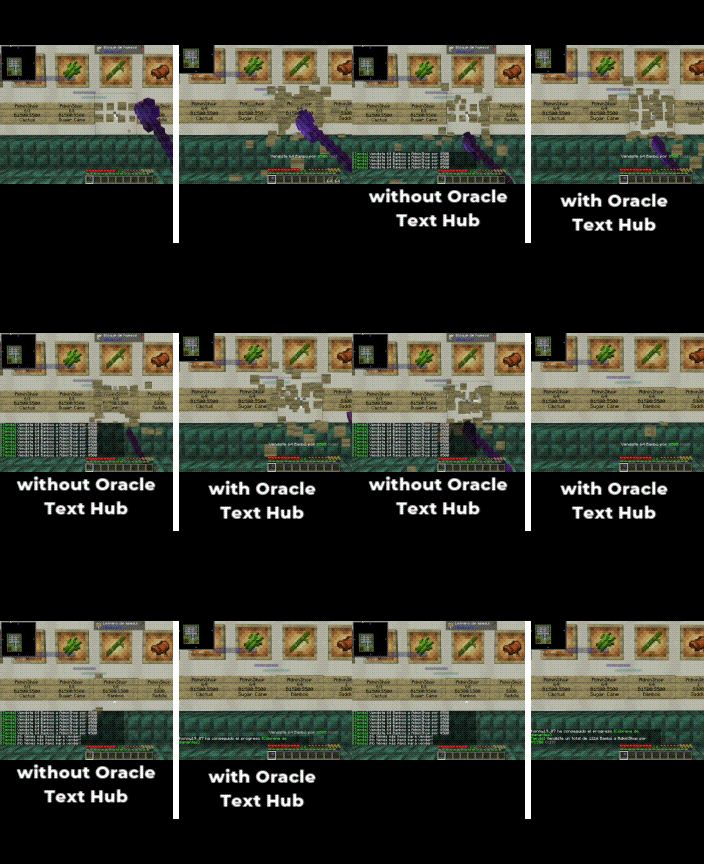
ChestShop: Compatible with Oracle Text Hub
ChestShop
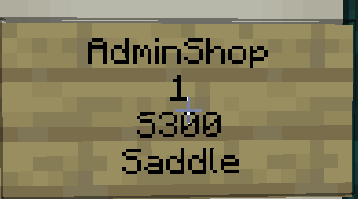
-We offer full support for ChestShop in both English and Spanish. If your language is different, the mod will default to English, and we plan to add more languages soon.
-Additionally, you can now see item names in whatever language you have configured, along with their rarity color, in both the chat and floating messages, instead of a name code like: Bow#fv.
ChestShop without Oracle Text Hub
These messages are informative, but they create so much spam in the chat that it's easy to miss important things.


ChestShop with Oracle Text Hub
Instead of sending a message to the chat for every single sale, we simply show you how many you're selling in real-time, so your chat doesn't fill up with unnecessary messages. We have included a multiplier (x1, x2, x3) so that you always know how many stacks or the total quantity you've sold.

When you're finished selling, you'll see a final message with the total amount sold and the money earned. This lets you know exactly how much you made without having to count message by message and without your chat being flooded.

Of course, when someone sells to or buys from your chests, you'll also see a summary instead of 20 messages for 20 different purchases.

All the messages that normally spam the chat—for example, "You are out of stock," "You can't buy/sell here," "You don't have permission," "You can't trade with your own shop," and many more—are now displayed as a temporary on-screen notification, and their color changes depending on the severity.

Configuration & Controls
Total Control! All of the mod's key actions can be assigned to any key you want from Minecraft's main Options > Controls > Key Binds menu.
Open Oracle Config: Opens the main menu to enable or disable modules.Open Spam List: Directly access your list of spam rules to manage them.
Frequently Asked Questions (FAQ)
- Q: How do I install it?
- A: You need the Fabric API. Then, just drag the
.jarfile into your.minecraft/modsfolder.
- Q: The Protection HUD doesn't work on my server, why?
- A: This mod is in Beta. Currently, automatic support is limited to the plugins and languages it was tested on (PreciousStones, in Spanish). But don't worry! We are developing a Universal Rule System that will allow you, the user, to teach the mod to recognize messages from ANY plugin.
- Q: Why should I install it?
- A: The real question is, why haven't you already?
- A: You need the Fabric API. Then, just drag the
Future Roadmap
This is just the beginning. Our next goals are:
- Universal Rule System: Implementing the pattern editor that will allow you to make the mod compatible with any plugin.
- Full Multi-Language Support: Translating all features so that message detection works perfectly in any language.
- Expanded Plugin Support: Adding native support for GriefPrevention, Towny, and Factions.
Our Philosophy: We Didn't Invent the Wheel, We Perfected It.
We know that spam filters and chat utilities are nothing new. We aren't here to reinvent the wheel.
We're here to give you a better wheel: one that runs smoother, adapts to any terrain, and gives you a level of control you've never felt before. Think of Oracle Text Hub as the next-gen technology for the "car" that is your gameplay experience. Smarter, more intuitive, and above all, designed for you.
Screenshots
Gallery
-
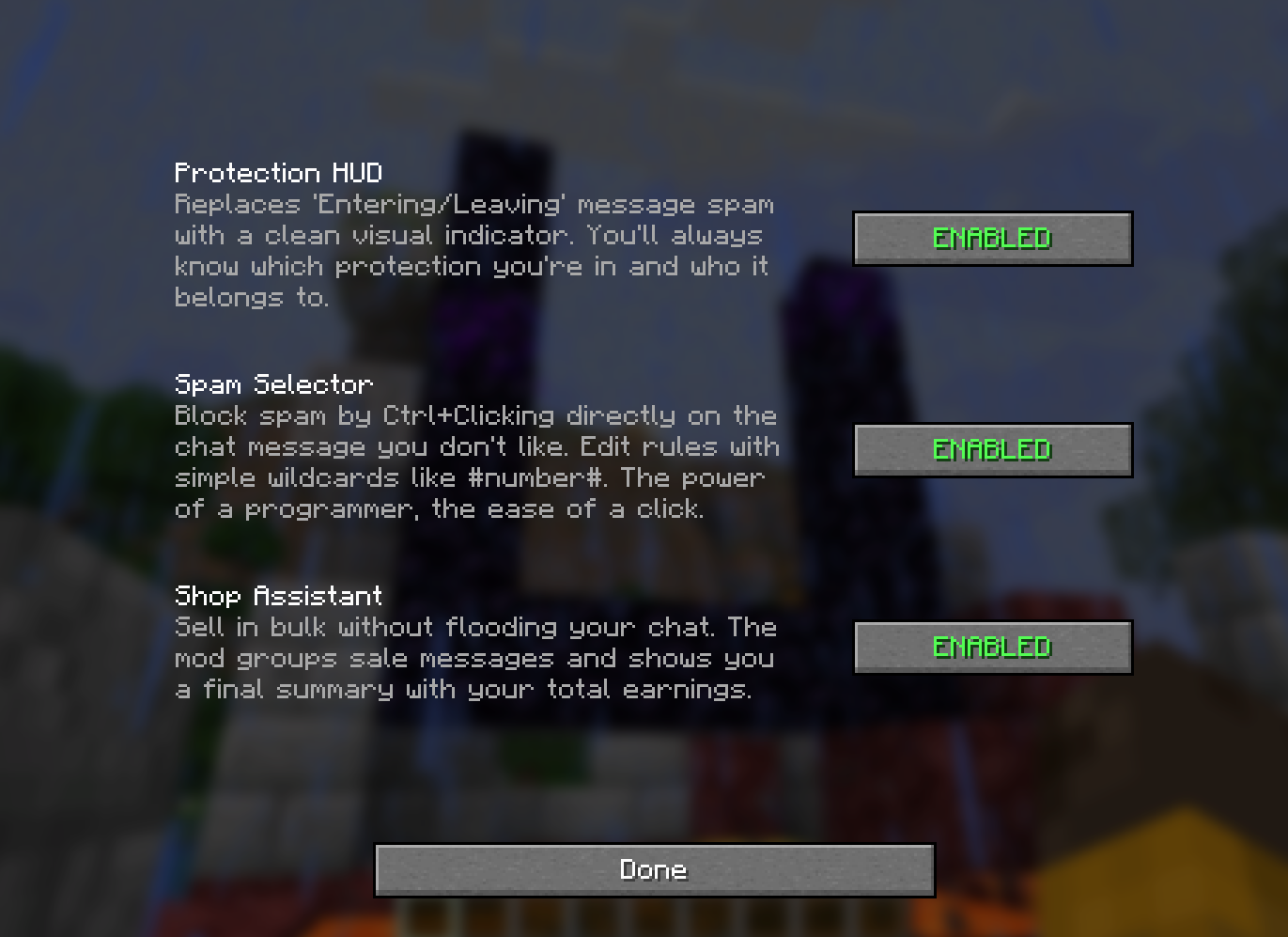 Settings To open the settings menu, hold down the 'R' key (3 seconds), or set a custom key for instant access in Minecraft's key bind settings. From there, you can enable and disable each feature as you like.
 -
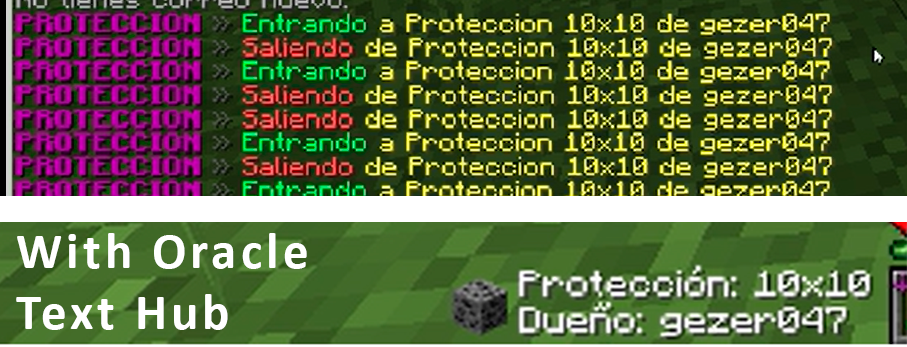 Protection HUD Replaces the constant "Entering/Leaving" message spam with a clean visual indicator on your screen. You'll always know what protection you're in and who owns it without flooding your chat.
 -
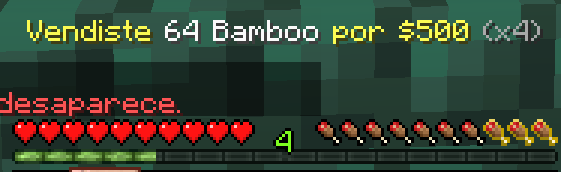 Asistente de Ventas Durante las ventas, el mod suprime los mensajes del chat para evitar el spam. En su lugar, muestra un indicador visual temporal en pantalla con un contador en tiempo real de los stacks vendidos. Al finalizar la transacción, se imprime en el chat un único
 -
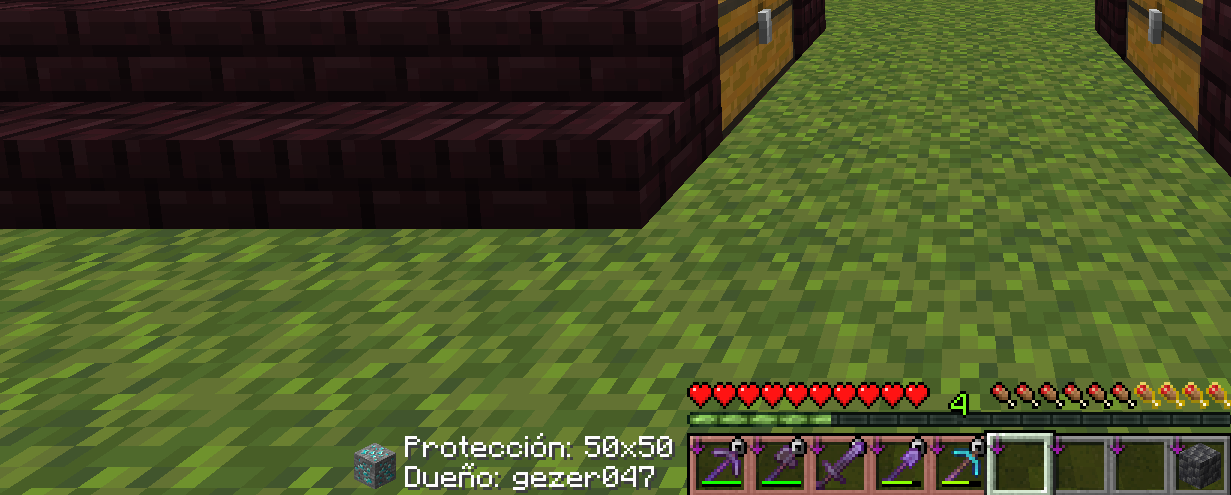 HUD de Protecciones Reemplaza los molestos mensajes de "Entrando/Saliendo" de las protecciones en el chat. En su lugar, muestra un indicador visual en tu pantalla (HUD) con un icono referente al tipo de protección y la información de su dueño.
 -
 Asistente de Ventas En lugar de mostrar 27 mensajes distintos por vender 27 stacks, el mod los consolida en un único resumen que indica la cantidad total de ítems vendidos y las ganancias totales.
Versions
Files
Relations
Project Relations
More like this
Similar Mods
Suggestions use data such as tags, dependencies, dependents, descriptions, titles, and more to rank how much they overlap with this mod.
On ModDex
Community snapshot
By the numbers
Statistics

Want to reach Minecraft players?
We're looking for a server hosting partner to feature here and other parts of the site. Interested? Send us a message!
Get in touchGet it on
Available Platforms
On ModDex
Community snapshot
By the numbers
Statistics
Resources