
Community listing page, reviews here may not be monitored by the author.

Community voices
Reviews
No reviews yet. Be the first to review this project!
Get it on
Available Platforms
About
Project Details
For authors
Embed Badge
If you're the author of this project, you can embed a live badge anywhere that supports HTML or Markdown. It updates automatically whenever ratings change.
Use HTML for any page that supports it, or Markdown for README files and Markdown-based descriptions.
Identifiers
Platform IDs
Resources
External Links
About
Description
“WHY IS THERE NO GOOD RESOURCE PACK MANAGER FOR FORGE 1.20.1?!”
I can already hear you saying it, because I said the exact same thing countless times while dealing with the resource packs in my own modpack.
A better way to manage large resource pack setups.
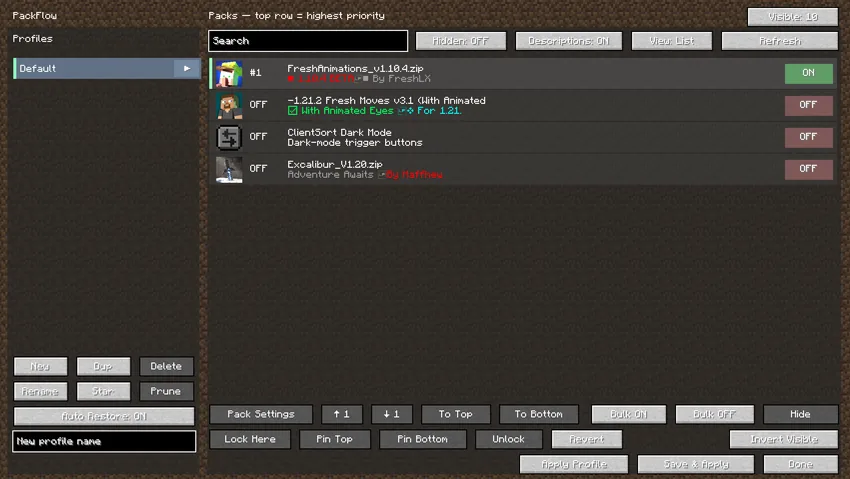
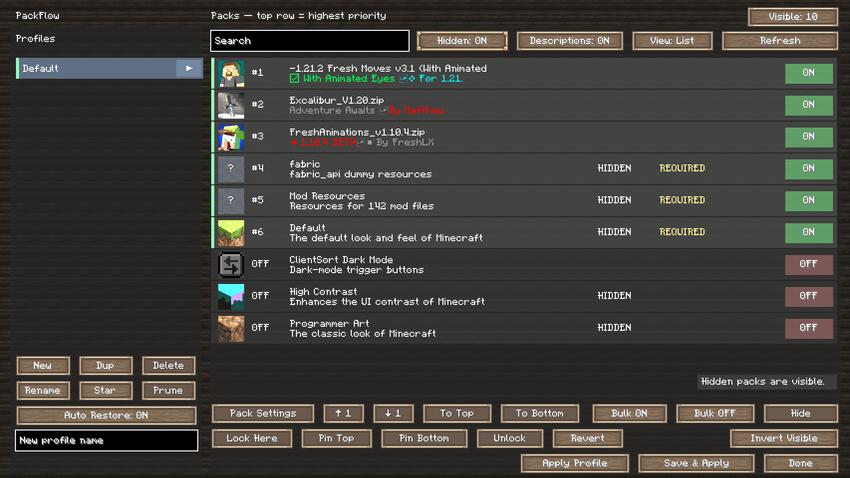
PackFlow replaces Minecraft's basic resource pack workflow with a proper manager for pack order, profiles, bulk actions and pack-specific settings.
If you regularly use a lot of resource packs, you probably know the routine: move packs around one by one, lose track of priority, accidentally change something, then try to remember how everything was ordered.
PackFlow is built to make that less painful.
Features
Resource Pack Profiles
Save complete resource pack setups as profiles and switch between them without rebuilding your pack list every time.
Profiles remember:
-
enabled resource packs
-
pack priority/order
-
position locks and pins
-
compatible pack settings
Profiles can also be renamed, duplicated and marked as favorites.
Your current setup can be restored automatically when Minecraft starts.
Better Pack Ordering
PackFlow uses a straightforward priority list:
Top = highest priority
Packs can be reordered by dragging them directly in the list, including large selections.
You can also use:
-
↑ 1 / ↓ 1 — move selected packs one position
-
To Top / To Bottom — move the whole selection
-
Lock Here — keep a pack at its current priority
-
Pin Top — keep a pack above everything else
-
Pin Bottom — keep a pack at the bottom
-
Unlock — remove position restrictions
Lock and pin actions also work with multiple selected packs.
Useful for packs that always need to stay above or below the rest of your setup.
Multi-Selection
The pack list supports desktop-style selection controls.
-
Ctrl + Click — select individual packs
-
Shift + Click — select a range
-
Ctrl + Shift + Click — add a range to the current selection
-
Ctrl + A — select all visible packs
-
Invert Visible — invert the current visible selection
Selected packs can be dragged and reordered together.
Bulk enable, disable, hide, lock and pin actions can also operate on the current selection.
Search & Bulk Management
PackFlow includes a proper search system for large pack collections.
Search works with:
-
pack names
-
pack IDs
-
descriptions
-
multiple search terms
-
*and?wildcards
You can then use Bulk ON or Bulk OFF on the filtered results instead of clicking packs one at a time.
Packs can also be hidden from the normal list without disabling or deleting them.
Not every pack collection is easier to recognize by name.
PackFlow includes both:
-
traditional list view
-
thumbnail-focused icon view
Real pack.png artwork is used where available, with safe handling for missing or malformed icons.
Descriptions can be shown or hidden, and the amount of packs visible on screen can be adjusted for either larger previews or a more compact layout.
Missing Pack Handling
Removing a resource pack temporarily will not destroy its place in your saved profiles.
Missing entries are preserved so the profile can recover automatically if the pack returns later.
If you actually want to clean them up, Prune removes stale entries manually.
Built-in Respackopts Compatibility
PackFlow also includes built-in compatibility for the Respackopts formats commonly used by Minecraft 1.20.1 resource packs.
Compatible packs automatically receive a CFG button inside the manager.
Supported functionality includes things such as:
-
toggles
-
enums
-
numeric options and sliders
-
.rpouser configuration -
conditional resources
-
file and directory filtering
-
fallback resources
-
replacement directories
-
text resource expansion
-
configuration values stored inside profiles
-
Respackopts shader config supplier support
The compatibility layer targets the formats relevant to Minecraft 1.20.1, including metadata formats through 12.
It is designed for pack compatibility and does not bundle the complete external Respackopts scripting runtime.
Paxi / OpenLoader Packs
Resource packs supplied through loaders such as Paxi or OpenLoader can also work with PackFlow when they are exposed through Minecraft's normal resource-pack system.
They do not have to physically exist inside the vanilla resourcepacks folder to appear in the manager.
Safe Profile Restoration
PackFlow keeps its own authoritative profile order instead of relying entirely on options.txt.
It can automatically restore the selected profile and repair unexpected order changes while respecting:
-
required packs
-
fixed-position packs
-
locked packs
-
top/bottom pins
Automatic enforcement is temporarily suspended while you are manually editing packs, so the manager does not fight against your changes.
Save & Apply batches the final setup into the resource reload rather than reloading for every individual change.
Keyboard Shortcuts
-
Ctrl + F — Search
-
Ctrl + S — Save & Apply
-
Ctrl + Z — Revert profile changes
-
Ctrl + A — Select all visible packs
Compatibility
Minecraft: 1.20.1
Mod Loader: Forge
Tested with: Forge 47.4.20
Environment: Client-side
No server installation is required.
PackFlow is mainly intended for players and modpacks with enough resource packs that Minecraft's normal two-list screen starts getting in the way.
If your resource pack list is already longer than you would like to admit, this mod is probably for you.
Screenshots
Gallery
-
 1
1 -
 2
2
Versions
Files
Relations
Project Relations
More like this
Similar Mods
Suggestions use data such as tags, dependencies, dependents, descriptions, titles, and more to rank how much they overlap with this mod.
On ModDex
Community snapshot
By the numbers
Statistics
Want to reach Minecraft players?
We're looking for a server hosting partner to feature here and other parts of the site. Interested? Send us a message!
Get in touchGet it on
Available Platforms
On ModDex
Community snapshot
By the numbers
Statistics
Resources