
PackTest
No reviews yet
Fabric mod for testing data packs, with data packs!
Fabric is a mod loader for versions 1.14+ of Minecraft, particularly popular for client side and optimization mods.
Community voices
Reviews
Click once to include, again to exclude, again to clear
No reviews yet. Be the first to review this project!
Get it on
Available Platforms
 Modrinth
Compatibility
Supported Environments
About
Project Details
For authors
Embed Badge
If you're the author of this project, you can embed a live badge anywhere that supports HTML or Markdown. It updates automatically whenever ratings change.
Use HTML for any page that supports it, or Markdown for README files and Markdown-based descriptions.
Identifiers
Platform IDs
About
Description
PackTest
PackTest allows you to write game tests in a data pack. Tests are *.mcfunction files in a test folder. They can be used to test custom data packs.
Example
data/example/test/foo.mcfunction
#> Summons an armor stand and finds it
# @template example:small_platform
# @optional

summon armor_stand ~1.5 ~1 ~1.5
execute positioned ~1.5 ~1 ~1.5 run assert entity @e[type=armor_stand,dx=0]

assert predicate example:test

setblock ~1 ~1 ~1 grass_block
execute if block ~1 ~1 ~1 stone run succeed

fail "Oh no"
Async tests
Test functions can be asynchronous, using the await keyword!
setblock ~ ~ ~ stone
summon item ~ ~6 ~

await entity @e[type=item,distance=..2]

await delay 1s

data merge entity @e[type=item,distance=..2,limit=1] {Motion: [0.0, 0.01, 0.0]}
Running tests
Tests can be run in-game using the test command.
test runall: runs all the teststest runall <namespace>: runs all tests from a specified namespacetest run <test>: runs the test with a specified nametest runfailed: runs all the previously failed teststest runthis: runs the closes testtest runthese: runs all tests within 200 blocks
Auto test server
Tests can also be run automatically, for instance in a CI environment. When -Dpacktest.auto is set, the game test server will start automatically with the loaded tests. The process will exit when all tests have finished with the exist code set to the number of failed tests.
Setting -Dpacktest.auto.annotations will emit GitHub annotations for all test failures and resource load errors.
The following example can be adapted into a GitHub action workflow.
on: [push, pull_request]

env:
  # Make sure to update these links!
  TEST_FABRIC_SERVER: https://meta.fabricmc.net/v2/versions/loader/1.20.4/0.15.3/0.11.2/server/jar
  TEST_FABRIC_API: https://cdn.modrinth.com/data/P7dR8mSH/versions/JMCwDuki/fabric-api-0.92.0%2B1.20.4.jar
  TEST_PACKTEST: https://cdn.modrinth.com/data/XsKUhp45/versions/18smpIeE/packtest-1.6-mc1.20.4.jar

jobs:
  test:
    runs-on: ubuntu-latest
    steps:
      - uses: actions/checkout@v4
      - uses: actions/setup-java@v4
        with:
          distribution: 'temurin'
          java-version: '17'
      - name: Download and prepare files
        run: |
          curl -o server.jar $TEST_FABRIC_SERVER
          mkdir mods
          curl -o mods/fabric-api.jar $TEST_FABRIC_API
          curl -o mods/packtest.jar $TEST_PACKTEST
          mkdir -p world/datapacks
          cp -r datapack world/datapacks/datapack
      - name: Run tests
        run: |
          java -Xmx2G -Dpacktest.auto -Dpacktest.auto.annotations -jar server.jar nogui
Commands
fail
fail <text component>: fails the current test and returns from the function
succeed
succeed: always succeeds the current test and returns from the function
assert
assert <condition>: if condition is unsuccessful, fails the current test and returns from the functionassert not <condition>: if condition is successful, fails the current test and returns from the function
await
await <condition>: similar to assert, but keeps trying the condition every tick until the test times our or the condition succeedsawait not <condition>: keeps trying the condition until it failsawait delay <time>: waits for a specified time with unit
Conditions
block <pos> <block>: checks if the block at the specified position matches the block predicatedata ...: checks NBT data using the same syntax asexecute if scoreentity <selector>: checks if the selector matches any entity (can also find entities outside the structure bounds)predicate <predicate>: checks a predicate in a data packscore ...: checks scores using the same syntax asexecute if scorechat <pattern> [<receivers>]: checks whether a chat message was sent in the past tick matching a regex pattern
Dummies
Fake players can be spawned using the /dummy command. Dummies won't save or load their data from disk, they will also not load their skin.
dummy <name> spawn: spawns a new dummydummy <name> respawn: respawns the dummy after it has been killeddummy <name> leave: makes the dummy leave the serverdummy <name> jump: makes the dummy jump, if currently on grounddummy <name> sneak [true|false]: makes the dummy hold shift or un-shift (not the same as currently crouching)dummy <name> sprint [true|false]: makes the dummy sprint or un-sprintdummy <name> drop [all]: makes the dummy drop the current mainhand, either one item or the entire stackdummy <name> swap: makes the dummy swap its mainhand and offhanddummy <name> selectslot: makes the dummy select a different hotbar slotdummy <name> use item: makes the dummy use its hand item, either mainhand or offhanddummy <name> use block <pos> [<direction>]: makes the dummy use its hand item on a block positiondummy <name> use entity <entity>: makes the dummy use its hand item on an entitydummy <name> attack <entity>: makes the dummy attack an entity with its mainhanddummy <name> mine <pos>: makes the dummy mine a block
Directives
Tests can be customized by placing certain directives as special comments at the start of the test function.
@template: the resource location of a structure template to use for the test, defaults to an empty 1x1x1 structure@timeout: an integer specifying the timeout, defaults to100@optional: whether this test is allowed to fail, defaults tofalse, if there is no value after the directive it is considered astrue@dummy: whether to spawn a dummy at the start of the test and set@sto this dummy, taking a position which defaults to~0.5 ~ ~0.5@batch: the batch name for this test, defaults topacktestBatch@beforebatch: a command to run before this batch, there can only be one per batch@afterbatch: a command to run after this batch, there can only be one per batch
Screenshots
Gallery
-
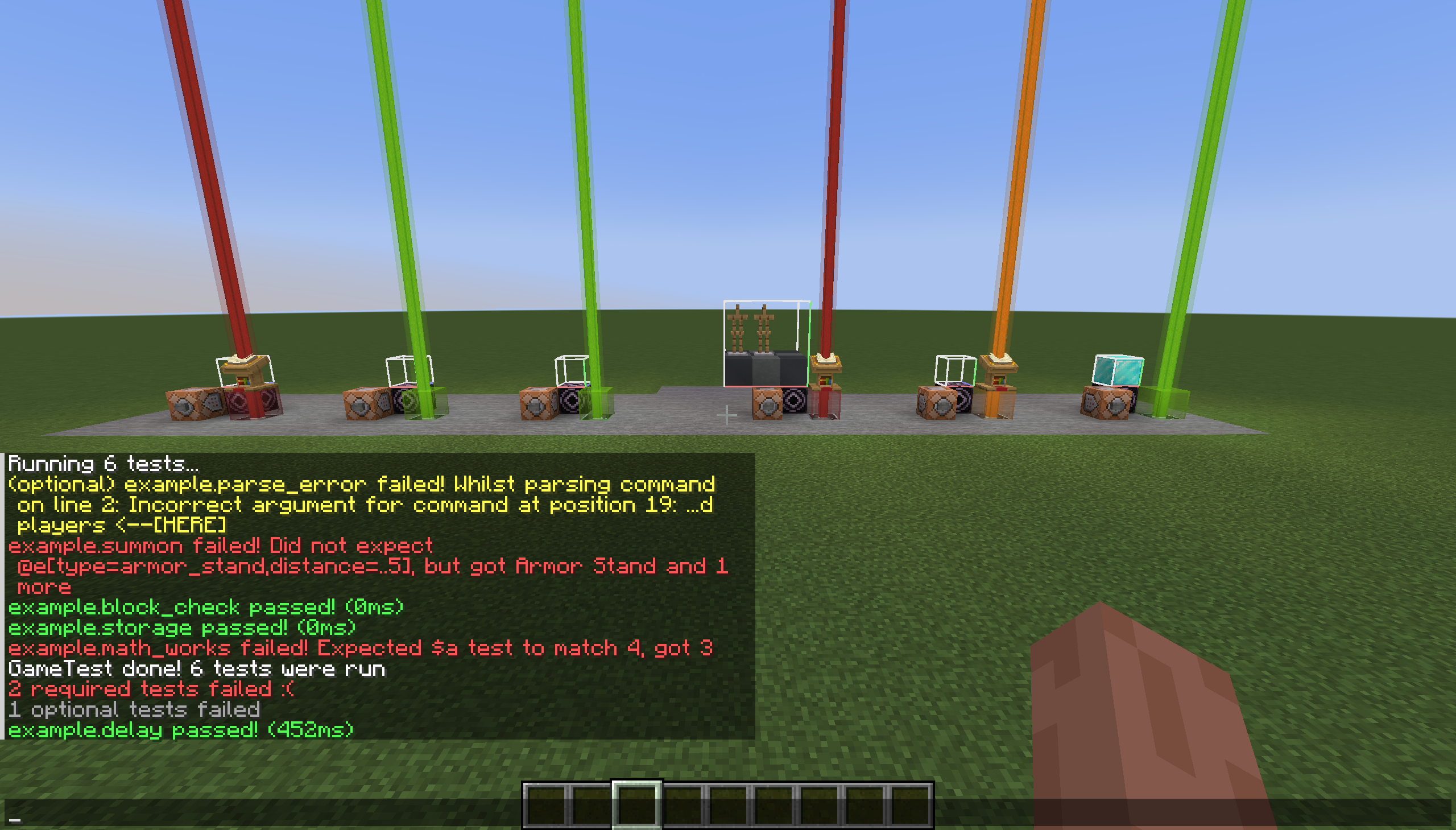 Test results with messages A few tests with their failure messages
 -
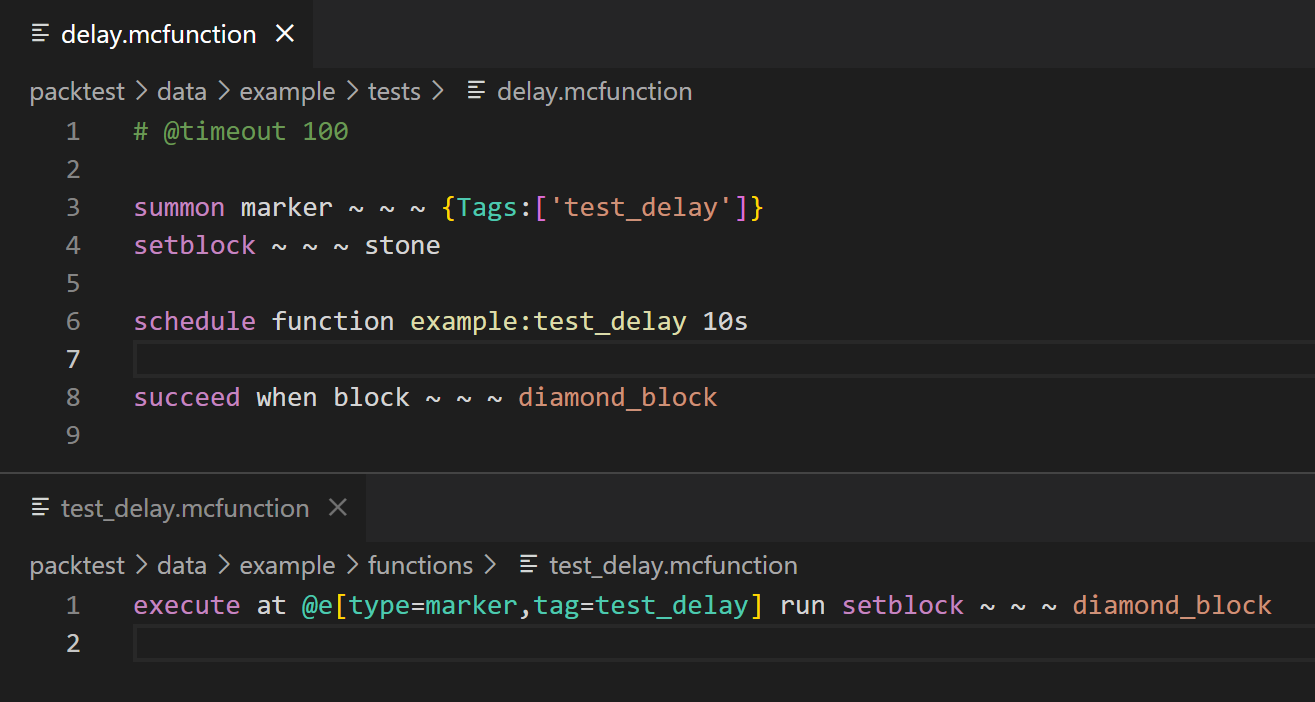 The code for a test Using the `/succeed when` command to wait for a condition to pass
 -
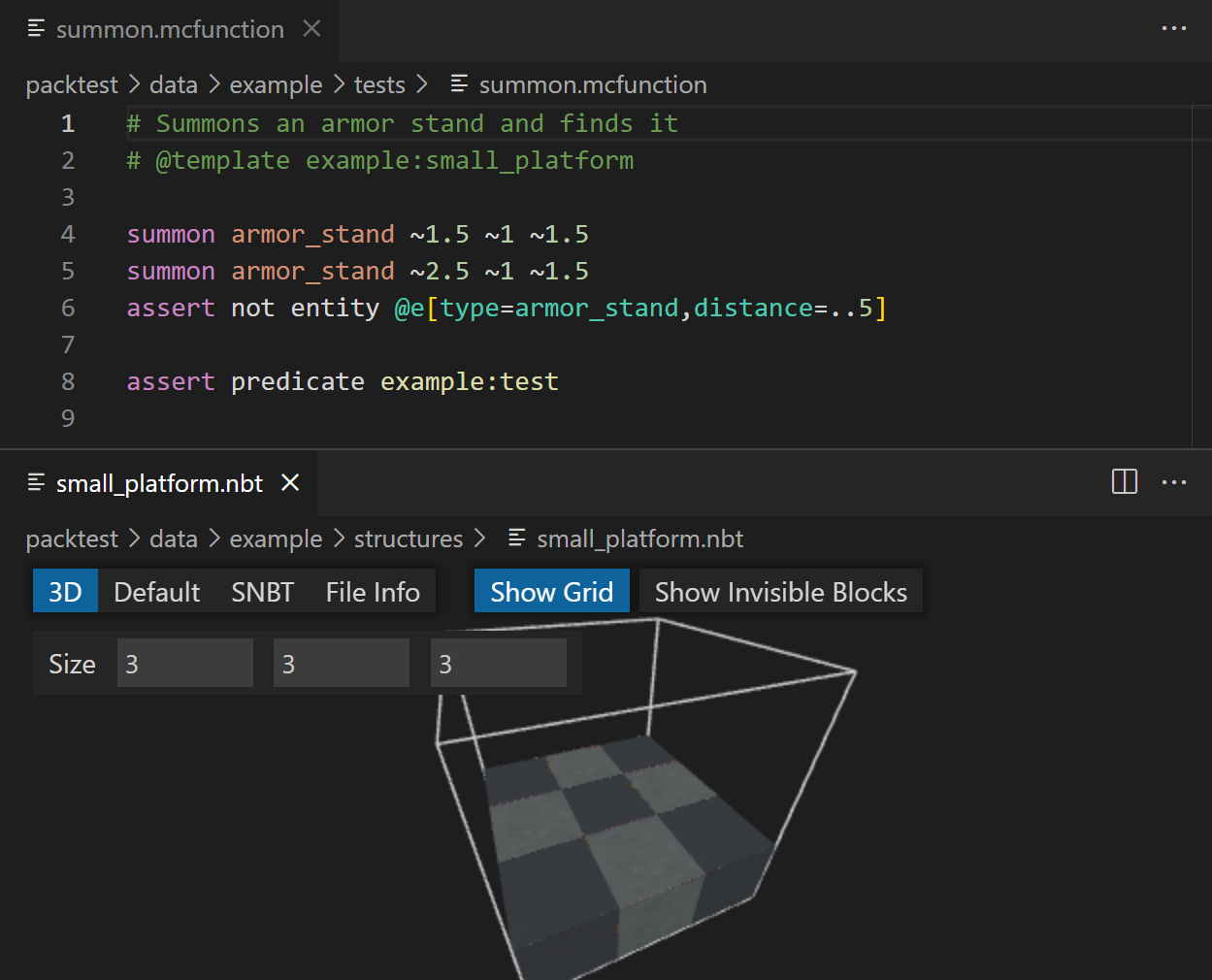 Test code using a structure template The `@template` directive can point to a structure file to load before the test
Versions
Files
Relations
Project Relations
More like this
Similar Mods
Suggestions use data such as tags, dependencies, dependents, descriptions, titles, and more to rank how much they overlap with this mod.
On ModDex
Community snapshot
By the numbers
Statistics

Want to reach Minecraft players?
We're looking for a server hosting partner to feature here and other parts of the site. Interested? Send us a message!
Get in touchGet it on
Available Platforms
On ModDex
Community snapshot
By the numbers