
Passwords
No reviews yet
A simple Server Pasword / Login Plugin
Paper is a fork of Spigot that adds its own plugin API on top of the Bukkit API. All Spigot plugins are compatible with paper, not all paper plugins are compatible with Spigot.
Spigot is a popular software for running dedicated servers that can load Plugins created with the Bukkit API.
Community voices
Reviews
Click once to include, again to exclude, again to clear
No reviews yet. Be the first to review this project!
Get it on
Available Platforms
 Modrinth
Compatibility
Supported Environments
About
Project Details
For authors
Embed Badge
If you're the author of this project, you can embed a live badge anywhere that supports HTML or Markdown. It updates automatically whenever ratings change.
Use HTML for any page that supports it, or Markdown for README files and Markdown-based descriptions.
Identifiers
Platform IDs
About
Description
Passwords
Secure your server with Passords!
Passwords an easy to use and simple plugin to secure your minecraft server from strangers. If you dont want to use a whitlis you can simply give your friends the password and thats it.
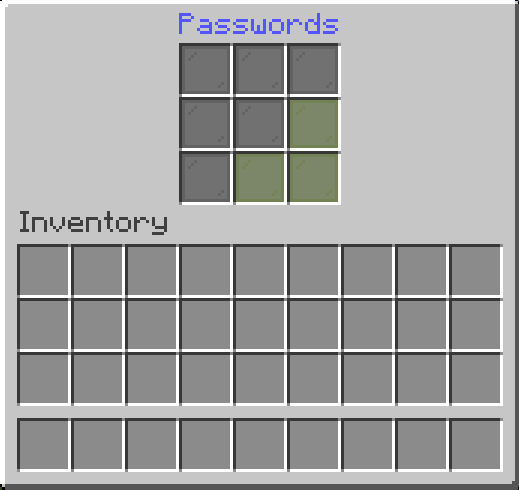
Features
-
Custom Passwords for Each Player
Allow players to create unique passwords, ensuring personalized and secure access to their accounts. -
Admin Password Options
Admins can set a master password for full permissions and Op status. -
Seamless Integration
Works effortlessly with any Minecraft server without requiring complex setup.
Sample Config.yml
Below is an example configuration file to get you started:
Click to view config.yml
version: "2.6.2"
debug: false
# Password dose not supports PlaceholderAPI in messages.
# Supported placeholders are: &player& -> Player Name
# Placeholders are only supported in messages

settings:
  # check-type: server : One password for the entire server.
  # check-type: player : A unique password for each player. (Works only on the first join. To reset, delete player data or use the /setpassword command)
  # check-type: none   : No password check.
  # check-type: pattern : The player must enter a pattern like "o x o"
  #                                                            "x x x"
  #                                                            "x x x"
  check-type: server
  # GUI Name
  gui-name: Enter Passwords
  # Set password name
  set-password-name: Set Password
  # Message that will be displayed as the kick reason.
  fail-message: The password is incorrect!
  # When the UI is closed without a password
  close-ui-message: You need to enter a password!
  # Enable welcome message.
  welcome-message-enabled: true
  # Welcome message after login.
  welcome-message: Welcome to ExampleServer
  # Welcome message second line (Only for title)
  welcome-message-second: Passwords
  # Display type for the welcome message: message; actionbar; title
  welcome-message-display-type: message
  # Enable login gamemode.
  login-gamemode-enabled: true
  # Gamemode every player will have upon login: survival, creative, adventure, spectator
  login-gamemode: survival
  # Player password length (for the check-type: player)
  player-password-length: 4
  # Blocked passwords ( only for the check-type: player & server )
  blocked-passwords:
    - 1111
  # Saves the player inventory on logout and restores it on login. ( !!!!! Waring: When the data folder or the player data in the passwords folder is deleted, the player inventory will be lost !!!!! )
  save-player-inventory: false
  # Saves the player inventory automatically
  enable-auto-save: true
  # Saves the player inventory every 5 minutes (if save-player-inventory is true)
  save-player-inventory-intervall: 10 # in minutes ( min 3 )
  # Invulnerable on login (note: this will prevent fall damage when exploited)
  invulnerable-on-login: true

server:
  # Server password (the password can be any length | for the check-type: server)
  password: 1234
  # Staff password (the password can be any length | for the check-type: server)
  staff-password: 8181
  # Staff permissions (will be given to the player after login)
  staff-permissions:
    - passwords.*
  # Remove staff permissions on logout
  remove-staff-permissions-on-logout: true
  # Password pattern (for the check-type: pattern)
  pattern:
    - oxo
    - xxx
    - xxx
Commands
Click to view commands
/setpassword <Password>→ Set your password./setplayerpassword <Player> <Password>→ Ser a Player's password./logout <Player>→ Logout player.
For Developers: Maven/Gradle Setup
Click to view Maven/Gradle setup
Maven:
<dependency>
    <groupId>cho.info</groupId>
    <artifactId>passwords</artifactId>
    <version>(Plugin version)</version>
</dependency>

<repositories>
    <repository>
        <id>local-repo</id>
        <url>file:/path/to/my-local-repo</url>
    </repository>
</repositories>
Gradle:
implementation files("$projectDir/lib/passwords-(Plugin version).jar")
Screenshots
Gallery
-
 Icon Normal
 -
 Kick Screen
 -
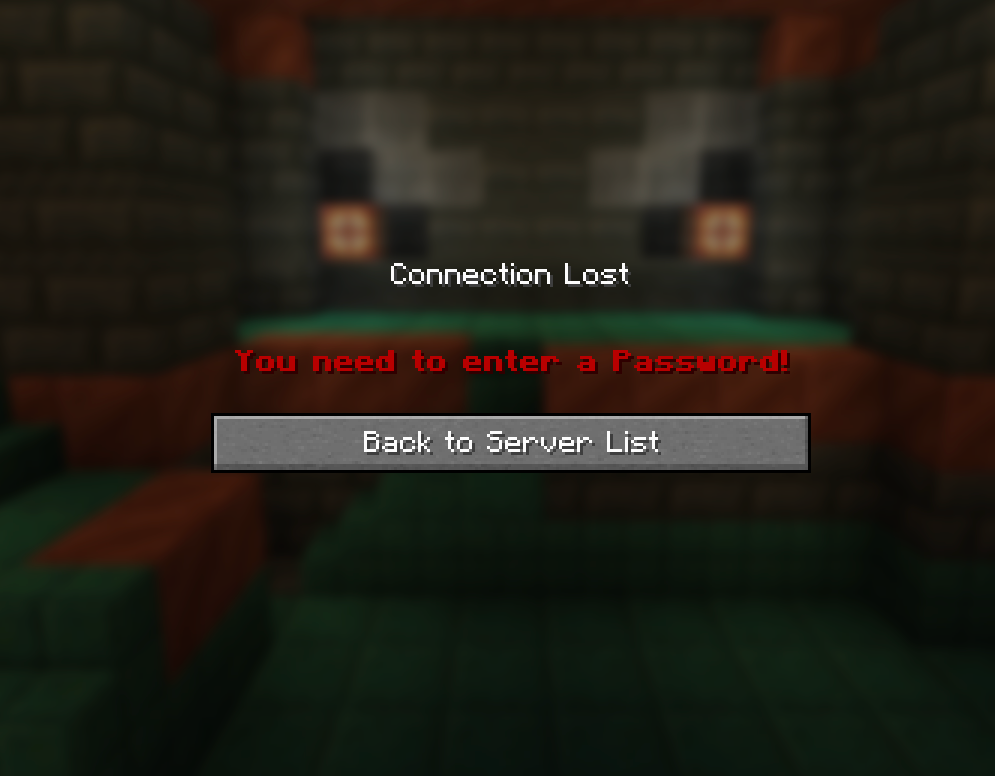 Kick Screen 2
 -
 Icon Winter
 -
Gui
Versions
Files
Relations
Project Relations
More like this
Similar Mods
Suggestions use data such as tags, dependencies, dependents, descriptions, titles, and more to rank how much they overlap with this mod.
On ModDex
Community snapshot
By the numbers
Statistics

Want to reach Minecraft players?
We're looking for a server hosting partner to feature here and other parts of the site. Interested? Send us a message!
Get in touchGet it on
Available Platforms
On ModDex
Community snapshot
By the numbers