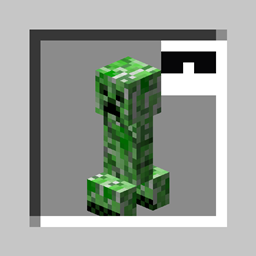
Community listing page, reviews here may not be monitored by the author.
Peekaboo!
 , GegyOrganizer
- jaskarthOrganizer
,
- LoveTropics
,
- MandaLinTVOrganizer
,
- NotActuallyTerryOrganizer
,
- RushmeadOrganizer
No reviews yet
Disguise as a mob, another player - or maybe just wear a Creeper on your head!
Community voices
Reviews
No reviews yet. Be the first to review this project!
Get it on
Available Platforms
Compatibility
Supported Environments
Must be installed on both the client and the server.
About
Project Details
For authors
Embed Badge
If you're the author of this project, you can embed a live badge anywhere that supports HTML or Markdown. It updates automatically whenever ratings change.
Use HTML for any page that supports it, or Markdown for README files and Markdown-based descriptions.
Identifiers
Platform IDs
About
Description
Peekaboo!
Disguise as a mob, another player - or maybe just wear a Creeper on your head! So stylish!
This mod is creative-only right now.
Items
Disguise
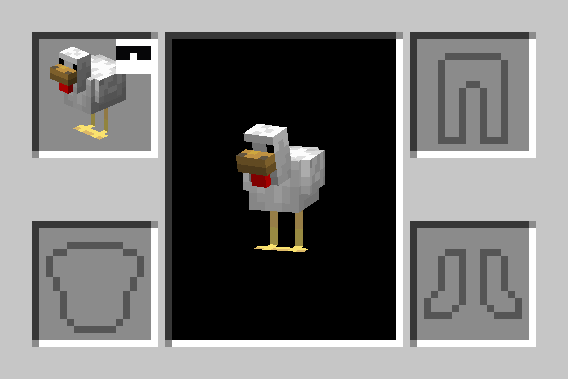
Equippable in the head slot, this item replaces the wearer's player model with that of the Disguise item.
A player wearing a Pig Disguise looks just like a normal Pig, but with a player name tag.
Mob Hat
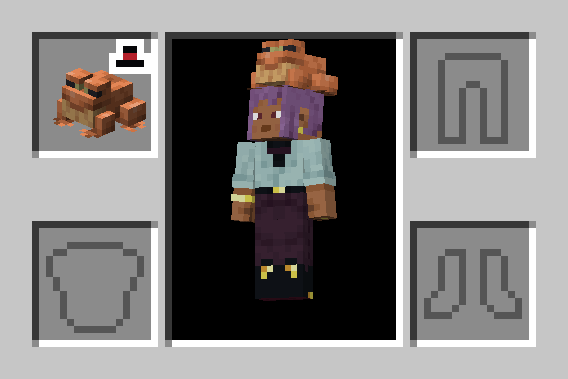
Equippable in the head slot, this item renders an entity model on the player's head.
Plushie
Just like a Mob Hat, but cannot be equipped.
Commands
The only command added by Peekaboo! is /disguise. This command modifies the Disguise of the source entity.
/disguise as <entity> [<nbt>]
Disguises the source entity (@s) as the specified entity type argument, with optional additional entity data.
For example:
/disguise as minecraft:pig- disguises as a plain Pig/disguise as minecraft:creeper {powered:true}- disguises as a Charged Creeper
/disguise skin as <player>
Disguises the source player with the skin of the specified player name.
For example:
/disguise skin as Cojomax99- replaces the source player's skin with that of Cojomax99- Note: this will only be visible if the source player is not already disguised as another entity
/disguise skin clear
Clears the current skin disguise of the source player, if any is set.
/disguise name as <name>
Replaces the source entity's custom name with the specified name Text Component.
For example:
/disguise name as "Dwight Schrute"
/disguise name clear
Clears the current custom name disguise of the source entity, if any is set.
/disguise scale <scale>
Sets the scale modifier for the current disguise of the source entity.
scale is a float between 0.1 and 20.0.
For example:
/disguise scale 0.5- sized to 50% of normal scale/disguise scale 1- resets scale to normal
/disguise hideShadow <value>
If value is true, the source entity will cast no shadow.
For example:
/disguise hideShadow true- hides the source entity's shadow
/disguise clear
Clears all currently applied disguise properties on the source entity, if any are set.
Applying disguises to other entities
Any Living Entity (generally: entities with AI, Players, and Armor Stands) can be disguised.
/execute as can be used to disguise another entity.
For example:
/execute as @n[type=wolf] run disguise as sheep- disguises the nearest Wolf as a Sheep
Item Components
peekaboo:disguise
A specification of the Disguise to be applied when equipping an item.
Format: object with fields:
entity- optional entity data (same format as theminecraft:entity_datacomponent), the entity disguise to apply- If not present, no entity disguise will be applied
scale- optional float between0.1and20.0, the scale modifier to apply- Default:
1.0
- Default:
changes_size- optional boolean,trueif the disguise entity's bounding box should be inherited- Default:
true
- Default:
custom_name- optional Text Component, the display name override (both in-world and in the Tab List)skin_profile- optional profile data (same format as theminecraft:profilecomponent), the player skin disguise to usehide_shadow- optional boolean,trueif the entity's shadow should be hidden- Default:
false
- Default:
- e.g.
peekaboo:disguise={entity:{id:'minecraft:creeper',powered:true}} - e.g.
peekaboo:disguise={skin_profile:{name:'Cojomax99'},scale:1.5}
peekaboo:entity
A specification of the entity to be rendered for the Mob Hat and Plushie items.
Format: same as the minecraft:entity_data component
- e.g.
peekaboo:entity={id:'minecraft:creeper',powered:true}
peekaboo:size
A scale modifier for the rendering of Disguise, Mob Hat, or Plushie items.
Format: positive float
e.g. peekaboo:size=1.5
Peekaboo!
Disguise as a mob, another player - or maybe just wear a Creeper on your head! So stylish!
This mod is creative-only right now.
Items
Disguise
Equippable in the head slot, this item replaces the wearer's player model with that of the Disguise item.
A player wearing a Pig Disguise looks just like a normal Pig, but with a player name tag.

Mob Hat
Equippable in the head slot, this item renders an entity model on the player's head.

Plushie
Just like a Mob Hat, but cannot be equipped.
Commands
The only command added by Peekaboo! is /disguise. This command modifies the Disguise of the source entity.
/disguise as <entity> [<nbt>]
Disguises the source entity (@s) as the specified entity type argument, with optional additional entity data.
For example:
/disguise as minecraft:pig- disguises as a plain Pig/disguise as minecraft:creeper {powered:true}- disguises as a Charged Creeper
/disguise skin as <player>
Disguises the source player with the skin of the specified player name.
For example:
/disguise skin as Cojomax99- replaces the source player's skin with that of Cojomax99- Note: this will only be visible if the source player is not already disguised as another entity
/disguise skin clear
Clears the current skin disguise of the source player, if any is set.
/disguise name as <name>
Replaces the source entity's custom name with the specified name Text Component.
For example:
/disguise name as "Dwight Schrute"
/disguise name clear
Clears the current custom name disguise of the source entity, if any is set.
/disguise scale <scale>
Sets the scale modifier for the current disguise of the source entity.
scale is a float between 0.1 and 20.0.
For example:
/disguise scale 0.5- sized to 50% of normal scale/disguise scale 1- resets scale to normal
/disguise hideShadow <value>
If value is true, the source entity will cast no shadow.
For example:
/disguise hideShadow true- hides the source entity's shadow
/disguise clear
Clears all currently applied disguise properties on the source entity, if any are set.
Applying disguises to other entities
Any Living Entity (generally: entities with AI, Players, and Armor Stands) can be disguised.
/execute as can be used to disguise another entity.
For example:
/execute as @n[type=wolf] run disguise as sheep- disguises the nearest Wolf as a Sheep
Item Components
peekaboo:disguise
A specification of the Disguise to be applied when equipping an item.
Format: object with fields:
entity- optional entity data (same format as theminecraft:entity_datacomponent), the entity disguise to apply- If not present, no entity disguise will be applied
scale- optional float between0.1and20.0, the scale modifier to apply- Default:
1.0
- Default:
changes_size- optional boolean,trueif the disguise entity's bounding box should be inherited- Default:
true
- Default:
custom_name- optional Text Component, the display name override (both in-world and in the Tab List)skin_profile- optional profile data (same format as theminecraft:profilecomponent), the player skin disguise to usehide_shadow- optional boolean,trueif the entity's shadow should be hidden- Default:
false
- Default:
- e.g.
peekaboo:disguise={entity:{id:'minecraft:creeper',powered:true}} - e.g.
peekaboo:disguise={skin_profile:{name:'Cojomax99'},scale:1.5}
peekaboo:entity
A specification of the entity to be rendered for the Mob Hat and Plushie items.
Format: same as the minecraft:entity_data component
- e.g.
peekaboo:entity={id:'minecraft:creeper',powered:true}
peekaboo:size
A scale modifier for the rendering of Disguise, Mob Hat, or Plushie items.
Format: positive float
e.g. peekaboo:size=1.5
Screenshots
Gallery
-
Hat Item Player inventory menu, but the player has equipped a Frog Hat item in their head slot. The player has a Frog model on top of their head.
-
Disguise Item Player inventory menu, but the player has equipped a Chicken Disguise item in their head slot. The player appears to be a Chicken.
Versions
Files
Relations
Project Relations
More like this
Similar Mods
Suggestions use data such as tags, dependencies, dependents, descriptions, titles, and more to rank how much they overlap with this mod.
On ModDex
Community snapshot
By the numbers
Statistics
Want to reach Minecraft players?
We're looking for a server hosting partner to feature here and other parts of the site. Interested? Send us a message!
Get in touchGet it on
Available Platforms
On ModDex
Community snapshot
By the numbers