![Personal Effects [FORGE]](https://media.forgecdn.net/avatars/thumbnails/131/239/256/256/636466209779735555.png)
Community listing page, reviews here may not be monitored by the author.
Personal Effects [FORGE]

No reviews yet
Saves your inventory and experience to your ender chest when you die

Community voices
Reviews
No reviews yet. Be the first to review this project!
Get it on
Available Platforms
About
Project Details
For authors
Embed Badge
If you're the author of this project, you can embed a live badge anywhere that supports HTML or Markdown. It updates automatically whenever ratings change.
Use HTML for any page that supports it, or Markdown for README files and Markdown-based descriptions.
Identifiers
Platform IDs
About
Description
Got tired of waiting for my favorite grave mod to upgrade past 1.8.9, so I created Personal Effects, the lazy player's grave mod. When you die, this mod saves your items, and optionally your experience, to a Personal Effects Box you've put in your ender inventory (the inventory tied to your player accessible normally via an Ender Chest). That's it. The mod can be paired with other grave mods as a backup or a preferred method for advanced players who prefer the ender chest route over the corpse run route. There are two commands '/pefput' and '/pefget' that allow you to stash and retrieve boxes from your ender inventory if you do not have access to an Ender Chest. (Note these commands do NOT open your ender inventory.)
MC 1.19.4 Mod Requirements
- Minecraft 1.19.4
- Forge (latest build to match 1.19.4)
- Client and Server use
MC 1.16.4 Mod Requirements
- Minecraft 1.16.4
- Forge (use recommended build)
- Client and Server use
MC 1.15.2 Mod Requirements
- Minecraft 1.15.2
- Forge (use recommended build)
- Client and Server use
MC 1.14.4 Mod Requirements
- Minecraft 1.14.4
- Forge (use recommended build)
MC 1.12/.1/.2 Mod Requirements
- Minecraft 1.12,1.12.1,1.12.2
- Forge (use recommended version for the MC you're using)
To Use [1.19.4+]:
- Create one of the three types of Personal Effects Box (see Images tab for recipes)
- Put the boxes in any Ender Chest (use any slot and you can put multiple boxes to be super-safe)
- If you do not yet have an Ender Chest, use the "/pefput" command to stash your box into your ender inventory
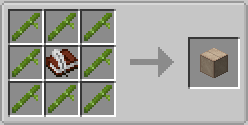
When you die, the mod will try to put your items including your armor, inventory, hotbar, and curios into your empty Personal Effects boxes. The mod will combine items in an effort to save as many items as possible in as little space as possible. Note that items removed due to a Curse of Vanishing enchantment are NOT saved by this mod. Custom, non-standard inventories may also be excluded depending on how their items are dropped on death.
To also save your experience, make sure you use an effects box that captures experience as well as items. If you have a lot of curios or other trinkets, you might want to invest in the 64-slot multi-use effects boxes if getting back to your death location to collect dropped items will be difficult. Another option for handling heavy inventories, is to use the config to prioritize what gets saved first and what items can be dropped (the mod already flags certain items like cobblestone as 'unimportant- save last').
After you respawn, to retrieve your items, get the (now filled) effects box from your Ender Chest and right-click it. If you cannot get to an Ender Chest, use the "/pefget" command to retrieve the most-recently filled effect box's contents directly.
To Use [pre-1.19]:
- Create one or more black shulker boxes
- Rename each one 'Personal Effects'
- Put them in your ender chest (any slot)
Don't have any Shulker Boxes to spare? Use this recipe:
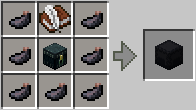 (any 'dyeBlack' [pre-mc1.14] or 'forge:dyes/black" [mc1.14+] works)
When you die, the mod will try to put your inventory contents including your armor, offhand items, and baubles/curios items into your empty shulker boxes. Note that items removed due to a Curse of Vanishing enchantment are NOT saved by this mod. Custom, non-standard inventories may also be excluded depending on how their items are dropped on death.
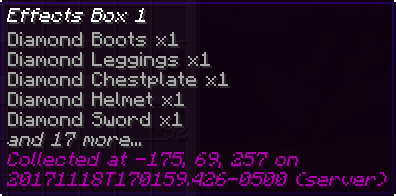
To make sure your valuable stuff is saved first, the mod will not save items like dirt blocks or cobblestone to the effects box. You can add other "disposable" items and blocks to the mod's configuration file.
Reset [pre-1.19]
After you've respawned and retrieved your items, you'll need to "reset" your personal effects shulker box so it's available for your next inevitable untimely death. To reset your effects shulker box, use this recipe:
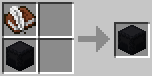 Don't forget to put it back into your ender chest!
Integration
- By default the mod is configured to run as late in the "death event" processing as possible, so if you've got other mods that can "save your stuff" selectively (for instance via enchantments), they should get executed before Personal Effects. However, starting with 1.0.3, you can also setup the mod to run as early as possible before any other grave mods; you would do this if you want personal effects to be an optional setup for more advanced players (with enderchests and shulkerboxes) while having a more typical "corpse run" grave mod as the default.
- If you're running with the 'keepInventory' game rule activated, this mod does nothing.
Screenshots
Gallery
-
![[1.19.4+] Death Keepsakes](https://media.forgecdn.net/attachments/681/427/death_keepsake_totem_recipe.png) [1.19.4+] Death Keepsakes Die a lot early game? Use Death Keepsakes to maybe not die so much in the future.
[1.19.4+] Death Keepsakes Die a lot early game? Use Death Keepsakes to maybe not die so much in the future. -
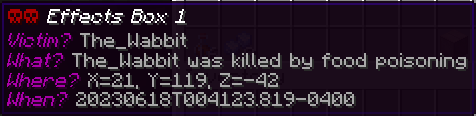
[1.19.4+] Example Saved Items Death Certificate. Player can use this information to return to "the site".
-
![[1.19.4+] Crafting Multi-Use Effects and Experience Box](https://media.forgecdn.net/attachments/681/412/items_and_xp_multi_use.png) [1.19.4+] Crafting Multi-Use Effects and Experience Box Stores experience and up to 64 slots of items (armor, inventory, hotbar, curios). Can be used up to 4 times!
[1.19.4+] Crafting Multi-Use Effects and Experience Box Stores experience and up to 64 slots of items (armor, inventory, hotbar, curios). Can be used up to 4 times! -
![[1.19.4+] Crafting Single-Use Effects and Experience Box](https://media.forgecdn.net/attachments/681/411/items_and_xp_single_use.png) [1.19.4+] Crafting Single-Use Effects and Experience Box Stores experience and up to 41 slots of items (armor, inventory, hotbar)
[1.19.4+] Crafting Single-Use Effects and Experience Box Stores experience and up to 41 slots of items (armor, inventory, hotbar) -
[1.19.4+] Crafting Single-Use Effects Box Stores up-to 41 slots of items (armor, inventory, hotbar)
-
[1.16.4] Example Saved Items
-
[1.16.4] Reseting Effects Shulker Box
-
![[1.16.4] Crafting Empty Effects Box (Modded)](https://media.forgecdn.net/attachments/220/215/pef_crafting_empty_effects_box_2.png) [1.16.4] Crafting Empty Effects Box (Modded)
[1.16.4] Crafting Empty Effects Box (Modded) -
[1.16.4] Crafting Empty Effects Box
Versions
Files
Relations
Project Relations
More like this
Similar Mods
Suggestions use data such as tags, dependencies, dependents, descriptions, titles, and more to rank how much they overlap with this mod.
On ModDex
Community snapshot
By the numbers
Statistics
 (opens in a new tab)
Get it on
Available Platforms
On ModDex
Community snapshot
By the numbers