Community listing page, reviews here may not be monitored by the author.
Perspective API Demo


No reviews yet
A demo mod showcasing custom camera perspectives using the Perspective API
Community voices
Reviews
No reviews yet. Be the first to review this project!
Get it on
Available Platforms
Compatibility
Supported Environments
Runs entirely on the client. Works on vanilla servers.
About
Project Details
For authors
Embed Badge
If you're the author of this project, you can embed a live badge anywhere that supports HTML or Markdown. It updates automatically whenever ratings change.
Use HTML for any page that supports it, or Markdown for README files and Markdown-based descriptions.
Identifiers
Platform IDs
About
Description
Perspective API Demo
This mod implements several simple custom perspectives based on the Perspective API. If you are developing a mod that involves custom perspective functionality, you may refer to the code in this mod. This mod is not intended for actual gameplay, so its features are not perfect—for example, in free camera mode, you can still break/place blocks with the mouse. This is not considered a bug.
Features
This mod adds the following custom perspectives:
Simple Third Person
Almost identical to vanilla third-person view, except that the camera position is adjusted so that the player is positioned in the lower-left portion of the screen.
Free Third Person
Almost identical to vanilla third-person view, but moving the mouse only rotates the camera, not the player. The player automatically turns toward the movement direction instead.
Additionally, the mouse scroll wheel adjusts both the camera-to-player distance and the FOV simultaneously, centered on the player, achieving a Hitchcock zoom (dolly zoom) effect.
Free Camera
The camera detaches from the player entity and can be controlled independently:
- Movement keys control camera movement
- Space / Sneak move the camera up / down
- Drop / Inventory keys roll the camera (rotate around the view axis)
All movements are based on the camera's local reference frame, not the world reference frame.
Perspective API Demo
This mod implements several simple custom perspectives based on the Perspective API. If you are developing a mod that involves custom perspective functionality, you may refer to the code in this mod. This mod is not intended for actual gameplay, so its features are not perfect—for example, in free camera mode, you can still break/place blocks with the mouse. This is not considered a bug.
Features
This mod adds the following custom perspectives:
Simple Third Person
Almost identical to vanilla third-person view, except that the camera position is adjusted so that the player is positioned in the lower-left portion of the screen.
Free Third Person
Almost identical to vanilla third-person view, but moving the mouse only rotates the camera, not the player. The player automatically turns toward the movement direction instead.
Additionally, the mouse scroll wheel adjusts both the camera-to-player distance and the FOV simultaneously, centered on the player, achieving a Hitchcock zoom (dolly zoom) effect.
Free Camera
The camera detaches from the player entity and can be controlled independently:
- Movement keys control camera movement
- Space / Sneak move the camera up / down
- Drop / Inventory keys roll the camera (rotate around the view axis)
All movements are based on the camera's local reference frame, not the world reference frame.
Screenshots
Gallery
-
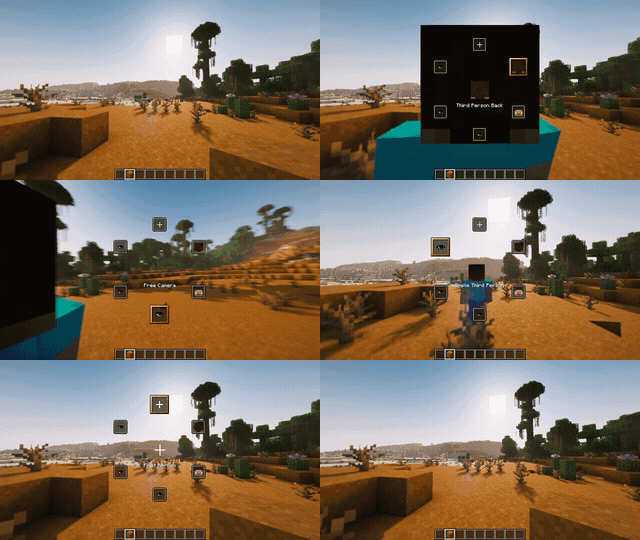 Wheel Hold the perspective toggle key to open perspective wheel. You can see the extra 3 perspectives
 -
 Perspective: Free Camera Freely control the camera to rotate and move around
 -
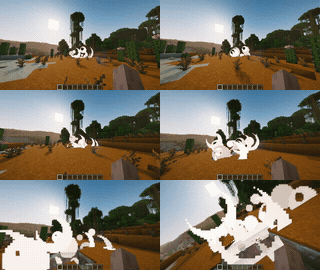 Explode Shake Explosion cause shake camera
 -
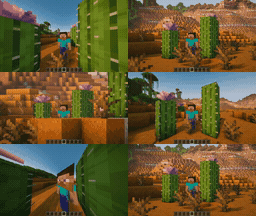 Perspective: Free Third Person Dolly zoom with mouse scroll
Versions
Files
Relations
Project Relations
More like this
Similar Mods
Suggestions use data such as tags, dependencies, dependents, descriptions, titles, and more to rank how much they overlap with this mod.
On ModDex
Community snapshot
By the numbers
Statistics
Want to reach Minecraft players?
We're looking for a server hosting partner to feature here and other parts of the site. Interested? Send us a message!
Get in touchGet it on
Available Platforms
On ModDex
Community snapshot
By the numbers