
Mod

Petite Inventory

Quick rating

Petite Inventory

No reviews yet

Provides a Resident Evil 4 / Diablo–style inventory layout, where a single item can occupy multiple slots, and adjusts the corresponding replacement and transfer operations.

No Theme
Adventure/Exploration
QoL & Tweaks
Mod Loaders
Forge
Minecraft

Community voices

Reviews

Versions
Loading versions…
Match includes

Click once to include, again to exclude, again to clear

Rating Any
Any 0.5 1.0 1.5 2.0 2.5 3.0 3.5 4.0 4.5 5.0
Min
Max
Play Status
Reviews
Time Played
hrs+
Verified developers only
Has developer response
List view
Grid view
Compact view
Sort by
Date
Rating
Helpful
Unhelpful
Edited
Sort ascending
Delete this review?

This removes your review from the project. You can write a new review after.

Review submitted for moderation

Your review has been sent to moderators, who will check that it meets our guidelines before it appears publicly.

No reviews yet. Be the first to review this project!

Get it on

Available Platforms

Compatibility

Supported Environments

Dev Environment
Client Required
Server Required

About

Project Details

Type
Mod
License
All Rights Reserved
Latest Version
petiteinventory-1.0.8.jar
Authors
CurseForge
Modrinth

For authors

Embed Badge

If you're the author of this project, you can embed a live badge anywhere that supports HTML or Markdown. It updates automatically whenever ratings change.

Custom banner text
ModDex rating badge preview

Use HTML for any page that supports it, or Markdown for README files and Markdown-based descriptions.

Identifiers

Platform IDs

CurseForge ID
Modrinth ID

Resources

External Links

Source Issues Wiki Discord

About

Description

Petite Inventory

Provides a Resident Evil 4 / Diablo–style inventory layout, where a single item can occupy multiple slots, and adjusts the corresponding replacement and transfer operations.

Features

On first launch, a default rule file is generated at: config/PetiteInventory/default.json

The rule format is extremely simple and intuitive—one glance and you’ll understand it. Tag matching is supported, and you can reload rules using the /reload command.

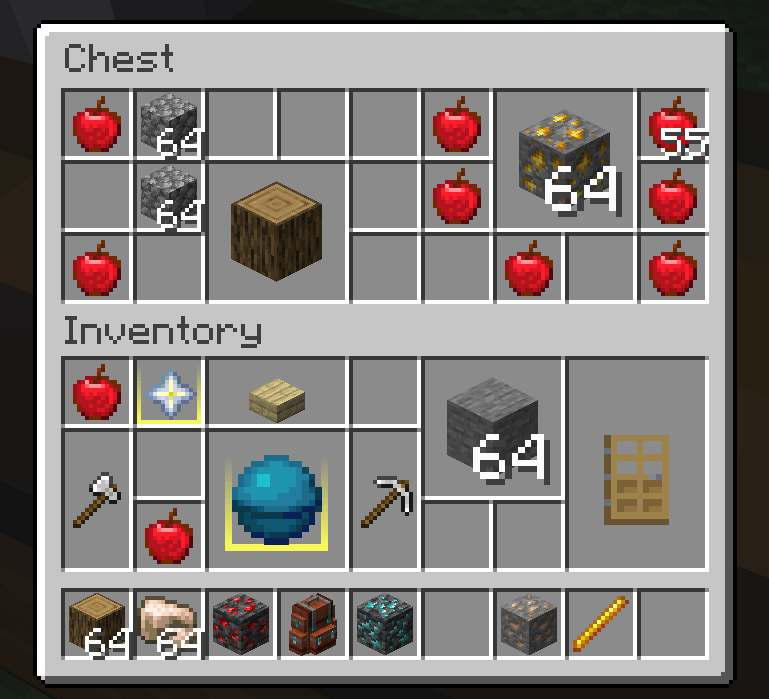
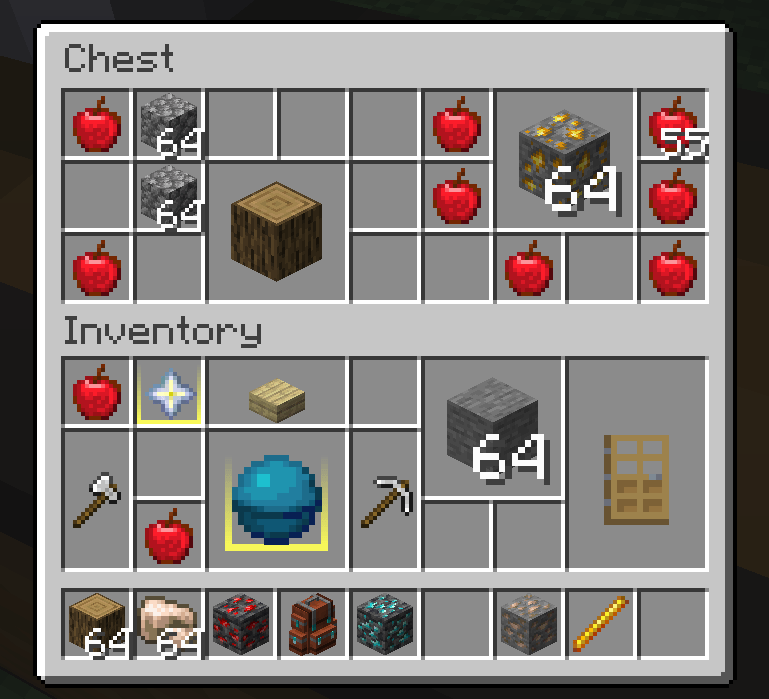
After entering the game, you’ll immediately notice that the inventory layout has changed:

image

For gameplay balance, the new layout only applies to the player inventory by default. If you prefer not to apply it to the player inventory, you can disable it in the config file.

If you want to enable the new layout for other containers, simply point at any slot of the target container and press the copy key (default: U) to copy its container ID.

Paste this container ID into the config file to enable the custom layout for that container.

Additionally, containers using the new layout benefit from several operation optimizations:

  • When moving an item with the mouse to replace another, replacement is allowed as long as the target area contains only one other item type.
  • When using Shift + Right Click for quick transfer, if the items cannot stack, the system intelligently finds an available blank area to place them.
  • The hotbar is never affected by the new layout—otherwise, the experience would be unbearable.

Notes

  • Due to the nature of this mod, some compatibility issues with other mods (e.g., container sorting, slot expansion) are inevitable.
  • There can never be a perfectly ideal compatibility solution with auto-sorting mods—not only because of technical conflicts, but also because manual organization is one of this mod’s core design philosophies.
  • In containers that use the new layout, click-dragging items with the mouse is disabled. This may return in the future if the technical challenges are solved.
  • If you encounter functional issues with important containers from other mods, please leave feedback.
  • Works better with Item Borders.

Roadmap

  • Port to additional Minecraft versions.
  • Compatibility with major container mods such as Sophisticated Backpacks.
  • Inventory expansion mechanisms.
  • Exploration of non-rectangular, Tetris-style item shapes.

Petite Inventory

Provides a Resident Evil 4 / Diablo–style inventory layout, where a single item can occupy multiple slots, and adjusts the corresponding replacement and transfer operations.

Features

On first launch, a default rule file is generated at: config/PetiteInventory/default.json

The rule format is extremely simple and intuitive—one glance and you’ll understand it. Tag matching is supported, and you can reload rules using the /reload command.

After entering the game, you’ll immediately notice that the inventory layout has changed:

Replace this with a description

For gameplay balance, the new layout only applies to the player inventory by default. If you prefer not to apply it to the player inventory, you can disable it in the config file.

If you want to enable the new layout for other containers, simply point at any slot of the target container and press the copy key (default: U) to copy its container ID.

Paste this container ID into the config file to enable the custom layout for that container.

Additionally, containers using the new layout benefit from several operation optimizations:

  • When moving an item with the mouse to replace another, replacement is allowed as long as the target area contains only one other item type.
  • When using Shift + Right Click for quick transfer, if the items cannot stack, the system intelligently finds an available blank area to place them.
  • The hotbar is never affected by the new layout—otherwise, the experience would be unbearable.

Notes

  • Due to the nature of this mod, some compatibility issues with other mods (e.g., container sorting, slot expansion) are inevitable.
  • There can never be a perfectly ideal compatibility solution with auto-sorting mods—not only because of technical conflicts, but also because manual organization is one of this mod’s core design philosophies.
  • In containers that use the new layout, click-dragging items with the mouse is disabled. This may return in the future if the technical challenges are solved.
  • If you encounter functional issues with important containers from other mods, please leave feedback.
  • Works better with Item Borders.

Roadmap

  • Port to additional Minecraft versions.
  • Compatibility with major container mods such as Sophisticated Backpacks.
  • Inventory expansion mechanisms.
  • Exploration of non-rectangular, Tetris-style item shapes.

Screenshots

Gallery

This project has no gallery images yet.

Versions

Files

Relations

Project Relations

More like this

Similar Mods

Suggestions use data such as tags, dependencies, dependents, descriptions, titles, and more to rank how much they overlap with this mod.

On ModDex

Community snapshot

0
Ratings
0
Followers
0
In stacks

By the numbers

Statistics

~70,000
Total Downloads
CurseForge
~65,000
Modrinth
~5,000
Last Updated
CurseForge
Created
CurseForge
Modrinth
Last synced
When ModDex last fetched and imported data for this project from CurseForge or Modrinth. High-traffic and active projects are checked more often.
Next pipeline sync