
Community listing page, reviews here may not be monitored by the author.
Photon & EpicFight


No reviews yet
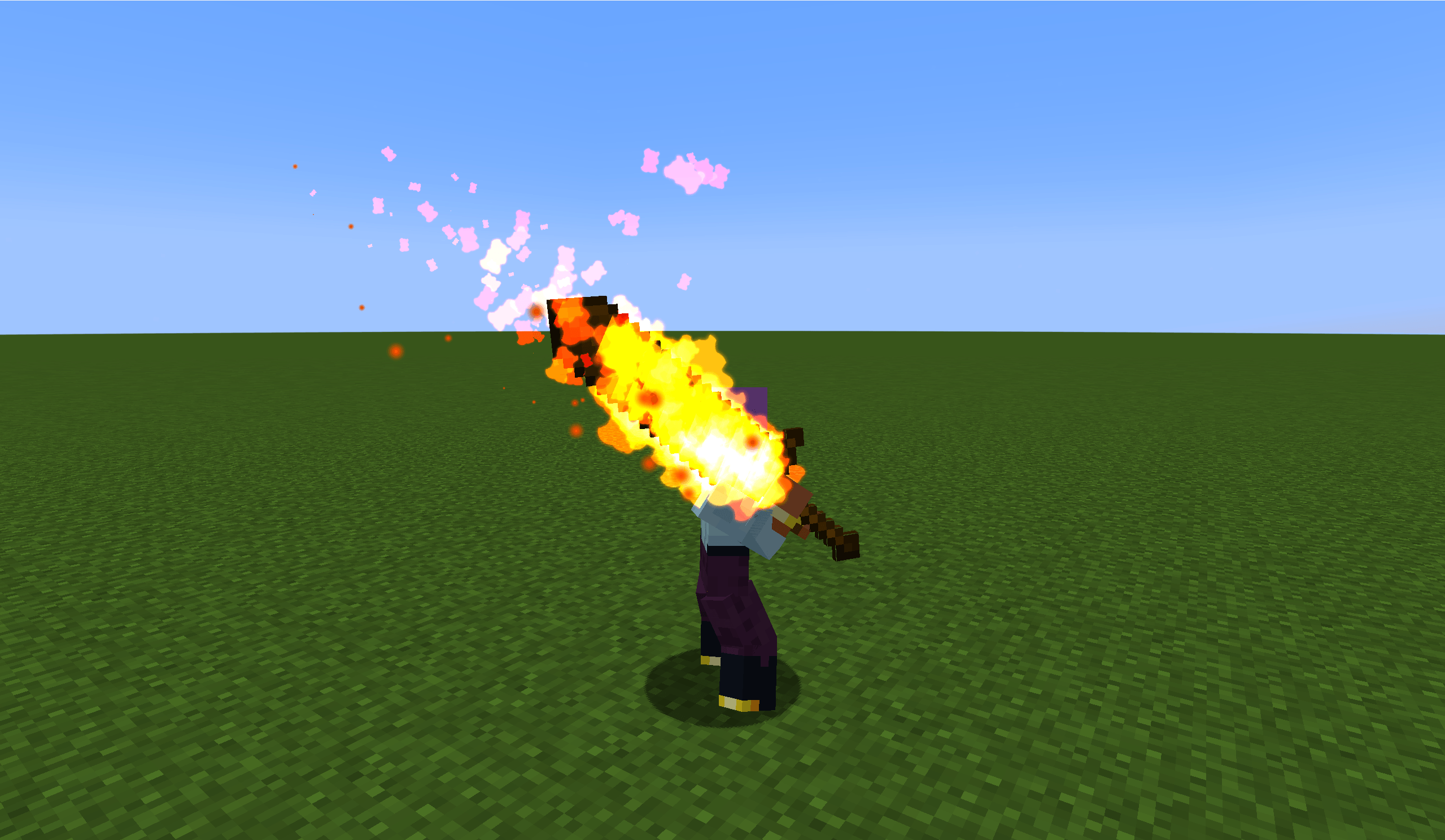
EpicFight integrates with Photon, making it easier for you to create special effects related to EpicFight.
Community voices
Reviews
No reviews yet. Be the first to review this project!
Get it on
Available Platforms
Compatibility
Supported Environments
Must be installed on both the client and the server.
About
Project Details
For authors
Embed Badge
If you're the author of this project, you can embed a live badge anywhere that supports HTML or Markdown. It updates automatically whenever ratings change.
Use HTML for any page that supports it, or Markdown for README files and Markdown-based descriptions.
Identifiers
Platform IDs
About
Description
Photon & EpicFight Integration
This is a tool for integrating Forge , designed to preview EpicFight skeletal animations within the Photon particle editor and bind visual effects to specific bones.
🎯 Purpose
This module adds support for EpicFight skeletal animations to the Photon VFX Editor, enabling VFX creators to:
Load a player clone into the particle editor and preview EpicFight animations in real-time.
Bind the effect currently being edited to a specified bone (with real-time position and rotation updates).
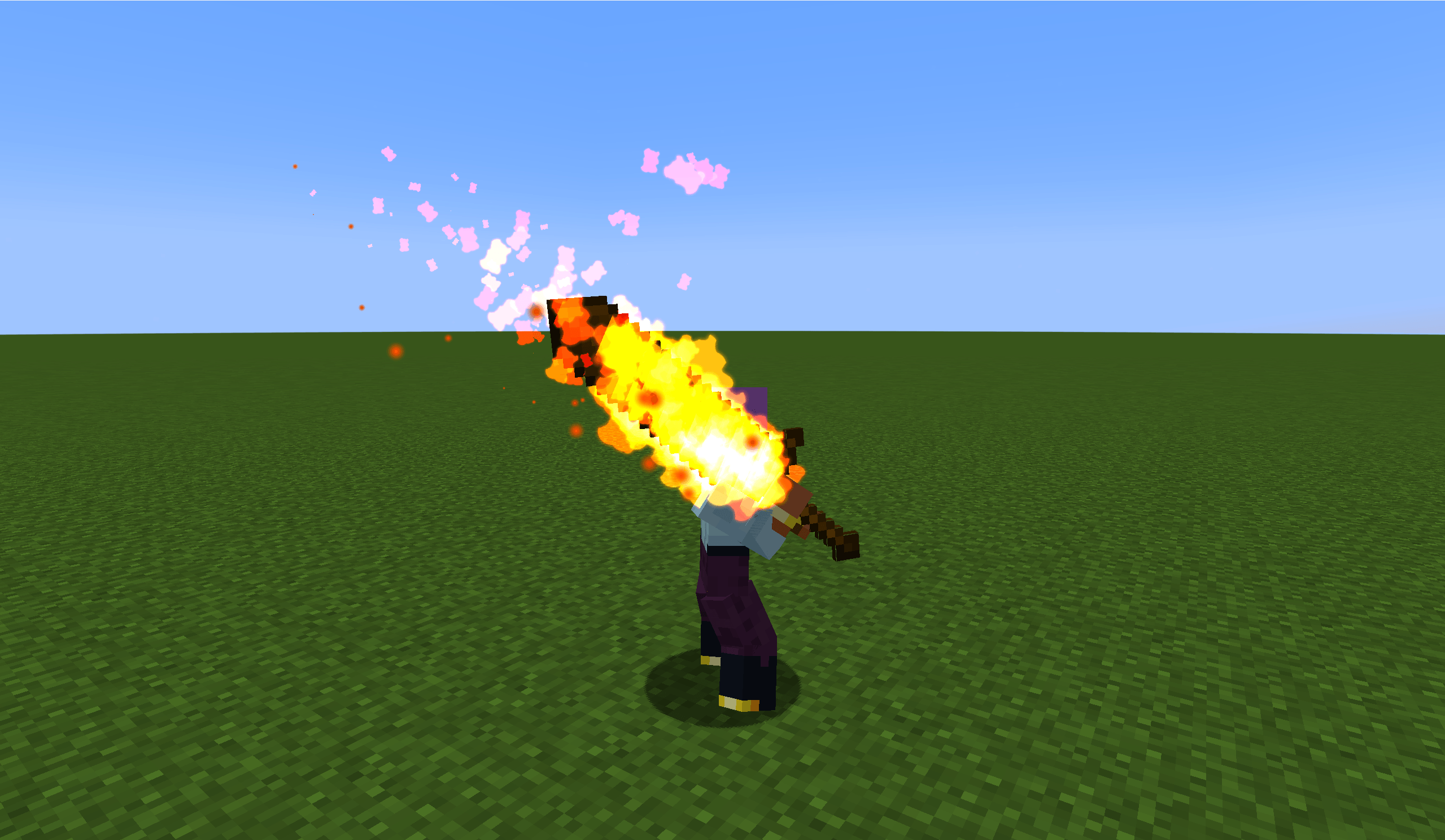
Bind effects to player or entity bones in-game via commands.
🛠️ Features
Editor Integration
Animation Control Panel - Enable "Animation Control" in the editor's "View" menu to search for and play EpicFight animations.
Bone Binding Input Field - Enter a bone name (e.g., Root, Chest, Head), and the effect in the editor will update in real-time based on that bone's position and rotation.
Bone Name Autocomplete - When typing, all bone names in the Armature are reflected, providing fuzzy-matching dropdown suggestions with support for page scrolling.
Real-time Player Sync - The clone syncs the player's equipment, health, and absorption values every frame.
Preview Toggle - Control whether EpicFight preview is enabled via the /photon_preview command.
In-Game Commands
/bone play <namespace> <path> [bone_name] - Play an effect on the specified bone (defaults to Tool_R).
/bone stop [bone_name] [namespace] [path] - Stop effects on the specified bone.
/bone list - List all available effects.
/photon_EpicFight_Editor - Toggle the editor's EpicFight preview mode.
Note: All commands support Tab completion (namespace, path, bone name).
⚙️ Animation Driving
Uses AnimationPlayer.tick() to naturally advance animation time and sets setHardPause(true) to prevent interference from ClientAnimator.
Avoids using modifyPose() / correctRootJoint(), directly reading getRawPose() to preserve Root bone displacement.
Automatically resets entity position after animation ends.
📖 Usage Instructions
Editor Preview
To enable preview, enter /photon_preview in-game (enter again to disable).
Open the Photon particle editor (/pe).
Open the "Animation Control" floating window from the "View" menu.
Enter the "Animation Resource Path" and click play.
Enter a bone name (e.g., Root, Chest) in the bone input field; the effect will follow the bone's movement.
Command Binding
# Play the "test" effect from the "epicfight" namespace on the Tool_R bone
/bone play epicfight test Tool_R
# Play on the Chest bone
/bone play epicfight test Chest
# Stop all effects on the Chest
/bone stop Chest
# Stop a specific effect on the Chest
/bone stop Chest epicfight test
# Stop all bone effects
/bone stop
# List available effects
/bone list
📦 Dependencies
Photon - VFX Editor
EpicFight - 20.14.X
LDLib - UI Library (dependency of Photon)
Minecraft Forge 1.20.1
Photon & EpicFight
这是一个用于整合 Forge 模组的工具,旨在 Photon 粒子编辑器中预览 EpicFight 的骨骼动画,并将特效绑定到特定的骨骼上。
🎯 目的
该模块为 Photon VFX 编辑器添加了对 EpicFight 骨骼动画的支持,使特效创作者能够:
在粒子编辑器中加载玩家克隆体,并实时预览 EpicFight 动画。
将正在编辑的特效绑定到指定的骨骼上(位置和旋转会实时更新)。
通过指令在游戏中将特效绑定到玩家或实体的骨骼上。
🛠️ 功能
编辑器整合
动画控制面板 - 在编辑器的“视图”菜单中启用“动画控制”,即可搜索并播放 EpicFight 动画。
骨骼绑定输入框 - 输入骨骼名称(如 Root, Chest, Head),编辑器中的特效将根据该骨骼的位置和旋转实时更新。
骨骼名称自动补全 - 输入时,会反射 Armature(骨架)中的所有骨骼名称,提供模糊匹配的下拉建议,并支持页面滚动。
实时玩家同步 - 克隆体会每帧同步玩家的装备、生命值和吸收值。
预览开关 - 通过指令 /photon_preview 控制是否启用 EpicFight 预览。
游戏内指令
/bone play <命名空间> <路径> [骨骼名称] - 在指定骨骼上播放特效(默认为 Tool_R)。
/bone stop [骨骼名称] [命名空间] [路径] - 停止指定骨骼上的特效。
/bone list - 列出所有可用的特效。
/photon_EpicFight_Editor - 切换编辑器的 EpicFight 预览模式。
注:所有指令均支持 Tab 键自动补全(命名空间、路径、骨骼名称)。
⚙️ 动画驱动
使用 AnimationPlayer.tick() 自然推进动画时间,并设置 setHardPause(true) 以防止 ClientAnimator 干扰。
避免使用 modifyPose() / correctRootJoint(),直接读取 getRawPose() 以保留 Root 骨骼的位移。
动画结束后自动重置实体位置。
📖 使用说明
编辑器预览
要启用预览,请在游戏中输入 /photon_preview(再次输入可禁用)。
打开 Photon 粒子编辑器(/pe)。
在“视图”菜单中打开“动画控制”浮动窗口。
输入“动画资源路径”并点击播放。
在骨骼输入框中输入骨骼名称(如 Root, Chest),特效将跟随骨骼移动.
指令绑定
# 在 Tool_R 骨骼上播放来自 "epicfight" 命名空间的 "test" 特效
/bone play epicfight test Tool_R
# 在 Chest 骨骼上播放
/bone play epicfight test Chest
# 停止 Chest 上的所有特效
/bone stop Chest
# 停止 Chest 上指定的特效
/bone stop Chest epicfight test
# 停止所有骨骼特效
/bone stop
# 列出可用的特效
/bone list
📦 依赖
Photon - VFX 编辑器
EpicFight - 20.14.X
LDLib - UI 库(依赖于 Photon)
Minecraft Forge 1.20.1
Photon & EpicFight Integration
This is a tool for integrating Forge , designed to preview EpicFight skeletal animations within the Photon particle editor and bind visual effects to specific bones.
🎯 Purpose This module adds support for EpicFight skeletal animations to the Photon VFX Editor, enabling VFX creators to: Load a player clone into the particle editor and preview EpicFight animations in real-time. Bind the effect currently being edited to a specified bone (with real-time position and rotation updates). Bind effects to player or entity bones in-game via commands.
🛠️ Features Editor Integration Animation Control Panel - Enable "Animation Control" in the editor's "View" menu to search for and play EpicFight animations. Bone Binding Input Field - Enter a bone name (e.g., Root, Chest, Head), and the effect in the editor will update in real-time based on that bone's position and rotation. Bone Name Autocomplete - When typing, all bone names in the Armature are reflected, providing fuzzy-matching dropdown suggestions with support for page scrolling. Real-time Player Sync - The clone syncs the player's equipment, health, and absorption values every frame. Preview Toggle - Control whether EpicFight preview is enabled via the /photon_preview command. In-Game Commands /bone play [bone_name] - Play an effect on the specified bone (defaults to Tool_R). /bone stop [bone_name] [namespace] [path] - Stop effects on the specified bone. /bone list - List all available effects. /photon_EpicFight_Editor - Toggle the editor's EpicFight preview mode. Note: All commands support Tab completion (namespace, path, bone name).
⚙️ Animation Driving Uses AnimationPlayer.tick() to naturally advance animation time and sets setHardPause(true) to prevent interference from ClientAnimator. Avoids using modifyPose() / correctRootJoint(), directly reading getRawPose() to preserve Root bone displacement. Automatically resets entity position after animation ends.
📖 Usage Instructions Editor Preview To enable preview, enter /photon_preview in-game (enter again to disable). Open the Photon particle editor (/pe). Open the "Animation Control" floating window from the "View" menu. Enter the "Animation Resource Path" and click play. Enter a bone name (e.g., Root, Chest) in the bone input field; the effect will follow the bone's movement.
Command Binding
Play the "test" effect from the "epicfight" namespace on the Tool_R bone
/bone play epicfight test Tool_R
Play on the Chest bone
/bone play epicfight test Chest
Stop all effects on the Chest
/bone stop Chest
Stop a specific effect on the Chest
/bone stop Chest epicfight test
Stop all bone effects
/bone stop
List available effects
/bone list
📦 Dependencies Photon - VFX Editor EpicFight - 20.14.X LDLib - UI Library (dependency of Photon) Minecraft Forge 1.20.1
Photon & EpicFight
📚 概述
这是一个用于整合 Forge 模组的工具,旨在 Photon 粒子编辑器中预览 EpicFight 的骨骼动画,并将特效绑定到特定的骨骼上。
🎯 目的
该模块为 Photon VFX 编辑器添加了对 EpicFight 骨骼动画的支持,使特效创作者能够:
在粒子编辑器中加载玩家克隆体,并实时预览 EpicFight 动画。
将正在编辑的特效绑定到指定的骨骼上(位置和旋转会实时更新)。
通过指令在游戏中将特效绑定到玩家或实体的骨骼上。
🛠️ 功能
编辑器整合
动画控制面板 - 在编辑器的“视图”菜单中启用“动画控制”,即可搜索并播放 EpicFight 动画;
骨骼绑定输入框 - 输入骨骼名称(如 Root, Chest, Head),编辑器中的特效将根据该骨骼的位置和旋转实时更新;
骨骼名称自动补全 - 输入时,会反射 Armature(骨架)中的所有骨骼名称,提供模糊匹配的下拉建议,并支持页面滚动;
实时玩家同步 - 克隆体会每帧同步玩家的装备、生命值和吸收值;
预览开关 - 通过指令 /photon_preview 控制是否启用 EpicFight 预览。
游戏内指令
/bone play <命名空间> <路径> [骨骼名称] - 在指定骨骼上播放特效(默认为 Tool_R);
/bone stop [骨骼名称] [命名空间] [路径] - 停止指定骨骼上的特效;
/bone list - 列出所有可用的特效;
/photon_EpicFight - 切换编辑器的 EpicFight 预览模式。
注:所有指令均支持 Tab 键自动补全(命名空间、路径、骨骼名称)。
⚙️ 动画驱动
使用 AnimationPlayer.tick() 自然推进动画时间,并设置 setHardPause(true) 以防止 ClientAnimator 干扰。
避免使用 modifyPose() / correctRootJoint(),直接读取 getRawPose() 以保留 Root 骨骼的位移。
动画结束后自动重置实体位置。
📖 使用说明
编辑器预览
要启用预览,请在游戏中输入 /photon_EpicFight(再次输入可禁用);
打开 Photon 粒子编辑器(/photon_editor);
在“视图”菜单中打开“动画控制”浮动窗口;
输入“动画资源路径”并点击播放;
在骨骼输入框中输入骨骼名称(如 Root, Chest),特效将跟随骨骼移动。
指令绑定
在 Tool_R 骨骼上播放来自 "epicfight" 命名空间的 "test" 特效。
/bone play epicfight test Tool_R
在 Chest 骨骼上播放。
/bone play epicfight test Chest
停止 Chest 上的所有特效。
/bone stop Chest
停止 Chest 上指定的特效。
/bone stop Chest epicfight test
停止所有骨骼特效。
/bone stop
列出可用的特效。
/bone list
📦 依赖
Photon - VFX 编辑器;
EpicFight - 20.14.X;
LDLib - UI 库( Photon前置库);
Minecraft Forge 1.20.1。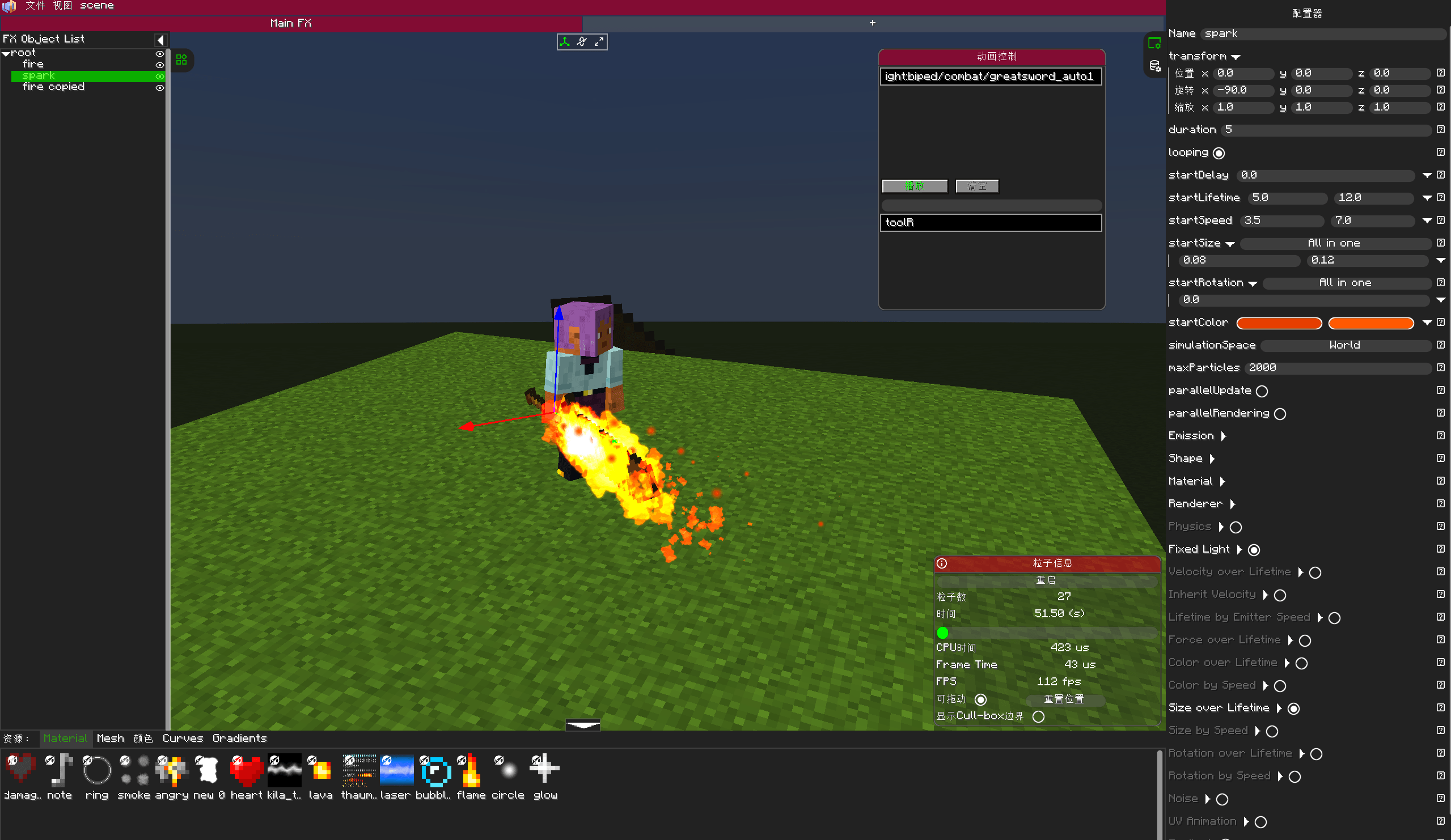
Screenshots
Gallery
-
 7c894506-da94-40ec-a0ba-4dd5f1024418.png 7c894506-da94-40ec-a0ba-4dd5f1024418.png
 -
 244e9b6d-b730-450f-8512-51d0dd028202.png 244e9b6d-b730-450f-8512-51d0dd028202.png
Versions
Files
Relations
Project Relations
More like this
Similar Mods
Suggestions use data such as tags, dependencies, dependents, descriptions, titles, and more to rank how much they overlap with this mod.
On ModDex
Community snapshot
By the numbers
Statistics
Want to reach Minecraft players?
We're looking for a server hosting partner to feature here and other parts of the site. Interested? Send us a message!
Get in touchGet it on
Available Platforms
On ModDex
Community snapshot
By the numbers