
Community listing page, reviews here may not be monitored by the author.
Pickup Filter

No reviews yet
Blacklist items you never want to pick up. Blocked items are left on the ground in singleplayer and LAN; on servers they are picked up and instantly thrown back out.
Community voices
Reviews
No reviews yet. Be the first to review this project!
Get it on
Available Platforms
Compatibility
Supported Environments
Runs entirely on the client. Works on vanilla servers.
About
Project Details
For authors
Embed Badge
If you're the author of this project, you can embed a live badge anywhere that supports HTML or Markdown. It updates automatically whenever ratings change.
Use HTML for any page that supports it, or Markdown for README files and Markdown-based descriptions.
Identifiers
Platform IDs
Resources
External Links
About
Description
Pickup Filter
Decide what ends up in your inventory. Pick the items you never want to collect and leave them on the ground - or turn it around and collect only the items you chose, ignoring everything else.
Both directions are the same list read two ways:
- Blacklist - everything is picked up except the items on the list. Add
rotten_fleshandgunpowder, walk over a zombie or creeper drop, and the loot stays on the ground. - Whitelist - nothing is picked up except the items on the list. Put ores and diamonds on it before a mining trip and the cobblestone stays where it is.
One button on the settings screen switches between them, and each saved profile remembers its own mode.
Profiles
The item list is a profile, and you can keep as many as you need (up to 32). They live in a sidebar on the left of the settings screen - click one to switch to it, immediately.
- Each profile stores its own items and its own mode, so a "mob junk" blacklist and a "mining trip" whitelist sit side by side.
- Every row is marked
BorW, so you can tell a whitelist from a blacklist without switching to it first. - New, Rename and Delete sit above the list. Deleting asks for confirmation, and the last remaining profile cannot be deleted.
An empty whitelist filters nothing at all, rather than blocking the entire game - a profile you have not filled in yet quietly leaves your pickups alone, and the screen tells you so.
Read this first: what "filtered" actually means
Item pickup is decided by the server, not by your client. That is a Minecraft fact, not a shortcoming of this mod, and it means you get one of two behaviours depending on where you are playing.
Singleplayer and LAN worlds - genuinely never picked up
The "server" is running inside your own game, so the mod reaches it. The pickup is cancelled before vanilla touches your inventory:
- no inventory insertion
- no pickup sound
- no take-item animation
- the item stays exactly where it dropped
No blip, no flicker, nothing to clean up. Change the list, the mode or the profile and it takes effect on the very next step - no restart, no relog.
Dedicated servers - picked up, then instantly thrown back out
On a real server the mod is not running on the machine making the decision. The
server hands you the item no matter what. So the fallback does the only honest
thing available: it drops the filtered stack straight back out, using the exact
packets vanilla sends when you press Q.
You will see the item briefly enter your inventory, a normal drop animation, and the item on the ground next to you. Nothing about it is a cheat - the server receives an ordinary drop and the vanilla drop-spam throttle is respected. But it is not the same as never picking it up, and no client-side mod can do better than this.
The mod tells you this in chat the first time it happens each session. You can switch the fallback off entirely with the Auto-drop on servers checkbox.
Loop protection on the server path: one stack per tick, a 60-tick cooldown per item type, nothing ejected while a screen is open or while you are carrying a stack on the cursor, and armour and offhand slots are never touched.
Features
- Blacklist or whitelist, switchable per profile.
- Profiles in a sidebar, with new / rename / delete and one-click switching.
- Whole item registry. Not just blocks - rotten flesh, gunpowder, arrows, spawn eggs, everything.
- Creative-inventory-style picker. 9 columns, 6 rows, mouse wheel and a draggable scrollbar.
- Live search by display name or registry id.
rotten,flesh, andminecraft:rotten_fleshall find the same item. - Creative tab browsing if you would rather look than type.
- Showcase grid of the active profile's items. Left-click to remove.
- Master on/off toggle and a two-step "Clear all".
- Mod Menu support (optional).
- Config stored as readable JSON with registry ids, never numeric ids.
Controls
The keybind "Open Pickup Filter" is under its own Pickup Filter category in Controls and is unbound by default - pick your own key. Pressing it again while the settings screen is open closes it, so it works as one toggle.
Config
config/pickupfilter.json:
{
  "enabled": true,
  "autoDropOnServers": true,
  "ejectDelayTicks": 5,
  "activeProfile": 0,
  "profiles": [
    {
      "name": "Mob junk",
      "mode": "blacklist",
      "items": [
        "minecraft:rotten_flesh",
        "minecraft:gunpowder"
      ]
    },
    {
      "name": "Mining trip",
      "mode": "whitelist",
      "items": [
        "minecraft:diamond",
        "minecraft:raw_iron"
      ]
    }
  ]
}
Unknown ids from an older config are skipped with a log warning, not crashed on. A config from 1.1.0 or earlier is migrated into a single blacklist profile named "Default" the first time it is loaded, with nothing lost.
Requirements
- Fabric Loader 0.19.3+
- Fabric API
- Mod Menu - optional
Screenshots
Gallery
-
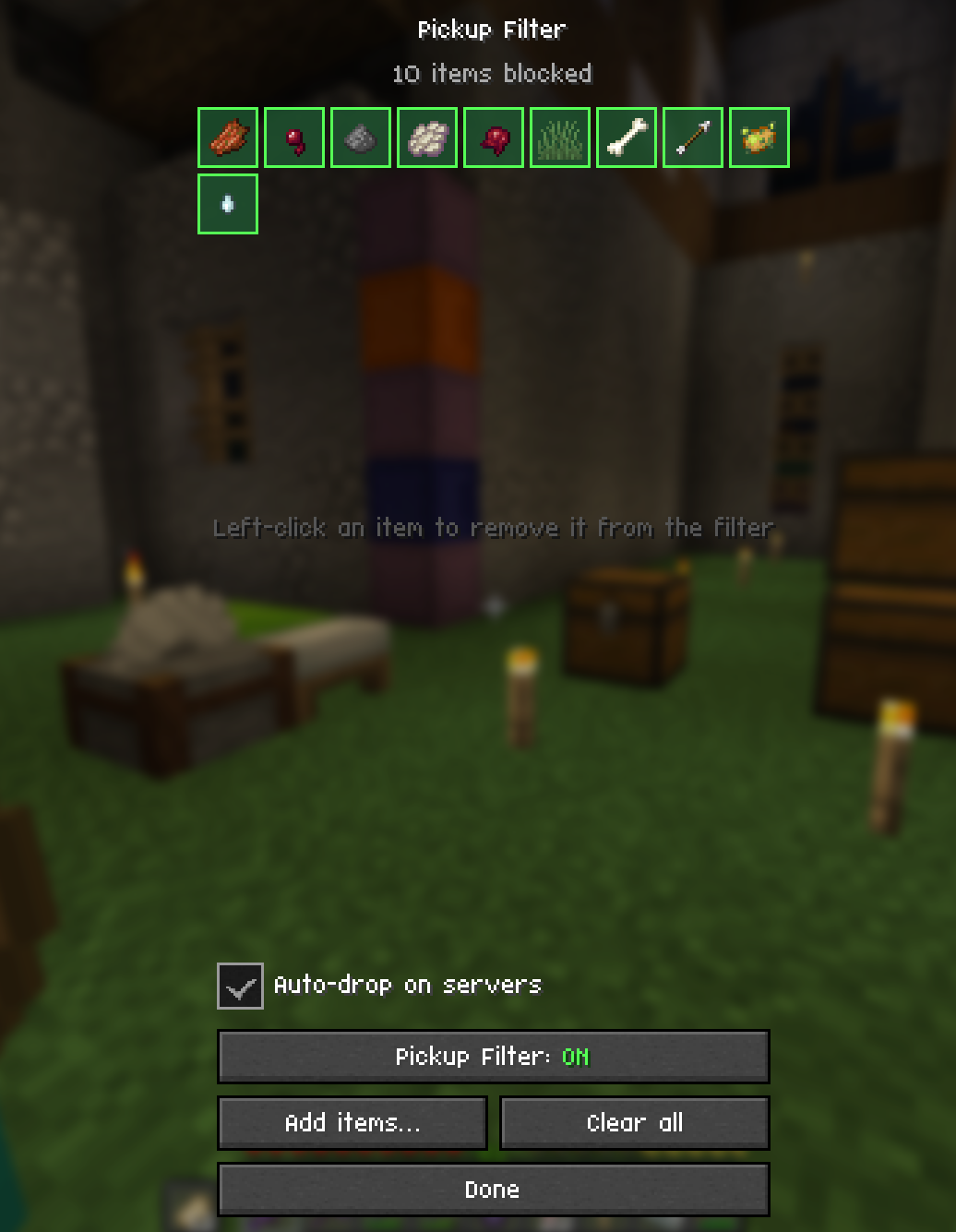 Pickup Filter Overview Pickup Filter Overview
 -
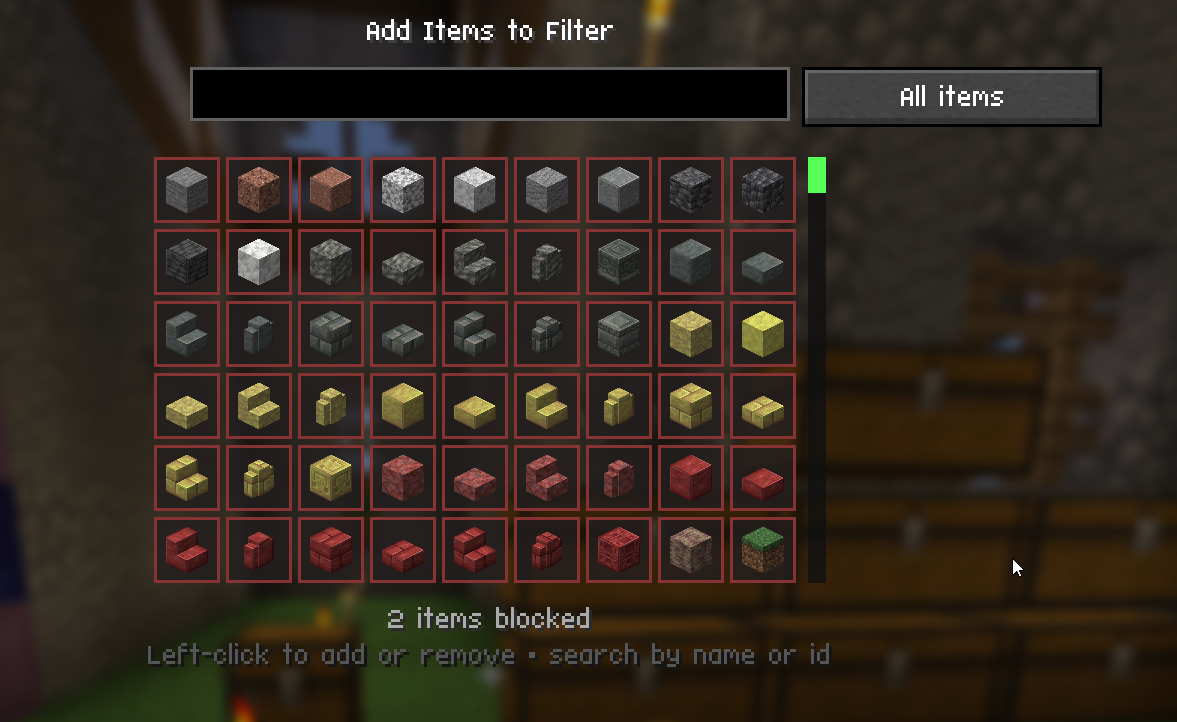 Pickup Filter Selection Menu Pickup Filter Selection Menu
 -
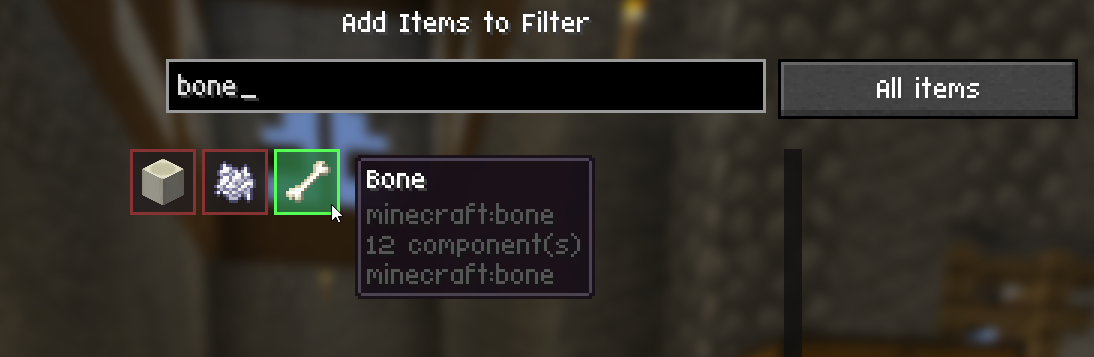 Pickup Filter Selecting Item Pickup Filter Selecting Item
Versions
Files
Relations
Project Relations
More like this
Similar Mods
Suggestions use data such as tags, dependencies, dependents, descriptions, titles, and more to rank how much they overlap with this mod.
On ModDex
Community snapshot
By the numbers
Statistics

Want to reach Minecraft players?
We're looking for a server hosting partner to feature here and other parts of the site. Interested? Send us a message!
Get in touchGet it on
Available Platforms
On ModDex
Community snapshot
By the numbers
Statistics
Resources