Community listing page, reviews here may not be monitored by the author.
Pixelmon Utility PokeRadar

No reviews yet
Pixelmon Helper Mod on servers and singleplayer
Community voices
Reviews
No reviews yet. Be the first to review this project!
Get it on
Available Platforms
About
Project Details
For authors
Embed Badge
If you're the author of this project, you can embed a live badge anywhere that supports HTML or Markdown. It updates automatically whenever ratings change.
Use HTML for any page that supports it, or Markdown for README files and Markdown-based descriptions.
Identifiers
Platform IDs
Resources
External Links
About
Description
I'm sorry for the inactivity... I'm currently working on a big project at my real-life job... so this project will be on hold and I won't be working on it until I have more free time... thanks for understanding! :)
Pixelmon Utility
A comprehensive utility mod for Pixelmon that enhances your gameplay with Pokemon detection, battle assistance, and quality-of-life features.
🎮 Features
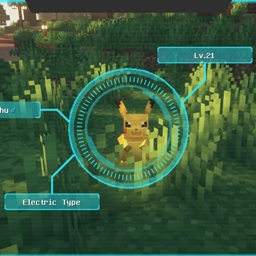
🔍 Pokemon Finder
Search for any Pokemon in your world!
- Press DELETE to open the search screen
- Draws yellow lines to matching Pokemon
- Filter by size:
pikachu(size:runt) - Filter by gender:
eevee(gen:f) - Combine filters:
charizard(size:huge)(gen:m)
Available sizes: runt, small, ordinary, large, huge, ginormous, enormous, microscopic, pygmy
⚡ Legendary Detection
Never miss a legendary spawn again!
- Automatic detection of nearby legendaries
- Red lines drawn to legendary Pokemon
- Alarm sound notification
- On-screen display with level and distance
- Toggle in settings
👑 Boss Detection
Spot boss Pokemon instantly!
- Blue lines drawn to boss Pokemon
- Shows boss tier (Epic/Legendary/Ultimate)
- Toggle in settings
⚔️ Battle HUDs
Gain tactical advantage in battles!
Weakness HUD (Pink border):
- Shows opponent's type weaknesses (2x/4x damage)
- Shows resistances (0.5x/0.25x damage)
- Shows immunities (0x damage)
- Draggable - click and drag to reposition!
Move Effectiveness HUD (Cyan border):
- Shows effectiveness of YOUR moves vs opponent
- x2 = Super effective, x1 = Normal, x0.5 = Not effective
- Draggable - click and drag to reposition!
🤖 Auto-Bot
Automate repetitive commands!
- Configure commands in settings
- Set interval between executions
- On-screen countdown timer
- Press INSERT to toggle on/off
- Alarm stops automatically when in battle
📦 Inventory Sorting
Keep your inventory organized!
- Middle-click in inventory or chests to sort
- Automatically stacks partial stacks
- Sorts by item type then name
🕊️ Creative Fly
Fly without creative mode!
- Double-tap SPACE to toggle
- SPACE = up, SHIFT = down, WASD = horizontal
- Enable feature in settings first
⌨️ Keybinds
| Key | Action |
|---|---|
| DELETE | Open Pokemon Finder |
| INSERT | Toggle Auto-Bot |
| CTRL+INSERT | Open Settings |
| HOME | Open Help Screen |
| Middle Mouse | Sort Inventory |
| Double-tap SPACE | Toggle Fly Mode |
All keybinds can be changed in Minecraft Controls settings
📋 Requirements
- Minecraft: 1.16.5
- Forge: 36.2.0+
- Pixelmon: 9.0.0+
- Java: 17+
📥 Installation
- Download the latest
pixelmonutility-x.x.x.jar - Place in your
modsfolder - Launch Minecraft with Forge
- Configure settings with CTRL+INSERT
💡 Tips
- Battle HUDs are draggable - click and drag to your preferred position!
- Positions are saved automatically
- Combine size and gender filters for precise searches
- Enable notifications in settings for legendary/boss alerts
📝 Support
If you encounter any issues or have suggestions, please report them! If you appreciate my spare-time work, a donation would be very much welcome ❤️
paypal.me/freshbuzz1996
Made for the Pixelmon community ❤️
Screenshots
Gallery
Versions
Files
Relations
Project Relations
More like this
Similar Mods
Suggestions use data such as tags, dependencies, dependents, descriptions, titles, and more to rank how much they overlap with this mod.
On ModDex
Community snapshot
By the numbers
Statistics
Want to reach Minecraft players?
We're looking for a server hosting partner to feature here and other parts of the site. Interested? Send us a message!
Get in touchGet it on
Available Platforms
On ModDex
Community snapshot
By the numbers
Statistics
Resources