
PlaceholderMaker
No reviews yet
A minecraft mod with which you can make unlimited placeholders on modded mc servers, using the placeholders api and much more!
Fabric is a mod loader for versions 1.14+ of Minecraft, particularly popular for client side and optimization mods.
Community voices
Reviews
Click once to include, again to exclude, again to clear
No reviews yet. Be the first to review this project!
Get it on
Available Platforms
 Modrinth
Compatibility
Supported Environments
About
Project Details
For authors
Embed Badge
If you're the author of this project, you can embed a live badge anywhere that supports HTML or Markdown. It updates automatically whenever ratings change.
Use HTML for any page that supports it, or Markdown for README files and Markdown-based descriptions.
Identifiers
Platform IDs
Resources
External Links
About
Description
PlaceholderMaker
Overview
PlaceholderMaker is a Fabric mod that allows you to create placeholders that use conditions and rules to create unique and unlimited placeholders and even placeholders that are inside other placeholders that use detect to change during the game using conditions that detect changes from placeholders.
How It Works
- It works using conditions from rules in configure
jsonmade for placeholders, conditions detect changes from other placeholders that are used in configs from the placeholder! - Doing this using Placeholder API, and other placeholders from any type of mod!
- Placeholders can be created in a
jsonfile inpmaker/placeholdersand can be used in the game like this%pm:player_health%
Commands and Permissions
/pm reload- Permission:
pm.reload(or Operator Level ≥ 2) - Reloads all placeholder configuration files from
config/pmaker/placeholders/. - Use this after editing or adding new placeholder JSON files.
- Permission:
Conditions
| Operator | Meaning | Example |
|---|---|---|
< |
Less than | "<3" → if value < 3 |
> |
Greater than | ">12" → if value > 12 |
<= |
Less than or equal to | "<="5" → if value ≤ 5 |
>= |
Greater than or equal to | ">=10" → if value ≥ 10 |
= |
Equal to | "=3" → if value == 3 |
! |
Not equal to | "!3" → if value != 3 |
% |
Checks if value is divisible by | "%5" → if value % 5 == 0 |
null |
If it is null | Show the message directly |
Example: Creating a Placeholder
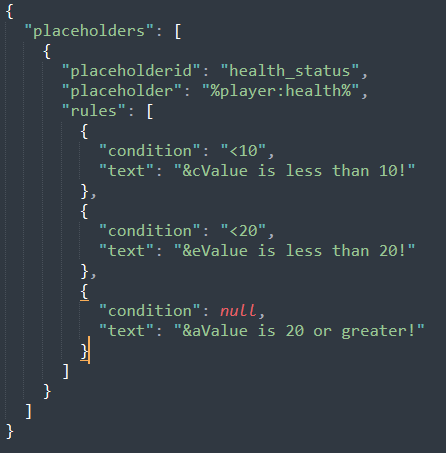
Below is a simple JSON file example you might place in config/pmaker/placeholders/health_status.json. This will create a placeholder health_status that references %player:health% and then decides which text to display based on the player’s health.
{
  "placeholders": [
    {
      "placeholderid": "health_status",
      "placeholder": "%player:health%",
      "rules": [
        {
          "condition": "<3",
          "text": "&cYou're about to die!"
        },
        {
          "condition": "<6",
          "text": "&eHang in there, warrior!"
        },
        {
          "condition": null,
          "text": "&aYou look perfectly healthy!"
        }
      ]
    }
  ]
}
Text Formats
Examples
-
Bold, Italic, Underline, Strikethrough, Obfuscated
<b>Bold text</b><i>Italic text</i><u>Underlined text</u><strike>Strikethrough text</strike><obf>Obfuscated text</obf>
-
Hex Colors
<#FF0000>This text is red</#><#00FF00>This text is green</#>
-
Gradient
<gradient:#FF0000:#FFFF00:#00FF00>Hello Gradient!</gradient>- You can use multiple hex colors separated by “:” (e.g.
#FF0000:#0000FF:#00FF00). - The parser will blend colors across the text.
-
Click Events
<click:run_command:'/say Hello'>Click to run a command</click><click:suggest_command:'/help'>Click to suggest a command in chat</click><click:open_url:'https://example.com'>Click to open a website</click><click:copy_to_clipboard:'Copied!'>Click to copy text</click>- Note:
run_commandis executed as if the player typed it in chat, so it requires permissions.
-
Hover Events
<hover:show_text:'Hover message here'>Hover over me</hover>
-
Links
<link:https://google.com>Click to open Google</link>- Equivalent to a
click:open_urlevent.
-
Reset
<reset>or<r>resets any formatting to default.
-
Vanilla Formatting Codes
- Use
&followed by a code (e.g.&a,&l,&r):&l= bold&o= italic&n= underline&m= strikethrough&k= obfuscated&r= reset&0-&f= color codes
- Use
Screenshots
Gallery
Versions
Files
Relations
Project Relations
More like this
Similar Mods
Suggestions use data such as tags, dependencies, dependents, descriptions, titles, and more to rank how much they overlap with this mod.
On ModDex
Community snapshot
By the numbers
Statistics

Want to reach Minecraft players?
We're looking for a server hosting partner to feature here and other parts of the site. Interested? Send us a message!
Get in touchGet it on
Available Platforms
On ModDex
Community snapshot
By the numbers
Statistics
Resources