Community listing page, reviews here may not be monitored by the author.
Placement Preview


No reviews yet
A client-side mod to show a preview of the block-to-be-placed

Community voices
Reviews
No reviews yet. Be the first to review this project!
Get it on
Available Platforms
Compatibility
Supported Environments
Runs entirely on the client. Works on vanilla servers.
About
Project Details
For authors
Embed Badge
If you're the author of this project, you can embed a live badge anywhere that supports HTML or Markdown. It updates automatically whenever ratings change.
Use HTML for any page that supports it, or Markdown for README files and Markdown-based descriptions.
Identifiers
Platform IDs
About
Description
Description
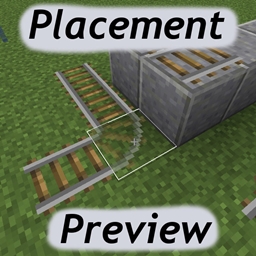
A client-side mod for displaying a preview of the block that would be placed on right click.
Example:

Configuration
There are several configuration options available, either via the in-game config menu, or in the configuration file.
- defaultStateGhost Should the ghost block rendering be enabled or disabled by default (when not holding any keys)
- defaultStateWire Should the wire frame rendering be enabled or disabled by default (when not holding any keys)
- enableRenderGhost The main enable for ghost block rendering
- enableRenderWire The main enable for wire frame rendering
- fakeWorldCopyRadius The radius of blocks that will be copied to the fake world. The change detection radius is one less than this value.
- renderAfterDelay The preview will only activate after the cursor has been held over a block for an amount of time.
- renderDelay The amount of time the cursor must be held over a block for the preview to activate.
- renderOverlapping Render a ghost block preview over existing blocks. This also changes the way the changed block models are detected. (when false, only blocks that were modified in the fake world via setBlockState() are included, when true, all blocks in a radius of fakeWorldCopyRadius - 1 are compared to the real world by comparing the getActualState() reference. This means that things like changing fence connections of adjacent existing blocks will be shown.)
- requireSneakForGhost Is holding sneak required to render the ghost blocks
- requireSneakForWire Is holding sneak required to render the wire frame
- resetHoverTimerOnPosChange Whether the hover delay will reset when the cursor moves over a different block.
- toggleGhostWhileHoldingKey Whether to toggle the ghost block rendering state from what the defaultStateGhost is, while holding the key set in toggleKeyGhost
- toggleWireWhileHoldingKey Whether to toggle the wire frame rendering state from what the defaultStateWire is, while holding the key set in toggleKeyWire
- toggleKeyGhost The key that must be help for the ghost block rendering state to toggle from the defaultStateGhost. Can be "shift", "alt" or "ctrl".
- toggleKeyWire The key that must be help for the wire frame rendering state to toggle from the defaultStateWire. Can be "shift", "alt" or "ctrl".
- transparencyAlpha The alpha value of the ghost block, if useTransparency is true. 0 = completely transparent, 1 = completely opaque.
- useTransparency Render the ghost blocks as transparent/translucent.
The rendering can be toggled on/off alltogether via the Toggle key, which is P by default.
The enableRenderGhost state can be toggled via the Toggle Ghost keybind (SHIFT + P by default).
The enableRenderWire state can be toggled via the Toggle Wire keybind (CTRL + P by default).
So to sum it up a bit:
- The enableRender* options are the "master controls" and turning them off means nothing will be rendered no matter what the other options for that mode (ghost or wire) are.
- Then the defaultState* options set the "default rendering state" (on vs. off) for that mode, when no keys are being pressed.
- requireSneakFor* controls if sneaking is required for the rendering to activate for that mode.
- toggle*WhileHoldingKey When enabled, the on/off state from the defaultState* will be toggled/reversed while the key set in the corresponding toggleKey* option is being pressed
So basically you can set it up to render one or both of the modes by default and be disabled while holding a key (ctrl or alt or shift), or make them require sneaking, or make them require holding ctrl or alt or shift, or make them be on by default but on a delay, or make them require sneaking and/or holding a key and still require a delay... You get the idea, I hope :p
Mod packs/permissions
- Mod packs: go ahead!
- Re-hosting the mod file otherwise is not cool, mmkay?
Short demonstration video (from version 0.1.0)
TBA
Description
A client-side mod for displaying a preview of the block that would be placed on right click.
preview example screenshot
Configuration
There are several configuration options available, either via the in-game config menu, or in the configuration file.
defaultStateGhost- Should the ghost block rendering be enabled or disabled by default (when not holding any keys)defaultStateWire- Should the wire frame rendering be enabled or disabled by default (when not holding any keys)enableRenderGhost- The main enable for ghost block renderingenableRenderWire- The main enable for wire frame renderingfakeWorldCopyRadius- The radius of blocks that will be copied to the fake world. The change detection radius is one less than this value.renderAfterDelay- The preview will only activate after the cursor has been held over a block for an amount of time.renderDelay- The amount of time the cursor must be held over a block for the preview to activate.renderOverlapping- Render a ghost block preview over existing blocks. This also changes the way the changed block models are detected. (when false, only blocks that were modified in the fake world viasetBlockState()are included, when true, all blocks in a radius offakeWorldCopyRadius - 1are compared to the real world by comparing thegetActualState()reference. This means that things like changing fence connections of adjacent existing blocks will be shown.)requireSneakForGhost- Is holding sneak required to render the ghost blocksrequireSneakForWire- Is holding sneak required to render the wire frameresetHoverTimerOnPosChange- Whether the hover delay will reset when the cursor moves over a different block.toggleGhostWhileHoldingKey- Whether to toggle the ghost block rendering state from what thedefaultStateGhostis, while holding the key set intoggleKeyGhosttoggleWireWhileHoldingKey- Whether to toggle the wire frame rendering state from what thedefaultStateWireis, while holding the key set intoggleKeyWiretoggleKeyGhost- The key that must be help for the ghost block rendering state to toggle from thedefaultStateGhost. Can beshift,altorctrl.toggleKeyWire- The key that must be help for the wire frame rendering state to toggle from thedefaultStateWire. Can beshift,altorctrl.transparencyAlpha- The alpha value of the ghost block, ifuseTransparencyistrue. Range:0.0 - 1.0, where0.0= completely transparent,1.0= completely opaque.useTransparency- Render the ghost blocks as transparent/translucent.
The rendering can be toggled on/off all together via the Toggle key, which is P by default.
The enableRenderGhost state can be toggled via the Toggle Ghost keybind (Shift + P by default).
The enableRenderWire state can be toggled via the Toggle Wire keybind (Ctrl + P by default).
So to sum it up a bit:
- The enableRender* options are the "master controls" and turning them off means nothing will be rendered no matter what the other options for that mode (ghost or wire) are.
- Then the defaultState* options set the "default rendering state" (on vs. off) for that mode, when no keys are being pressed.
requireSneakFor*controls if sneaking is required for the rendering to activate for that mode.toggle*WhileHoldingKey- When enabled, the on/off state from thedefaultState*will be toggled/reversed while the key set in the correspondingtoggleKey*option is being pressed.
So basically you can set it up to render one or both of the modes by default and be disabled while holding a key (Ctrl or Alt or Shift), or make them require sneaking, or make them require holding Ctrl or Alt or Shift, or make them be on by default but on a delay, or make them require sneaking and/or holding a key and still require a delay... You get the idea, I hope :p
Screenshots
Gallery
Versions
Files
Relations
Project Relations
More like this
Similar Mods
Suggestions use data such as tags, dependencies, dependents, descriptions, titles, and more to rank how much they overlap with this mod.
On ModDex
Community snapshot
By the numbers
Statistics
 (opens in a new tab)
Get it on
Available Platforms
On ModDex
Community snapshot
By the numbers