
Player Capes
No reviews yet
A beautiful client-side Fabric mod to wear any premium player's cape or elytra with an interactive 3D preview GUI!
Fabric is a mod loader for versions 1.14+ of Minecraft, particularly popular for client side and optimization mods.
Community voices
Reviews
Click once to include, again to exclude, again to clear
No reviews yet. Be the first to review this project!
Get it on
Available Platforms
 Modrinth
Compatibility
Supported Environments
About
Project Details
For authors
Embed Badge
If you're the author of this project, you can embed a live badge anywhere that supports HTML or Markdown. It updates automatically whenever ratings change.
Use HTML for any page that supports it, or Markdown for README files and Markdown-based descriptions.
Identifiers
Platform IDs
Resources
External Links
About
Description
🌟 Player Capes
Have you ever wanted to wear your favorite Minecraft player's cape, or preview how an Elytra looks on your skin before buying or earning it? Player Capes is a premium, client-side cosmetic mod that lets you customize your cape and elytra textures in real-time using a beautiful, interactive 3D GUI!
✨ Features
- 🎭 Premium Cape Redirection: Apply any premium Minecraft player's cape (e.g., Mojang, Minecon, OptiFine) to your character instantly just by typing their username!
- 📦 Local Custom Capes: Load any local custom
.pngcape file directly from your computer using a LWJGL-native file picker! - 🧍 Interactive 3D Preview Pane: Features a 360-degree continuously rotating 3D preview of your player skin!
- Drag-to-Rotate: Click and drag your character horizontally to rotate them and inspect your cape from any angle. Releasing the mouse smoothly resumes the automatic rotation!
- Upright Head Alignment: The preview model's head remains completely straight and forward-facing, unaffected by where your in-game player is looking.
- Nametag Hidden: The floating nametag above the character is completely hidden for a clean, professional outline preview!
- ⚡ Instant Elytra/Cape Toggle: Seamlessly swap between a flat cape and a full 3D Elytra in the preview.
- In Cape Mode, standard chestplates (Netherite, Diamond, etc.) you are wearing in-game are preserved and rendered beneath the cape!
- ⭐ Favorites Naming Modal: Save your favorite capes to a local favorites list. When saving, a beautiful naming dialog prompts you for a custom name, keeping your main control panel clean and uncluttered.
- 🟢 Active Highlight: Applied favorites instantly light up in vibrant green in your sidebar list so you always know which custom look is active.
- 🚀 Native Drag-and-Drop / File Pickers: A robust dual file-picking system that seamlessly falls back to LWJGL text fields to ensure file picking works on all platforms and launchers.
🛠️ How to Use
Simply launch the game and open the configuration screen:
- Open the GUI: Use the client command
/pcapes(or/pcapes info) to open the customized tri-pane configuration screen. - Add a Cape: Type a premium player's username in the text field and click Apply Cape!
- Save to Favorites: Click Save to Favs, type a custom name in the dialog popup, and hit Enter.
- Reset: Click Reset Original (or run
/pcapes reset) to return to your default in-game look.
💻 Commands
/pcapes <premium_username>- Instantly sets your cape to that player's cape./pcapes favourite- Saves the current cape to your favorites./pcapes reset- Resets your cape back to your default skin look./pcapes info- Opens the interactive split-pane 3D Preview GUI.
Screenshots
Gallery
-
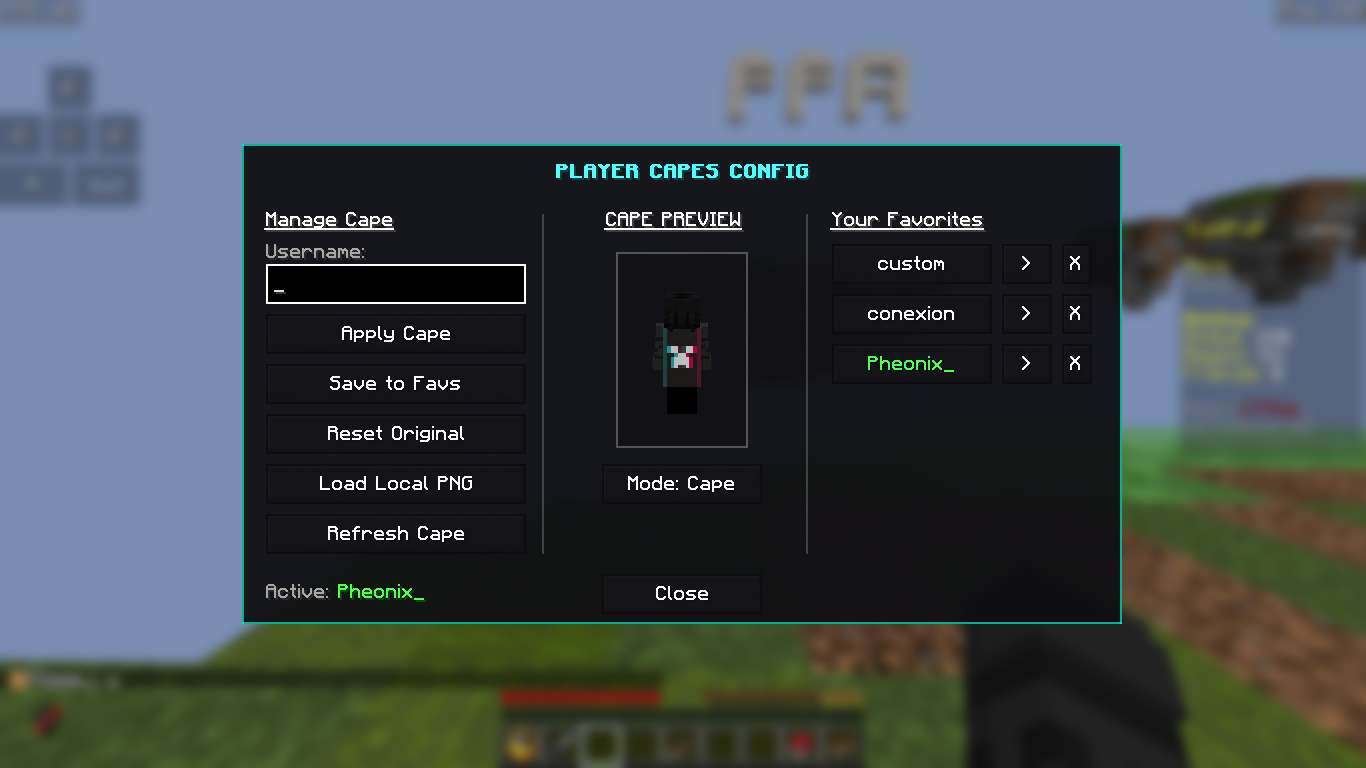 GUI Here You Can Manage The Mod
Versions
Files
Relations
Project Relations
More like this
Similar Mods
Suggestions use data such as tags, dependencies, dependents, descriptions, titles, and more to rank how much they overlap with this mod.
On ModDex
Community snapshot
By the numbers
Statistics

Want to reach Minecraft players?
We're looking for a server hosting partner to feature here and other parts of the site. Interested? Send us a message!
Get in touchGet it on
Available Platforms
On ModDex
Community snapshot
By the numbers
Statistics
Resources