Community listing page, reviews here may not be monitored by the author.
Player Radar


No reviews yet
Get notified when players are near.
Community voices
Reviews
No reviews yet. Be the first to review this project!
Get it on
Available Platforms
Compatibility
Supported Environments
Runs entirely on the client. Works on vanilla servers.
About
Project Details
For authors
Embed Badge
If you're the author of this project, you can embed a live badge anywhere that supports HTML or Markdown. It updates automatically whenever ratings change.
Use HTML for any page that supports it, or Markdown for README files and Markdown-based descriptions.
Identifiers
Platform IDs
Resources
External Links
About
Description


About
Get notified when a player is within your loaded chunks. Fully client-side.
You can choose between a chat message, a message above the hotbar, and/or a sound indicator.
It is highly recommended you install MidnightLib, as the config will NOT WORK without MidnightLib installed.
Commands
To prevent some players from being picked up in the radar, or to only make specific players get picked up, use /radarlist. The usage is:
/radarlist add <player>- Add a player to the list by their username./radarlist remove <player>- Remove a player from the list by their username./radarlist mode- Returns the current radar mode./radarlist mode (blacklist|whitelist)- Sets the current radar mode./radarlist uuid add <uuid>- Add a player to the list by their UUID./radarlist uuid remove <uuid>- Remove a player from the list by their UUID./radarlist toggle- Toggles the radar on or off.
Using blacklist mode will prevent any user in the list from being detected.
Using whitelist mode will only allow users in the list to be detected.
The whitelist and blacklist are two separate lists; they do not share the same data.
WARNING
Some servers may consider this a cheat or a hack. I do not encourage hacking. Please check with your server owner or a moderator before using this mod.
Bugs
Found a bug or issue? Or want to suggest a feature? Submit an issue here.


About
Get notified when a player is within your loaded chunks. Fully client-side.
You can choose between a chat message, a message above the hotbar, and/or a sound indicator.
It is highly recommended you install MidnightLib, as the config will NOT WORK without MidnightLib installed.
Commands
To prevent some players from being picked up in the radar, or to only make specific players get picked up, use /radarlist. The usage is:
/radarlist add <player>- Add a player to the list by their username./radarlist remove <player>- Remove a player from the list by their username./radarlist mode- Returns the current radar mode./radarlist mode (blacklist|whitelist)- Sets the current radar mode./radarlist uuid add <uuid>- Add a player to the list by their UUID./radarlist uuid remove <uuid>- Remove a player from the list by their UUID./radarlist toggle- Toggles the radar on or off.
Using blacklist mode will prevent any user in the list from being detected.
Using whitelist mode will only allow users in the list to be detected.
The whitelist and blacklist are two separate lists; they do not share the same data.
WARNING
Some servers may consider this a cheat or a hack. I do not encourage hacking. Please check with your server owner or a moderator before using this mod.
Made by the request of u/RateRight8781
Screenshots
Gallery
-
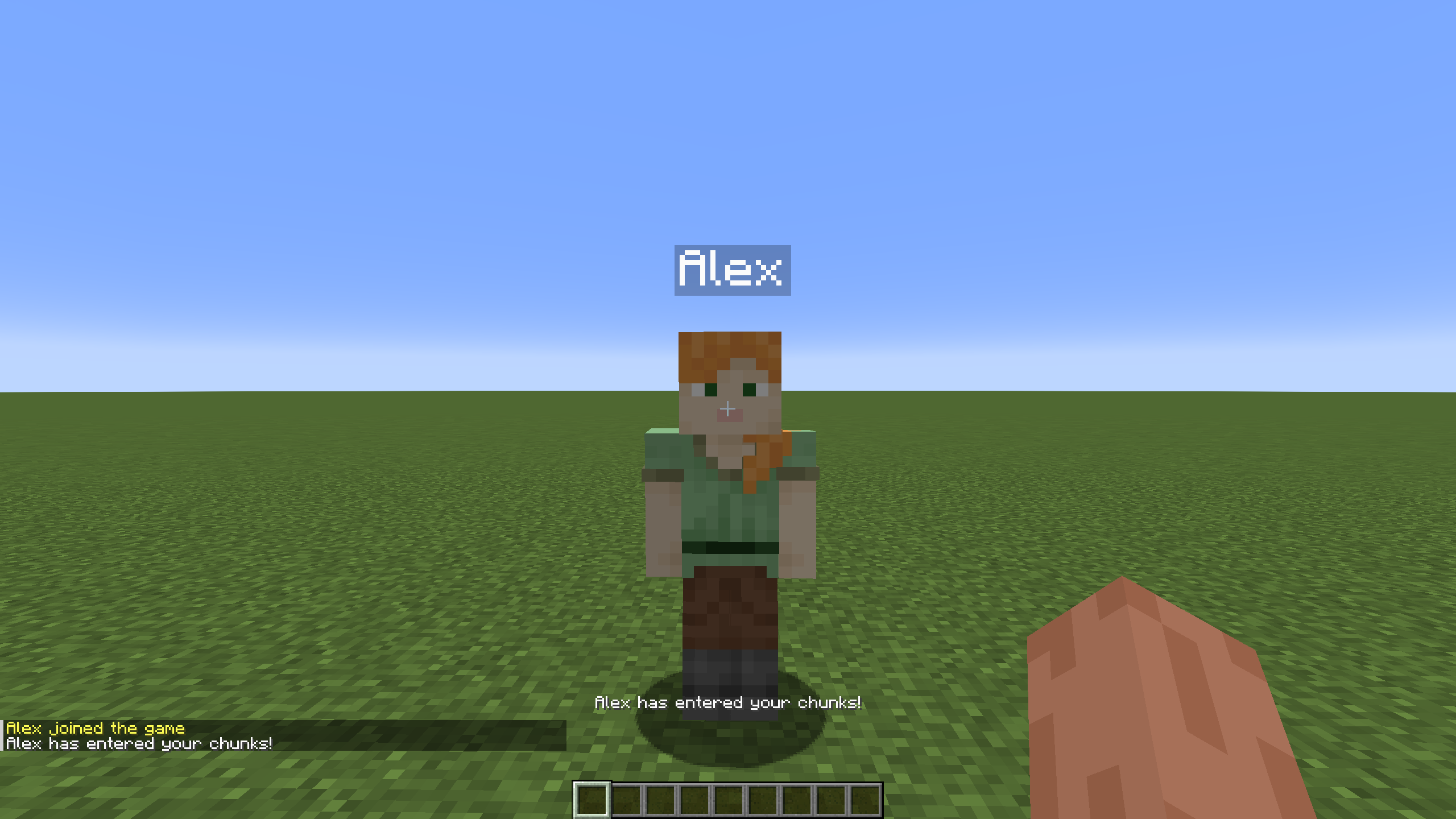 Entered chunks This is what you see when a player enters your chunks. A noise also plays.
Versions
Files
Relations
Project Relations
More like this
Similar Mods
Suggestions use data such as tags, dependencies, dependents, descriptions, titles, and more to rank how much they overlap with this mod.
On ModDex
Community snapshot
By the numbers
Statistics
Want to reach Minecraft players?
We're looking for a server hosting partner to feature here and other parts of the site. Interested? Send us a message!
Get in touchGet it on
Available Platforms
On ModDex
Community snapshot
By the numbers
Statistics
Resources