Community listing page, reviews here may not be monitored by the author.
Player Sync Data

No reviews yet
PlayerSyncData mod allows you to synchronize the inventory of 2 minecraft worlds automatically
Community voices
Reviews
No reviews yet. Be the first to review this project!
Get it on
Available Platforms
About
Project Details
For authors
Embed Badge
If you're the author of this project, you can embed a live badge anywhere that supports HTML or Markdown. It updates automatically whenever ratings change.
Use HTML for any page that supports it, or Markdown for README files and Markdown-based descriptions.
Identifiers
Platform IDs
Resources
External Links
About
Description
PLAYER SYNC INVENTORY
The mod "Player Sync Inventory" allows you to synchronize the inventory of players between several minecraft worlds !!!
[EN]
List of examples:
- Example 1: Between 2 solo worlds
- Example 2: Between 2 minecraft servers
- Example 3: Between 1 solo world and a minecraft server
FAQ
Q1: How to install it?
A1: Directly via curseforge with the version of forge indicated on the file name
Q2: Do you have to configure it?
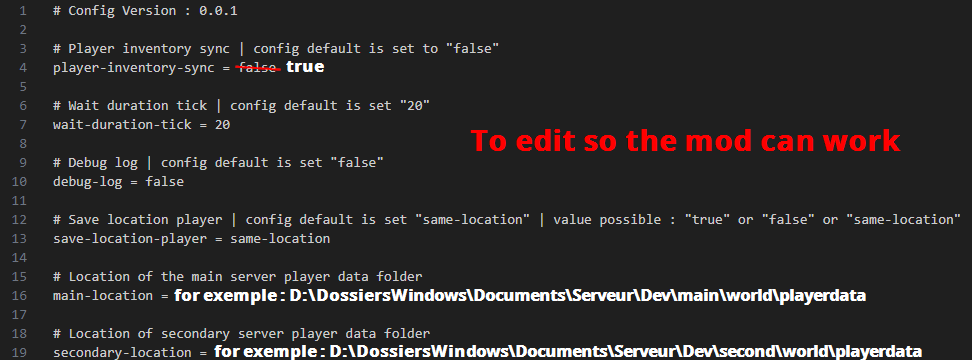
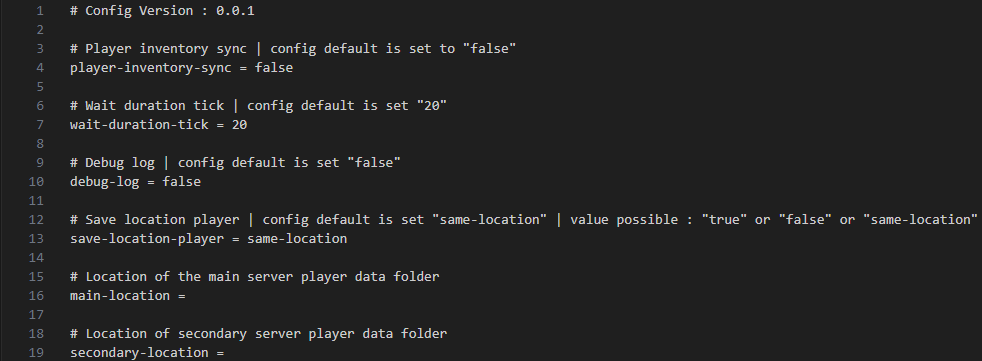
A2: Yes by default in the mod config it is disabled so you have to replace the value "false" with "true" on the line "player-inventory-sync" to enable it BUT you also have to fill in the lines "main-location" and "secondary-location" by directly indicating the location of the "playerdata" folder of the world you wanted to use
Example on my 2 test servers
# Location of the player data folder of the main server
main-location = D:\WindowsFolders\Documents\Server\Dev\main\world\playerdata
Location of the player data folder of the secondary server
secondary-location = D:\WindowsFolders\Documents\Server\Dev\second\world\playerdata
Q3: What is the save-location-player option for?
A3: there are 3 ways that the mod manages the player's position between servers
same-location: keep the location in memory of the player's location for each minecraft world
true: synchronizes 100% the locations between each minecraft world [Warning this option is extremely dangerous and risk of death very high !!!]
false: When the player joins the world is teleported to the spawn or their respawn point
Q4: Are modded dimensions supported?
A4: In theory all modded dimensions are supported I tested with the dimension "The Aether"
Q5: Are additional inventories such as Curio Slot or Cosmectic Armor?
A5: Yes I have already added support for this inventory in my mod but hesitated to contact me on the page to tell me about unsynchronized inventories
Q6: I have an error message in the game chat when I join my minecraft world "PlayerSyncData is Disabled
If you had not activated it voluntarily, please ignore the error above
But if it should be activated, make sure to check the "PlayerSyncData" mod config"
A6: As the error message indicates it is because you wanted to activate the mod without filling in the lines of the playerdata file locations and for safety to avoid any crash it is automatically deactivated
[FR]
le mod "Player Sync Inventory" permet de synchroniser l'inventaire des joueurs entre plusieurs monde minecraft ! ! !
List d'exemple :
- Exemple 1 : Entre 2 Monde solo
- Exemple 2 : Entre 2 Serveurs minecraft
- Exemple 3 : Entre 1 Monde Solo et un Serveur minecraft
FAQ
Q1 : Comment l'installer ?
R1 : Directement via curseforge avec la version de forge indiqué sur le nom de fichier
Q2 : Est ce que il faut le configuerer ?
R2 : Oui par defaut dans la config du mod il est désactivé il faut donc remplacé la valeur "false" par "true" sur la ligne "player-inventory-sync" pour l'activé MAIS cependant il faut aussi remplir les lignes "main-location" et "secondary-location" en indiquant directement l'emplacement du dossier "playerdata" du monde que vous voulais utiliser
Exemple sur mes 2 serveur de test
# Emplacement du dossier des donnés des joueurs du serveur principale
main-location = D:\DossiersWindows\Documents\Serveur\Dev\main\world\playerdata
Emplacement du dossier des donnés des joueurs du serveur secondaire
secondary-location = D:\DossiersWindows\Documents\Serveur\Dev\second\world\playerdata
Q3 : A quoi sert l'option save-location-player ?
R3 : il y a 3 façon que le mod gère la position du joueur entre les serveurs
same-location : garder l'emplacement en mémoire de l'emplacement du joueur pour chaque monde minecraft
true : a synchronise a 100% les emplacement entre chaque monde minecraft [Attention cet option est extrement dangereux et risque de mort très haut ! ! !]
false : Quand le joueurs rejoind le monde se fait téléporté au spawn ou sont point de réaparision
Q4 : Est ce que les dimensions moddé sont supporté ?
R4 : En Théorie toute les dimensions moddé sont supporté j'ai tester avec la dimensions "The Aether"
Q5 : Est ce que les inventaire supplumentaire comme par exemple Curio Slot ou Cosmectic Armour ?
R5 : Oui j'ai déjà rajouté le support de c'est inventaire dans mon mod mais hésité a me contact sur la page pour m'indiqué des inventaire non synchronisé
Q6 : J'ai un message d'erreur dans le tchat du jeu quand je rejoins mon monde minecraft "PlayerSyncData is Disabled
If you had not activated it voluntarily, please ignore the error above
But if it should be activated, make sure to check the "PlayerSyncData" mod config"
R6 : Comme le message d'erreur indique c'est que vous avait voulu activé le mod sans remplir les lignes des emplacement des ficher playerdata et par sécurité pour évité tout crash il se désactivé automatiquement
Screenshots
Gallery
-
Config Edit.png Config Edit.png
-
 Config.png Config.png
 -
 icon PlayerSyncData.png icon PlayerSyncData.png
Versions
Files
Relations
Project Relations
More like this
Similar Mods
Suggestions use data such as tags, dependencies, dependents, descriptions, titles, and more to rank how much they overlap with this mod.
On ModDex
Community snapshot
By the numbers
Statistics
Want to reach Minecraft players?
We're looking for a server hosting partner to feature here and other parts of the site. Interested? Send us a message!
Get in touchGet it on
Available Platforms
On ModDex
Community snapshot
By the numbers
Statistics
Resources