Community listing page, reviews here may not be monitored by the author.
Player Tracking


No reviews yet
🔎 A PvP mod that encourages raiding. Allows the tracking of players via special trackers.

Community voices
Reviews
No reviews yet. Be the first to review this project!
Get it on
Available Platforms
Compatibility
Supported Environments
Runs entirely on the server. Also works in singleplayer.
About
Project Details
For authors
Embed Badge
If you're the author of this project, you can embed a live badge anywhere that supports HTML or Markdown. It updates automatically whenever ratings change.
Use HTML for any page that supports it, or Markdown for README files and Markdown-based descriptions.
Identifiers
Platform IDs


About
Description


Player Tracking is a PvP mod which allows tracking players via trackers in the world, via the /track command. These have been originally used by the Minecraft PvP server (mcpvp) and later on many raiding servers following their example. It encourages raiding on a hardcore/no-rule server.


The '/track help' content:
Tracking Help Page (1/5)
For an introduction to tracking read page 2.
For information on building a tracker read page 3
For explanation on '/track all' read page 4.
For explanation on '/track [playerName]' read page 5.
To select a page: '/track help [page]'.
Tracking Help Page (2/5) - Introduction:
Tracking is a feature to encourage raiding on a server. Without this it would be near-impossible to find enemy bases legit, and would give hackers an unfair advantage. Tracking is the art of finding a player before he or she finds you. It is not cheap, you will need many valuable materials to start off. Read the next few pages for more information.
Tracking Help Page (3/5) - Building:
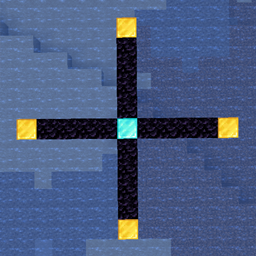
To start building a solid tracker you will need a 'Diamond Block' for the middle, 4 'Gold Blocks' for the end of each 'arm', and as much 'Obsidian' as you can find for the length of the arms. Every obsidian block equals 25 blocks in the real world. Build your tracker at a smart position. Not too close to spawn, and not at coords that are easy to guess. You are not the only one that will try to make one.
To see a 'layout' of a tracker do '/track help 3 layout'.
Tracking Help Page (3/5) - Building LAYOUT:
In the picture below you can see multiple letters and dashes. The dashes are Obsidian blocks, D is a Diamond block, and G are Gold blocks.
G
|
G ---- D ---- G
|
G
Tracking Help Page (4/5) - /track all:
Once you have made your own solid tracker, it's time to find those bases! Stand on the Diamond block in the middle of your tracker and do /track all. If there are players within the range of your tracker they will show up. You will need a player on atleast 2 of your arms to continue to page 5. If not, try to increase the length of your arms or wait until there are more/different players online.
To proceed to page 5 do '/track help 5'.
Tracking Help Page (5/5) - /track [playerName]:
If you are lucky enough to find a player on 2 different arms, it's time to lower the size of your arms. Keep moving the Gold block down/up your arm to pinpoint the location of the player you want to track. If he doesn't show up anymore after you moved the Gold block, place the block higher up until you are at a 1 block difference. Now all that is left is to add the length of the arm from the respective coordinate on your Diamond block and you've found the location of an enemy within 25 blocks!
Basic tracking explained by the original creator, hclewk, on youtube:

A permanent tracker with a range of 150 blocks on all arms, works with '/track all' and '/track playerName':
A single-use tracker which allows '/track playerName':
Stand on the middle block and enter the command:

You may freely use this mod in any modpack, as long as the download remains hosted within the CurseForge or Modrinth ecosystem.
Serilum.com contains an overview and more information on all mods available.
Comments are disabled as I'm unable to keep track of them across so many separate mod pages.
For issues, ideas, suggestions or anything else there is the Github repo. Thanks!
Requires the library mod Collective (Fabric) and the Fabric API.
Player Tracking is a PvP mod which allows tracking players via trackers in the world, via the /track command. These have been originally used by the Minecraft PvP server (mcpvp) and later on many raiding servers following their example. It encourages raiding on a hardcore/no-rule server.
The '/track help' content:
Tracking Help Page (1/5)
For an introduction to tracking read page 2.
For information on building a tracker read page 3
For explanation on '/track all' read page 4.
For explanation on '/track [playerName]' read page 5.
To select a page: '/track help [page]'.
Tracking Help Page (2/5) - Introduction:
Tracking is a feature to encourage raiding on a server. Without this it would be near-impossible to find enemy bases legit, and would give hackers an unfair advantage. Tracking is the art of finding a player before he or she finds you. It is not cheap, you will need many valuable materials to start off. Read the next few pages for more information.
Tracking Help Page (3/5) - Building:
To start building a solid tracker you will need a 'Diamond Block' for the middle, 4 'Gold Blocks' for the end of each 'arm', and as much 'Obsidian' as you can find for the length of the arms. Every obsidian block equals 25 blocks in the real world. Build your tracker at a smart position. Not too close to spawn, and not at coords that are easy to guess. You are not the only one that will try to make one.
To see a 'layout' of a tracker do '/track help 3 layout'.
Tracking Help Page (3/5) - Building LAYOUT:
In the picture below you can see multiple letters and dashes. The dashes are Obsidian blocks, D is a Diamond block, and G are Gold blocks.
G
|
G ---- D ---- G
|
G
Tracking Help Page (4/5) - /track all:
Once you have made your own solid tracker, it's time to find those bases! Stand on the Diamond block in the middle of your tracker and do /track all. If there are players within the range of your tracker they will show up. You will need a player on atleast 2 of your arms to continue to page 5. If not, try to increase the length of your arms or wait until there are more/different players online.
To proceed to page 5 do '/track help 5'.
Tracking Help Page (5/5) - /track [playerName]:
If you are lucky enough to find a player on 2 different arms, it's time to lower the size of your arms. Keep moving the Gold block down/up your arm to pinpoint the location of the player you want to track. If he doesn't show up anymore after you moved the Gold block, place the block higher up until you are at a 1 block difference. Now all that is left is to add the length of the arm from the respective coordinate on your Diamond block and you've found the location of an enemy within 25 blocks!
Basic tracking explained by the original creator, hclewk, on youtube:
A permanent tracker with a range of 150 blocks on all arms, works with '/track all' and '/track playerName':
A single-use tracker which allows '/track playerName':
Stand on the middle block and enter the command:
------------------
You may freely use this mod in any modpack, as long as the download remains hosted within the CurseForge ecosystem.
Serilum.com contains an overview and more information on all mods available.
Comments are disabled as I'm unable to keep track of all the separate pages on each mod.
For issues, ideas, suggestions or anything else there is the Github repo. Thanks!


Player Tracking is a PvP mod which allows tracking players via trackers in the world, via the /track command. These have been originally used by the Minecraft PvP server (mcpvp) and later on many raiding servers following their example. It encourages raiding on a hardcore/no-rule server.


The '/track help' content:
Tracking Help Page (1/5)
For an introduction to tracking read page 2.
For information on building a tracker read page 3
For explanation on '/track all' read page 4.
For explanation on '/track [playerName]' read page 5.
To select a page: '/track help [page]'.
Tracking Help Page (2/5) - Introduction:
Tracking is a feature to encourage raiding on a server. Without this it would be near-impossible to find enemy bases legit, and would give hackers an unfair advantage. Tracking is the art of finding a player before he or she finds you. It is not cheap, you will need many valuable materials to start off. Read the next few pages for more information.
Tracking Help Page (3/5) - Building:
To start building a solid tracker you will need a 'Diamond Block' for the middle, 4 'Gold Blocks' for the end of each 'arm', and as much 'Obsidian' as you can find for the length of the arms. Every obsidian block equals 25 blocks in the real world. Build your tracker at a smart position. Not too close to spawn, and not at coords that are easy to guess. You are not the only one that will try to make one.
To see a 'layout' of a tracker do '/track help 3 layout'.
Tracking Help Page (3/5) - Building LAYOUT:
In the picture below you can see multiple letters and dashes. The dashes are Obsidian blocks, D is a Diamond block, and G are Gold blocks.
G
|
G ---- D ---- G
|
G
Tracking Help Page (4/5) - /track all:
Once you have made your own solid tracker, it's time to find those bases! Stand on the Diamond block in the middle of your tracker and do /track all. If there are players within the range of your tracker they will show up. You will need a player on atleast 2 of your arms to continue to page 5. If not, try to increase the length of your arms or wait until there are more/different players online.
To proceed to page 5 do '/track help 5'.
Tracking Help Page (5/5) - /track [playerName]:
If you are lucky enough to find a player on 2 different arms, it's time to lower the size of your arms. Keep moving the Gold block down/up your arm to pinpoint the location of the player you want to track. If he doesn't show up anymore after you moved the Gold block, place the block higher up until you are at a 1 block difference. Now all that is left is to add the length of the arm from the respective coordinate on your Diamond block and you've found the location of an enemy within 25 blocks!
Basic tracking explained by the original creator, hclewk, on youtube:
Show Spoiler

A permanent tracker with a range of 150 blocks on all arms, works with '/track all' and '/track playerName':
A single-use tracker which allows '/track playerName':
Stand on the middle block and enter the command:

You may freely use this mod in any modpack, as long as the download remains hosted within the CurseForge or Modrinth ecosystem.
Serilum.com contains an overview and more information on all mods available.
For issues, ideas, suggestions or anything else there is the Github repo. Thanks!
Screenshots
Gallery
Versions
Files
Relations
Project Relations
More like this
Similar Mods
Suggestions use data such as tags, dependencies, dependents, descriptions, titles, and more to rank how much they overlap with this mod.
On ModDex
Community snapshot
By the numbers
Statistics
 (opens in a new tab)
Get it on
Available Platforms
On ModDex
Community snapshot
By the numbers