
PlayerCoordsAPI
No reviews yet
Lightweight Fabric mod exposing locally MC player coords through HTTP API
Community voices
Reviews
Click once to include, again to exclude, again to clear
No reviews yet. Be the first to review this project!
Get it on
Available Platforms
 Modrinth
Compatibility
Supported Environments
About
Project Details
For authors
Embed Badge
If you're the author of this project, you can embed a live badge anywhere that supports HTML or Markdown. It updates automatically whenever ratings change.
Use HTML for any page that supports it, or Markdown for README files and Markdown-based descriptions.
Identifiers
Platform IDs
About
Description
PlayerCoordsAPI
A lightweight Fabric mod that exposes your Minecraft player coordinates via a local HTTP API.


📋 Overview
PlayerCoordsAPI provides real-time access to your Minecraft player coordinates through a simple HTTP endpoint. This enables external applications to track your position without needing to read Minecraft's memory or capture the screen.
✨ Features
- Lightweight HTTP server running only on localhost providing your coordinates
- Client-side only - no server-side components needed
- Works in singleplayer and multiplayer
- Mod menu integration allowing you to enable/disable the API, change its port, and configure requests with or without an
Originheader
🚀 Installation
- Install Fabric Loader for a supported Minecraft version
- Download the latest
playercoordsapi-x.x.x+mcx.x.x.jarfrom the releases page - Place the jar in your
.minecraft/modsfolder - Launch Minecraft with the Fabric profile
⚙️ Configuration
The API is read-only and only accepts loopback connections such as 127.0.0.1 and ::1.
From Mod Menu, you can configure:
- Whether the API is enabled
- Which port it listens on (default:
25565) - How requests without a CORS
Originheader are handled - How requests with a CORS
Originheader are handled
Requests with an Origin can be handled in three different modes:
Allow allLocal originsWhitelist
In Whitelist mode, you can configure each allowed origin with a scheme, host/IP, and optional port.
🔌 API Usage
| Endpoint | Method | Description |
|---|---|---|
/api/coords |
GET, OPTIONS |
Returns the player's current coordinates and world infos |
Response Fields
| Field | Type | Description |
|---|---|---|
x |
number |
East-West |
y |
number |
Height |
z |
number |
North-South |
yaw |
number |
Horizontal rotation (degrees) |
pitch |
number |
Vertical rotation (degrees) |
world |
string |
Minecraft world registry ID |
biome |
string |
Minecraft biome registry ID |
uuid |
string |
Player UUID |
username |
string |
Player username |
Error Responses
| Status | Message |
|---|---|
403 |
Access denied / Origin not allowed |
404 |
Player not in world |
405 |
Method not allowed |
Response Format Example
{
  "x": 123.45,
  "y": 64.00,
  "z": -789.12,
  "yaw": 180.00,
  "pitch": 12.50,
  "world": "minecraft:overworld",
  "biome": "minecraft:plains",
  "uuid": "550e8400-e29b-41d4-a716-446655440000",
  "username": "PlayerName"
}
🛠️ Examples
Replace 25565 with your configured port if you changed it in the Mod Menu.
cURL
curl http://localhost:25565/api/coords
Python
import requests

response = requests.get("http://localhost:25565/api/coords")
data = response.json()
print(f"Player {data['username']} (UUID: {data['uuid']}) at X: {data['x']}, Y: {data['y']}, Z: {data['z']}")
JavaScript
fetch("http://localhost:25565/api/coords")
    .then(response => response.json())
    .then(data => console.log(`Player ${data.username} (UUID: ${data.uuid}) at X: ${data.x}, Y: ${data.y}, Z: ${data.z}`));
Screenshots
Gallery
-
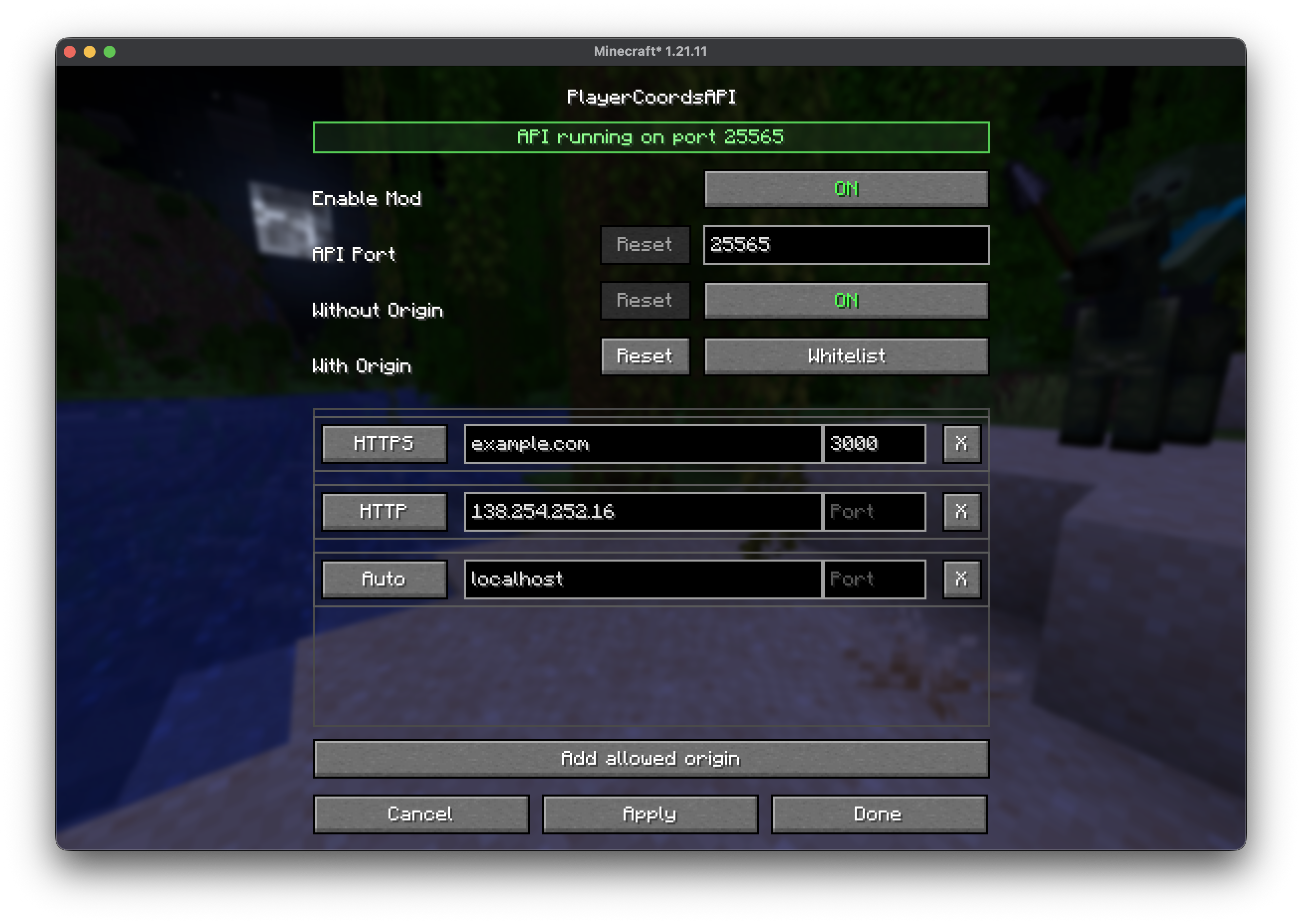 Mod Menu
Versions
Files
Relations
Project Relations
More like this
Similar Mods
Suggestions use data such as tags, dependencies, dependents, descriptions, titles, and more to rank how much they overlap with this mod.
On ModDex
Community snapshot
By the numbers
Statistics

Want to reach Minecraft players?
We're looking for a server hosting partner to feature here and other parts of the site. Interested? Send us a message!
Get in touchGet it on
Available Platforms
On ModDex
Community snapshot
By the numbers