
Community listing page, reviews here may not be monitored by the author.
Player Guard

No reviews yet
CoreProtect-style transaction logging and rollback for player inventories, armor, backpacks, and Cobblemon data. Recover lost items after crashes, dupes, or bad restarts.
Community voices
Reviews
No reviews yet. Be the first to review this project!
Get it on
Available Platforms
Compatibility
Supported Environments
Runs entirely on the server. Also works in singleplayer.
About
Project Details
For authors
Embed Badge
If you're the author of this project, you can embed a live badge anywhere that supports HTML or Markdown. It updates automatically whenever ratings change.
Use HTML for any page that supports it, or Markdown for README files and Markdown-based descriptions.
Identifiers
Platform IDs
Resources
External Links
About
Description
Player Guard
CoreProtect for player inventories.
Player Guard logs every item that moves through a player's inventory, armor, offhand, and equipped accessories, then lets admins snapshot, roll back, or fully restore a player's gear after a crash, a bad mod interaction, a dupe exploit, or just "I logged out and now I have nothing."
Unlike CoreProtect, this mod doesn't touch blocks or chests, it's laser-focused on what's on the player: main inventory, armor, offhand, cursor slot, ender chest, and anything Accessories/Trinkets has equipped or stored as cosmetics.
If you also run Cobblemon, Player Guard backs up and restores party, PC boxes, and Pokédex/spawn data alongside the player's items, so a rollback covers everything a player would consider "my stuff."
Why you need this
Modded servers break inventories. A crash mid-join, a broken mod interaction, a rogue plugin, or a player exploiting a bug can wipe someone's gear in an instant, and without a tool like this, that's just gone. Player Guard gives you a full paper trail and a one-command way to give it back.
Features
- Full transaction logging: every inventory click is diffed and logged per-slot, the same way CoreProtect logs block changes. See exactly what a player added, removed, or modified, and when.
- Automatic snapshots: configurable interval snapshots while a player is online, plus a snapshot on disconnect, so you always have a recent recovery point without relying on someone remembering to ask for one.
- Full player state, not just the hotbar: armor, offhand, main inventory, ender chest, cursor, and anything Accessories/Trinkets attaches to the player (equipped + cosmetic slots) are all captured together.
- Optional Cobblemon integration: automatically detected. Backs up and restores party, PC, Pokédex, and spawn data alongside item snapshots. Runs perfectly fine without Cobblemon installed too.
- Online or offline restore: bring a player's gear back while they're online (with a safety snapshot taken automatically first), or edit their playerdata directly while they're offline.
- Safe by design: restores can never teleport a player, change their gamemode, or move them between dimensions. A pre-restore snapshot is always taken automatically so a bad restore is itself reversible. All writes are atomic (crash-mid-write can't corrupt data).
- Zero server-thread impact: all database and file I/O runs on a background thread, so logging and snapshotting never causes lag or tick stutter.
- Configurable retention: old snapshots and transaction logs are pruned automatically after however many days you configure (or kept forever).
- Clickable, paginated lookup: /playerguard lookup shows a Ledger-style paginated list with clickable next/previous page arrows.
Commands
All commands are under /playerguard (permission level configurable, default 3):
/playerguard: Quick status line /playerguard status: Full status - config, database stats, Cobblemon detection /playerguard enable: disable - Toggle background snapshotting/logging /playerguard reload: Reload config from disk /playerguard snapshot : Take a manual snapshot right now /playerguard rollback [online]: Restore nearest snapshot at/before a time (e.g. 30m, 2h, 1d) /playerguard restore : Restore a specific snapshot by ID /playerguard lookup [pageSize] [page]: Browse a player's snapshot history
Configuration
config/playerguard/playerguard.json:
{ "enabled": true, "snapshotIntervalMinutes": 60, "snapshotOnJoin": false, "snapshotOnDisconnect": true, "retentionDays": 30, "permissionLevel": 3, "lookupPageSize": 5 }
Installation
- Install [Fabric Loader] 0.18.4 and [Fabric API] 0.116.13+1.21.1.
- Drop playerguard jar into your server's mods folder.
- Start the server once to generate the config, then adjust
config/playerguard/playerguard.jsonto taste. - No client installation needed for your players.
Compatibility
- Works on any Fabric 1.21.1 server, Cobblemon or not.
- No known conflicts. Inventory click logging is defensively wrapped so a broken third-party inventory implementation (storage mods, etc.) can never interrupt normal play.
About Mossfall Network
Player Guard was built for the Mossfall Network, a collection of long-term, community-driven multiplayer worlds, including Mossvale (Minecraft survival) and Greyhaven (Vintage Story). Rather than resetting every few months, Mossfall worlds are built to last for years, so the tools we make for our own communities are built the same way: safe, low-maintenance, and meant to stick around and now we want to share the mods with you all.
Come say hi: Discord - https://discord.gg/APmGC8vwtZ Support the Network on Patreon: https://www.patreon.com/c/Mossfall
Screenshots
Gallery
-
 The Player Guard Lookup The Player Guard Lookup Command
 -
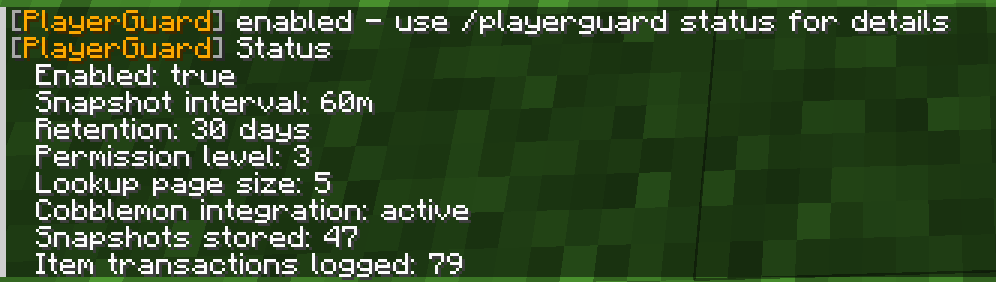 Player Guard Status The /playerguard status command
Versions
Files
Relations
Project Relations
More like this
Similar Mods
Suggestions use data such as tags, dependencies, dependents, descriptions, titles, and more to rank how much they overlap with this mod.
On ModDex
Community snapshot
By the numbers
Statistics

Want to reach Minecraft players?
We're looking for a server hosting partner to feature here and other parts of the site. Interested? Send us a message!
Get in touchGet it on
Available Platforms
On ModDex
Community snapshot
By the numbers
Statistics
Resources