
Community listing page, reviews may not be monitored by the author.
PlayerTrackerPlus

No reviews yet
A client-side mod that enhances Minecraft's locator bar to display players' skin faces instead of generic dots.

Community voices
Reviews
No reviews yet. Be the first to review this project!
Get it on
Available Platforms
About
Project Details
For authors
Embed Badge
If you're the author of this project, you can embed a live badge anywhere that supports HTML or Markdown. It updates automatically whenever ratings change.
Use HTML for any page that supports it, or Markdown for README files and Markdown-based descriptions.
Identifiers
Platform IDs
Resources
External Links
About
Description
PlayerTrackerPlus
Replace the boring locator-bar dots with each player's skin face.
Built for Minecraft Fabric. Pixel-perfect overlay, friends list, in-game UI.
✨ What it does
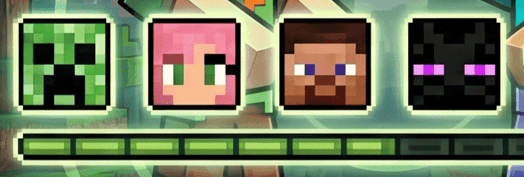
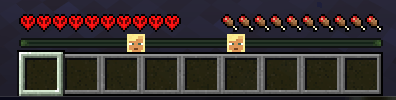
Minecraft's locator bar shows colored dots for nearby players, but you can't tell who's who at a glance. PlayerTrackerPlus replaces every dot with the actual skin face of that player, drawn pixel-perfect on top of the vanilla indicator.
- 🎭 Skin-face overlay on every locator-bar dot, aligned exactly with vanilla's position
- 👥 Friends list with a "friends only" mode — hide everyone else's face
- 🪟 In-game UI — button in inventory and pause menu opens a searchable player list
- ⌨️ Hotkey (default <kbd>F8</kbd>) instantly toggles between "all players" and "friends only"
- ↕️ Adjustable HUD spacing — lifts the health row a couple pixels so the faces have room to breathe
- 🌐 100% client-side — no server install required, works on any server
📸 Vanilla vs PlayerTrackerPlus
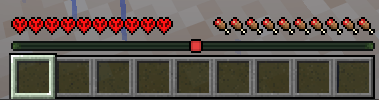
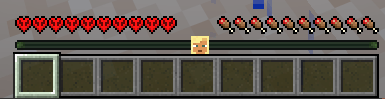
Left: vanilla colored dots. Right: same locator bar with PlayerTrackerPlus enabled.
🎮 How to use
Quick toggle (F8)
Press <kbd>F8</kbd> at any time to flip between show every player's face and show only my friends. A chat message confirms the change. The key is rebindable from Options → Controls → Misc.
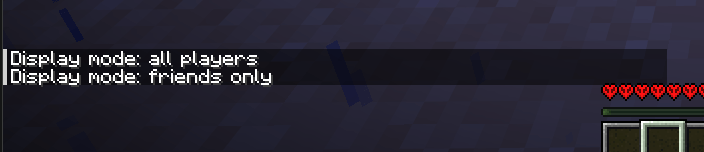
In-game management UI
Open your inventory or the game menu (Esc). A new button labeled PlayerTrackerPlus appears in the bottom-right corner.
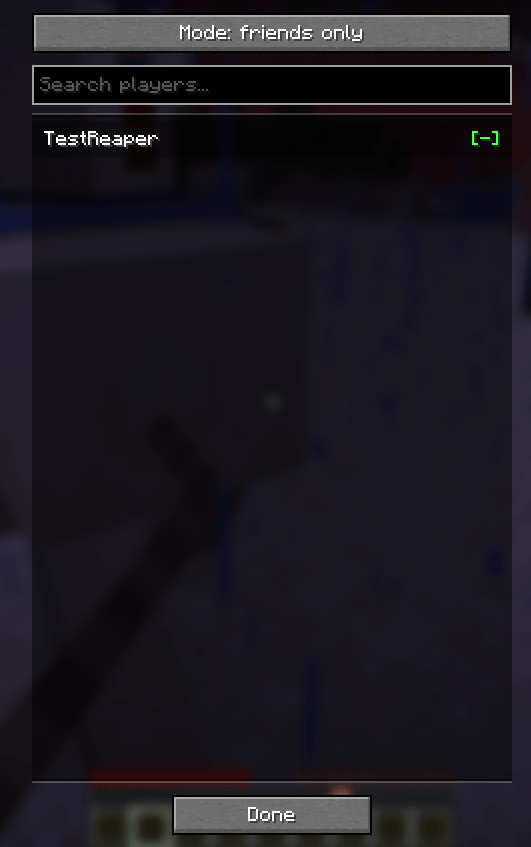
Clicking the button opens a modal with:
- A mode toggle at the top (all players / friends only)
- A search field to filter the player list
- A scrollable list of every online player — click a row to add/remove from friends.
[+]= not a friend yet,[-]= already in your list
Commands
For keyboard lovers, the /playertrackerplus command does the same things:
/playertrackerplus add <name>— add a player to your friends list/playertrackerplus remove <name>— remove a player/playertrackerplus list— show your current friends/playertrackerplus mode all— show face for every player/playertrackerplus mode friends— show face only for friends
⚙️ Configuration
All settings live in .minecraft/config/playertrackerplus.json. The file is created on first launch.
{
  "mode": "ALL_PLAYERS",          // or "FRIENDS_ONLY"
  "healthRowYOffset": 2,          // pixels to lift hearts/food/armor (0-40)
  "friends": [
    "vicxelcode",
    "reaperfxx"
  ]
}
Changes apply when you re-enter the world (no full Minecraft restart needed). Editing the JSON by hand is safe; the UI just writes the same file.
📦 Supported versions
| Minecraft | Loader | Fabric API | Java |
|---|---|---|---|
| 1.21.6 | Fabric ≥ 0.16.10 | ≥ 0.127.0+1.21.6 | 21+ |
| 26.1.2 | Fabric ≥ 0.19.2 | ≥ 0.149.1+26.1.2 | 25+ |
Download the JAR matching your Minecraft version and drop it in .minecraft/mods/. Requires Fabric Loader and Fabric API.
❓ FAQ
Does it work on servers I don't own?
Yes. The mod is 100% client-side, no server install needed. Faces show for any player visible on the locator bar.
Does it work for players whose skin hasn't loaded?
If a player's skin isn't loaded yet (rare — usually means they're not on the tab list), the vanilla colored dot stays visible as a fallback.
Will it conflict with other HUD mods?
The mod only touches the locator-bar render and the health-row position. It should coexist with most HUD mods, but report any conflicts as an issue.
Is the friends list shared across servers?
Yes — it's stored in your Minecraft client config, so the same list applies on every server you join.
🌟 In action
🛠️ Credits
Built by vicxelcode for the Fabric community.
Issues, suggestions and pull requests welcome on the source repository.
If you enjoy the mod, leave a ⭐ and share it with your friends!
Screenshots
Gallery
Versions
Files
Relations
Project Relations
More like this
Similar Mods
Suggestions use data such as tags, dependencies, dependents, descriptions, titles, and more to rank how much they overlap with this mod.
On ModDex
Community snapshot
By the numbers
Statistics
 (opens in a new tab)
Get it on
Available Platforms
On ModDex
Community snapshot
By the numbers
Statistics
Resources