
Community listing page, reviews may not be monitored by the author.
Playsound_Pro - 音频播放专业版


No reviews yet
This mod is an enhanced version of the vanilla /playsound command, adding features such as distance attenuation and looping playback.

Community voices
Reviews
No reviews yet. Be the first to review this project!
Get it on
Available Platforms
Compatibility
Supported Environments
Install on the client or the server; either alone gives full functionality.
About
Project Details
For authors
Embed Badge
If you're the author of this project, you can embed a live badge anywhere that supports HTML or Markdown. It updates automatically whenever ratings change.
Use HTML for any page that supports it, or Markdown for README files and Markdown-based descriptions.
Identifiers
Platform IDs
Resources
External Links
About
Description
Core Features: 中国用户可以前往:Summer_XTJL - 个人作者 - MC百科|最大的Minecraft中文MOD百科
Can be used together with this mod. F5 Camera control - F5视角控制器 - Minecraft Mods - CurseForge
🎵 Read audio files directly from resource pack
🗺️ Support area audio playback (dynamically adjust volume based on player position)
👥 Multiplayer compatibility (audio calculated independently for each player)
🔧 Rich command system
🌐 Full multi-language support (English & Chinese)
📁 Audio file location
Place your WAV format audio files into the following directory of the resource pack: assets/summer_xtjl_audio/audio/
File Requirements:
Only supports .wav format files
File naming is recommended to use English or numbers
Supports all standard WAV audio parameters
Normal Audio Playback Command
Normal audio playback: /playsound_pro play <category> <loop> <filename>
Parameter Description:
Category: Sound category (controls which in-game volume setting affects the volume)
unlimited - Not affected by in-game volume settings (always maximum volume)
master - Affected by master volume
music - Affected by music volume
record - Affected by jukebox/record volume
weather - Affected by weather volume
block - Affected by block volume
hostile - Affected by hostile mob volume
neutral - Affected by neutral mob volume
player - Affected by player volume
ambient - Affected by ambient volume
voice - Affected by voice volume
Loop: true (loop playback) or false (play once)
Filename: Audio filename (the .wav extension can be omitted)
Example: /playsound_pro play master false test
Area Audio Playback Command
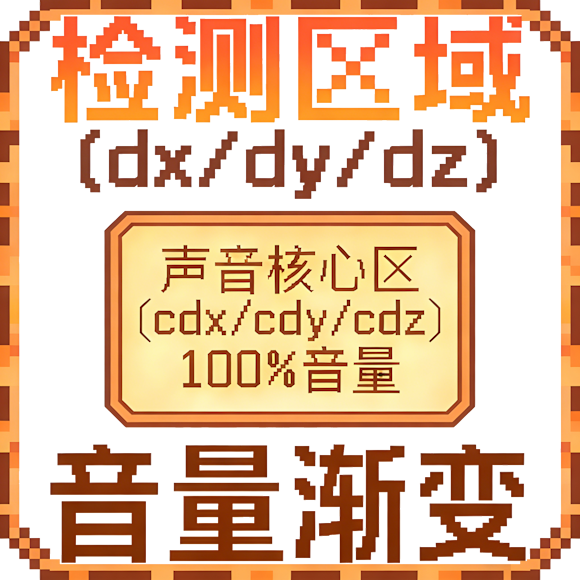
Area audio playback: /playsound_pro play <category> <loop> <filename> x=<x> y=<y> z=<z> dx=<dx> dy=<dy> dz=<dz> center cx=<cx> cy=<cy> cz=<cz> cdx=<cdx> cdy=<cdy> cdz=<cdz> mv=<Minimum volume>
[The farther away from the sound core area, the smaller the volume. Outside the range defined by x y z dx dy dz, no sound can be heard.]
Category: Sound category (controls which in-game volume setting affects the volume)
unlimited - Not affected by in-game volume settings (always maximum volume)
master - Affected by master volume
music - Affected by music volume
record - Affected by jukebox/record volume
weather - Affected by weather volume
block - Affected by block volume
hostile - Affected by hostile mob volume
neutral - Affected by neutral mob volume
player - Affected by player volume
ambient - Affected by ambient volume
voice - Affected by voice volume
Loop: true (loop playback) or false (play once)
Filename: Audio filename (the .wav extension can be omitted)
x=, y=, z=: Starting coordinates of the area
dx=, dy=, dz=: Area dimensions (can be negative, but cannot be 0)
center cx=, cy=, cz=: Starting coordinates of the sound core area [volume is always 100% within the sound core area]
cdx=, cdy=, cdz=: Dimensions of the sound core area
mv=: Minimum volume percentage (0-100), default is 0
Area Audio Features:
Audio only plays when the player is within the detection area
Volume changes dynamically based on player position:
Inside the sound core area: 100% volume
Inside the detection area but outside the core area: Volume gradually decreases with distance Outside the detection area: No sound
The mv parameter sets the minimum volume, ensuring distant players can still hear faint sound [within the detection area range]
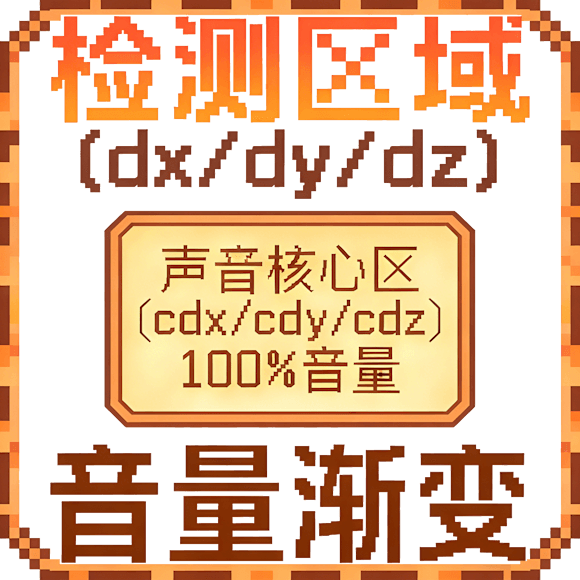
Area Audio Logic
Core Features: 中国用户可以前往:https://www.mcmod.cn/author/37861.html
Can be used together with this mod. https://modrinth.com/mod/summer_xtjl_f5_camera_control/versions
🎵 Read audio files directly from resource pack
🗺️ Support area audio playback (dynamically adjust volume based on player position)
👥 Multiplayer compatibility (audio calculated independently for each player)
🔧 Rich command system
🌐 Full multi-language support (English & Chinese)
📁 Audio file location
Place your WAV format audio files into the following directory of the resource pack: assets/summer_xtjl_audio/audio/
File Requirements:
Only supports .wav format files
File naming is recommended to use English or numbers
Supports all standard WAV audio parameters
Normal Audio Playback Command
Normal audio playback: /playsound_pro play
Parameter Description:
Category: Sound category (controls which in-game volume setting affects the volume)
unlimited - Not affected by in-game volume settings (always maximum volume)
master - Affected by master volume
music - Affected by music volume
record - Affected by jukebox/record volume
weather - Affected by weather volume
block - Affected by block volume
hostile - Affected by hostile mob volume
neutral - Affected by neutral mob volume
player - Affected by player volume
ambient - Affected by ambient volume
voice - Affected by voice volume
Loop: true (loop playback) or false (play once)
Filename: Audio filename (the .wav extension can be omitted)
Example: /playsound_pro play master false test
Area Audio Playback Command
Area audio playback: /playsound_pro play x= y= z= dx= dy= dz= center cx= cy= cz= cdx= cdy= cdz= mv=
[The farther away from the sound core area, the smaller the volume. Outside the range defined by x y z dx dy dz, no sound can be heard.]
Category: Sound category (controls which in-game volume setting affects the volume)
unlimited - Not affected by in-game volume settings (always maximum volume)
master - Affected by master volume
music - Affected by music volume
record - Affected by jukebox/record volume
weather - Affected by weather volume
block - Affected by block volume
hostile - Affected by hostile mob volume
neutral - Affected by neutral mob volume
player - Affected by player volume
ambient - Affected by ambient volume
voice - Affected by voice volume
Loop: true (loop playback) or false (play once)
Filename: Audio filename (the .wav extension can be omitted)
x=, y=, z=: Starting coordinates of the area
dx=, dy=, dz=: Area dimensions (can be negative, but cannot be 0)
center cx=, cy=, cz=: Starting coordinates of the sound core area [volume is always 100% within the sound core area]
cdx=, cdy=, cdz=: Dimensions of the sound core area
mv=: Minimum volume percentage (0-100), default is 0
Area Audio Features:
Audio only plays when the player is within the detection area
Volume changes dynamically based on player position:
Inside the sound core area: 100% volume
Inside the detection area but outside the core area: Volume gradually decreases with distance Outside the detection area: No sound
The mv parameter sets the minimum volume, ensuring distant players can still hear faint sound [within the detection area range]
Area Audio Logic
Screenshots
Gallery

Versions
Files
Relations
Project Relations
More like this
Similar Mods
Suggestions use data such as tags, dependencies, dependents, descriptions, titles, and more to rank how much they overlap with this mod.
On ModDex
Community snapshot
By the numbers
Statistics

Get it on
Available Platforms
On ModDex
Community snapshot
By the numbers
Statistics
Resources