Community listing page, reviews here may not be monitored by the author.
Playtime advertisement

No reviews yet
This is a mod that displays the player's playing time in days, hours, minutes, and seconds.

Community voices
Reviews
No reviews yet. Be the first to review this project!
Get it on
Available Platforms
About
Project Details
For authors
Embed Badge
If you're the author of this project, you can embed a live badge anywhere that supports HTML or Markdown. It updates automatically whenever ratings change.
Use HTML for any page that supports it, or Markdown for README files and Markdown-based descriptions.
Identifiers
Platform IDs
Resources
External Links
About
Description
If you are playing on a server, it is sufficient for the mod to be on the server; you do not need it on the client, so your fellow players do not need to download it either.
1. Administrator commands (only with cheats)
You can use these commands for setup and manual time management.
Command Function
/function pt:setup Initialization: Creates all scoreboards, sets the status to Start, and activates the display. (Usually executed automatically at startup by load.json).
/function pt:start Global start: Sets the counter for the entire system to “Active.”
/function pt:stop Global stop: Pauses the time count for everyone (freezes the scores).
/function pt:add Admin menu: Opens the clickable chat menu to add hours or minutes.
/scoreboard players set [name] pt_add_min [number] Manual entry: Adds exactly the specified number of minutes for a player.
/scoreboard players set [name] playtime 0 Reset: Resets the playtime of a specific player completely to zero.
/datapack list Status check: Shows whether the mod/datapack has been loaded correctly by the game.
2. Player commands (without cheats/triggers)
Any player on the server can use these commands, provided you have built the trigger logic into tick.mcfunction.
Command Function
/trigger pt_trigger_stop Pause: The player pauses their own time count (or globally, depending on your setup).
/trigger pt_trigger_start Resume: The player restarts their time count.
Wenn Sie auf einem Server spielen, reicht es aus, wenn die Mod auf dem Server installiert ist. Sie benötigen ihn nicht auf dem Client, sodass Ihre Mitspieler ihn auch nicht herunterladen müssen.
1. Administrator-Befehle (Nur mit Cheats)
Diese Befehle nutzt du zur Einrichtung und für die manuelle Zeitverwaltung.
Befehl Funktion
/function pt:setup Initialisierung: Erstellt alle Scoreboards, setzt den Status auf Start und aktiviert die Anzeige. (Wird durch load.json meist automatisch beim Start ausgeführt).
/function pt:start Globaler Start: Setzt den Zähler für das gesamte System auf "Aktiv".
/function pt:stop Globaler Stopp: Pausiert die Zeitzählung für alle (friert die Scores ein).
/function pt:add Admin-Menü: Öffnet das klickbare Chat-Menü, um Stunden oder Minuten nachzutragen.
/scoreboard players set [Name] pt_add_min [Zahl] Manuelle Eingabe: Trägt exakt die angegebene Anzahl an Minuten für einen Spieler nach.
/scoreboard players set [Name] playtime 0 Reset: Setzt die Spielzeit eines bestimmten Spielers komplett auf Null zurück.
/datapack list Status-Check: Zeigt an, ob die Mod/das Datapack vom Spiel korrekt geladen wurde.
2. Spieler-Befehle (Ohne Cheats / Trigger)
Diese Befehle kann jeder Spieler auf dem Server nutzen, sofern du die Trigger-Logik in der tick.mcfunction eingebaut hast.
Befehl Funktion
/trigger pt_trigger_stop Pausieren: Der Spieler pausiert seine eigene Zeitzählung (oder global, je nach deinem Setup).
/trigger pt_trigger_start Fortsetzen: Der Spieler startet seine Zeitzählung wieder.
Screenshots
Gallery
-
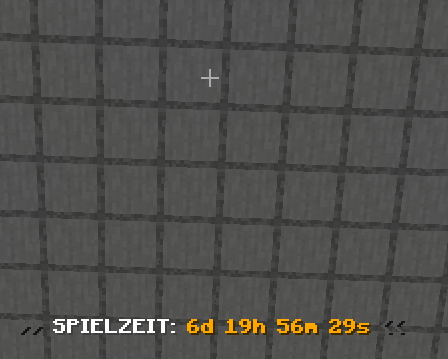 Bild1 Day
Versions
Files
Relations
Project Relations
More like this
Similar Mods
Suggestions use data such as tags, dependencies, dependents, descriptions, titles, and more to rank how much they overlap with this mod.
On ModDex
Community snapshot
By the numbers
Statistics
 (opens in a new tab)
Get it on
Available Platforms
On ModDex
Community snapshot
By the numbers
Statistics
Resources