
Community listing page, reviews here may not be monitored by the author.
plsnerfModCheck

No reviews yet
A Fabric mod to validate and synchronize client-side mods with server-side requirements.
Community voices
Reviews
No reviews yet. Be the first to review this project!
Get it on
Available Platforms
About
Project Details
For authors
Embed Badge
If you're the author of this project, you can embed a live badge anywhere that supports HTML or Markdown. It updates automatically whenever ratings change.
Use HTML for any page that supports it, or Markdown for README files and Markdown-based descriptions.
Identifiers
Platform IDs
Resources
External Links
About
Description
plsnerfModCheck - Fabric Mod
plsnerfModCheck is a Fabric mod designed to enhance server-client compatibility in Minecraft 1.21.1 by validating client-side mods and ensuring they match server-side requirements. It provides an efficient way for server administrators to manage mod compliance, ensuring all players on the server have the correct setup.
Features
- Client-Server Mod Validation: Automatically verifies the client mod list to ensure compatibility with the server's configuration.
- Custom Download Link for Modpacks: If a client’s mod list does not match the server, they will receive a link to download the correct modpack.
- Multi-Client Support: Allows multiple client modpacks to connect to the same server by validating them against pre-approved configurations.
- Flexible Configuration: The mod generates a
config.jsonfile that can be customized to meet your server's needs, including enabling/disabling features, setting timeouts, and managing multi-client functionality. - Easy Integration with Modpacks: Supports both single modpack and multi-client configurations, making it highly versatile for modded servers.
- Manifest Support: Server administrators can use a
manifest.jsonto define required mods for their server, simplifying management. (not implemented now)
Installation and Usage
Server Installation
Download and Setup:
- Download the latest
plsnerfModCheckJAR file from the CurseForge release section. - Place the downloaded file into your server's
modsfolder.
Start the Server:
- Start your Fabric server. This will generate the necessary configuration files in the
config/plsnerfmodcheckfolder.
Configuration:
- Open the
config.jsonfile located inconfig/plsnerfmodcheck. - Customize the settings to match your server's requirements. For example:
- Enable multi-client support by setting
"multiClient": true. - Add a custom download link for modpacks using the
downloadLinkoption.
- Enable multi-client support by setting
Client Modlist Validation:
- If you are using multiple modpacks, place their corresponding
modlist.jsonfiles into theconfig/plsnerfmodcheckfolder on the server. - Restart the server to validate and register the modlists.
Testing:
- Have clients connect to the server. If their mod list matches the server’s configuration, they can join. Otherwise, they will receive an error message with the provided download link.
Client Installation
Download and Setup:
- Download the same
plsnerfModCheckJAR file as the server. - Place the file into your client's
modsfolder.
Generate Modlist:
- Start Minecraft. The mod will automatically generate a
modlist.jsonin theconfig/plsnerfmodcheckfolder.
Share with Server Admin:
- Send the generated
modlist.jsonto the server administrator so they can validate and add it to the server.
Connect to Server:
- Once the server is configured with your modlist, you can connect without issues. If your mods are incompatible, you will receive a message with a download link to the correct modpack.
Configuration Details
The config.json file is automatically created when the server starts for the first time. Below is an example of the configuration options:
{
  "enableMod": true,
  "useManifestFile": false,
  "multiClient": true,
  "TIMEOUT_SECONDS": 5,
  "downloadLink": "https://example.com/download-modpack"
}- enableMod: Enables or disables the mod validation feature.
- useManifestFile: Determines whether to use a
manifest.jsonfor validation. - multiClient: Enables support for multiple modpack configurations.
- TIMEOUT_SECONDS: Defines the timeout duration for validation.
- downloadLink: URL to redirect players to the correct modpack download if their setup does not match the server.
Use Case Scenarios
Single Modpack Server:
If all players on your server use the same modpack:
- Generate a single
modlist.jsonfrom any client. - Place it in the server’s
config/plsnerfmodcheckfolder. - Enable validation to ensure all clients have the same mod setup.
Multi-Client Support:
For servers that support multiple modpacks:
- Collect
modlist.jsonfiles from all supported client modpacks. - Add them to the
config/plsnerfmodcheckfolder on the server. - Enable
"multiClient": truein the configuration file. - Players using any of the approved modpacks will be able to connect.
Error Handling
If a client’s modlist does not match the server’s configuration, they will receive an error message:
Your mod list does not match the server's requirements.
Download the correct modpack here: https://example.com/download-modpack
plsnerfModCheck is designed to simplify modpack management and enhance compatibility between clients and servers. With its robust configuration options and multi-client support, it’s an essential tool for any modded Minecraft server.
Screenshots
Gallery
-
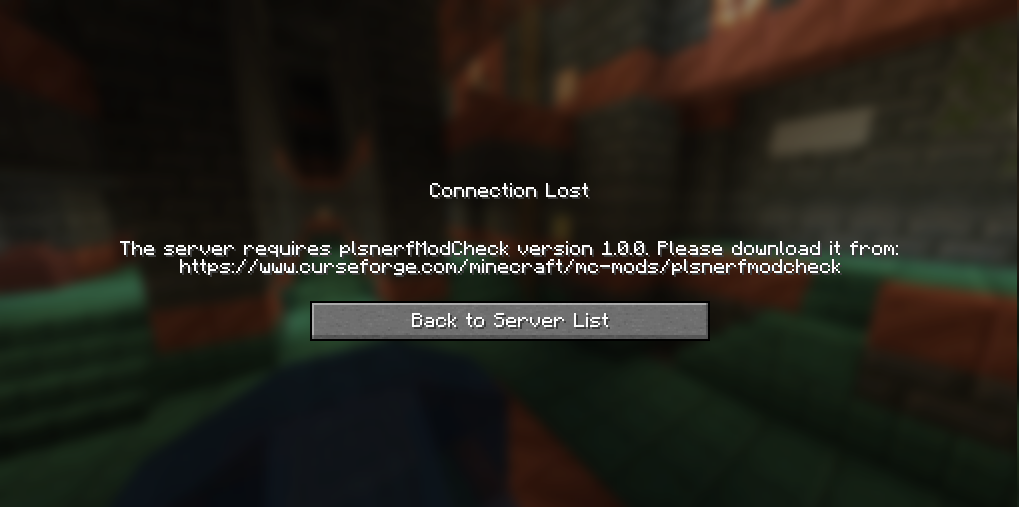 no mod plsnerfModCheck does not run on client
 -
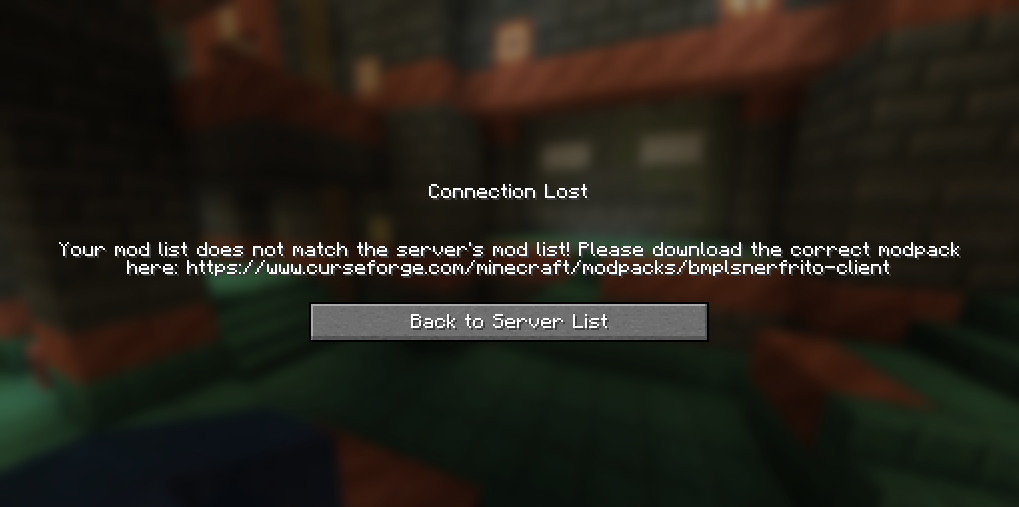 No Matching Mods No matching mods on client.
Versions
Files
Relations
Project Relations
More like this
Similar Mods
Suggestions use data such as tags, dependencies, dependents, descriptions, titles, and more to rank how much they overlap with this mod.
On ModDex
Community snapshot
By the numbers
Statistics
Want to reach Minecraft players?
We're looking for a server hosting partner to feature here and other parts of the site. Interested? Send us a message!
Get in touchGet it on
Available Platforms
On ModDex
Community snapshot
By the numbers
Statistics
Resources