
Community listing page, reviews here may not be monitored by the author.
PMW Optimizations


No reviews yet
PMW Optimizations is a server-side mod that aims to optimize a bunch of ProtoManly's Weather Mod
Community voices
Reviews
No reviews yet. Be the first to review this project!
Get it on
Available Platforms
Compatibility
Supported Environments
Runs entirely on the server. Also works in singleplayer.
About
Project Details
For authors
Embed Badge
If you're the author of this project, you can embed a live badge anywhere that supports HTML or Markdown. It updates automatically whenever ratings change.
Use HTML for any page that supports it, or Markdown for README files and Markdown-based descriptions.
Identifiers
Platform IDs
Resources
External Links
About
Description
PMWeather Optimizations 1.2.1
PMWeather Optimizations is a server-only mod designed to improve TPS and make higher player counts more playable.
Built for ProtoManly’s Weather 0.16.4 on Minecraft 1.21.1.
Chunk and Surface Processing
Reduces PMWeather’s expensive chunk scanning while preserving wildfire, scorching, extinguishing, thermal shock, and dead-log behavior.
Modified Precipitation Budget
Limits optional PMWeather precipitation work per level to prevent large weather events from overwhelming the server thread.
Biome and Chunk-Loading Protection
Uses already-loaded chunk and biome data wherever possible, preventing precipitation checks from generating or synchronously loading missing chunks.
Precipitation Optimizations
Reuses repeated precipitation calculations and skips atmospheric values that are not needed by the precipitation system.
Rain Query Caching
Caches identical isRainingAt checks during the same server tick, reducing repeated PMWeather rain calculations.
Wind Optimizations
Reduces unnecessary terrain collision rays, duplicate heightmap queries, cyclone calculations outside their effective range, and repeated fire-intensity lookups.
Entity Wind Safety
Entity movement and wind effects remain entirely on the Minecraft server thread. No entities are asynchronously ticked or modified.
Moisture Networking
Sends moisture and fire updates only to players already tracking the affected chunk.
Smaller Optimizations
Reuses storm identifiers and removes several repeated object allocations and lookups.
Experimental Thermodynamic Optimization
Disabled by default.
This feature is purely experimental and has shown a regression in TPS during testing. It should not be enabled by default or treated as a recommended performance improvement.
It remains available only for additional testing and development.
Experimental Multithreading
Disabled by default.
Experimental atmospheric calculation workers are available only when both multithreading and thermodynamic optimization are manually enabled.
The server thread never waits for worker results, and all live Minecraft world access remains on the server thread.
Because the thermodynamic system currently shows a TPS regression, experimental multithreading is also not recommended for normal servers.
Runtime Controls
All commands require Minecraft permission level 2 aka OP only:
/pmw-optimizations on
/pmw-optimizations off
/pmw-optimizations status

/pmw-optimizations thermodynamic on
/pmw-optimizations thermodynamic off
/pmw-optimizations thermodynamic status
PMWeather Optimizations 1.2.1
PMWeather Optimizations is a server-only mod designed to improve TPS and make higher player counts more playable.
Built for ProtoManly’s Weather 0.16.4 on Minecraft 1.21.1.
Chunk and Surface Processing
Reduces PMWeather’s expensive chunk scanning while preserving wildfire, scorching, extinguishing, thermal shock, and dead-log behavior.
Modified Precipitation Budget
Limits optional PMWeather precipitation work per level to prevent large weather events from overwhelming the server thread.
Biome and Chunk-Loading Protection
Uses already-loaded chunk and biome data wherever possible, preventing precipitation checks from generating or synchronously loading missing chunks.
Precipitation Optimizations
Reuses repeated precipitation calculations and skips atmospheric values that are not needed by the precipitation system.
Rain Query Caching
Caches identical isRainingAt checks during the same server tick, reducing repeated PMWeather rain calculations.
Wind Optimizations
Reduces unnecessary terrain collision rays, duplicate heightmap queries, cyclone calculations outside their effective range, and repeated fire-intensity lookups.
Entity Wind Safety
Entity movement and wind effects remain entirely on the Minecraft server thread. No entities are asynchronously ticked or modified.
Moisture Networking
Sends moisture and fire updates only to players already tracking the affected chunk.
Smaller Optimizations
Reuses storm identifiers and removes several repeated object allocations and lookups.
Experimental Thermodynamic Optimization
Disabled by default.
This feature is purely experimental and has shown a regression in TPS during testing. It should not be enabled by default or treated as a recommended performance improvement.
It remains available only for additional testing and development.
Experimental Multithreading
Disabled by default.
Experimental atmospheric calculation workers are available only when both multithreading and thermodynamic optimization are manually enabled.
The server thread never waits for worker results, and all live Minecraft world access remains on the server thread.
Because the thermodynamic system currently shows a TPS regression, experimental multithreading is also not recommended for normal servers.
Runtime Controls
All commands require Minecraft permission level 2 aka OP only:
/pmw-optimizations on
/pmw-optimizations off
/pmw-optimizations status

/pmw-optimizations thermodynamic on
/pmw-optimizations thermodynamic off
/pmw-optimizations thermodynamic status
Screenshots
Gallery
-
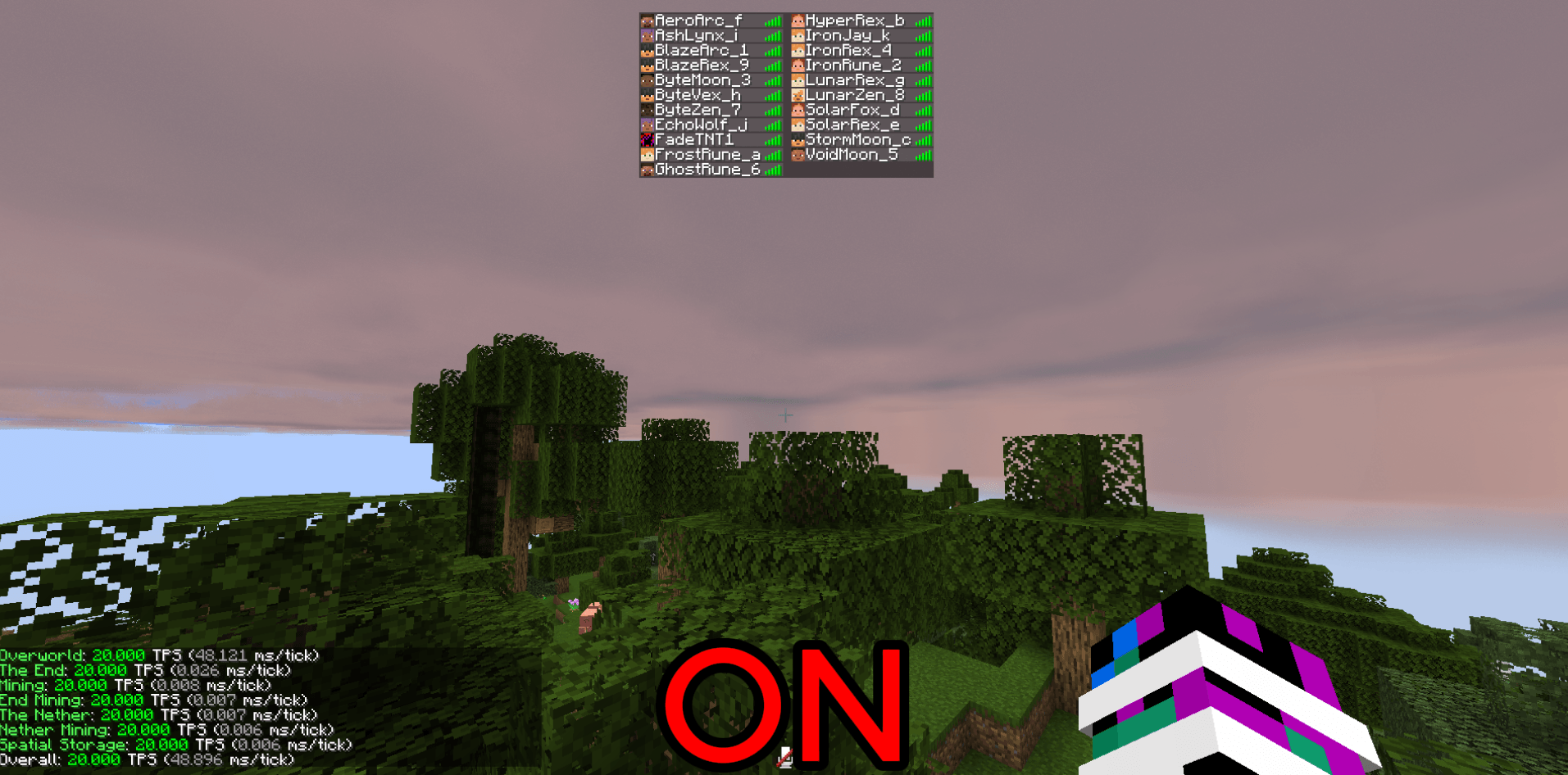 Screenshot_26.png Screenshot_26.png
 -
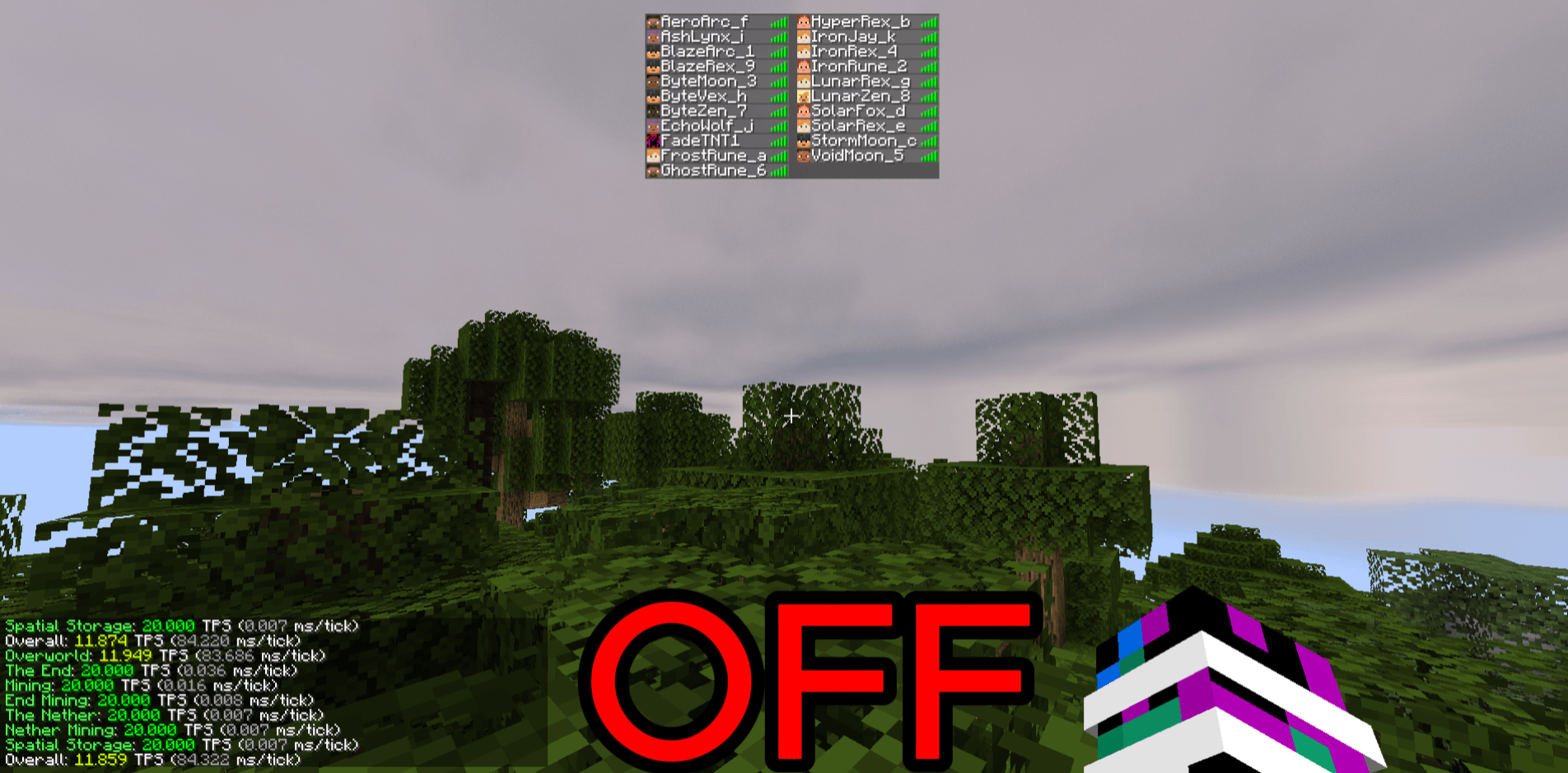 Screenshot_27.png Screenshot_27.png
-
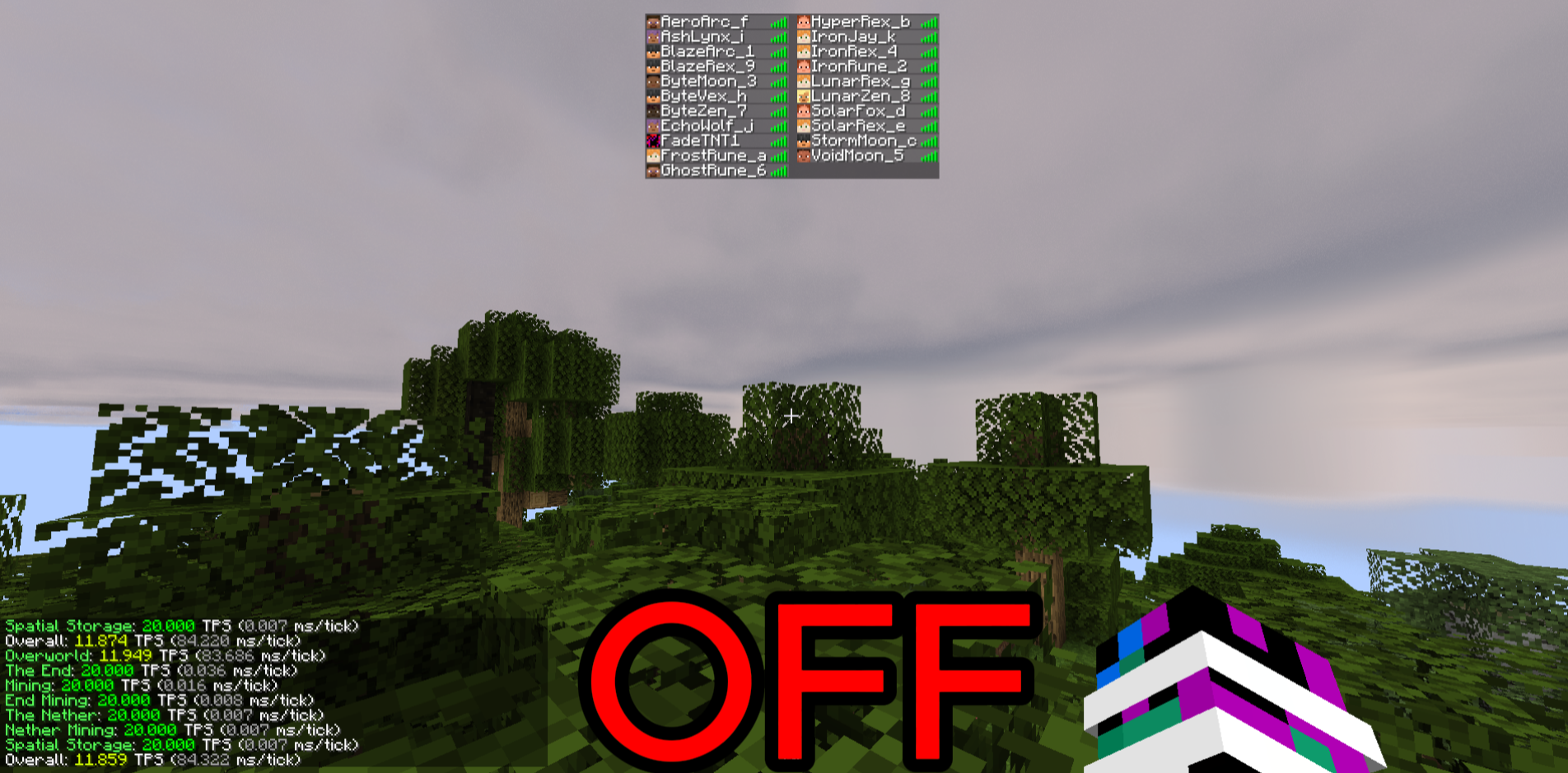 Without optimizations
 -
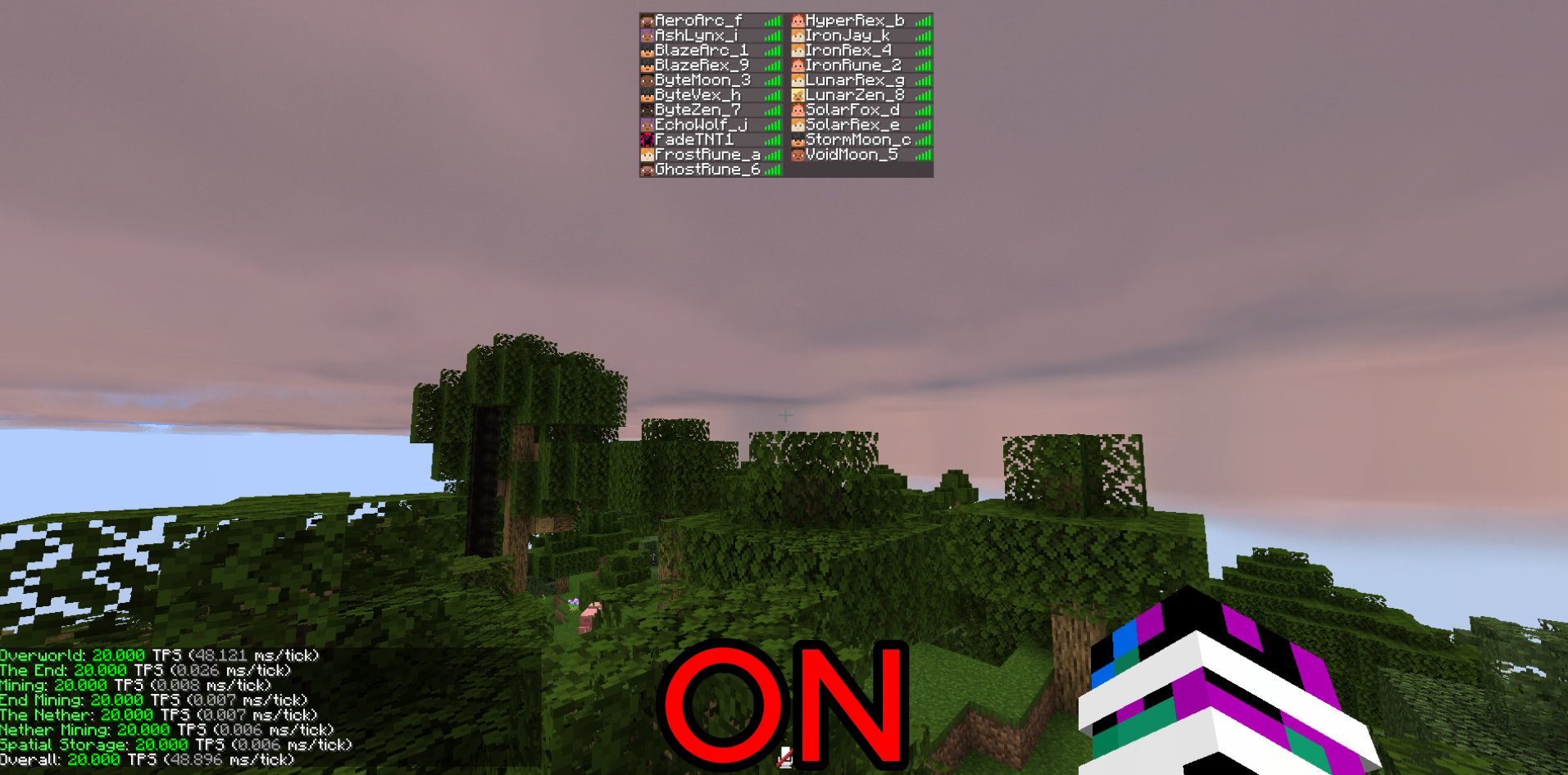 Optimizations on
Versions
Files
Relations
Project Relations
More like this
Similar Mods
Suggestions use data such as tags, dependencies, dependents, descriptions, titles, and more to rank how much they overlap with this mod.
On ModDex
Community snapshot
By the numbers
Statistics
Want to reach Minecraft players?
We're looking for a server hosting partner to feature here and other parts of the site. Interested? Send us a message!
Get in touchGet it on
Available Platforms
On ModDex
Community snapshot
By the numbers
Statistics
Resources