
Community listing page, reviews here may not be monitored by the author.
PMWU-EAS

No reviews yet
PMWU-EAS (Emergency Alert System) allows users to receive SWS/SVR [PDS & DST]/TOR [PDS & TORE] warnings in chat, along with overlaying warning polygons on radar.
Community voices
Reviews
No reviews yet. Be the first to review this project!
Get it on
Available Platforms
Compatibility
Supported Environments
Must be installed on both the client and the server.
About
Project Details
For authors
Embed Badge
If you're the author of this project, you can embed a live badge anywhere that supports HTML or Markdown. It updates automatically whenever ratings change.
Use HTML for any page that supports it, or Markdown for README files and Markdown-based descriptions.
Identifiers
Platform IDs
Resources
External Links
About
Description
Introduction
PMWU-EAS brings a fully functional Emergency Alert System to the game, adding Special Weather Statements, Severe Thunderstorm Warnings (including PDS and Destructive), Tornado Warnings (including PDS and Tornado Emergency), Mesoscale Discussions, and Weather Watches into the game via chat and polygon overlays on the PMWeather radar.
AI Disclosure
The use of AI generated code was used in this project. While this project was not entirely made with AI generative code, portions of the code were generated using AI along with AI checks for bugs in human written portions.
Weather Warnings
Severe Thunderstorm and Tornado warnings can be recived through chat and their polygons are overlaid on the PMWeather radar. To receive a weather warning in chat, you must have the EAS Receiver in your inventory and turned on (right-click with it in hand to toggle).
Mesoscale Discussions & Weather Watches
Mesoscale Discussions and Weather Watches are received in chat. To receive alerts, you must have the EAS Receiver in your inventory and turned on (right-click with it in hand to toggle). You must have PMWU-AO installed to receive Mesoscale Discussions and Watches, as it uses PMWU-AO's sounding system to schedule their issuances.
PC & Self-Issued Warnings
Using the PMWU-EAS PC item, users can issue their own Severe Thunderstorm & Tornado Warnings. You must have a PMWeather radar nearby so it can be synced to the PC.
Cities/Towns
Users can create their own cities/towns that gets displayed in weather warnings instead of coordinates.
Commands

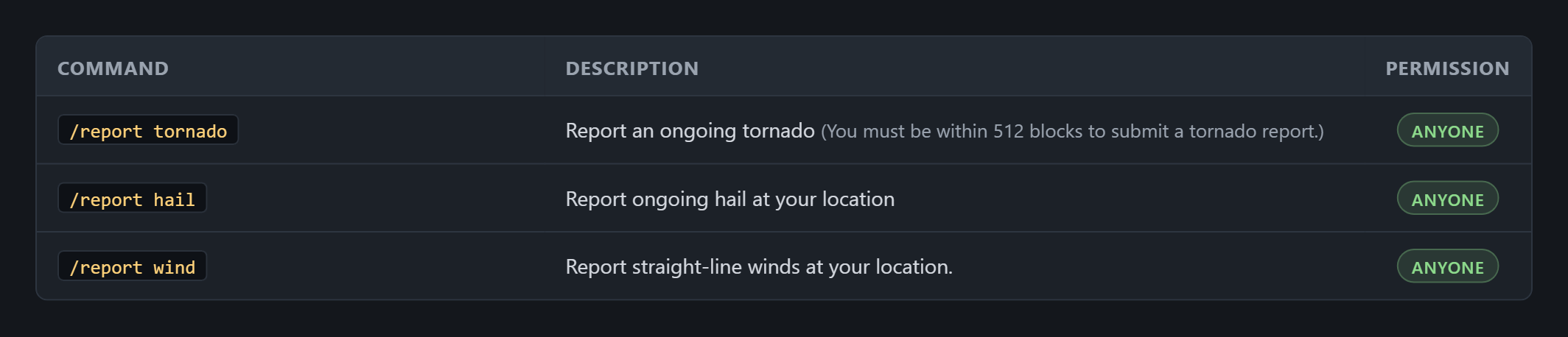
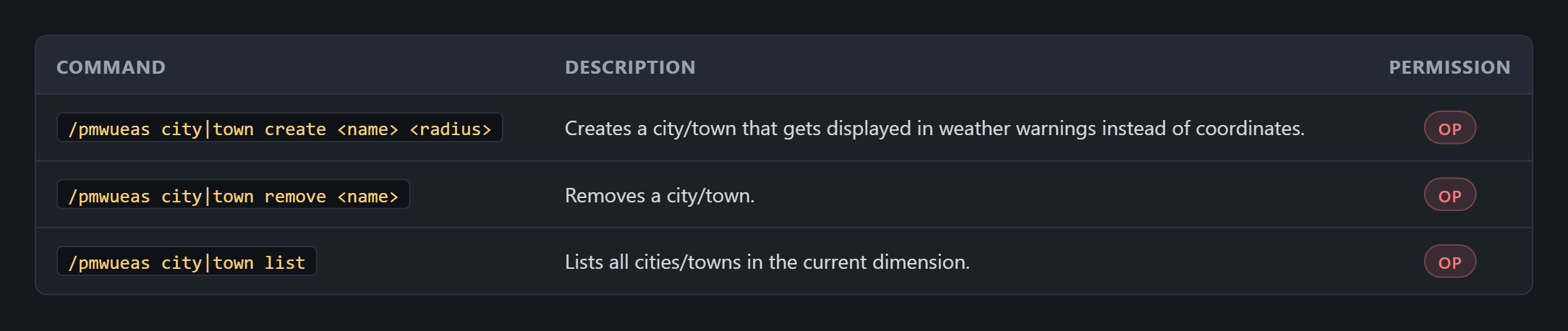
Permissions

Crafting Recipes
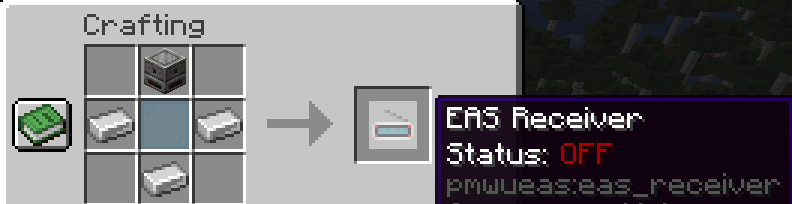
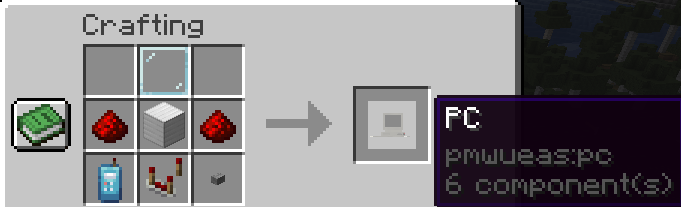
Requirements
- ProtoManly's Weather
- PMWU-AO - Optional for Mesoscale Discussions & Weather Watches
- PMWU-RE - Optional for Color Table usage within the PC.
Support
Support for all PMWU mods are available within the PMWU Support Discord server.
Extra
This mod is apart of the PMWU modline, which was created to add multiple addon mods to ProtoManly's Weather. All PMWU mods are compatible with each other, but they have not been tested for compatability with other PMW sidemods.
This mod has been vigorously tested, but bugs may still appear. If you encounter a bug, please submit it to the PMWU Support Discord server in a ticket.
WX-Minecraft
WX-Minecraft is the official Minecraft server of the PMWU modline! Join our Discord!

Screenshots
Gallery
Versions
Files
Relations
Project Relations
More like this
Similar Mods
Suggestions use data such as tags, dependencies, dependents, descriptions, titles, and more to rank how much they overlap with this mod.
On ModDex
Community snapshot
By the numbers
Statistics

Want to reach Minecraft players?
We're looking for a server hosting partner to feature here and other parts of the site. Interested? Send us a message!
Get in touchGet it on
Available Platforms
On ModDex
Community snapshot
By the numbers
Statistics
Resources