
Community listing page, reviews here may not be monitored by the author.
PowerHUD


No reviews yet
A modern, highly customizable HUD overlay mod for Minecraft

Community voices
Reviews
No reviews yet. Be the first to review this project!
Get it on
Available Platforms
Compatibility
Supported Environments
Runs entirely on the client. Works on vanilla servers.
About
Project Details
For authors
Embed Badge
If you're the author of this project, you can embed a live badge anywhere that supports HTML or Markdown. It updates automatically whenever ratings change.
Use HTML for any page that supports it, or Markdown for README files and Markdown-based descriptions.
Identifiers
Platform IDs
About
Description
A modern, highly customizable HUD overlay mod for Minecraft Fabric, supporting Minecraft 26.3 ("Wilderness Bound") and 1.21.4.
✨ Features
📊 Performance & Diagnostics
- Real-time FPS Display with color-coded performance indicators
- Animated FPS Dot that pulses based on real-time performance
- Min/Max/Average FPS Tracking with one-key reset capability
- Custom F3 Debug Screen – Cleaner, tabbed debug interface
🗺️️ Navigation & World Info
- Coordinates Display (XYZ) with current block position
- Facing Direction with cardinal directions and degrees
- Biome Information – Real-time biome detection
- Time Display – In-game clock with day/night and sunset/sunrise indicator
- Gamemode Indicator – Shows current game mode
🎒 Inventory & Equipment
- Visual Inventory Display – Grid, percentage, or fractional count visualization
- Best Tool Suggestions – Displays the optimal tool for the block in crosshairs
- Target Block Information – Displays the exact block you're looking at
- Block Statistics – Tracks blocks mined and placed in the current session
🌊 Survival Stats
- Oxygen Level Indicator – Visual, color-coded oxygen bar for underwater exploration
- Vitality Display – Health and status information
🎮 Default Keybindings
| Key | Action | Notes |
|---|---|---|
U |
Open Config Screen | Default on Minecraft 26.3 (avoids conflict with vanilla Friends List) |
O |
Open Config Screen | Default on legacy Minecraft 1.21.4 |
H |
Toggle HUD Visibility | Instantly show or hide the overlay |
R |
Reset FPS Statistics | Resets min/max/average FPS trackers |
Z |
Cycle Debug Screen Modes | Cycles through custom tabbed debug screens |
TIP: All keybindings are fully remappable in Options ➔ Controls ➔ Key Binds under the dedicated PowerHUD category.
📦 Installation & Compatibility
Choose the release file matching your Minecraft version:
For Minecraft 26.3 (v1.14.0+)
- Minecraft:
26.3 - Fabric Loader:
>= 0.19.5 - Fabric API:
>= 0.161.0+26.3 - Java:
25 LTS
For Minecraft 1.21.4 (v1.13.0)
- Minecraft:
1.21.4 - Fabric Loader:
>= 0.16.9 - Fabric API:
0.110.0+1.21.4 - Java:
21
Steps
- Install Fabric Loader for your Minecraft version.
- Download Fabric API and place it in your
.minecraft/modsfolder. - Download the matching PowerHUD version (
powerhud-1.14.0.jarfor 26.3, orpowerhud-1.13.0.jarfor 1.21.4). - Place the
.jarfile in your.minecraft/modsfolder. - Launch Minecraft using the Fabric profile.
⚙️ Configuration
Press U (or O on 1.21.4) in-game to open the configuration screen.
Available Options
- Toggle Elements: Show or hide individual HUD components.
- Font Selection: Choose from 9 included custom monospace fonts (JetBrains Mono, Roboto Mono, Fira Code, Cascadia Code, Source Code Pro, Comic Mono, Monofur, Ubuntu Mono, Inter Mono).
- Color Customization: Select from 20+ colors for text, data, and titles.
- Bold Titles: Toggle bold formatting for element titles.
- HUD Workbench: Visual drag-and-drop editor featuring:
- Live interactive HUD preview.
- Zone-based snapping (Left, Center, Right).
- Spacer elements for flexible vertical gaps.
- Auto-stacking with precise hitbox alignment.
- Scaling: Adjust global HUD scale from 50% to 250%.
- FPS Tweaks: Configure display complexity (Minimal / Normal / Full), threshold cutoffs, and animated dot indicator.
- Inventory Tweaks: Choose display style (Grid / Percent / Fraction).
- Oxygen Settings: Adjust centered overlay height and toggle vanilla air bubbles.
- HUD Profiles: Save, load, rename, delete, export, and import multiple HUD layouts.
Export & Import Profiles
- Export: Click Export to save the active profile as a
.jsonfile to your home folder. - Import: Place a file named
import_profile.jsonin your home folder and click Import to load it into your profile list.
📋 Roadmap
Under consideration for future updates:
- Animated transitions and fade effects
- Light level indicator
- Armor & tool durability warnings
- Extended session statistics
🤝 Contributing
Contributions and feedback are always welcome!
- Report Bugs: Open an issue on GitHub with steps to reproduce and crash logs.
- Suggest Features: Share ideas in the GitHub issues section.
- Pull Requests: Fork, code, and submit a PR!
📄 License
This project is licensed under the MIT License.
📊 Version History
v1.14.1 – (October 2, 2026)
- NEW: Full compatibility with Minecraft 26.3 ("Wilderness Bound")
- NEW: Updated toolchain to Java 25 LTS and Gradle 9.8.0
- NEW: Modernized rendering engine to Minecraft 26.3's
GuiGraphicsExtractorand RenderPearl pipeline - NEW: Native oxygen bubble bar replacement via Fabric API
HudElementRegistry - CHANGED: Default configuration key changed from
OtoUto avoid conflict with vanilla 26.3 Friends List / Social menu - NEW: Dedicated PowerHUD category in Controls / Key Binds with full translation support
- FIXED: Workbench layout state persistence and live re-render after closing editor
- FIXED: About screen:** the donation QR code no longer renders as a white box.
v1.13.0 – (February 13, 2026)
- NEW: Accessibility color presets (color blindness, high contrast, dyslexia) are now stored per profile
- CHANGED: 'Default' color preset renamed to 'Off'; manual color selection is only available when 'Off' is selected
- IMPROVED: Accessibility presets enforce dark background and bold data
- README and
version.txtupdated to reflect these changes
v1.12.0 – (February 13, 2026)
- NEW: Complete profile management overhaul (save, rename, delete, export, and import profiles)
- Save button always enabled: blank = save to current, text = new/overwrite
- Profile name validation (letters, numbers,
-,_, max 32 chars) - Visual feedback and tooltips for all profile actions
- Keyboard shortcuts for save/cancel with auto-focus on profile input
v1.11.5 – (February 13, 2026)
- IMPROVED: Profile manager displays the currently loaded profile at the top
- IMPROVED: Profile list includes compact Load (
L) and Delete (x) buttons - NEW: Delete confirmation dialog prevents accidental profile deletion
- UI fixes for button sizing and layout
v1.11.4 – (February 12, 2026)
- NEW: HUD Profiles – Save/load/delete HUD layouts for quick switching
- IMPROVED: Oxygen overlay UI – Lighter opacity, fixed width, improved text contrast
- IMPROVED: HUD Workbench – Drag boxes align exactly with HUD bounds at any scale
- FIXED: Vanilla air bubble hiding across all bubble states
v1.11.1 – (February 12, 2026)
- NEW: WYSIWYG HUD Workbench – Visual drag-and-drop editor with live preview
- NEW: Zone-Based Snapping – Elements auto-snap to left, center, or right zones
- NEW: Spacer Elements – Add vertical spacing between elements
🙏 Acknowledgments
- Built with Fabric
- Font resources from open-source monospace font projects
- Inspired by the Minecraft modding community
PowerHUD
A modern, highly customizable HUD overlay mod for Minecraft Fabric, supporting Minecraft 26.3 ("Wilderness Bound") and 1.21.4.
✨ Features
📊 Performance & Diagnostics
- Real-time FPS Display with color-coded performance indicators
- Animated FPS Dot that pulses based on real-time performance
- Min/Max/Average FPS Tracking with one-key reset capability
- Custom F3 Debug Screen – Cleaner, tabbed debug interface
🗺️️ Navigation & World Info
- Coordinates Display (XYZ) with current block position
- Facing Direction with cardinal directions and degrees
- Biome Information – Real-time biome detection
- Time Display – In-game clock with day/night and sunset/sunrise indicator
- Gamemode Indicator – Shows current game mode
🎒 Inventory & Equipment
- Visual Inventory Display – Grid, percentage, or fractional count visualization
- Best Tool Suggestions – Displays the optimal tool for the block in crosshairs
- Target Block Information – Displays the exact block you're looking at
- Block Statistics – Tracks blocks mined and placed in the current session
🌊 Survival Stats
- Oxygen Level Indicator – Visual, color-coded oxygen bar for underwater exploration
- Vitality Display – Health and status information
🎮 Default Keybindings
| Key | Action | Notes |
|---|---|---|
U |
Open Config Screen | Default on Minecraft 26.3 (avoids conflict with vanilla Friends List) |
O |
Open Config Screen | Default on legacy Minecraft 1.21.4 |
H |
Toggle HUD Visibility | Instantly show or hide the overlay |
R |
Reset FPS Statistics | Resets min/max/average FPS trackers |
Z |
Cycle Debug Screen Modes | Cycles through custom tabbed debug screens |
TIP: All keybindings are fully remappable in Options ➔ Controls ➔ Key Binds under the dedicated PowerHUD category.
📦 Installation & Compatibility
Choose the release file matching your Minecraft version:
For Minecraft 26.3 (v1.14.0+)
- Minecraft:
26.3 - Fabric Loader:
>= 0.19.5 - Fabric API:
>= 0.161.0+26.3 - Java:
25 LTS
For Minecraft 1.21.4 (v1.13.0)
- Minecraft:
1.21.4 - Fabric Loader:
>= 0.16.9 - Fabric API:
0.110.0+1.21.4 - Java:
21
Steps
- Install Fabric Loader for your Minecraft version.
- Download Fabric API and place it in your
.minecraft/modsfolder. - Download the matching PowerHUD version (
powerhud-1.14.0.jarfor 26.3, orpowerhud-1.13.0.jarfor 1.21.4). - Place the
.jarfile in your.minecraft/modsfolder. - Launch Minecraft using the Fabric profile.
⚙️ Configuration
Press U (or O on 1.21.4) in-game to open the configuration screen.
Available Options
- Toggle Elements: Show or hide individual HUD components.
- Font Selection: Choose from 9 included custom monospace fonts (JetBrains Mono, Roboto Mono, Fira Code, Cascadia Code, Source Code Pro, Comic Mono, Monofur, Ubuntu Mono, Inter Mono).
- Color Customization: Select from 20+ colors for text, data, and titles.
- Bold Titles: Toggle bold formatting for element titles.
- HUD Workbench: Visual drag-and-drop editor featuring:
- Live interactive HUD preview.
- Zone-based snapping (Left, Center, Right).
- Spacer elements for flexible vertical gaps.
- Auto-stacking with precise hitbox alignment.
- Scaling: Adjust global HUD scale from 50% to 250%.
- FPS Tweaks: Configure display complexity (Minimal / Normal / Full), threshold cutoffs, and animated dot indicator.
- Inventory Tweaks: Choose display style (Grid / Percent / Fraction).
- Oxygen Settings: Adjust centered overlay height and toggle vanilla air bubbles.
- HUD Profiles: Save, load, rename, delete, export, and import multiple HUD layouts.
Export & Import Profiles
- Export: Click Export to save the active profile as a
.jsonfile to your home folder. - Import: Place a file named
import_profile.jsonin your home folder and click Import to load it into your profile list.
📋 Roadmap
Under consideration for future updates:
- Animated transitions and fade effects
- Light level indicator
- Armor & tool durability warnings
- Extended session statistics
🤝 Contributing
Contributions and feedback are always welcome!
- Report Bugs: Open an issue on GitHub with steps to reproduce and crash logs.
- Suggest Features: Share ideas in the GitHub issues section.
- Pull Requests: Fork, code, and submit a PR!
📄 License
This project is licensed under the MIT License.
📊 Version History
v1.14.1 – (October 2, 2026)
- NEW: Full compatibility with Minecraft 26.3 ("Wilderness Bound")
- NEW: Updated toolchain to Java 25 LTS and Gradle 9.8.0
- NEW: Modernized rendering engine to Minecraft 26.3's
GuiGraphicsExtractorand RenderPearl pipeline - NEW: Native oxygen bubble bar replacement via Fabric API
HudElementRegistry - CHANGED: Default configuration key changed from
OtoUto avoid conflict with vanilla 26.3 Friends List / Social menu - NEW: Dedicated PowerHUD category in Controls / Key Binds with full translation support
- FIXED: Workbench layout state persistence and live re-render after closing editor
- FIXED: About screen:** the donation QR code no longer renders as a white box.
v1.13.0 – (February 13, 2026)
- NEW: Accessibility color presets (color blindness, high contrast, dyslexia) are now stored per profile
- CHANGED: 'Default' color preset renamed to 'Off'; manual color selection is only available when 'Off' is selected
- IMPROVED: Accessibility presets enforce dark background and bold data
- README and
version.txtupdated to reflect these changes
v1.12.0 – (February 13, 2026)
- NEW: Complete profile management overhaul (save, rename, delete, export, and import profiles)
- Save button always enabled: blank = save to current, text = new/overwrite
- Profile name validation (letters, numbers,
-,_, max 32 chars) - Visual feedback and tooltips for all profile actions
- Keyboard shortcuts for save/cancel with auto-focus on profile input
v1.11.5 – (February 13, 2026)
- IMPROVED: Profile manager displays the currently loaded profile at the top
- IMPROVED: Profile list includes compact Load (
L) and Delete (x) buttons - NEW: Delete confirmation dialog prevents accidental profile deletion
- UI fixes for button sizing and layout
v1.11.4 – (February 12, 2026)
- NEW: HUD Profiles – Save/load/delete HUD layouts for quick switching
- IMPROVED: Oxygen overlay UI – Lighter opacity, fixed width, improved text contrast
- IMPROVED: HUD Workbench – Drag boxes align exactly with HUD bounds at any scale
- FIXED: Vanilla air bubble hiding across all bubble states
v1.11.1 – (February 12, 2026)
- NEW: WYSIWYG HUD Workbench – Visual drag-and-drop editor with live preview
- NEW: Zone-Based Snapping – Elements auto-snap to left, center, or right zones
- NEW: Spacer Elements – Add vertical spacing between elements
🙏 Acknowledgments
- Built with Fabric
- Font resources from open-source monospace font projects
- Inspired by the Minecraft modding community
Screenshots
Gallery
-
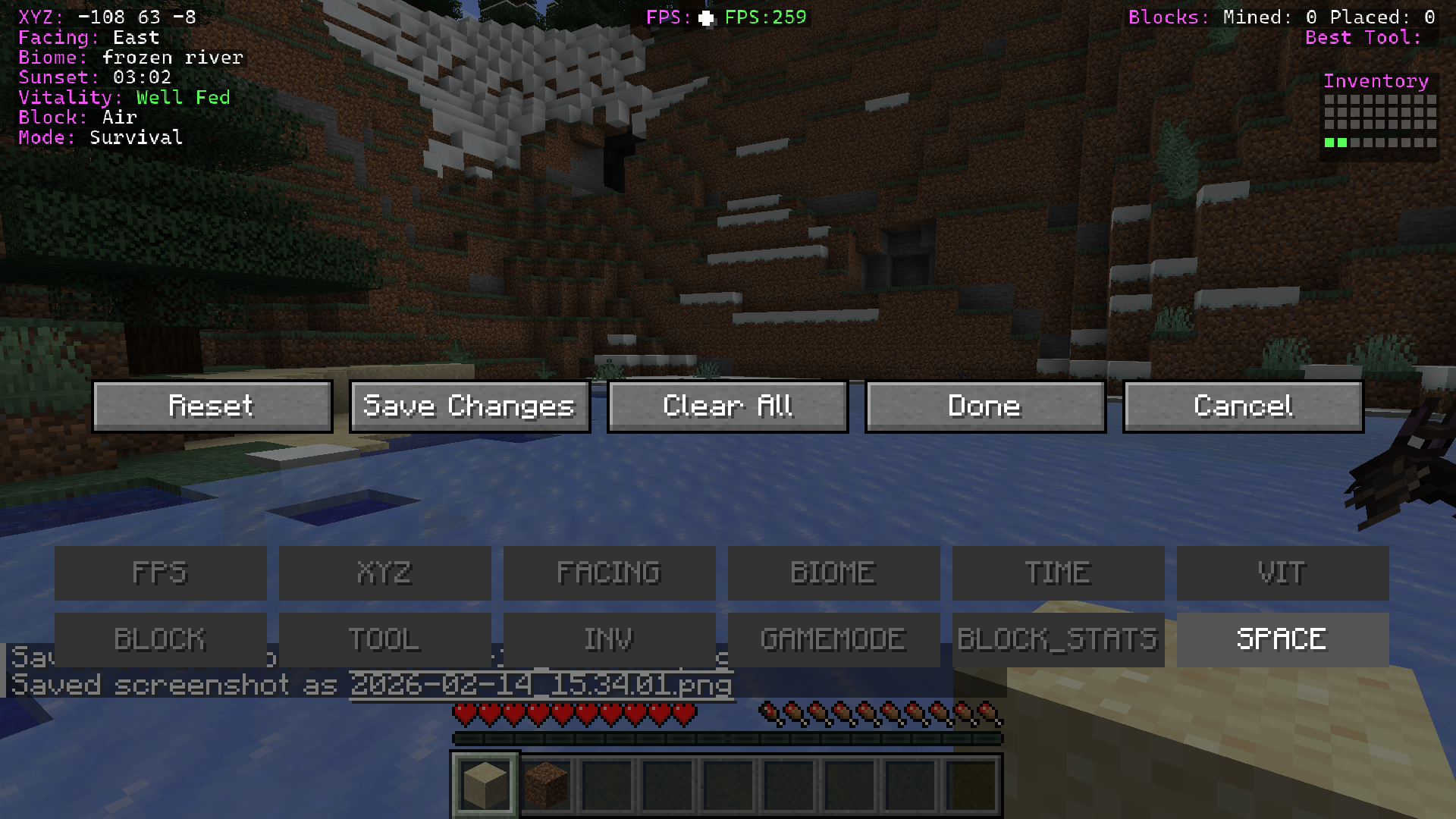 Element Drag & Drop interface Drag & drop elements to your preferred location, left right or middle, and save changes, include spacers if needed.
 -
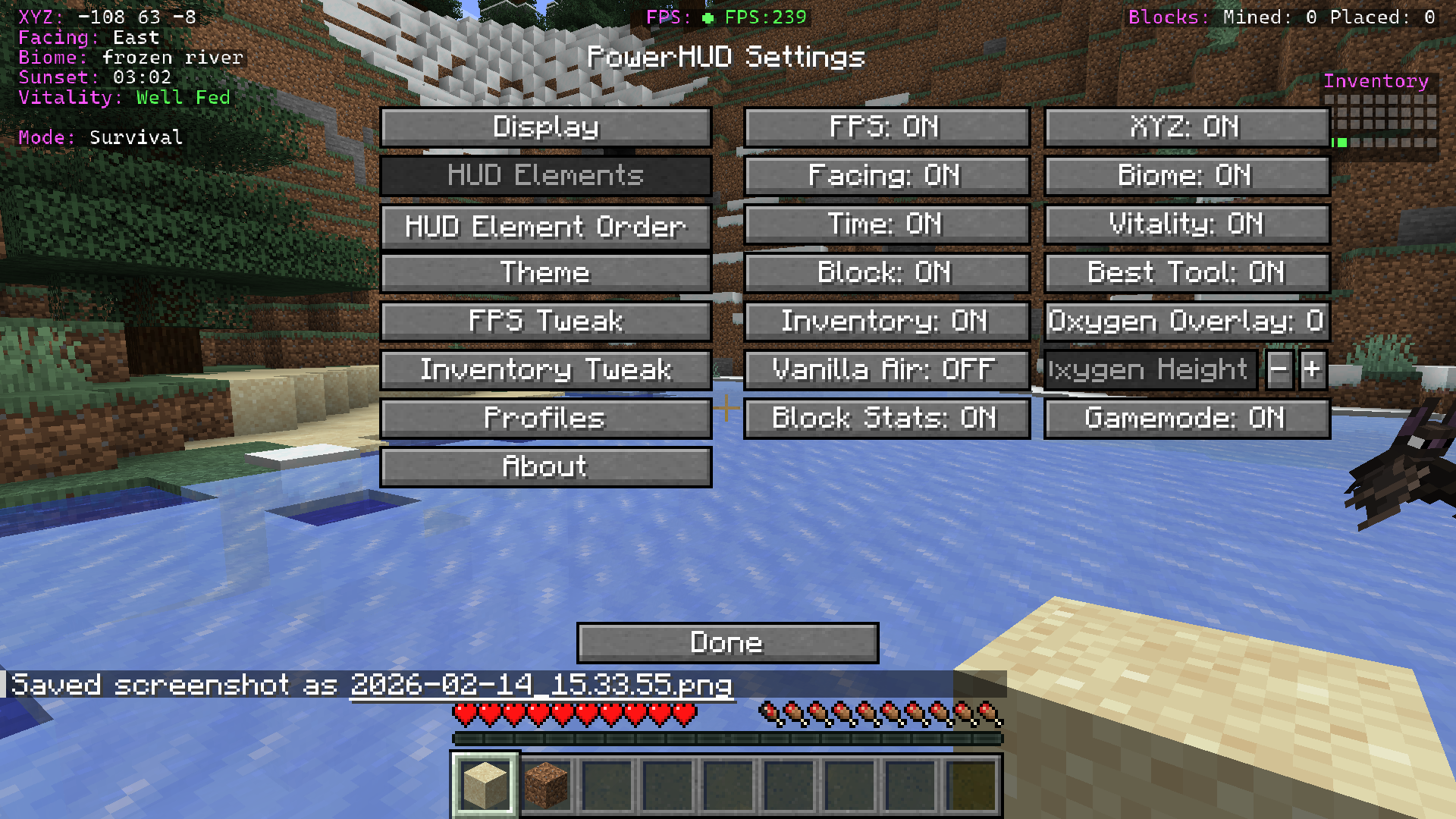 PowerHUD elements Each element can be toggled on/off including toggling off Vanilla air bubble and having a custom oxygen warning display underwater.
 -
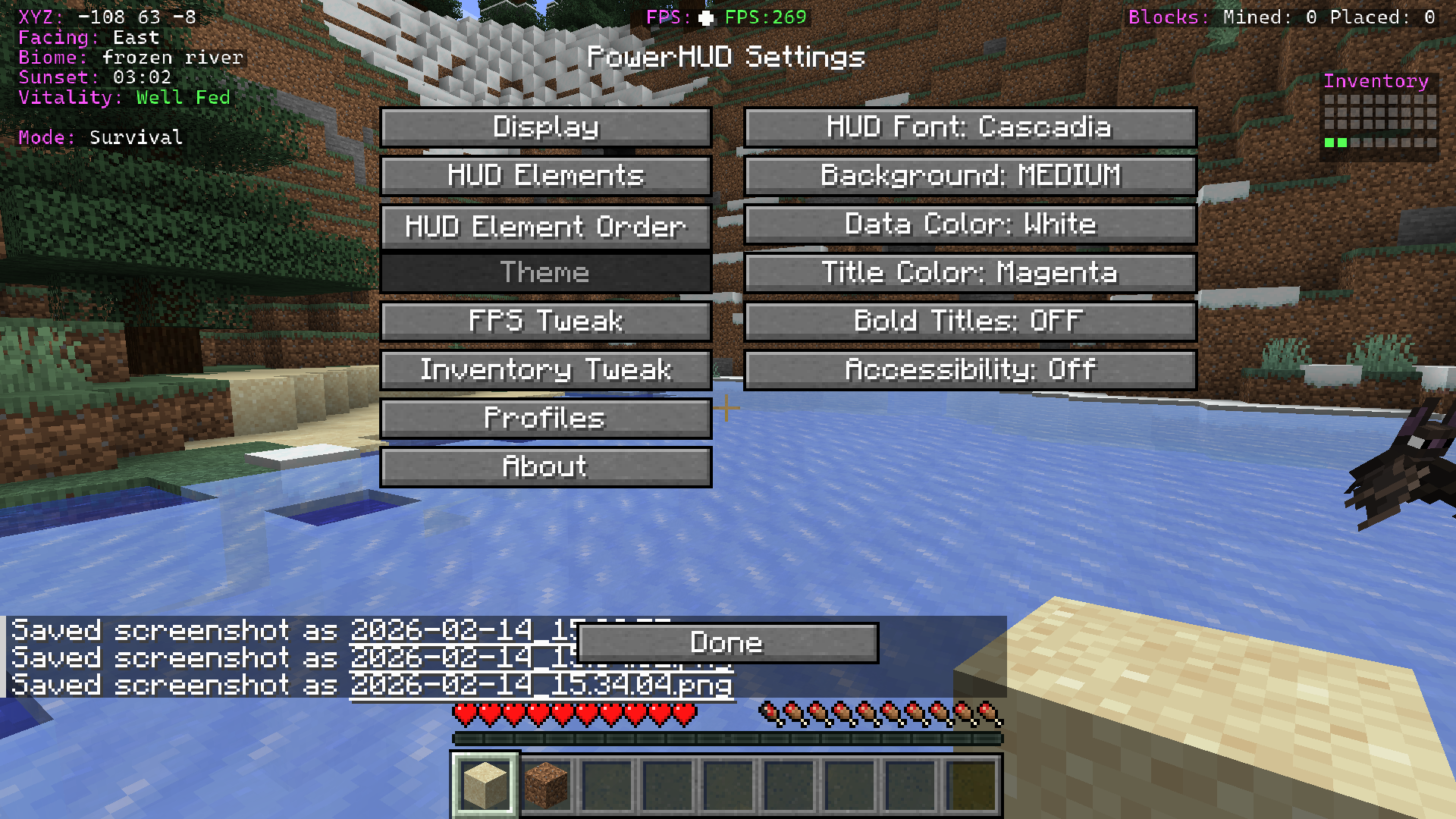 Theme options Custom fonts, scaling, colours for title, data, and accesibility options.
 -
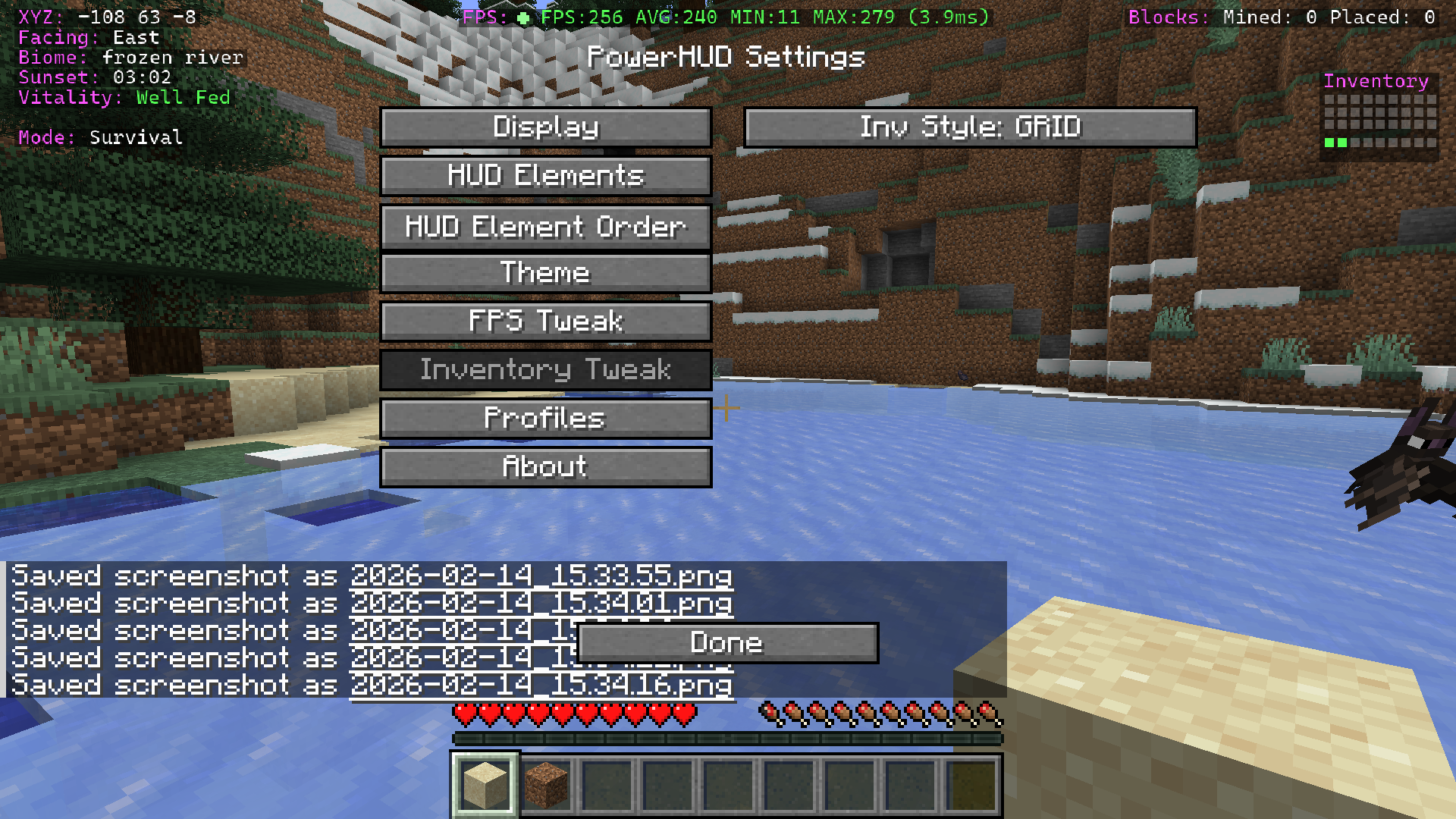 Inventory box Shows dynamically when objects in your inventory it will fill up, useful to see at a glance how much space you have left. Works in creative & survival.
 -
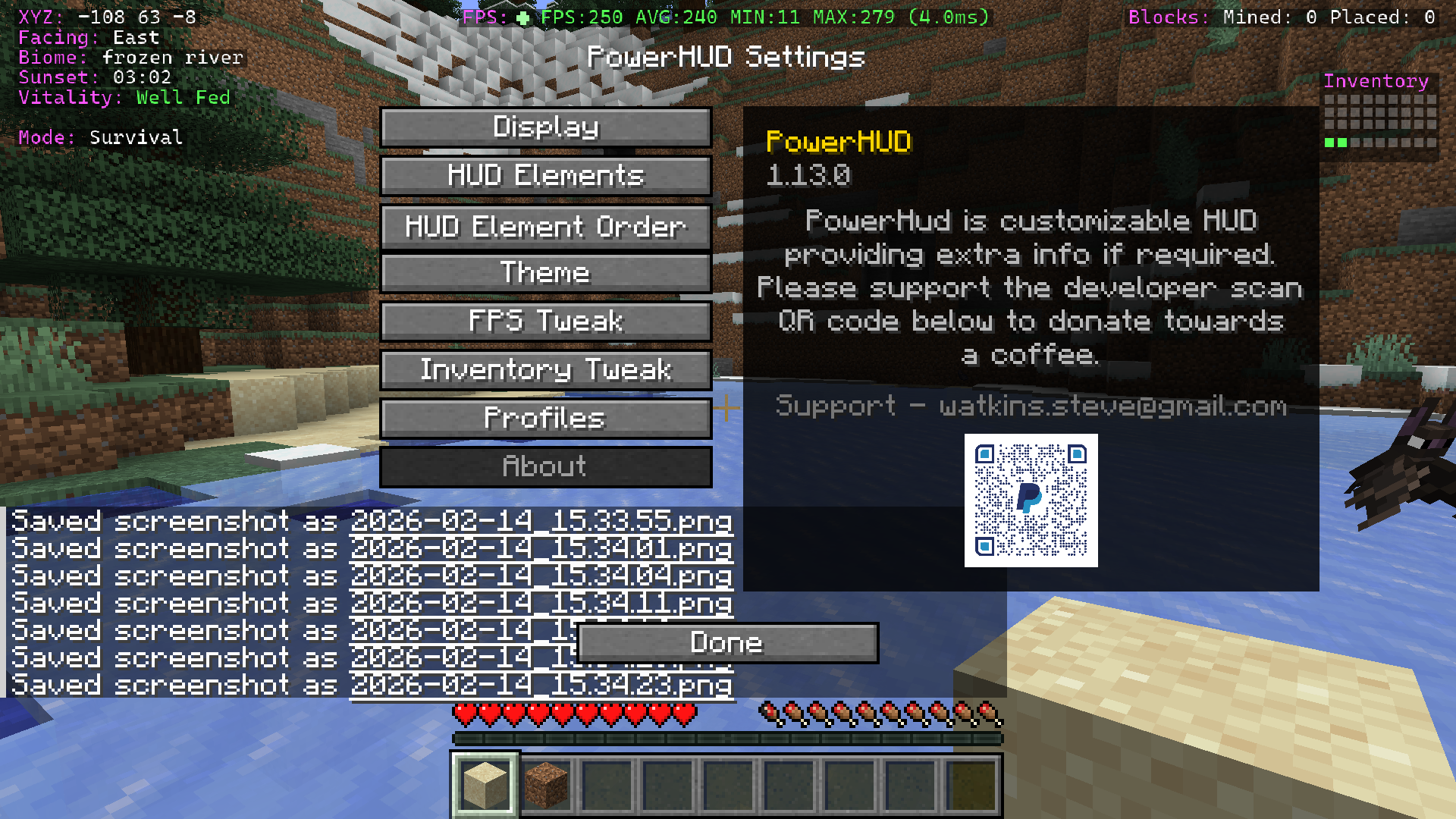 About screen Donation for a coffee :)
 -
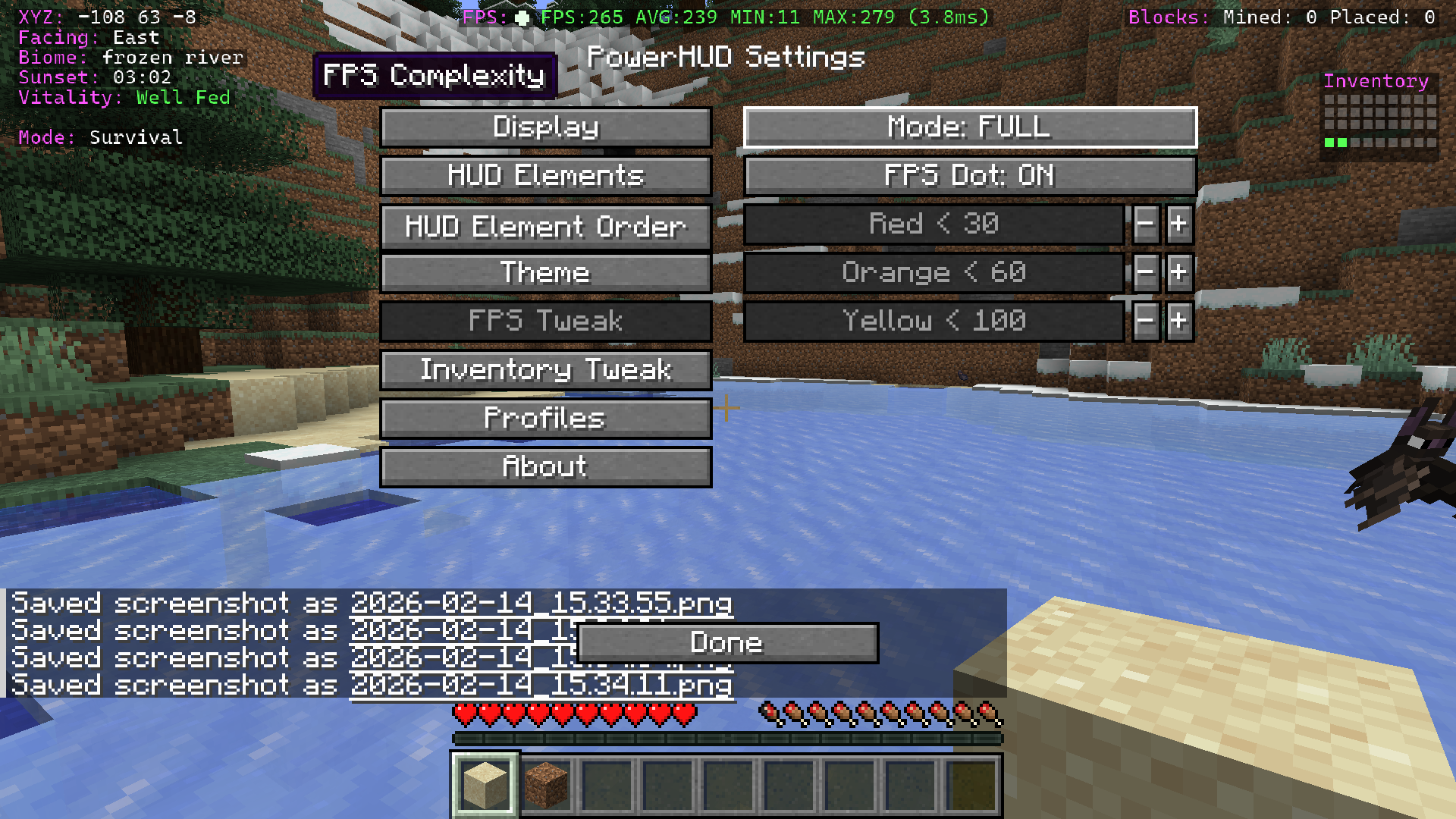 FPS customisation Colour code your FPS display as you choose, changes colour when FPS moves between set limits, 3 modes for FPS data and also flashing dot.
 -
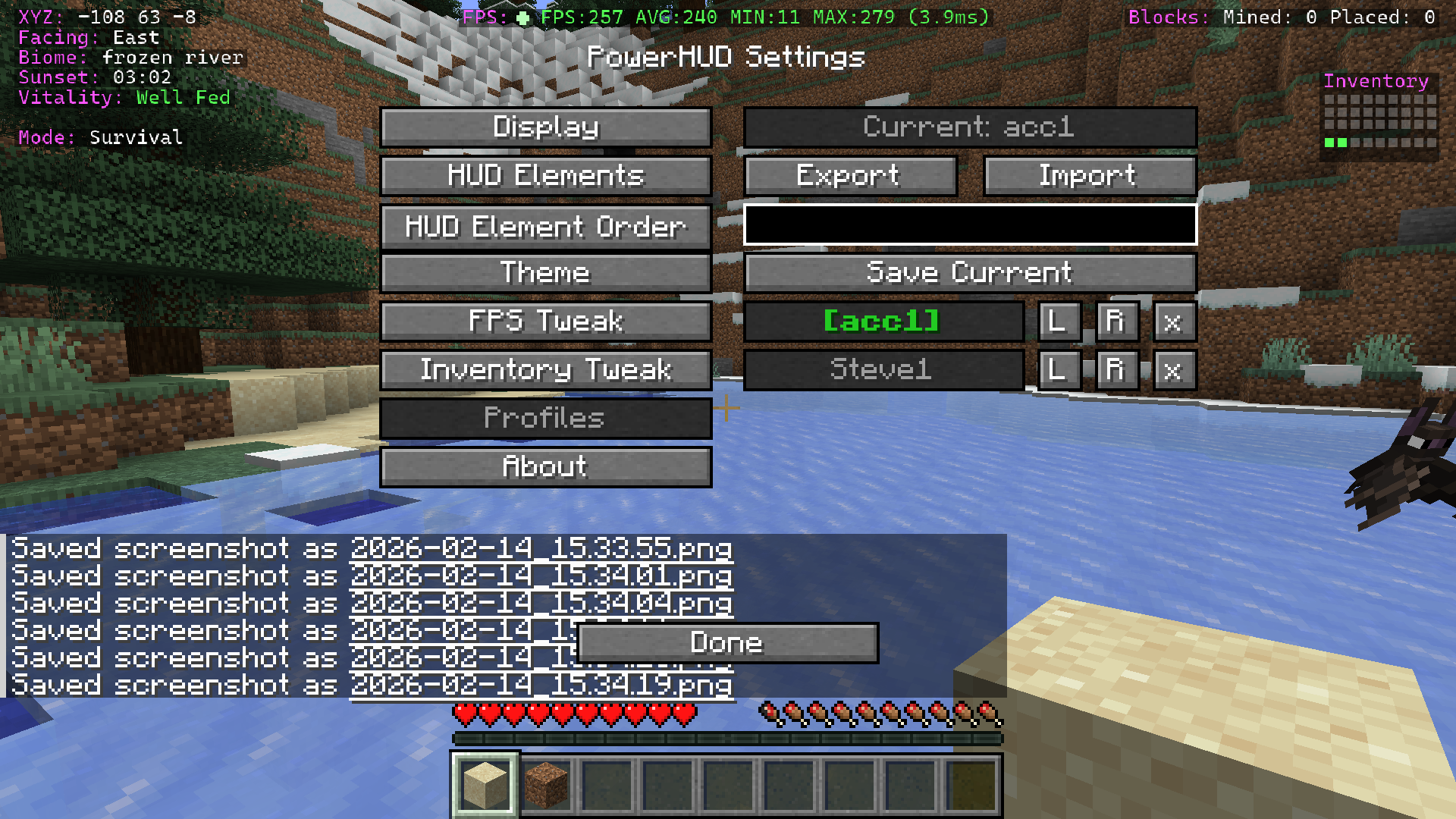 Profile manager Load, save, create new profiles, rename, delete and export & import.
 -
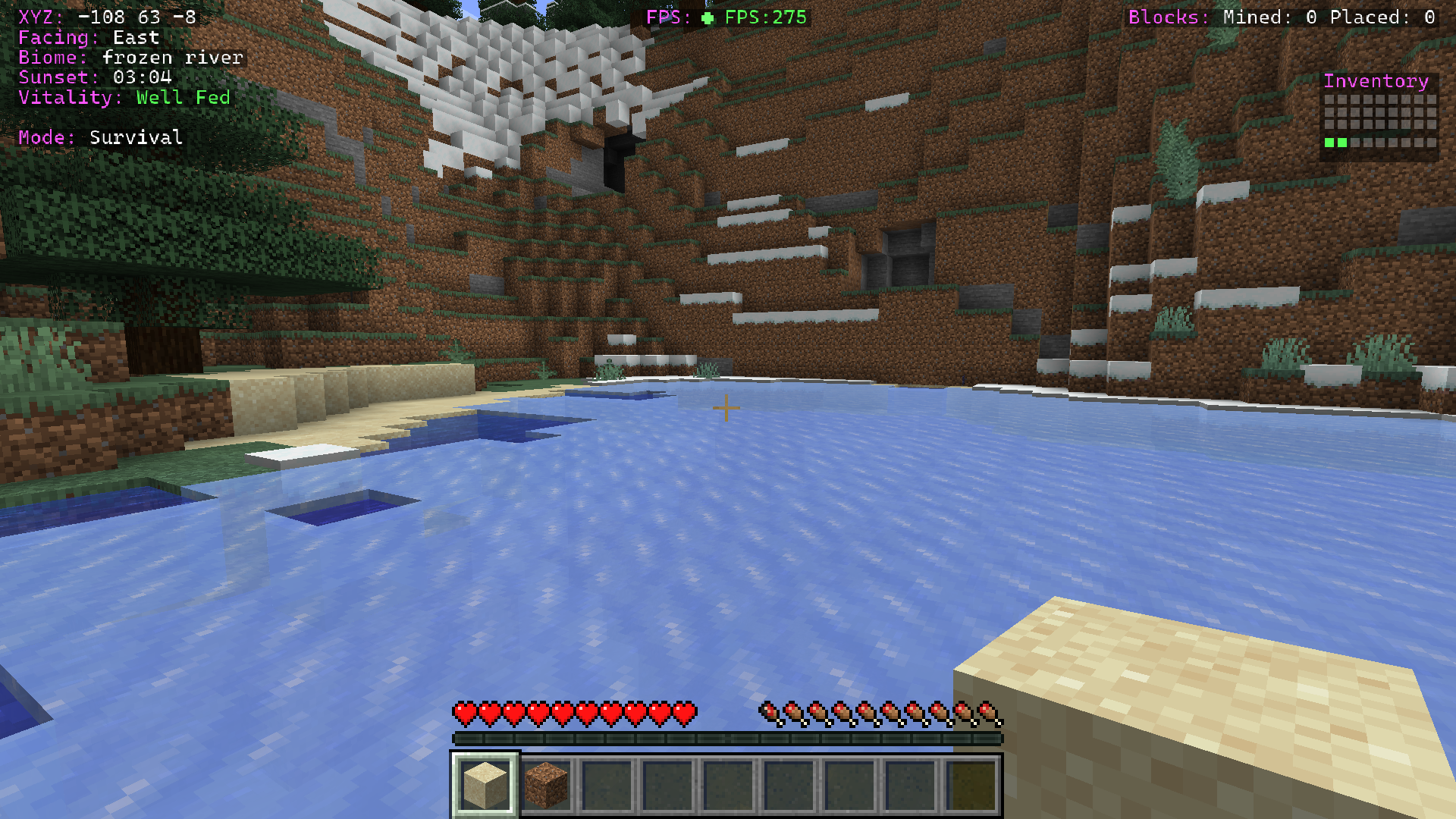 PowerHUD MOD on display in game
Versions
Files
Relations
Project Relations
More like this
Similar Mods
Suggestions use data such as tags, dependencies, dependents, descriptions, titles, and more to rank how much they overlap with this mod.
On ModDex
Community snapshot
By the numbers
Statistics
 (opens in a new tab)
Get it on
Available Platforms
On ModDex
Community snapshot
By the numbers