
Presentation
No reviews yet
A Minecraft mod that allows you to display image presentations in-game.
Neoforge is a fork of the Minecraft Forge available for versions 1.20.1+ of Minecraft. Many Forge mods are compatible with Neoforge and vice versa.
Community voices
Reviews
Click once to include, again to exclude, again to clear
No reviews yet. Be the first to review this project!
Get it on
Available Platforms
 Modrinth
Compatibility
Supported Environments
About
Project Details
For authors
Embed Badge
If you're the author of this project, you can embed a live badge anywhere that supports HTML or Markdown. It updates automatically whenever ratings change.
Use HTML for any page that supports it, or Markdown for README files and Markdown-based descriptions.
Identifiers
Platform IDs
Resources
External Links
About
Description
Presentation Mod
Bring your slides directly into the Minecraft world!
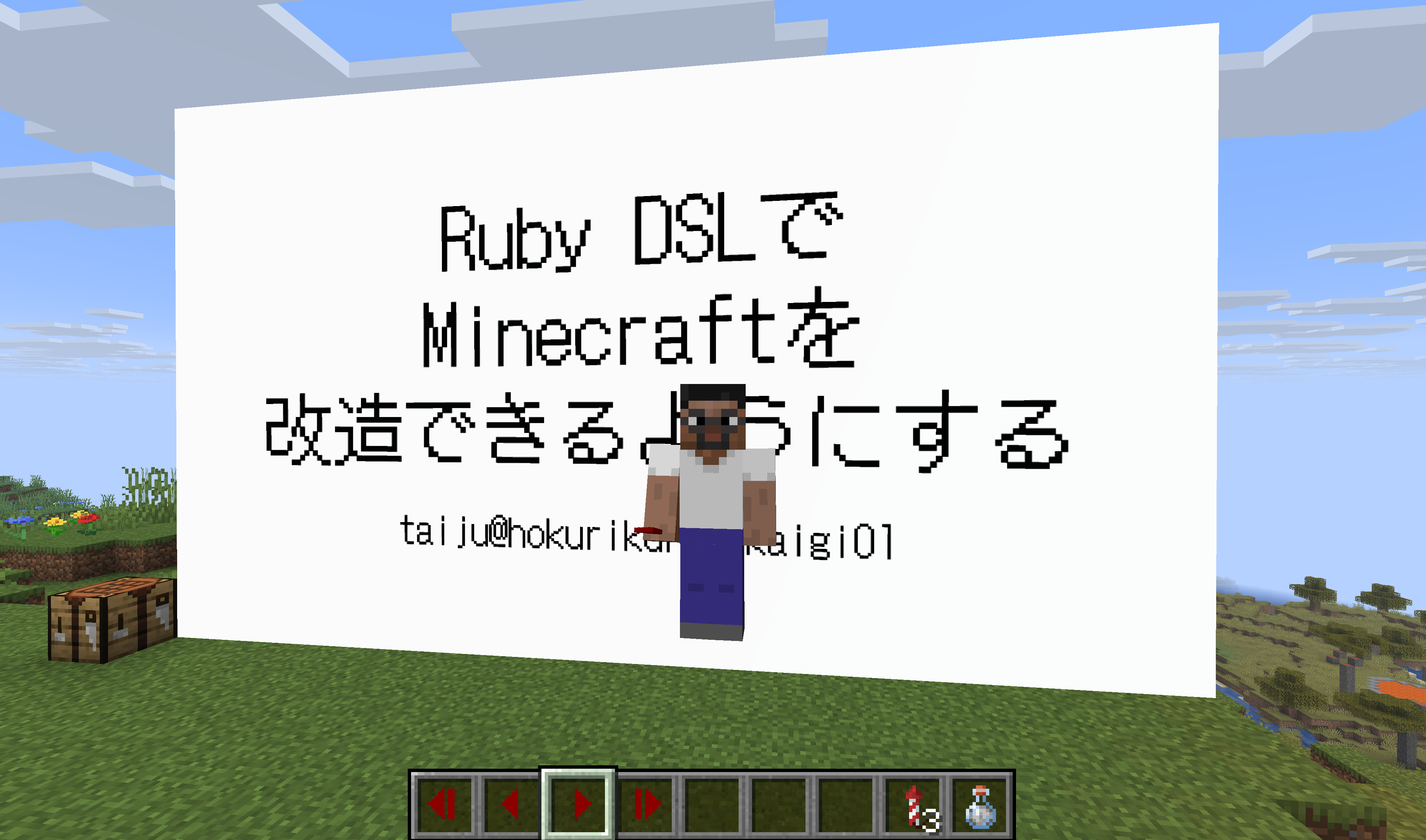
The Presentation Mod is a unique tool designed for content creators, streamers, and educators. It allows you to import image files and display them as projected slides within the game world. You can then control the slides using in-game items, making your character the presenter.
Whether you are explaining a redstone tutorial, creating a lore video, or giving a technical talk, this mod lets you do it without leaving the immersion of Minecraft.

⚠️ Important Note
Current Status: Singleplayer Only This mod is currently optimized for Singleplayer worlds. It is intended for local recording, streaming, or screen-sharing scenarios. (Multiplayer synchronization is not yet implemented. In a server environment, slide changes will not be visible to other players.)
✨ Features
- In-Game Slides: Display any
.pngimages as a presentation board in the world. - Immersive Control: Use "Controller Items" (Next/Prev/First/Last) to switch slides by right-clicking. Your avatar physically holds the "remote," looking great on camera!
- Customizable Layout: Set the position, size (width/height), and rotation of the screen freely.
- Simple Import: Just drop your images into the mod folder and run a command.
🚀 How to Use
1. Prepare Your Slides
- Navigate to your Minecraft folder:
mods/presentation/. - Create a folder for your deck (e.g.,
my_talk). - Place your
.pngimages inside. (Name them01.png,02.png... to sort them).
2. Import & Display
Run the following commands in-game:
// Import the images
/presentation import my_talk

// Place the screen.
// Tip: Use the aspect ratio of your images (e.g., 16 9 or 4 3) for the size!
/presentation set my_talk ~ ~ ~ 16 9
3. Present!
Give yourself the controller items:
/presentation controller my_talk
Right-click with the Next Slide item to advance your presentation.

Advances to the next slide.

Returns to the previous slide.

Resets to the first slide.

Skips to the last slide.
💡 Pro Tips for Presenters
Performance & Immersion
Switch to Front Third Person view (press F5 twice) to show your avatar standing next to the screen. This allows you to "act" as a presenter within the Minecraft world, making your video much more engaging than a simple screen share.
Want to focus on the slides?
Instead of using commands, try drinking an Invisibility Potion right on stage!
The animation of drinking a potion adds a great "live performance" feel to your presentation.
(Of course, you can also use /effect give @s invisibility if you prefer instant magic.)
Stage Control with Command Blocks
Want to create a lecture hall with a "Next Slide" trigger on the podium? You can use Command Blocks!
- Get a command block:
/give @s command_block - Set the command:
presentation slide next my_talk - Activate it with any Redstone signal (Buttons, Pressure Plates, Levers, etc.). Now you can advance slides physically!
📚 Command Reference
For the full list of commands and detailed usage, please refer to the README on GitHub: View Full Command Reference (README)
🎥 Perfect For...
- Tech Talks & Workshops: Give a presentation using your Minecraft avatar as the speaker (via screen sharing).
- Video Tutorials: Explain complex redstone or mod mechanics visually in your videos.
- Storytelling: Display intro slides or lore images to enhance your content.
Screenshots
Gallery
Versions
Files
Relations
Project Relations
More like this
Similar Mods
Suggestions use data such as tags, dependencies, dependents, descriptions, titles, and more to rank how much they overlap with this mod.
On ModDex
Community snapshot
By the numbers
Statistics

Want to reach Minecraft players?
We're looking for a server hosting partner to feature here and other parts of the site. Interested? Send us a message!
Get in touchGet it on
Available Platforms
On ModDex
Community snapshot
By the numbers
Statistics
Resources