
Community listing page, reviews here may not be monitored by the author.
Prompt Overlay

No reviews yet
Prompt Overlay is a modern Minecraft client-side mod that replaces supported chat prompts on Hypixel with a clean, interactive overlay. Instead of opening chat and clicking messages, you can quickly respond using configurable keybinds.
Community voices
Reviews
No reviews yet. Be the first to review this project!
Get it on
Available Platforms
Compatibility
Supported Environments
Runs entirely on the client. Works on vanilla servers.
About
Project Details
For authors
Embed Badge
If you're the author of this project, you can embed a live badge anywhere that supports HTML or Markdown. It updates automatically whenever ratings change.
Use HTML for any page that supports it, or Markdown for README files and Markdown-based descriptions.
Identifiers
Platform IDs
About
Description
Prompt Overlay
Prompt Overlay is a client-side Fabric mod that turns supported Hypixel chat prompts into compact, keyboard-driven overlays. Respond with configurable keys instead of opening chat and clicking a message, while retaining the commands and choices supplied by the server.
Work in progress: Prompt Overlay is under active development. Supported prompts and the public API may change before the first stable release.
Features
- Configurable keys for accepting, denying, dismissing, and selecting up to five options
- Individual feature toggles and configurable display duration, background, and prompt colors
- Friend, party, guild, duel, and SkyBlock trade requests
- Trophy Fish GG, Catacombs requeue, Abiphone, Trapper, and Dark Auction prompts
- Confirmation prompts and NPC dialogs with up to five choices
- A public API that other Fabric mods can use to display their own prompts
Configuration
Run /prompt-overlay in game to open the configuration screen. Controls can also be changed in Minecraft's keybind settings.
Configuration includes per-feature toggles, overlay duration and colors, ignored Abiphone contacts, and feature-specific timing options.
For developers
Other mods can submit custom overlays without requiring Prompt Overlay to be installed (in case it isn't, no Exception is thrown). Integrations can use action and option templates, limit a prompt's lifetime, and detect failure so they can retain their original interaction as a fallback.
See the Prompt Overlay API integration guide for dependency setup and a complete example.
Credits
Prompt Overlay was inspired by Popup Events by Sk1er LLC. It is an independent implementation for modern Minecraft versions with a new codebase and expanded scope.
Screenshots
Gallery
-
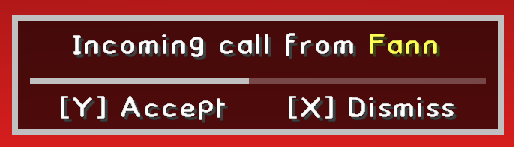 Abiphone call prompt
 -
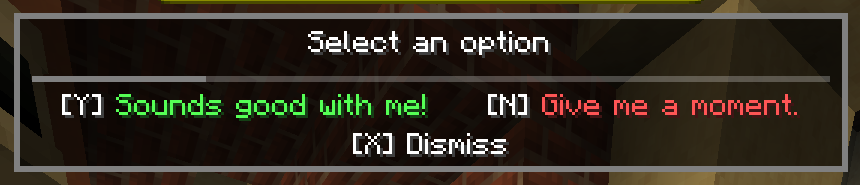 NPC options
 -
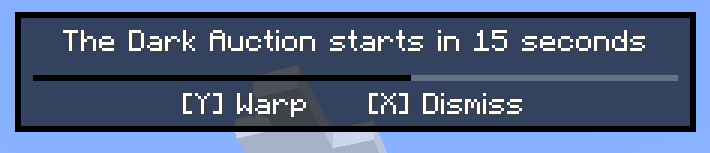 Dark Auction reminder It even has a configurable time to be reminded at!
Versions
Files
Relations
Project Relations
More like this
Similar Mods
Suggestions use data such as tags, dependencies, dependents, descriptions, titles, and more to rank how much they overlap with this mod.
On ModDex
Community snapshot
By the numbers
Statistics

Want to reach Minecraft players?
We're looking for a server hosting partner to feature here and other parts of the site. Interested? Send us a message!
Get in touchGet it on
Available Platforms
On ModDex
Community snapshot
By the numbers