
Community listing page, reviews may not be monitored by the author.
PteroControl

No reviews yet
PteroControl is a powerful, client-side Minecraft mod that seamlessly integrates your Pterodactyl game server panel directly into the multiplayer screen. Manage your servers without ever leaving the game!

Community voices
Reviews
No reviews yet. Be the first to review this project!
Get it on
Available Platforms
Compatibility
Supported Environments
Runs entirely on the client. Works on vanilla servers.
About
Project Details
For authors
Embed Badge
If you're the author of this project, you can embed a live badge anywhere that supports HTML or Markdown. It updates automatically whenever ratings change.
Use HTML for any page that supports it, or Markdown for README files and Markdown-based descriptions.
Identifiers
Platform IDs
Resources
External Links
About
Description
Tired of alt-tabbing to a web browser just to start, stop, or restart your Pterodactyl-hosted game server? PteroControl is the solution!
This powerful, client-side utility mod seamlessly integrates your Pterodactyl panel directly into Minecraft's multiplayer screen, giving you essential server controls right where you need them.
Watch a short video about the features in the gallery.
✨ Key Features
- In-Game Server Controls: Adds Start, Stop, and Restart buttons directly to your server entries in the multiplayer list.
- Smart Display: Buttons only appear for servers that match the configurable node address, keeping your server list clean.
- Dynamic Status: The buttons are intelligent! They automatically enable or disable based on the server's live ping status in Minecraft (Online, Offline, or Pinging) to prevent mistakes.
- Offline? Only the "Start" button is active.
- Online? Only "Restart" and "Stop" are active.
- Pinging? All buttons are temporarily disabled.
- Automatic Refresh: After sending a command, the buttons will temporarily disable and then automatically update to reflect the server's new state after a few seconds.
- Easy Configuration: A simple in-game settings screen (via Mod Menu) lets you set up your Pterodactyl panel URL, API key, and node address in seconds.
⚙️ How to Set Up
- Install the mod and all required dependencies (see below).
- Launch Minecraft and go to the Mods menu from the main screen.
- Find PteroControl in the list and click the gear icon (⚙️).
- Enter your Pterodactyl Panel URL (e.g.,
https://panel.yourdomain.com). - Enter your Client API Key. This must be generated from your user account's "API Credentials" page on the panel and usually starts with
ptlc_. - Enter the Node Address of your servers (e.g.,
node.yourdomain.com). The buttons will only appear for servers matching this address. - Click Save, and you're all set!
⚠️ Requirements
This mod is for the Fabric modloader. It requires the following mods to be installed:
📜 License
PteroControl is licensed under CC0-1.0 Universal. It is in the public domain, meaning you are free to use, modify, and distribute it as you see fit.
Screenshots
Gallery
-
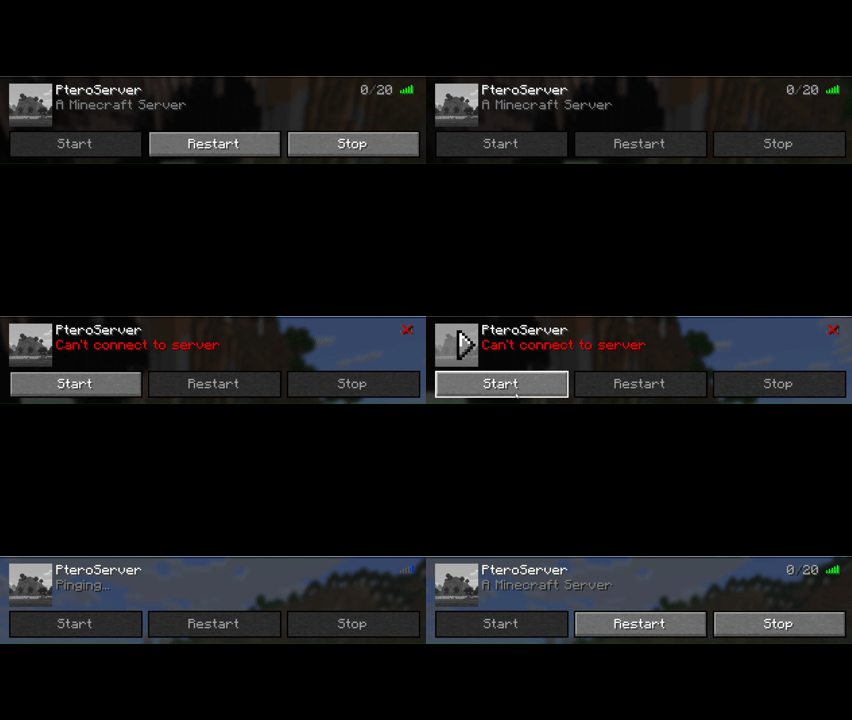 Mod Feature Showcase
Versions
Files
Relations
Project Relations
More like this
Similar Mods
Suggestions use data such as tags, dependencies, dependents, descriptions, titles, and more to rank how much they overlap with this mod.
On ModDex
Community snapshot
By the numbers
Statistics

 (opens in a new tab)
Get it on
Available Platforms
On ModDex
Community snapshot
By the numbers
Statistics
Resources