
Community listing page, reviews here may not be monitored by the author.
Pufferfish's Skills Configuration Expanded (Unofficial)

No reviews yet
Provides greater configuration options for Pufferfish's Skills mod.
Community voices
Reviews
No reviews yet. Be the first to review this project!
Get it on
Available Platforms
About
Project Details
For authors
Embed Badge
If you're the author of this project, you can embed a live badge anywhere that supports HTML or Markdown. It updates automatically whenever ratings change.
Use HTML for any page that supports it, or Markdown for README files and Markdown-based descriptions.
Identifiers
Platform IDs
Resources
External Links
About
Description
Pufferfish's Skills Configuration Expanded (Unofficial)
Pufferfish's Skills Configuration Expanded (Unofficial) is a NeoForge 1.21.1 server-side progression layer for Pufferfish's Skills. It adds personal, FTB-team, and server-global XP pools; level limits; configured free/disabled skills; operator commands; and optional FTB Quests tasks and rewards.
This unofficial add-on is not affiliated with the creator of Pufferfish's Skills.
Dependencies
- Pufferfish's Skills 0.18.0 or newer is required.
- FTB Teams is optional. It is needed for team progression and team overrides.
- FTB Quests is optional. When installed, PCE registers the
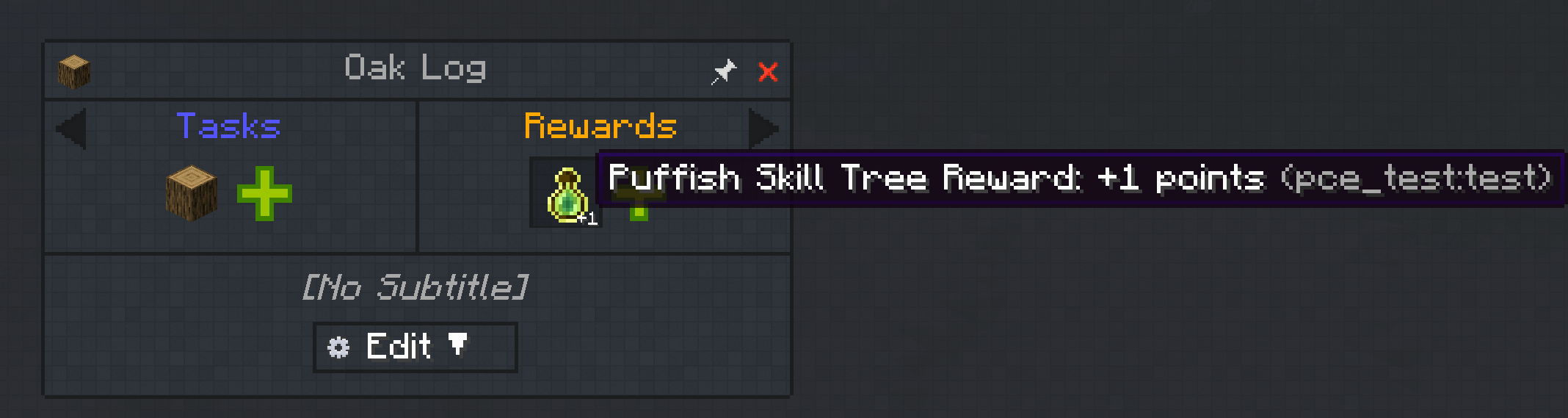
Puffish Skill Leveltask andPuffish Skill Tree Reward.
Configuration
The single instance-wide file is config/puffish_configuration_expanded.toml. It is created on first launch. Fields inherit in this order:
- global defaults;
- global tree override;
- team defaults;
- team tree override.
An omitted field inherits. A present field replaces the inherited value, including an explicitly empty skill list.
schema_version = 1

debug = false # enables extra diagnostic logging; errors are always logged

[global]
enabled = true
progression_scope = "personal" # personal, team, or global
minimum_level = 0
maximum_level = 100
always_enabled = []
always_disabled = []
on_team_leave = "retain" # retain or restore_personal
insufficient_points_policy = "debt" # debt or revoke_random_edge_skills

[global.trees."example:mining"]
progression_scope = "global"
maximum_level = 50
always_enabled = ["starter"]

[teams."00000000-0000-0000-0000-000000000000"]
enabled = true
label = "Blue" # documentation only; matching uses the UUID
progression_scope = "team"

[teams."00000000-0000-0000-0000-000000000000".trees."example:mining"]
maximum_level = 30
always_enabled = [] # replaces the inherited list
always_disabled = ["overpowered_skill"]
always_disabled wins over always_enabled. Free skills cost no points. PCE persists whether a free skill was previously purchased so removing the rule can correctly restore or remove it. Disabling a prerequisite revokes descendants only when no alternate unlocked path remains.
Configuration reloads are transactional. An invalid reload leaves the last valid configuration active.
Commands
All commands require permission level 2.
/pce xp <add|set|remove> global <tree_id> <amount>
/pce xp <add|set|remove> team <team> <tree_id> <amount>
/pce points <add|set|remove> global <tree_id> <amount>
/pce points <add|set|remove> team <team> <tree_id> <amount>
/pce whole_levels <add|set|remove> global <tree_id> <amount>
/pce whole_levels <add|set|remove> team <team> <tree_id> <amount>
/pce reload
/pce team-id [team]
Team arguments accept a UUID, exact FTB short name, or unique display name. Team and tree arguments have suggestions. XP is raw Puffish XP; set uses absolute accumulated XP, and remove floors at the configured minimum. Point commands modify bonus-point entitlement and floor at zero. Whole-level commands preserve progress within the current level: add and remove move relative to the current level, while set selects an absolute level. All level mutations respect the configured minimum and maximum. Persistent team/global records allow mutations while every affected player is offline.
FTB Quests task and reward
Add a Puffish Skill Level task to complete a quest when its configured skill
tree reaches the required level. The task checks automatically, does not consume
levels or XP, and completes when the current level is equal to or above the
configured value. It follows the effective personal, team, or global progression
scope. With global progression configured, any online player's check observes the
same server-wide level; players and FTB quest teams are also checked when they log
in.
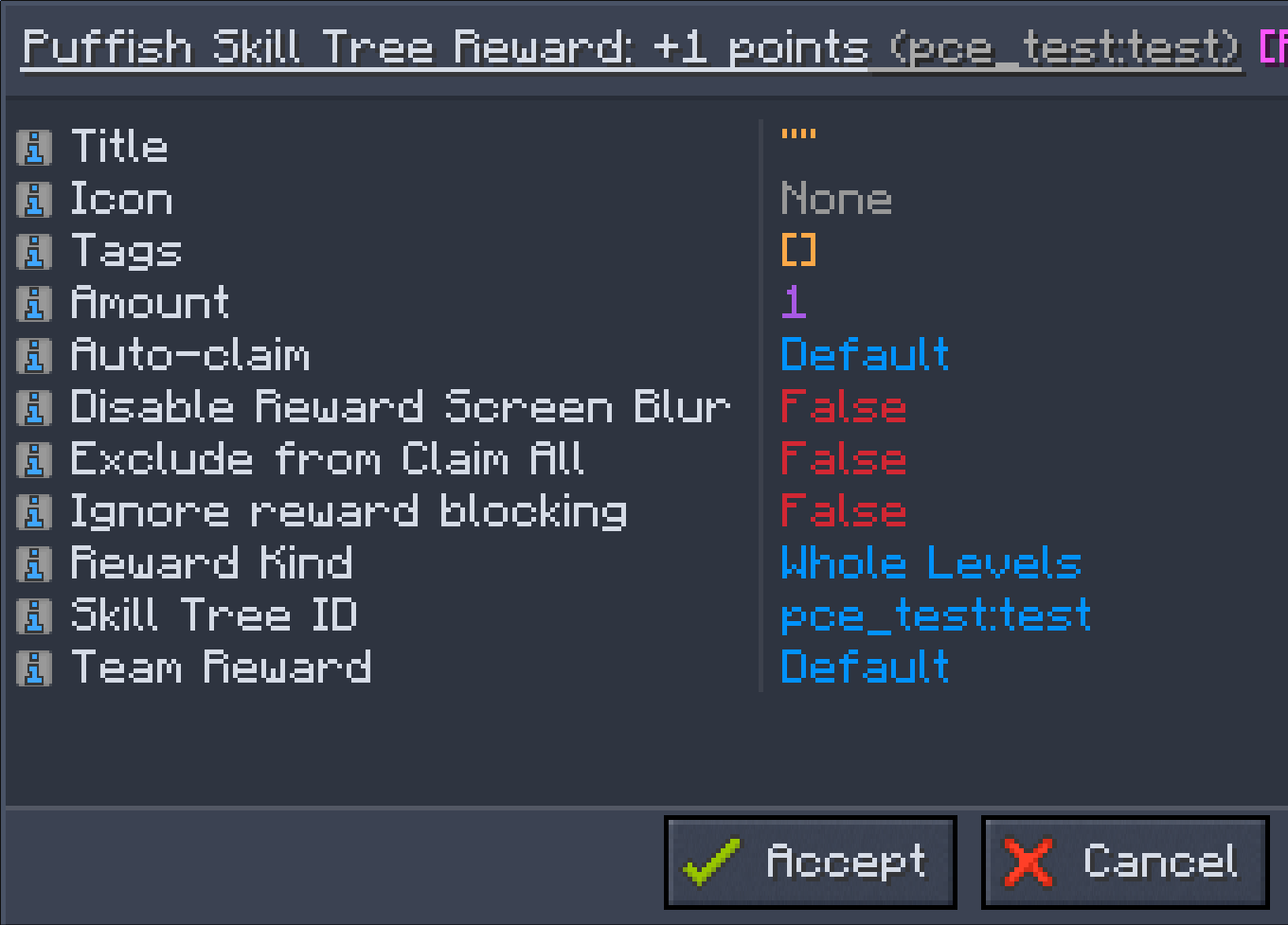
With FTB Quests installed, add a Puffish Skill Tree Reward to a quest and configure:
- the Pufferfish skill tree, selected from the available tree IDs;
- reward kind:
Experience,Points, orWhole Levels; - a positive amount.
Experience adds the specified amount of raw skill-tree XP. Points adds
spendable skill points directly without changing XP or level. Whole Levels
adds however much XP the tree's experience curve requires to advance by the
specified number of complete levels.
Whole-level rewards preserve current within-level progress. For example, a claimant at level 4 with 40/100 XP who receives one whole level ends at level 5 with 40 XP toward level 6. The reward targets the claimant's currently effective personal, team, or global pool.
Screenshots
Gallery
-
 1.png 1.png
 -
 2.png 2.png
 -
 3.png 3.png
Versions
Files
Relations
Project Relations
More like this
Similar Mods
Suggestions use data such as tags, dependencies, dependents, descriptions, titles, and more to rank how much they overlap with this mod.
On ModDex
Community snapshot
By the numbers
Statistics
Want to reach Minecraft players?
We're looking for a server hosting partner to feature here and other parts of the site. Interested? Send us a message!
Get in touchGet it on
Available Platforms
On ModDex
Community snapshot
By the numbers
Statistics
Resources