
Community listing page, reviews here may not be monitored by the author.
PVPHQ TierTagger


No reviews yet
Displays any Players PVPHQ Rank next to their name on any Server.
Community voices
Reviews
No reviews yet. Be the first to review this project!
Get it on
Available Platforms
Compatibility
Supported Environments
Runs entirely on the client. Works on vanilla servers.
About
Project Details
For authors
Embed Badge
If you're the author of this project, you can embed a live badge anywhere that supports HTML or Markdown. It updates automatically whenever ratings change.
Use HTML for any page that supports it, or Markdown for README files and Markdown-based descriptions.
Identifiers
Platform IDs
Resources
External Links
About
Description
# PVPHQ TierTagger
Announcement!!
I am currently updating/rebuilding the Project for the new PVPHQ ranked System. Not all old features are supported yet. Supported features for PVPHQ are:
- Display the rank of any player next to their name. (rank, rating, icon) (layout can only be changed inside the config as of right now, sry)
- Cycle which kit the rank is shown for using a hotkey.
- Cycle which kit the rank is shown for using a hotkey
Functionality:
- Display the rank of any player next to their name.
- Cycle which kit the rank is shown for using a hotkey or "Mod menu" settings.
- Automaticly pick the shown kit based on your inventorys contents.
- Show all of your own ranks using a hotkey.
- Show any Players ranks with /tiertags.
- Works on any Server.
How to use:
Keybinds
You can set all the keybinds in your controls settings just as usual.
| Keybind name | function | Category | default keybind |
|---|---|---|---|
| Cycle Kits | Switch, which kit the Elo/Sr is displayed for | Tier Tagger (Flow PVP) | none |
| Show Stats | Opens the stats screen for yourself | Tier Tagger (Flow PVP) | none |
Settings
You can acces the settings menu through Mod Menu.
| Setting | function |
|---|---|
| Kit: | Switch, which kit the Elo/Sr is displayed for |
| Auto Pick Displayed Kit: | Automaticly switches which kit the Elo/Sr is displayed for, based on your inventorys content |
Commands
| Command | function |
|---|---|
| /tiertags <name> | Lookup any players stats, match history and skin |
Statistics Screen:
//cdn.modrinth.com/data/dT03BfmG/images/78bab6a7d0fa0d7c20b9a35c25e620feeadb6985_350.webp" rel="noopener noreferrer" target="_blank">https://cdn.modrinth.com/data/dT03BfmG/images/78bab6a7d0fa0d7c20b9a35c25e620feeadb6985_350.webp
" width="50%">
Customize Rank Diplay
You can completly customize how any players ranks get displayed.

just use the nametag customization menu in the settings.
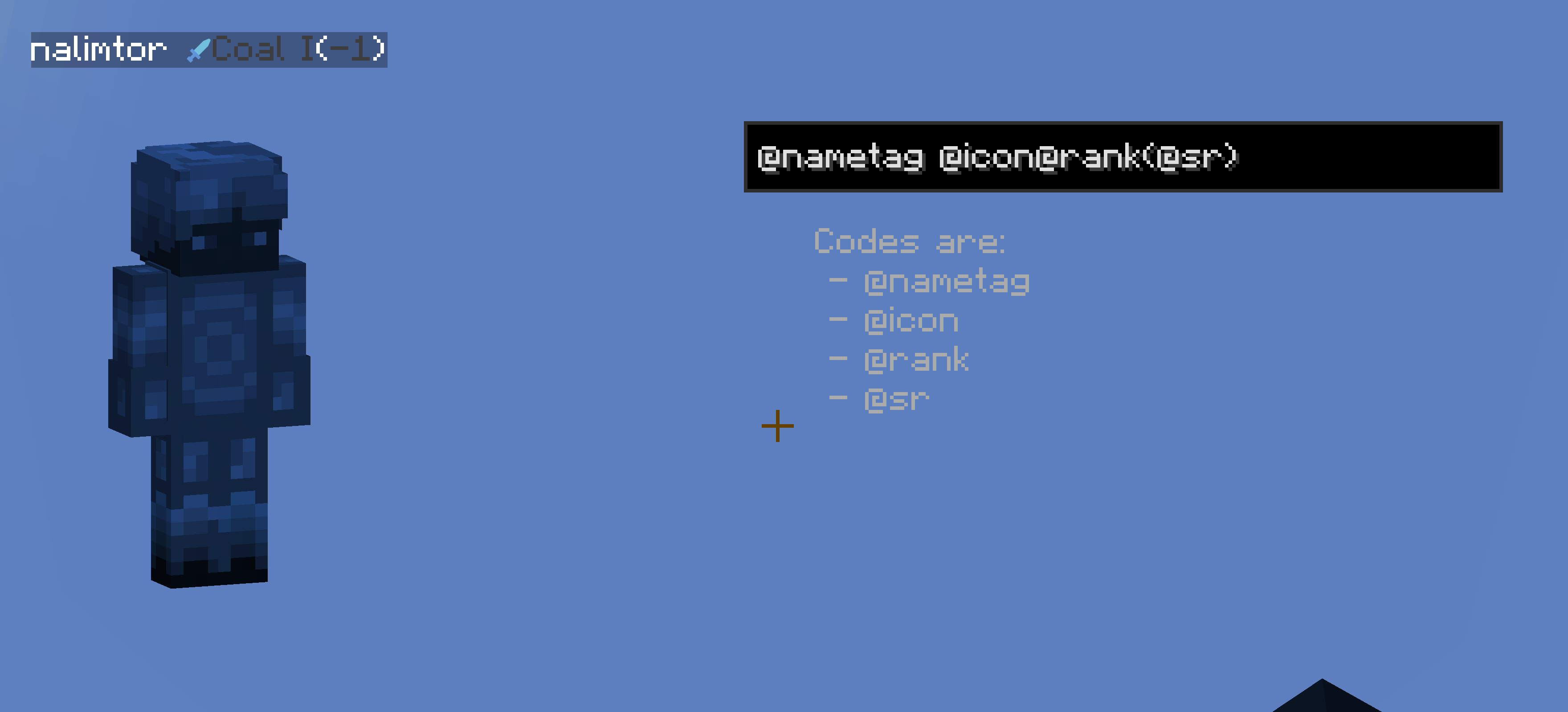
I am also open for ideas and issue fixes, for both just create a new issue on github.
(This project is unofficial and not associated with PVPHQ)




PVPHQ TierTagger
Announcement!!
I am currently updating/rebuilding the Project for the new PVPHQ ranked System. Not all old features are supported yet. Supported features for PVPHQ are:
- Display the rank of any player next to their name. (rank, rating, icon) (layout can only be changed inside the config as of right now, sry)
- Cycle which kit the rank is shown for using a hotkey.
- Cycle which kit the rank is shown for using a hotkey
Functionality:
- Display the rank of any player next to their name.
- Cycle which kit the rank is shown for using a hotkey or "Mod menu" settings.
- Automaticly pick the shown kit based on your inventorys contents.
- Show all of your own ranks using a hotkey.
- Show any Players ranks with /tiertags.
- Works on any Server.
How to use:
Keybinds
You can set all the keybinds in your controls settings just as usual.
| Keybind name | function | Category | default keybind |
|---|---|---|---|
| Cycle Kits | Switch, which kit the Elo/Sr is displayed for | Tier Tagger (Flow PVP) | none |
| Show Stats | Opens the stats screen for yourself | Tier Tagger (Flow PVP) | none |
Settings
You can acces the settings menu through Mod Menu.
| Setting | function |
|---|---|
| Kit: | Switch, which kit the Elo/Sr is displayed for |
| Auto Pick Displayed Kit: | Automaticly switches which kit the Elo/Sr is displayed for, based on your inventorys content |
Commands
| Command | function |
|---|---|
| /tiertags | Lookup any players stats, match history and skin |
Statistics Screen:
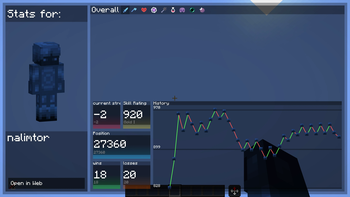
Customize Rank Diplay
You can completly customize how any players ranks get displayed.
just use the nametag customization menu in the settings.
I am also open for ideas and issue fixes, for both just create a new issue on github.
(This project is unofficial and not associated with PVPHQ)
Screenshots
Gallery
Versions
Files
Relations
Project Relations
More like this
Similar Mods
Suggestions use data such as tags, dependencies, dependents, descriptions, titles, and more to rank how much they overlap with this mod.
On ModDex
Community snapshot
By the numbers
Statistics
Want to reach Minecraft players?
We're looking for a server hosting partner to feature here and other parts of the site. Interested? Send us a message!
Get in touchGet it on
Available Platforms
On ModDex
Community snapshot
By the numbers
Statistics
Resources