
Community listing page, reviews here may not be monitored by the author.
Pyro

No reviews yet
Light things up with explosive pyrotechnics. Watch it burn.
Community voices
Reviews
No reviews yet. Be the first to review this project!
Get it on
Available Platforms
Compatibility
Supported Environments
Must be installed on both the client and the server.
About
Project Details
For authors
Embed Badge
If you're the author of this project, you can embed a live badge anywhere that supports HTML or Markdown. It updates automatically whenever ratings change.
Use HTML for any page that supports it, or Markdown for README files and Markdown-based descriptions.
Identifiers
Platform IDs
About
Description

Pyro
Light the fuse. Watch it burn.




Overview
Pyro is a Fabric mod for Minecraft 26.1 that brings hands-on pyrotechnic destruction to survival and adventure play. Throw a stick of dynamite, watch the fuse burn down, and take cover. Every explosion is physics-driven: thrown dynamite lands, sits, and detonates on its own, or goes off in your hand if you wait too long.
Features
Throwable Dynamite

- Ignite dynamite with a torch or at a campfire, then throw it with right-click
- 4-second fuse (80 ticks) counts down whether the dynamite is in your hand, mid-air, or lying on the ground
- Lands on the ground and detonates after the fuse expires, perfect for timed demolitions
- Drop it on the ground and it still detonates when the fuse runs out. Dropping clears the ignited state from any remaining dynamite in your hand so only the dropped piece explodes
- Hold it too long and it detonates in your inventory: instant kill for the holder, splash damage to nearby players and mobs
- Blast radius of 2.5 blocks for block destruction; damage reaches out to 5 blocks, scaling with distance
Thrown Molotov

- Ignite with a torch, fire charge, or any heat source, then throw with right-click
- Shatters on the first block or entity it contacts: no countdown at the moment of impact
- Direct hit on an entity deals 3 HP impact damage and ignites the target for 8 seconds
- Fire spreads outward from the impact point, starting at 3-5 blocks and expanding up to 5-8 blocks over the following ticks
- 30-second fuse (600 ticks) persists through the throw: whatever time burned in-hand carries over to the projectile
Contact Dynamite

- No ignition required: throw it directly with right-click and it detonates the instant it contacts any block or entity
- No fuse, no countdown. What leaves your hand explodes on the first thing it touches
- Blast radius of 3 blocks for block destruction; damage reaches out to 5 blocks, scaling with distance
- Up to 15 HP at point-blank range, survivable on full health but barely
- Crafted with a tripwire hook instead of a fuse; shares the same sand-and-gunpowder recipe layout as standard dynamite
Stack-Scaled Inventory Explosion

- Igniting dynamite without throwing it detonates the entire stack at once
- Explosion radius, maximum damage, and number of sub-explosions all scale with stack size
- Each sub-explosion is offset from the others, spreading blast force across a wider area
- A full stack is far more lethal than a single stick, so handle with care
Dropped Molotov

- Drop an ignited molotov and it lands as a live item with the fuse still ticking
- 50% chance to shatter on first contact with the ground: landing is never guaranteed safe, with no warning before it goes
- If the bottle survives the landing roll, the fuse counts down to zero and the molotov shatters anyway, igniting the area
- Less predictable than a throw: the instant-shatter risk makes it unreliable as a pure timed delay
Timed Fuse System

- Unlit dynamite sits safely in your inventory; it will never explode until ignited
- Once ignited, a custom lit model replaces the standard dynamite texture so you always know it's live
- The fuse timer persists through throws: if 2 seconds burn down in your hand before you throw, only 2 seconds remain in the air
Molotov Hand Explosion

- Hold an ignited molotov for the full 30 seconds without throwing and it shatters in your hands
- Deals 10 HP of fire damage to the holder and ignites them for 5 seconds
- Triggers the same fire spread as a normal impact, centered on the holder's position
Dynamic Lights (Optional)

- With LambDynamicLights installed, ignited dynamite emits full-brightness dynamic light (level 15)
- Light is cast both while held in your hand and while the projectile is in flight or resting on the ground
- Purely visual enhancement; the mod runs without it, but dark corridors become dramatically more tense with it
Igniting Dynamite
With a Torch (Off-hand or Main-hand)
Hold dynamite in one hand and right-click while holding any of the following in the other hand:
| Torch | Notes |
|---|---|
| Torch | Standard wood torch |
| Redstone Torch | Works even when powered |
| Soul Torch | Full support |
| Copper Torch | Full support |
At a Lit Campfire

Hold dynamite and right-click a lit campfire to ignite it. The campfire must be actively burning; an extinguished campfire will not work.
On Fire

Hold dynamite and right-click directly on a fire block to ignite it. Click the fire's hitbox itself, not the block underneath. Works with both regular fire and soul fire.
On Lava

Hold dynamite and right-click directly on lava to ignite it. Both source blocks and flowing lava work.
Other Ignition Sources
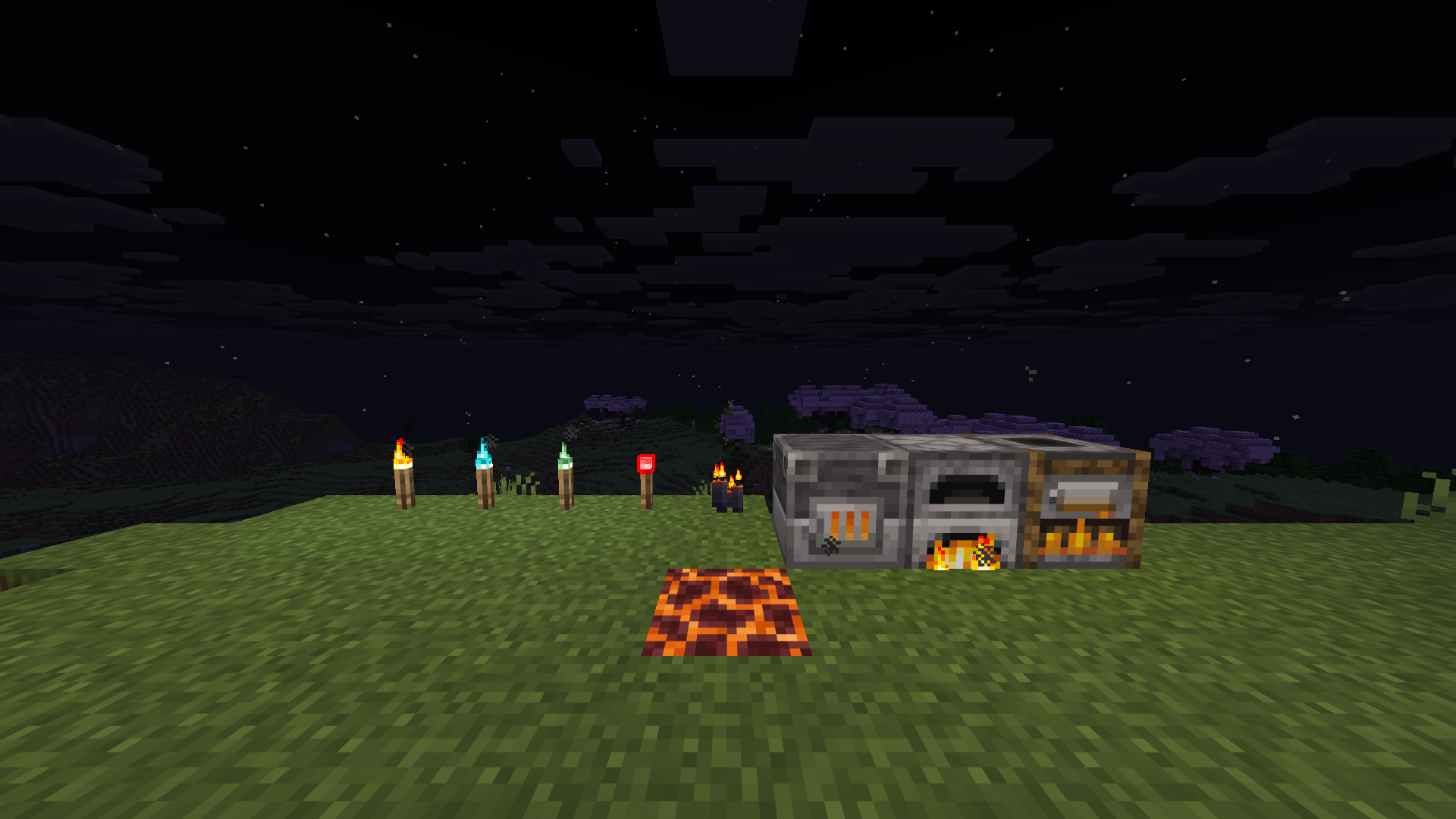
Dynamite can be ignited by right-clicking almost any open flame or active heat source in the world: torches, burning furnaces, lit candles, magma blocks, and more. If it generates heat or it's on fire, it can light a fuse.
Dynamite
Shaped recipe (3×3 crafting grid):
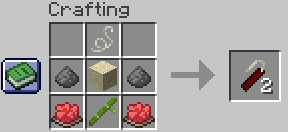
Yields 2× Dynamite.
Contact Dynamite
Shaped recipe (3×3 crafting grid):
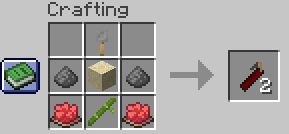
Yields 2× Contact Dynamite.
Molotov
Shaped recipe (3×3 crafting grid):
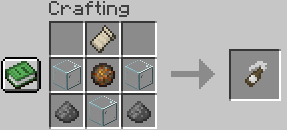
Yields 1× Molotov.
TNT
Shaped recipe (3×3 crafting grid), replacing the vanilla TNT recipe:
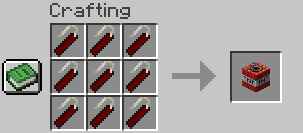
Fill the entire grid with 9× Dynamite to craft 1× TNT. The vanilla gunpowder-and-sand recipe no longer works; TNT is now gated behind Pyro's crafting chain.
Crafting Recipes
Fuse
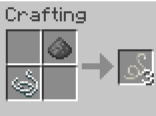
Crafted shapeless: combine 1× Gunpowder + 1× String → 3× Fuse
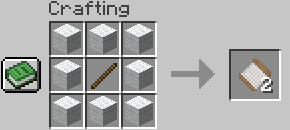
Spool of White Thread
Shaped recipe (3×3 crafting grid): surround 1× Stick with 8× White Wool → 2× Spool of White Thread
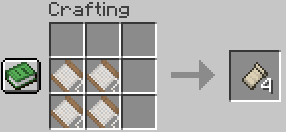
White Fabric
Shaped recipe: arrange 4× Spool of White Thread in a 2×2 block → 4× White Fabric
Optional Compatibility
LambDynamicLights
Pyro has built-in optional support for LambDynamicLights. No extra configuration is needed; install both mods and dynamic lighting activates automatically.
What it adds:
- Lit dynamite in your hand illuminates the area around you at full light level
- Thrown, landed, or dropped dynamite continues to cast light until it detonates
- Makes underground demolition runs dramatically more atmospheric
Installation
- Install Fabric Loader 0.18.6+ for Minecraft 26.1
- Download Fabric API 0.145.1+26.1
- Place both
.jarfiles in yourmods/folder - (Optional) Add LambDynamicLights for dynamic lighting support
- Launch Minecraft 26.1 and enjoy
Requirements
| Dependency | Version | Required |
|---|---|---|
| Minecraft | 26.1.x | Yes |
| Fabric Loader | ≥ 0.19.2 | Yes |
| Fabric API | 0.145.1+26.1 | Yes |
| Java | ≥ 25 | Yes |
| LambDynamicLights | ≥ 4.10.0 | Optional |
Screenshots
Gallery
-
 How to craft a Fuse A string and gunpowder gives you multiple fuse
 -
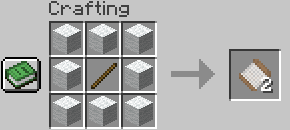 How to craft Spool of White Thread
 -
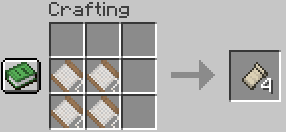 How to craft White Fabric
 -
 How to craft a Dynamite This is the crafting recipe of dynamite
 -
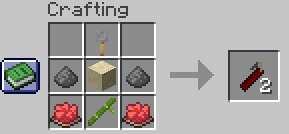 How to craft Contact Dynamite
 -
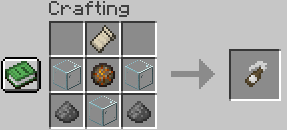 How to craft Molotov
 -
 How to craft a TNT 9 Dynamite to craft a single TNT, not sand and gunpowder
 -
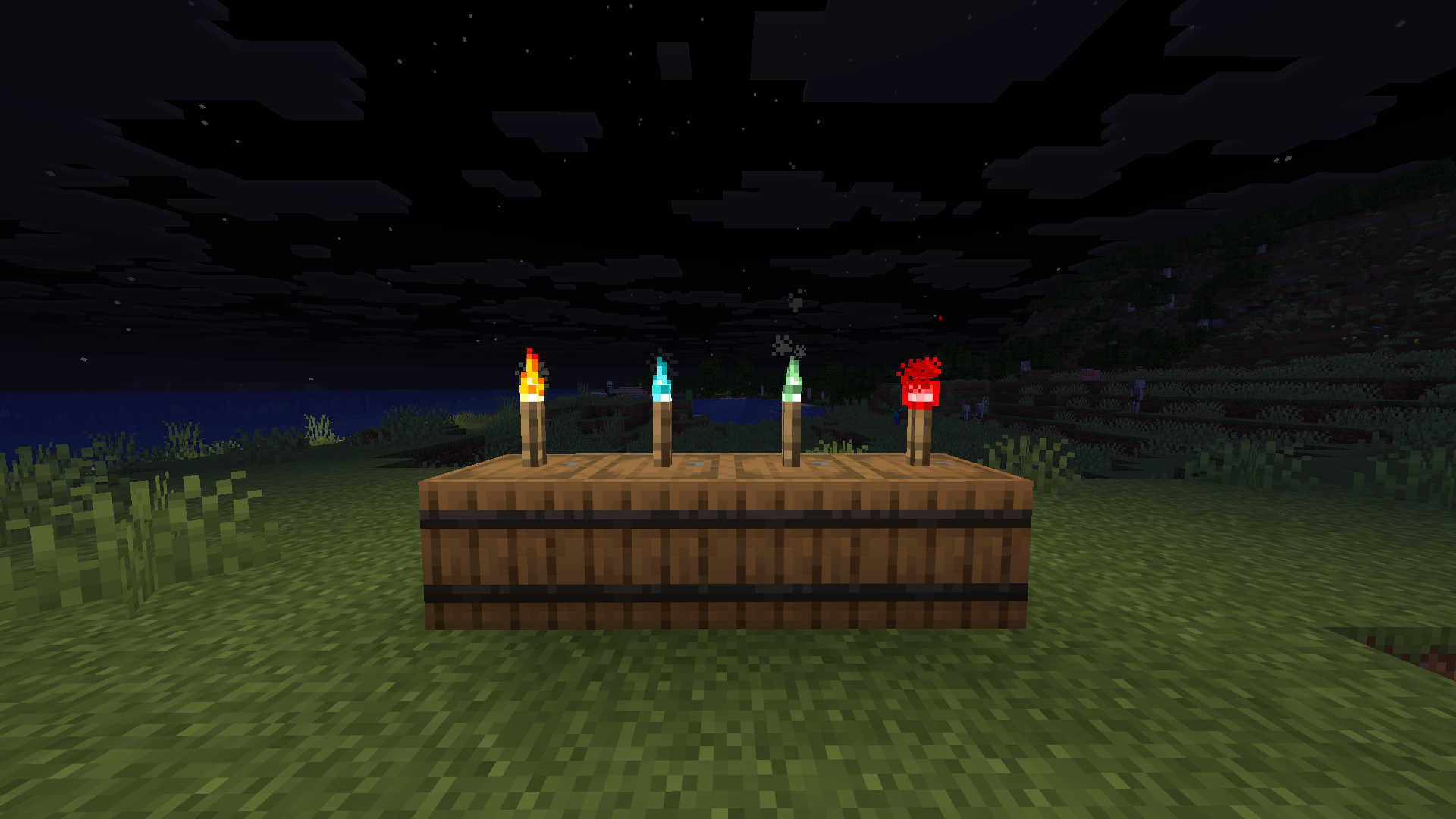 Ways to ignite Dynamite These are torches that you can use in order to ignite a dynamite
Versions
Files
Relations
Project Relations
More like this
Similar Mods
Suggestions use data such as tags, dependencies, dependents, descriptions, titles, and more to rank how much they overlap with this mod.
On ModDex
Community snapshot
By the numbers
Statistics

Want to reach Minecraft players?
We're looking for a server hosting partner to feature here and other parts of the site. Interested? Send us a message!
Get in touchGet it on
Available Platforms
On ModDex
Community snapshot
By the numbers