
Community listing page, reviews here may not be monitored by the author.
Quick World Settings


No reviews yet
You can easily change the time, weather, and night vision settings!
Community voices
Reviews
No reviews yet. Be the first to review this project!
Get it on
Available Platforms
Compatibility
Supported Environments
Works in singleplayer only; does not function in multiplayer.
About
Project Details
For authors
Embed Badge
If you're the author of this project, you can embed a live badge anywhere that supports HTML or Markdown. It updates automatically whenever ratings change.
Use HTML for any page that supports it, or Markdown for README files and Markdown-based descriptions.
Identifiers
Platform IDs
About
Description
A simple utility mod that lets you quickly change the time, weather, and night vision settings.
How to Use
- Press the U key to make it morning.
- Press the I key to make it daytime.
- Press the O key to make it nighttime.
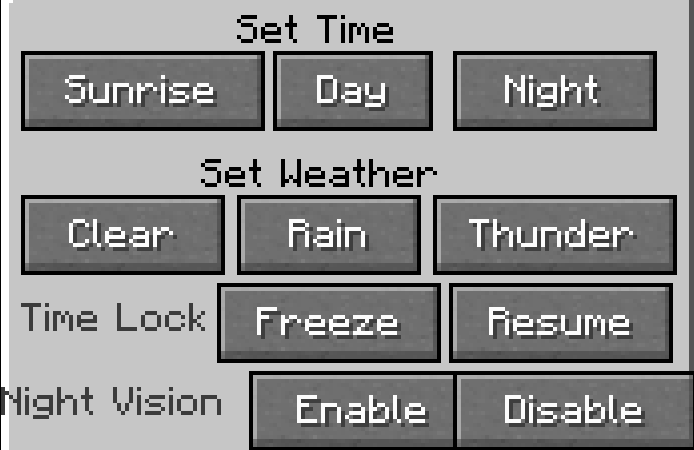
Press the P key to open the settings screen.
Supported Languages
- English (en_us)
- Japanese (ja_jp) [Note: Japanese is only available in version 1.2.1 and later.]
Known Issues
Due to a bug, Japanese may not be displayed correctly.
Requirements
- Fabric API (Required only for Fabric/Quilt versions)
Update Details (v1.2.0)
New features have been added:
- Fixed time settings
- Toggle night vision on/off
- Weather control
- Improved settings screen UI
A simple utility mod that lets you quickly change the time, weather, and night vision settings.
Key Features of Version 1.2.1
- You can change the time using keyboard shortcuts.
- You can use the GUI to change the time, lock the time, control the weather, and toggle night vision.
- A chat message will appear when you enable or disable features such as time locking or night vision. (Japanese only)
How to Use
- Press the U key to make it morning.
- Press the I key to make it daytime.
- Press the O key to make it nighttime.
Press the P key to open the settings screen.
Supported Languages
- English (en_us)
- Japanese (ja_jp) [Note: Japanese is only available in version 1.2.1 and later.]
Versions in which Japanese text is confirmed to display properly
- 1.20.1 v1.2.1
- 1.21.1 v1.2.1
Known Issues
- Due to a bug, Japanese may not be displayed correctly.
Requirements
- Fabric API (Required only for Fabric/Quilt versions)
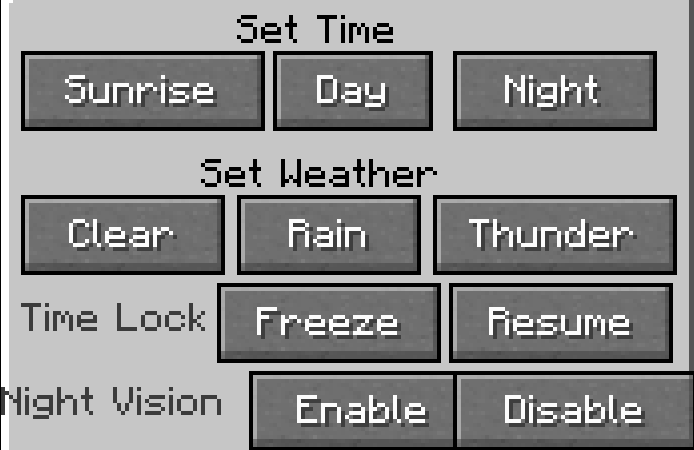
日本語
時間、天候、暗視設定を素早く変更できるシンプルなユーティリティMODです。
バージョン 1.2.1 の主な機能
- キーボードショートカットを使って時間を変更できます。
- GUIを使用して、時間の変更・固定、天候の制御、暗視の切り替えが可能です。
- 時間固定や暗視などの機能を有効または無効にすると、チャットメッセージが表示されます。(日本語のみ)
使い方
- U キーを押すと朝になります。
- I キーを押すと昼になります。
- O キーを押すと夜になります。
P キーを押すと設定画面が開きます。
対応言語
- 英語 (en_us)
- 日本語 (ja_jp) [注: 日本語はバージョン 1.2.1 以降でのみ利用可能です。]
日本語が正しく表示されることが確認されているバージョン
- 1.20.1 v1.2.1
- 1.21.1 v1.2.1
既知の問題
バグにより、日本語が正しく表示されない場合があります。 バグにより、日本語が正しく表示されない場合があります。 (大事なことなので2回言いました)
要件
- Fabric API (Fabric/Quilt版でのみ)
Screenshots
Gallery
Versions
Files
Relations
Project Relations
More like this
Similar Mods
Suggestions use data such as tags, dependencies, dependents, descriptions, titles, and more to rank how much they overlap with this mod.
On ModDex
Community snapshot
By the numbers
Statistics
Want to reach Minecraft players?
We're looking for a server hosting partner to feature here and other parts of the site. Interested? Send us a message!
Get in touchGet it on
Available Platforms
On ModDex
Community snapshot
By the numbers