
Community listing page, reviews may not be monitored by the author.
QuickControls

No reviews yet
A fast and intuitive radial menu for using your favorite items without moving them into your hotbar.

Community voices
Reviews
No reviews yet. Be the first to review this project!
Get it on
Available Platforms
Compatibility
Supported Environments
Runs entirely on the client. Works on vanilla servers.
About
Project Details
For authors
Embed Badge
If you're the author of this project, you can embed a live badge anywhere that supports HTML or Markdown. It updates automatically whenever ratings change.
Use HTML for any page that supports it, or Markdown for README files and Markdown-based descriptions.
Identifiers
Platform IDs
Resources
External Links
About
Description
Quick Controls
A fast and intuitive radial menu for using your favorite items without moving them into your hotbar.
Quick Controls adds a lightweight Pie Menu that lets you instantly use frequently needed items directly from your inventory. Simply bind an item once, then access it anytime with a single key.
Designed for players who want a cleaner hotbar and faster gameplay.
✨ Features
-
🎯 Radial (Pie) Menu
- Press the configured key to open a circular quick-access menu.
- Select a bound item with your mouse.
-
📦 9 Quick Bind Slots
- A dedicated binding panel appears on the right side of the inventory.
- Bind up to 9 different items.
-
⚡ Instant Item Usage
- Use bound items without manually moving them into your hotbar.
- Great for food, potions, tools, utility items, and more.
-
🪶 Lightweight
- Client-focused implementation.
- Minimal performance impact.
- Vanilla-style experience.
🎮 Default Controls
| Key | Action |
|---|---|
| Tab | Open the Pie Menu |
The key can be changed through Minecraft's Controls settings.
Right-click to unbind.
📖 How to Use
- Open your inventory.
- Locate the Quick Controls binding bar on the right side.
- Drag or assign items to any of the 9 binding slots.
- Close the inventory.
- Press Tab to open the Pie Menu.
- Move your cursor over the desired item and release/select to use it instantly.
💡 Perfect For
- Food
- Potions
- Buckets
- Ender Pearls
- Firework Rockets
- Utility Tools
- Any frequently used item
⚙ Requires:
📌 Notes
- Items must exist in your inventory to be used.
- Unsupported items will simply not activate.
- Bindings update automatically as your inventory changes.
🤝 Feedback
Found a bug or have a feature suggestion?
Feel free to open an issue or leave a comment on the Modrinth page.
Suggestions and contributions are always welcome!
❤️ Credits
Developed for players who want faster inventory interaction while keeping their hotbar clean.
Enjoy!
Screenshots
Gallery
-
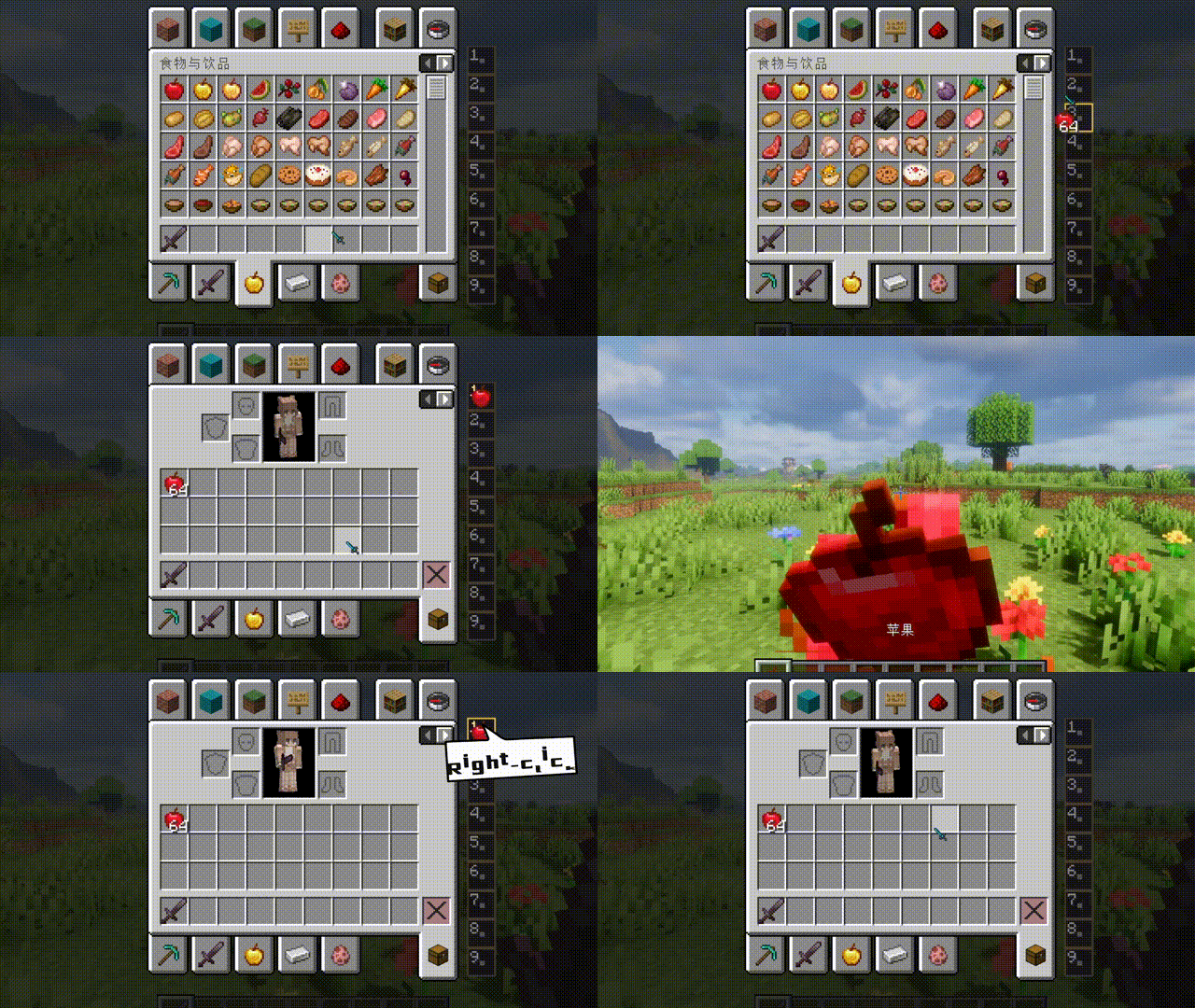 Use
Use
Versions
Files
Relations
Project Relations
More like this
Similar Mods
Suggestions use data such as tags, dependencies, dependents, descriptions, titles, and more to rank how much they overlap with this mod.
On ModDex
Community snapshot
By the numbers
Statistics

 (opens in a new tab)
Get it on
Available Platforms
On ModDex
Community snapshot
By the numbers
Statistics
Resources