
QuickEconomy
No reviews yet
An economy plugin for Minecraft servers running PaperMC.
Includes systems for trading and managing economies.
Paper is a fork of Spigot that adds its own plugin API on top of the Bukkit API. All Spigot plugins are compatible with paper, not all paper plugins are compatible with Spigot.
Community voices
Reviews
Click once to include, again to exclude, again to clear
No reviews yet. Be the first to review this project!
Get it on
Available Platforms
 Modrinth
Compatibility
Supported Environments
About
Project Details
For authors
Embed Badge
If you're the author of this project, you can embed a live badge anywhere that supports HTML or Markdown. It updates automatically whenever ratings change.
Use HTML for any page that supports it, or Markdown for README files and Markdown-based descriptions.
Identifiers
Platform IDs
About
Description
QuickEconomy
A lightweight economy plugin for Minecraft servers running PaperMC.
Version 1.2.1 is live!
Upgrade guide



Commands
Commands featured in this plugin:
Balance
The /balance command shows the player's balance.
Using subcommand send, players can send coins to other players.
Players with the corresponding permissions can use subcommand set, add och subtract to
modify the balance of themselves or any other specified player. Or do /bal list player to
see any players balance. When using SQL as storage method players can use the command /balance transactions
to see their past transactions.
Bal
The /bal command has the same functionality as /balance.
QuickEconomy
The /quickeconomy command displays helpful information about the plugin. This command also has some subcommands:
/quickeconomy setup shows your current plugin setup.
/quickeconomy migrate lets you migrate from file mode to SQL mode or the other way around.
/quickeconomy rollback lets you reset all balances and transactions to a past date and time. This only works in SQL mode.
Signs
This plugin modifies the behavior of the different signs.
Bank
With the corresponding permission placing or editing a sign that says
[BANK] on the first line creates a modified sign that functions as a bank.
Shop
Any player can make a shop by writing [SHOP] on the first line of a sign
that is placed on the side of a (non shop) chest. On the second line, first
write the prize for the shop, followed by a "/" and then what kind of shop it is.
There is two kind of shops, Item or Stack. In item shop you can only buy one
item at a time. In a stack shop, you buy however many items there is in the slot.
The second line could look like "10.5/Item" or "20/Stack".
The fourth line is optional, here you can add another player,
if you wish to share the income with them.
Permissions
quickeconomy.balance Allows the player to use the balance command and see their own balance. Default true
quickeconomy.balance.seeallAllows the player to see all players balances. Default false
quickeconomy.balance.modifyall Allows the player to modify all player balances. Default false
quickeconomy.help Allows the player to use the quickeconomy command and get a help message. Default true
quickeconomy.shop Allows the player to use shops. Default true
quickeconomy.shop.create Allows the player to create shops. Default true
quickeconomy.shop.destroyall Allows the player to remove all shops, not exclusively theirs. Default false
quickeconomy.bank Allows the player to use banks. Default true
quickeconomy.bank.create Allows the player to create banks. Default false
quickeconomy.bank.command Allows the player to open the bank with command. Default false
quickeconomy.bank.destroy Allows the player to destroy banks. Default false
quickeconomy.rollback Allows the player to perform rollback on transactions. Default false
quickeconomy.migrate Allows the player to migrate between file- and SQL-mode. Default false
quickeconomy.setup Allows the player to see the current plugin setup. Default false
Screenshots
Gallery
-
 Bank How a bank sign looks.
 -
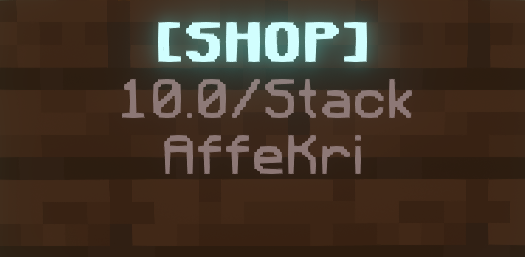 Shop sign How a shop sign looks.
Versions
Files
Relations
Project Relations
More like this
Similar Mods
Suggestions use data such as tags, dependencies, dependents, descriptions, titles, and more to rank how much they overlap with this mod.
On ModDex
Community snapshot
By the numbers
Statistics

Want to reach Minecraft players?
We're looking for a server hosting partner to feature here and other parts of the site. Interested? Send us a message!
Get in touchGet it on
Available Platforms
On ModDex
Community snapshot
By the numbers