Community listing page, reviews here may not be monitored by the author.
QuickNoteMax


No reviews yet
An in-game notepad — write coords, notes and more. Press N to open.

Community voices
Reviews
No reviews yet. Be the first to review this project!
Get it on
Available Platforms
Compatibility
Supported Environments
Runs entirely on the client. Works on vanilla servers.
About
Project Details
For authors
Embed Badge
If you're the author of this project, you can embed a live badge anywhere that supports HTML or Markdown. It updates automatically whenever ratings change.
Use HTML for any page that supports it, or Markdown for README files and Markdown-based descriptions.
Identifiers
Platform IDs
Resources
External Links
About
Description
📓 QuickNoteMax
Never lose your coords again. QuickNoteMax is a lightweight client-side mod that adds an in-game notepad — press N and start writing.
✨ Features
- Multi-page notepad — create as many pages as you need
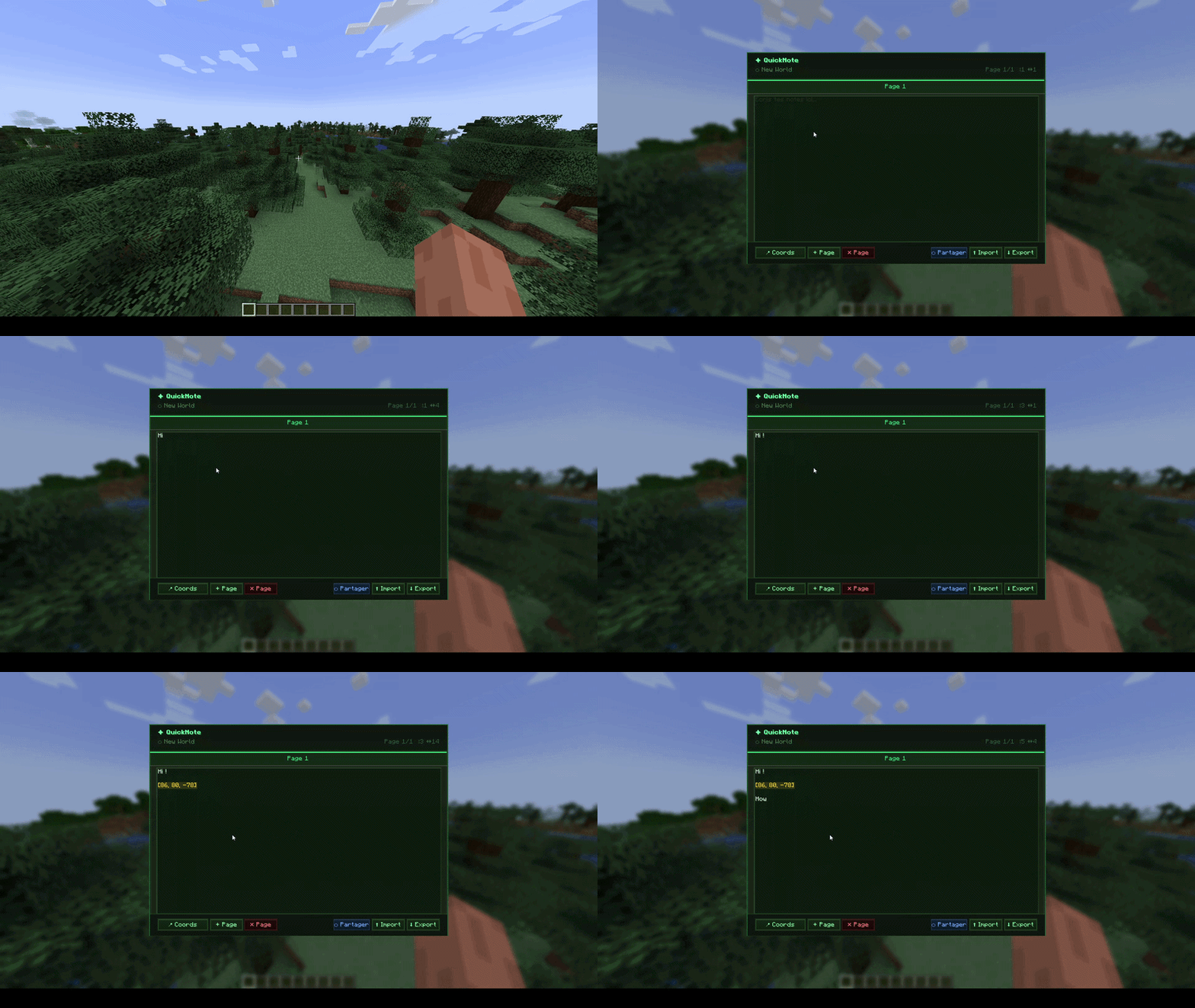
- 📍 Coords button — inserts your current X Y Z with one click
- Saved per world — notes are separate for each world and server
- Export to .txt — saves a file to your Desktop, path shown in chat
- Import from .txt — reimport a previously exported file
- Real multiline editor — use Enter for new lines, arrow keys, Home/End
- Keyboard shortcuts — Ctrl+A, Ctrl+C, Ctrl+V, Shift+arrows
- Client-side only — works on any server, no server install needed
- The game does not pause when the notepad is open
🎮 How to use
| Action | Result |
|---|---|
Press N |
Open QuickNote |
Enter |
New line |
📍 Coords button |
Insert current coordinates |
+ Page |
Add a new page |
✕ Page |
Delete current page |
Export |
Save .txt to Desktop + chat confirmation |
Import |
Load latest quicknote .txt from Desktop |
Ctrl+A |
Select all |
Ctrl+C / V |
Copy / Paste |
💾 Where are notes saved?
.minecraft/quicknote/<world_name>/notes.json
Each world and server has its own separate notes file.
📓 QuickNoteMax
Never lose your coords again. QuickNoteMax is an in-game notepad — press N and start writing. Share your notes with other players in real time.
✨ Features
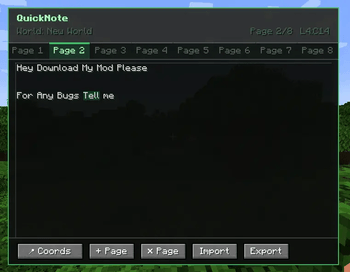
- Multi-page notepad — up to 8 pages with tabs
- 📍 Coords button — inserts your current X Y Z highlighted in gold
- Saved per world — notes are separate for each world and server
- Global pages — mark a page as global so it stays the same across all worlds and servers
- Export / Import .txt — saves to your Desktop, reimport anytime
- Auto-backup — notes are automatically backed up every 10 saves (last 5 kept)
- Full text editor — mouse selection, Home/End, Page Up/Down, word jump (Ctrl+Left/Right)
- Keyboard shortcuts — Ctrl+A, C, V, X, Z, Y — configurable in Options → Controls
- Undo / Redo — Ctrl+Z / Ctrl+Y, per page, up to 50 states
- Ctrl+F search — find text in your notes, highlighted in real time
- Color text — start a line with
/red,/green,/blue,/yellow… to color it - Page rename — double-click a tab to rename it
- Pin pages — pin a page to keep it at the front (gold block icon)
- Drag tabs — drag and drop to reorder your pages
- Real-time sharing — share a page with specific players on the server, they see your edits live
- Share notification — get a toast when someone shares a page with you
- Adaptive GUI — scales to your window size
- Does not pause the game when open
🎮 How to use
| Action | Result |
|---|---|
Press N |
Open QuickNote |
Enter |
New line |
📍 Coords |
Insert current coordinates (shown in gold) |
+ Page / ✕ Page |
Add / delete page |
| Double-click tab | Rename page |
| Drag tab | Reorder pages |
| Gold block button | Pin / unpin page |
| Lapis block button | Toggle global page |
⬡ Share |
Share current page with online players |
⬆ Import / ⬇ Export |
Load or save .txt on Desktop |
Ctrl+Z / Y |
Undo / Redo |
Ctrl+F |
Search in current page |
Ctrl+A |
Select all (configurable key) |
Ctrl+C / V / X |
Copy / Paste / Cut |
| Click & drag | Select text with mouse |
/red (start of line) |
Color that line red |
💾 Where are notes saved?
.minecraft/quicknote/<world_name>/notes.json
Global pages are saved in .minecraft/quicknote/global/notes.json
Backups are stored in .minecraft/quicknote/<world_name>/backups/
Each world and server has its own separate notes file.
🌐 Multiplayer sharing
The sharing feature requires both players to have the mod installed. It also requires the mod to be installed on the server if you're on a dedicated server (the server doesn't need to be modded otherwise — just Fabric with the mod in the mods folder).
Screenshots
Gallery
-
 Openned Menu.png
-
 QuickNoteMax Gui
Versions
Files
Relations
Project Relations
More like this
Similar Mods
Suggestions use data such as tags, dependencies, dependents, descriptions, titles, and more to rank how much they overlap with this mod.
On ModDex
Community snapshot
By the numbers
Statistics
 (opens in a new tab)
Get it on
Available Platforms
On ModDex
Community snapshot
By the numbers
Statistics
Resources