Community listing page, reviews here may not be monitored by the author.
QuickStack & Craft


No reviews yet
All-in-one inventory QoL mod combining quick stack, dump all, slot-based favorites, and craft-from-nearby-storage. Inspired by Terraria's inventory management.

Community voices
Reviews
No reviews yet. Be the first to review this project!
Get it on
Available Platforms
Compatibility
Supported Environments
Must be installed on both the client and the server.
About
Project Details
For authors
Embed Badge
If you're the author of this project, you can embed a live badge anywhere that supports HTML or Markdown. It updates automatically whenever ratings change.
Use HTML for any page that supports it, or Markdown for README files and Markdown-based descriptions.
Identifiers
Platform IDs
About
Description
QuickStack & Craft brings Terraria-style inventory management to Minecraft. Send items to nearby storage, restock supplies, protect important slots and craft using ingredients stored around you.
Use the inventory buttons immediately, or assign your own shortcuts. The showcase above covers the original release; the features below describe version 1.1.0.
Getting started
- Install the matching mod and dependencies on the server and participating clients.
- Put items in nearby chests or other supported storage, then open your inventory.
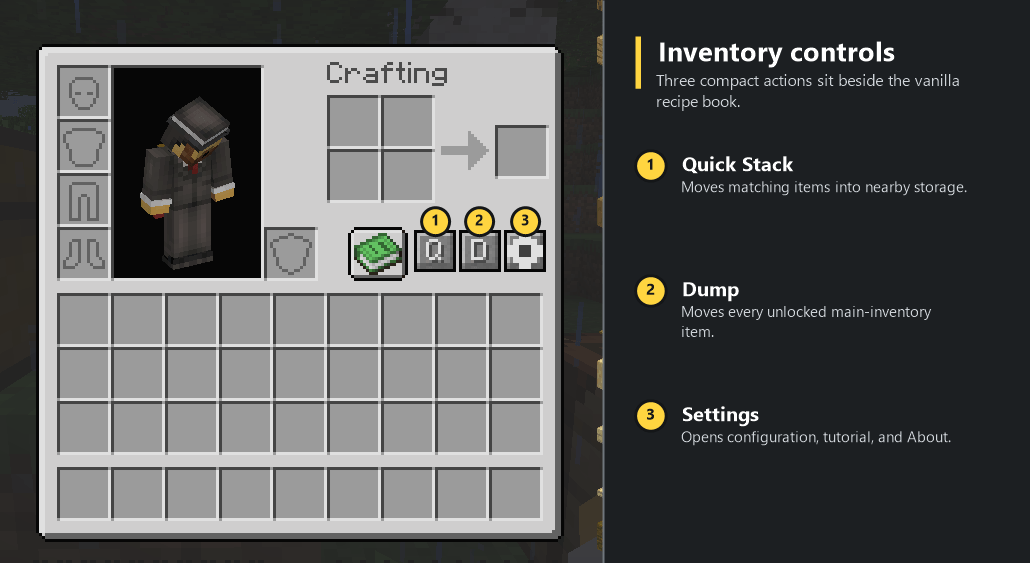
- Use Q to quick-stack matching items, R to restock partial stacks or D to dump unlocked items. These are on-screen buttons; keyboard shortcuts are unbound by default.
- Alt-left-click a player inventory slot to lock it. Locked slots are protected during transfers and nearby crafting.
- Use the recipe book, JEI or supported EMI recipe transfers to craft with ingredients from your inventory and nearby storage.
- Open the gear button for settings, or assign shortcuts under Options → Controls → Key Binds → QuickStack & Craft.
Features and controls
- Quick Stack sends matching items to storage that already contains them. Regular Quick Stack and Dump leave your hotbar alone. A separate hovered-stack shortcut can move just the stack under your cursor, including a hotbar stack.
- Restock fills existing unlocked inventory and hotbar stacks. It does not fill empty slots or introduce new item types.
- Dump moves unlocked items into eligible nearby storage with space. Items that do not fit stay where they are.
- Open-storage transfers let Quick Stack and Dump act directly on supported chests, barrels, shulker boxes and modded backpacks.
- Nearby crafting uses ingredients from your inventory and nearby containers. Hold Shift during recipe transfer to fill as many crafts as the available ingredients allow.
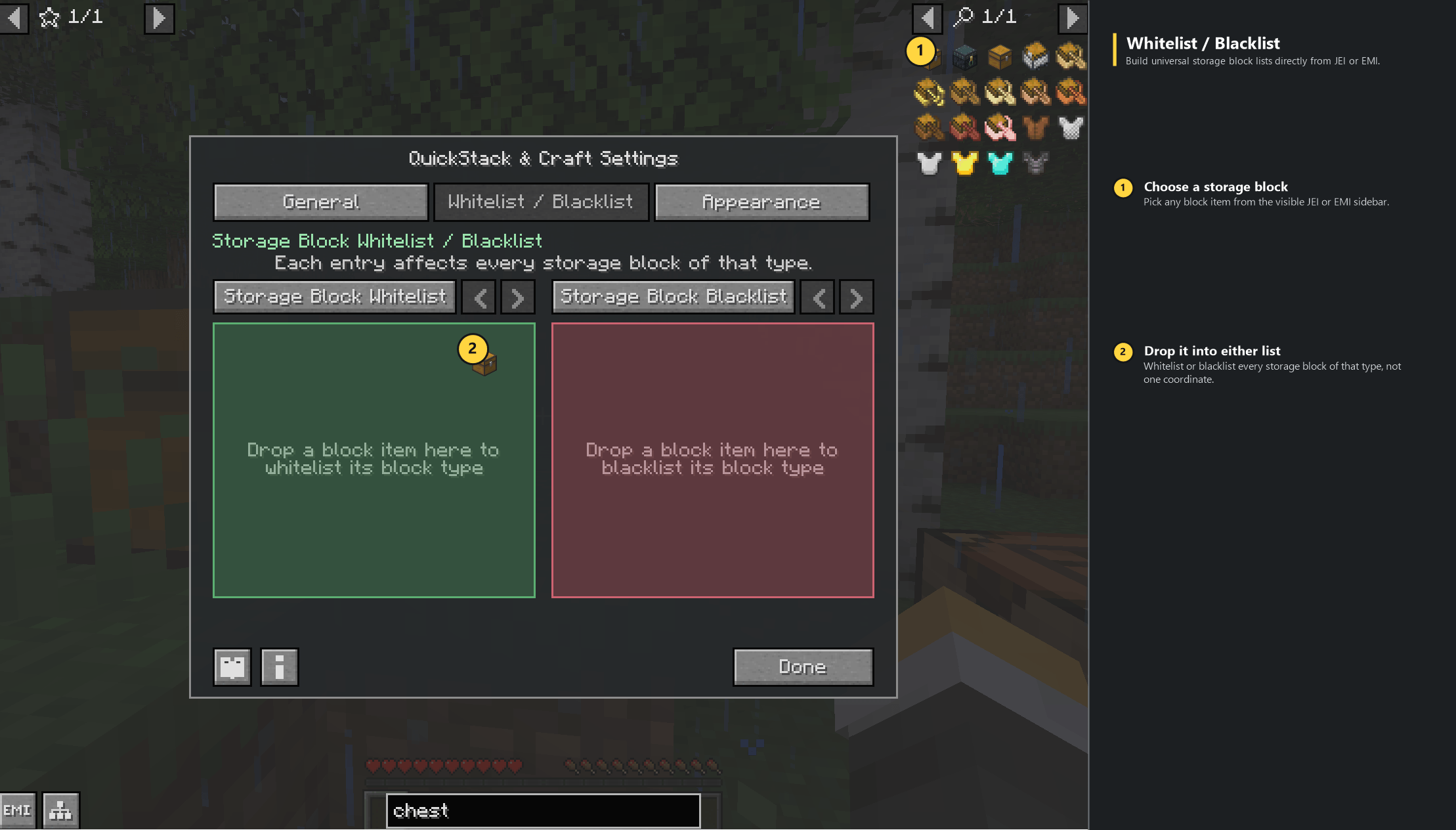
- Storage filters choose which block types can participate. Use the whitelist/blacklist controls, drag block items from JEI or supported EMI into the lists, or assign the block-filter cycling shortcut.
- Slot protection combines server-persisted native locks with optional ItemLocks protection. Native locks persist across sessions and death.
- Button settings let you hide or reposition inventory and open-storage controls independently. Keybinds remain available when buttons are hidden.
Visuals and in-game help
Successful transfers highlight the storage involved and show an action-bar result. Choose the destination outline color, opacity and duration; restock sources use cyan. Storage filter changes use both color and text.
The animated guide covers inventory actions, nearby crafting, storage filters and controls. Open it from the book in Settings, or hover an inventory button and hold your forward key, W by default. Pause, replay or drag the timeline to revisit a step. The guide also opens on the first inventory opening in each save or server.
Compatibility and multiplayer
Available for Minecraft 1.20.1 on Fabric and Forge, and 1.21.1 / 1.21.4 on Fabric and NeoForge. Use Java 17 for 1.20.1 and Java 21 for 1.21.x.
All builds require Architectury API. Fabric also requires Fabric API.
Optional integrations include JEI, EMI on supported versions, ItemLocks, Sophisticated Backpacks and other supported storage mods. The vanilla recipe book works without a recipe-viewer mod. Applied Energistics 2 and Refined Storage keep their own terminal workflows; there are no dedicated network-storage adapters.
Install on the server and participating clients for full functionality. Clients without the mod can connect, but do not get its controls or features. Item movement is handled by the server, and multiplayer storage-list changes are restricted to operators.
Modpacks and license
Modpacks may reference official CurseForge or Modrinth releases. Bundling, rehosting, modified releases, public forks and other redistribution currently require written permission under the QuickStackCraft Source Available License. Source availability does not make this an open-source license. Earlier releases retain the terms supplied with them.
Links and feedback
Player guide and controls · Report a bug · Source · Discord
Playtesters and feedback are welcome. For bug reports, include your Minecraft version, loader, mod version and steps to reproduce the issue.
All my other mods
- Field Emitters — Glowing forcefields, filtered doors and smart redstone tripwires.
- Flux Pylons — Wireless power for nearby machines, with upgrades and handheld network management.
Help me keep making mods
I develop and support these mods for free. If you enjoy them, consider throwing a little support my way. It helps me keep making new mods, adding features, fixing bugs and keeping up with Minecraft updates. Every bit helps, and I really appreciate it.
Buy Me a Coffee · Support me on Patreon
Disclaimers
This is an unofficial Minecraft mod, not affiliated with or endorsed by Mojang or Microsoft. Provided as is, without warranty, to the extent permitted by law. Third-party components retain their own licenses.
QuickStack & Craft brings Terraria-style inventory management to Minecraft. Send items to nearby storage, restock supplies, protect important slots and craft using ingredients stored around you.
Use the inventory buttons immediately, or assign your own shortcuts. The showcase above covers the original release; the features below describe version 1.1.0.
Getting started
- Install the matching mod and dependencies on the server and participating clients.
- Put items in nearby chests or other supported storage, then open your inventory.
- Use Q to quick-stack matching items, R to restock partial stacks or D to dump unlocked items. These are on-screen buttons; keyboard shortcuts are unbound by default.
- Alt-left-click a player inventory slot to lock it. Locked slots are protected during transfers and nearby crafting.
- Use the recipe book, JEI or supported EMI recipe transfers to craft with ingredients from your inventory and nearby storage.
- Open the gear button for settings, or assign shortcuts under Options → Controls → Key Binds → QuickStack & Craft.
Features and controls
- Quick Stack sends matching items to storage that already contains them. Regular Quick Stack and Dump leave your hotbar alone. A separate hovered-stack shortcut can move just the stack under your cursor, including a hotbar stack.
- Restock fills existing unlocked inventory and hotbar stacks. It does not fill empty slots or introduce new item types.
- Dump moves unlocked items into eligible nearby storage with space. Items that do not fit stay where they are.
- Open-storage transfers let Quick Stack and Dump act directly on supported chests, barrels, shulker boxes and modded backpacks.
- Nearby crafting uses ingredients from your inventory and nearby containers. Hold Shift during recipe transfer to fill as many crafts as the available ingredients allow.
- Storage filters choose which block types can participate. Use the whitelist/blacklist controls, drag block items from JEI or supported EMI into the lists, or assign the block-filter cycling shortcut.
- Slot protection combines server-persisted native locks with optional ItemLocks protection. Native locks persist across sessions and death.
- Button settings let you hide or reposition inventory and open-storage controls independently. Keybinds remain available when buttons are hidden.
Visuals and in-game help
Successful transfers highlight the storage involved and show an action-bar result. Choose the destination outline color, opacity and duration; restock sources use cyan. Storage filter changes use both color and text.
The animated guide covers inventory actions, nearby crafting, storage filters and controls. Open it from the book in Settings, or hover an inventory button and hold your forward key, W by default. Pause, replay or drag the timeline to revisit a step. The guide also opens on the first inventory opening in each save or server.
Compatibility and multiplayer
Available for Minecraft 1.20.1 on Fabric and Forge, and 1.21.1 / 1.21.4 on Fabric and NeoForge. Use Java 17 for 1.20.1 and Java 21 for 1.21.x.
All builds require Architectury API. Fabric also requires Fabric API.
Optional integrations include JEI, EMI on supported versions, ItemLocks, Sophisticated Backpacks and other supported storage mods. The vanilla recipe book works without a recipe-viewer mod. Applied Energistics 2 and Refined Storage keep their own terminal workflows; there are no dedicated network-storage adapters.
Install on the server and participating clients for full functionality. Clients without the mod can connect, but do not get its controls or features. Item movement is handled by the server, and multiplayer storage-list changes are restricted to operators.
Modpacks and license
Modpacks may reference official CurseForge or Modrinth releases. Bundling, rehosting, modified releases, public forks and other redistribution currently require written permission under the QuickStackCraft Source Available License. Source availability does not make this an open-source license. Earlier releases retain the terms supplied with them.
Links and feedback
Player guide and controls · Report a bug · Source · Discord
Playtesters and feedback are welcome. For bug reports, include your Minecraft version, loader, mod version and steps to reproduce the issue.
All my other mods
- Field Emitters — Glowing forcefields, filtered doors and smart redstone tripwires.
- Flux Pylons — Wireless power for nearby machines, with upgrades and handheld network management.
Help me keep making mods
I develop and support these mods for free. If you enjoy them, consider throwing a little support my way. It helps me keep making new mods, adding features, fixing bugs and keeping up with Minecraft updates. Every bit helps, and I really appreciate it.
Buy Me a Coffee · Support me on Patreon
Disclaimers
This is an unofficial Minecraft mod, not affiliated with or endorsed by Mojang or Microsoft. Provided as is, without warranty, to the extent permitted by law. Third-party components retain their own licenses.
Screenshots
Gallery
-
 01-inventory-controls-annotated.png 01-inventory-controls-annotated.png
 -
 02-settings-general-emi-annotated.png 02-settings-general-emi-annotated.png
 -
 03-whitelist-drag-drop-annotated.png 03-whitelist-drag-drop-annotated.png
 -
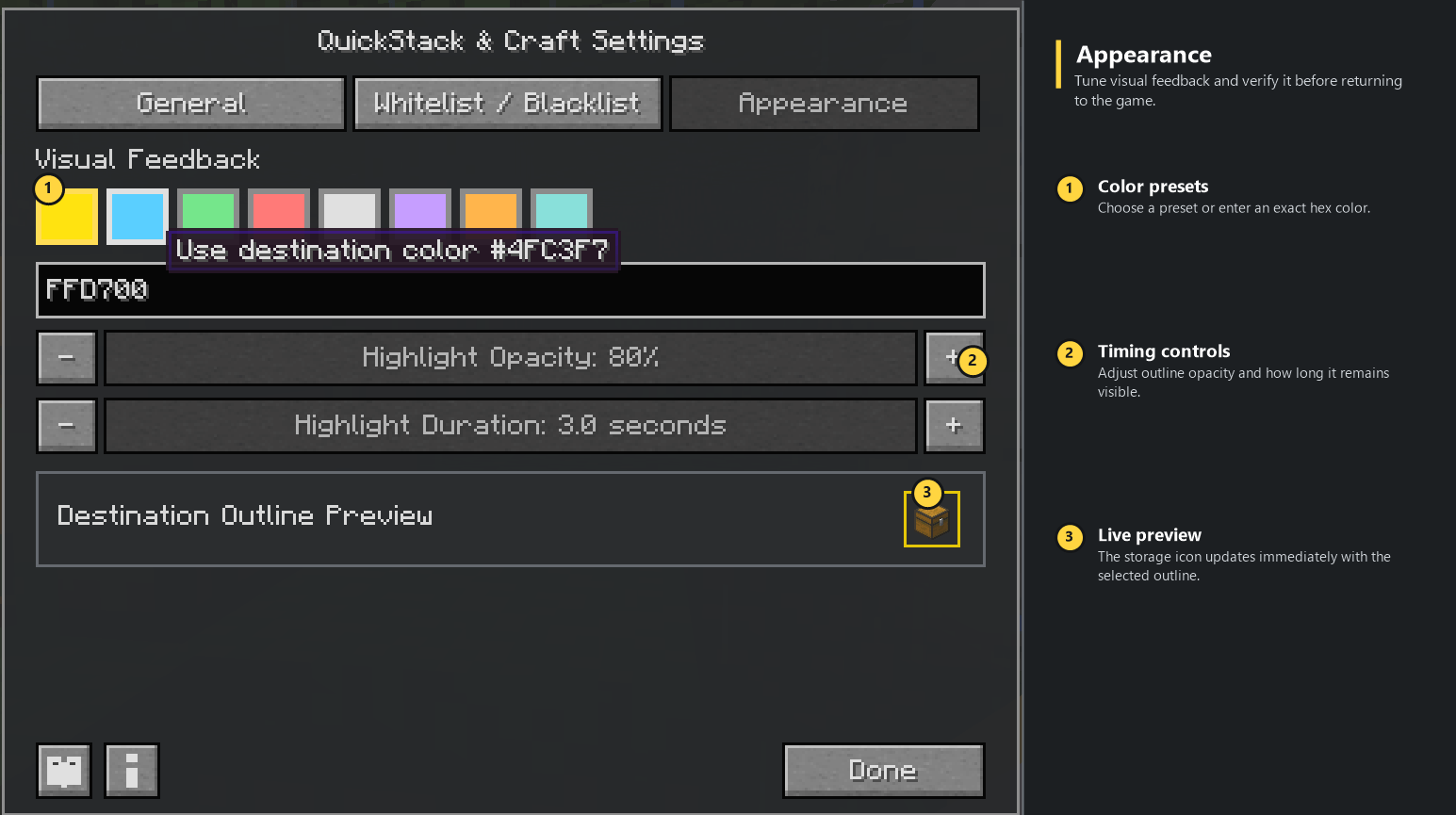 05-appearance-preview-annotated.png 05-appearance-preview-annotated.png
-
-
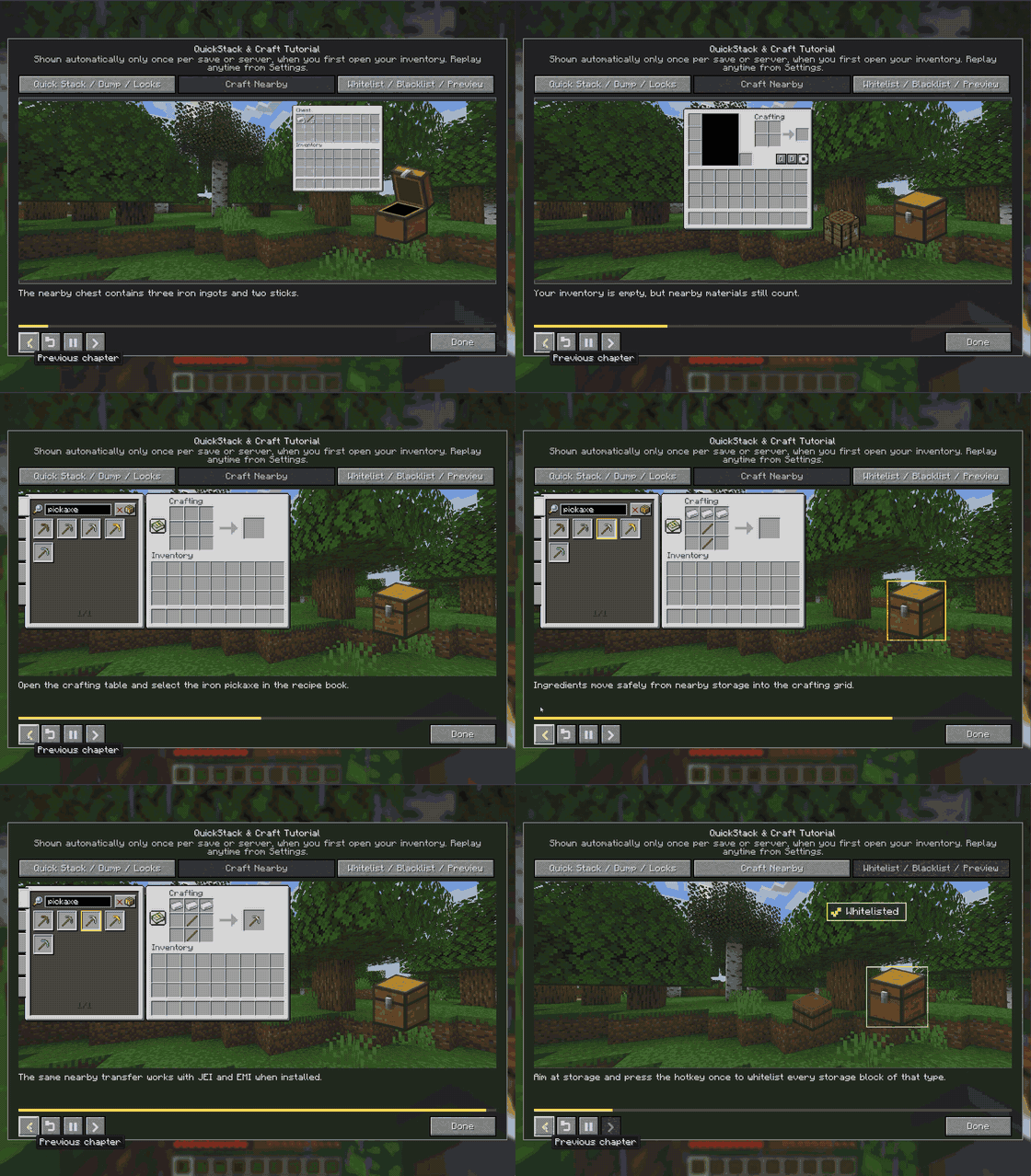 Animated Tutorial Replayable in-game tutorial.
 -
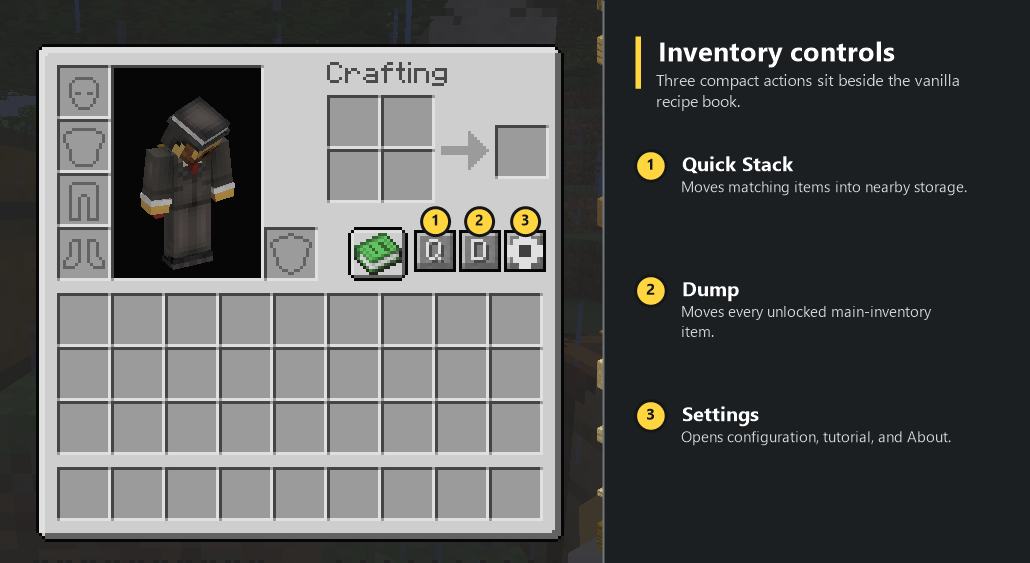 Quick Stack, Dump, and Settings Q, D, and Settings controls.
 -
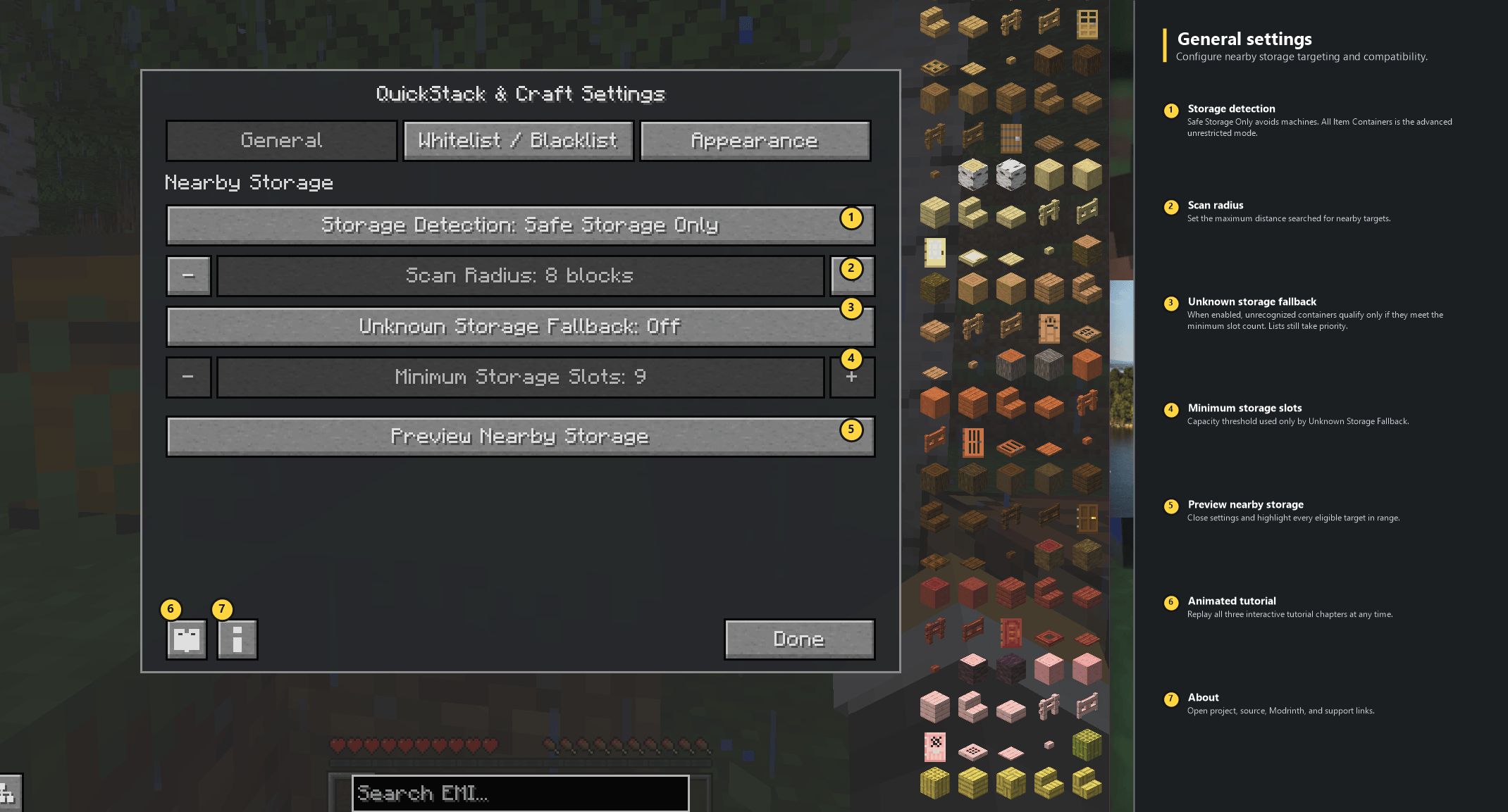
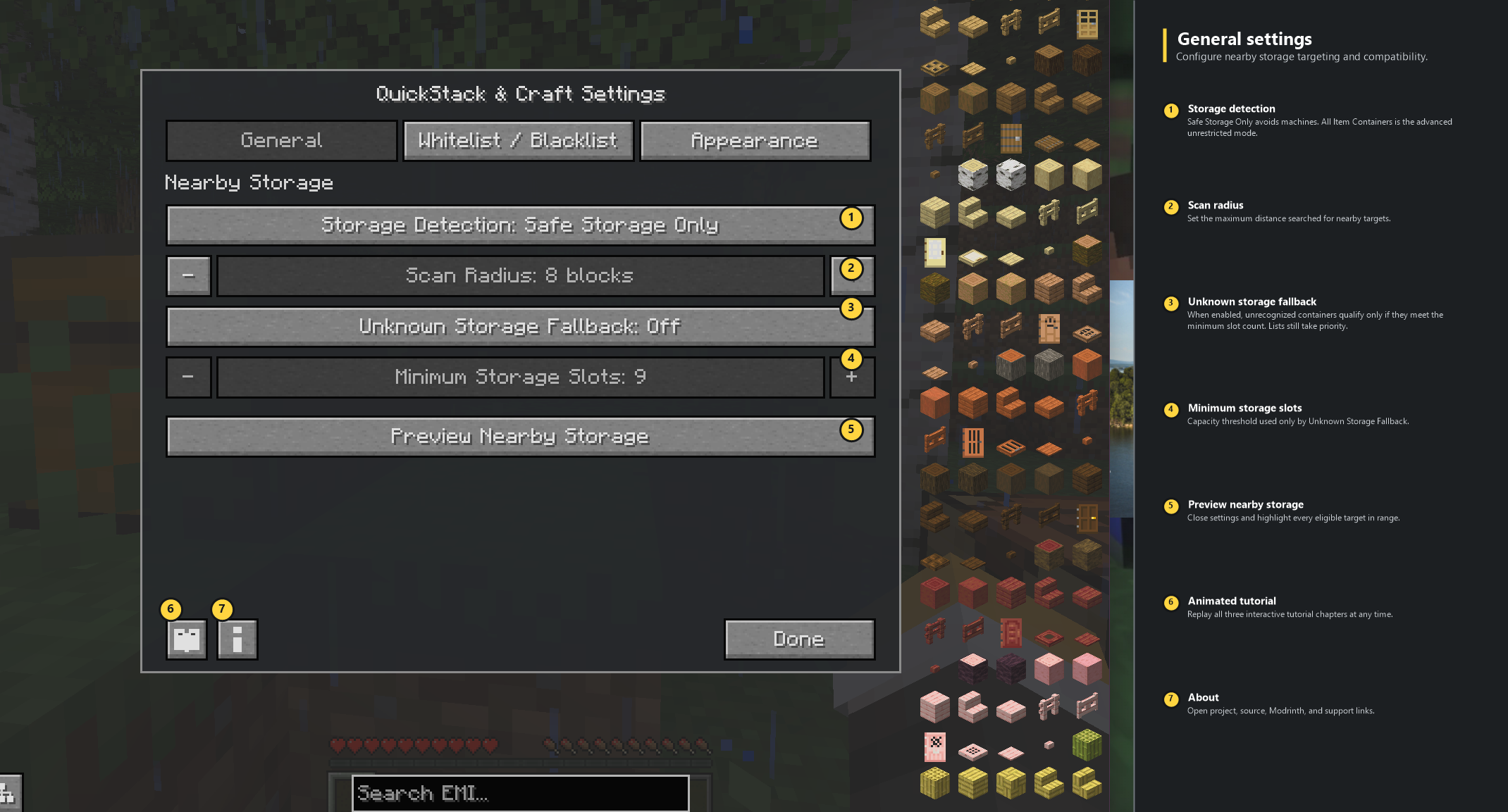 General Storage Settings Configure safe storage detection, scan range, compatibility fallback, previews, tutorial access, and project links.
 -
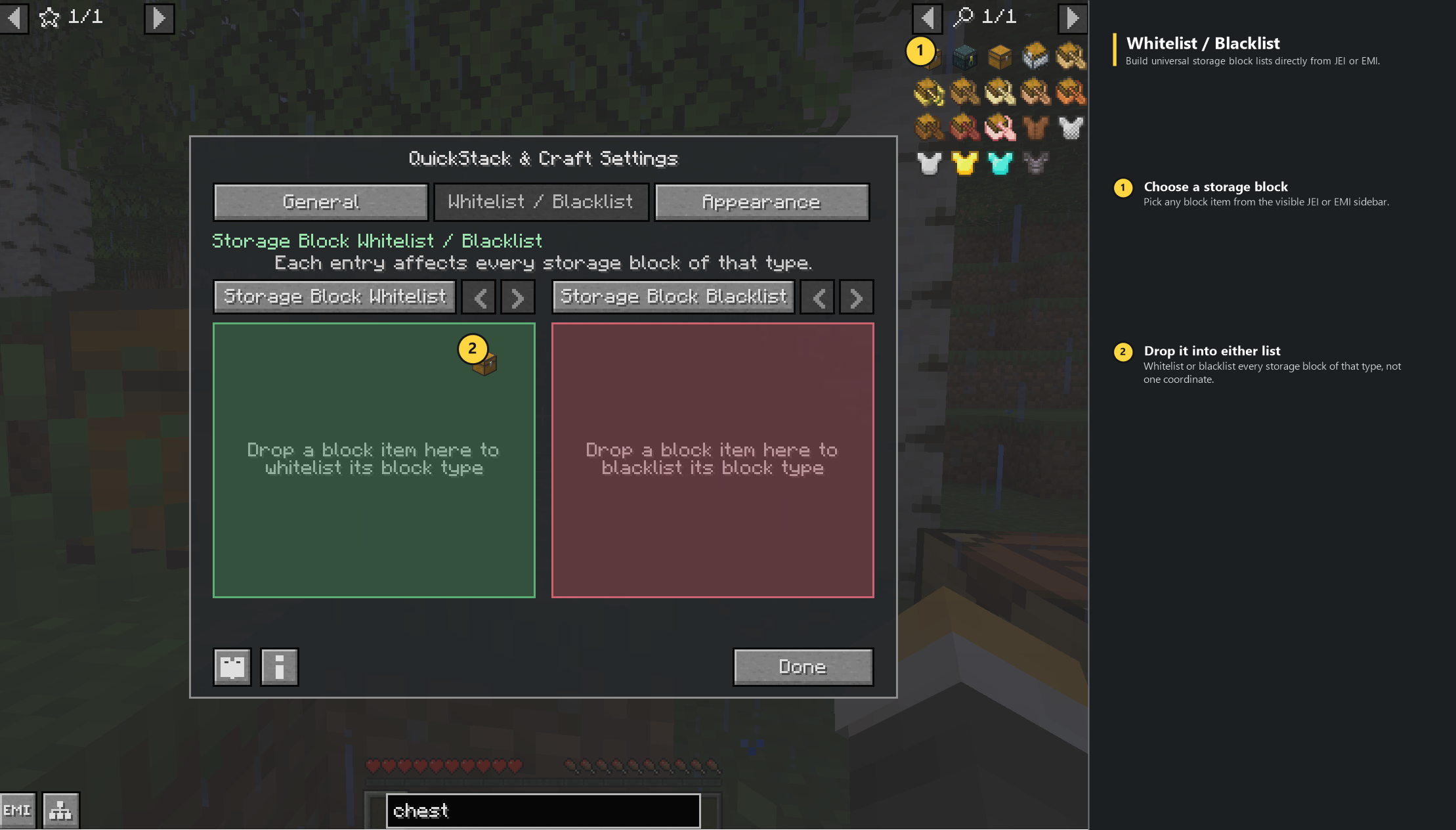 JEI and EMI Whitelist Drag-and-Drop Drag a storage block from JEI or EMI into the universal Storage Block Whitelist or Blacklist.
 -
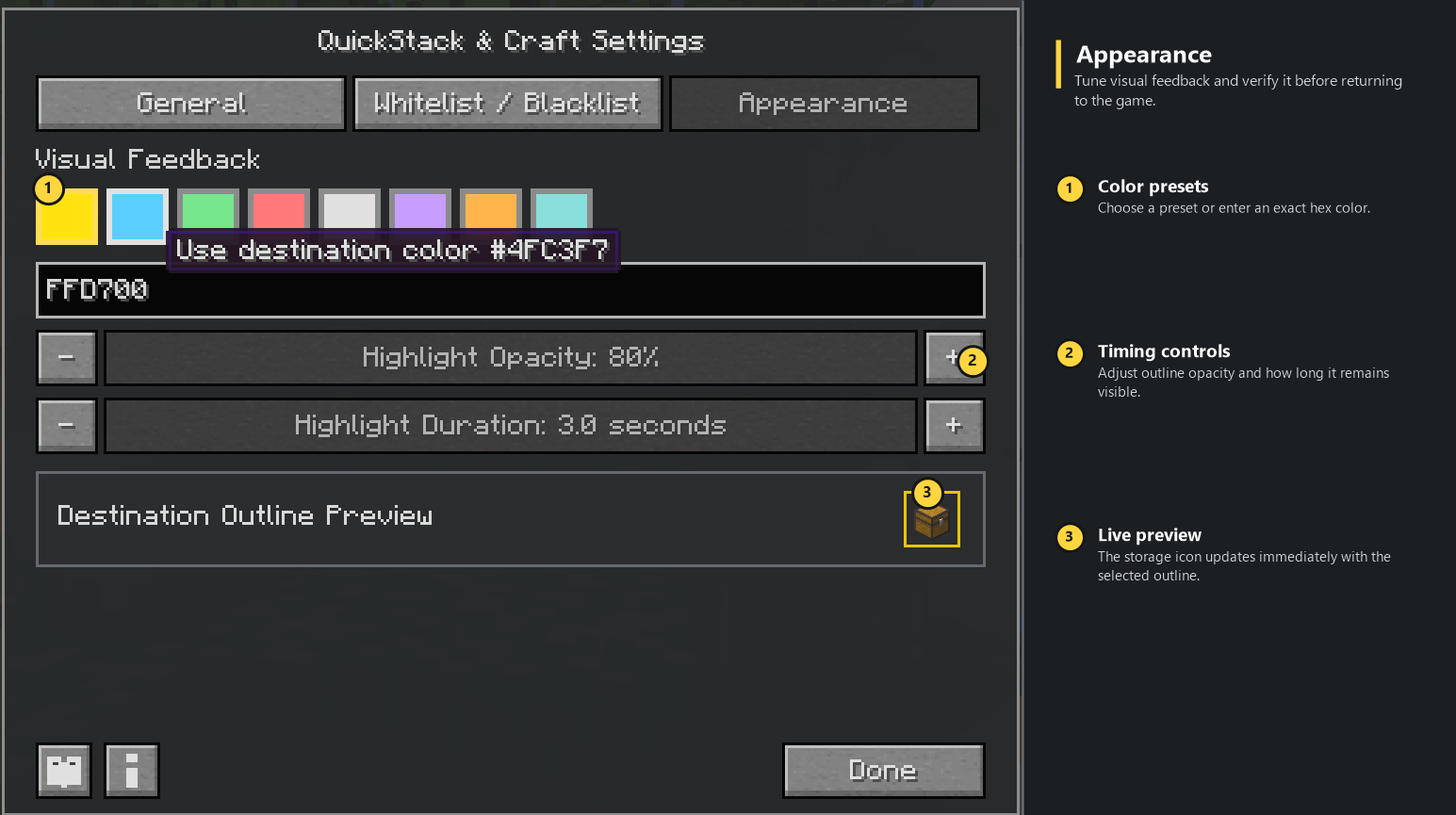 Destination Outline Appearance Choose destination color, opacity, and duration with an immediate in-game preview.
 -
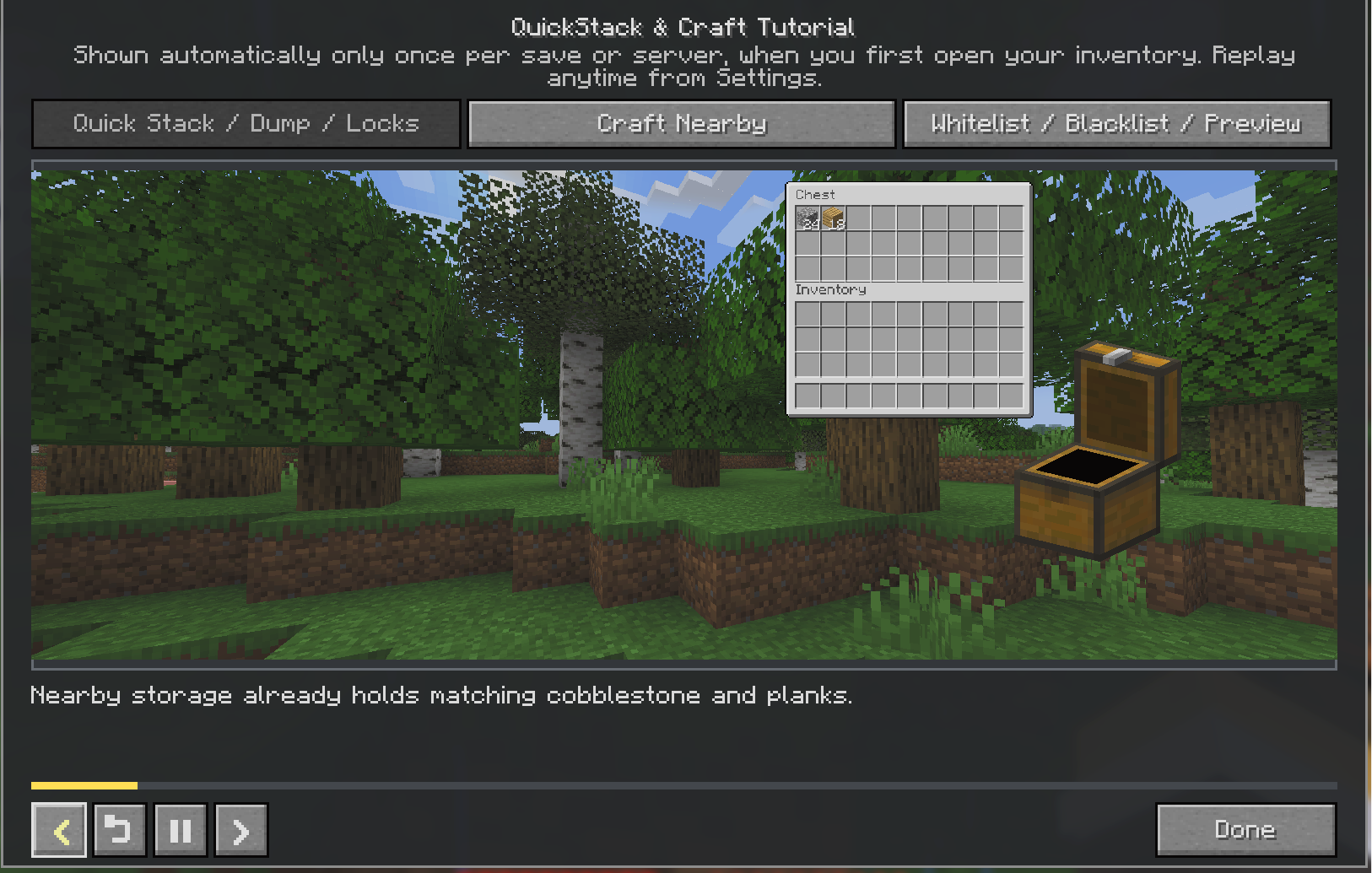 One-Time In-Game Tutorial Three replayable chapters demonstrate inventory management, nearby crafting, and storage targeting.
Versions
Files
Relations
Project Relations
More like this
Similar Mods
Suggestions use data such as tags, dependencies, dependents, descriptions, titles, and more to rank how much they overlap with this mod.
On ModDex
Community snapshot
By the numbers
Statistics
 (opens in a new tab)
Get it on
Available Platforms
On ModDex
Community snapshot
By the numbers