

RadioFM
A radio everyone nearby hears: plays on its own or through Simple Voice Chat or Plasmo Voice. YouTube, SoundCloud, Dropbox, Discord and direct links. Carry it in hand or place it on a block
No ratings yet
Be the first to rate it.
Community listing page
Community listing page, reviews may not be monitored by the author.

Community voices
Reviews
No reviews yet. Be the first to review this project!
Get it on
Available Platforms
Compatibility
Supported Environments
Must be installed on both the client and the server.
About
Project Details
For authors
Embed Badge
If you're the author of this project, you can embed a live badge anywhere that supports HTML or Markdown. It updates automatically whenever ratings change.
Use HTML for any page that supports it, or Markdown for README files and Markdown-based descriptions.
Identifiers
Platform IDs
About
Description
A radio everyone nearby hears. It plays on its own or through a voice chat mod
Sources. YouTube, SoundCloud, Dropbox, Discord and direct file links. Track lists load from a .txt or .m3u file
Using it. Craft a radio or get one with /radiofm give. Right click switches it on, shift and right click opens the settings. It works in hand and on a block. Shift with the mouse wheel sets the range, ctrl makes the step finer. The radio screen shows the playing track, and the arrows next to a track move it up or down the queue
Voice mods. None are needed: without them the radio plays through its own channel, with a volume slider in the radio screen and the track name in the subtitles. With Simple Voice Chat or Plasmo Voice installed, pick which one to use with /radiofm choice
For servers. /radiofm ban takes radios away from a player entirely. The game rules radiofm:max and radiofm:maxRadius cap how many radios one player may run and how far they carry; everything else is in config/radiofm-server.toml. Links are checked: a radio will not reach addresses inside the server's network
Source code and the full documentation are on GitHub
Радио, которое слышат все вокруг. Играет само или через мод голосового чата
Источники. YouTube, SoundCloud, Dropbox, Discord и прямые ссылки на файлы. Список треков можно загрузить файлом .txt или .m3u
Как пользоваться. Скрафтить радио или получить командой /radiofm give. ПКМ - включить, Shift+ПКМ - настройки. Работает и в руке, и на блоке. Shift с колесом мыши меняет слышимость, с Ctrl - точнее. В окне радио видно играющий трек, а стрелками рядом с треком его можно двигать по очереди
Голосовые моды. Не обязательны: без них радио играет через свой канал, с ползунком громкости в окне радио и названием трека в субтитрах. Если стоит Simple Voice Chat или Plasmo Voice, какой использовать, выбирается командой /radiofm choice
Для серверов. /radiofm ban закрывает игроку доступ к радио целиком. Гейм-рулы radiofm:max и radiofm:maxRadius ограничивают число радио на игрока и дальность звука, остальное - в config/radiofm-server.toml. Ссылки проверяются: внутренние адреса сервера радио не откроет
Исходный код и подробное описание - GitHub
Screenshots
Gallery
-
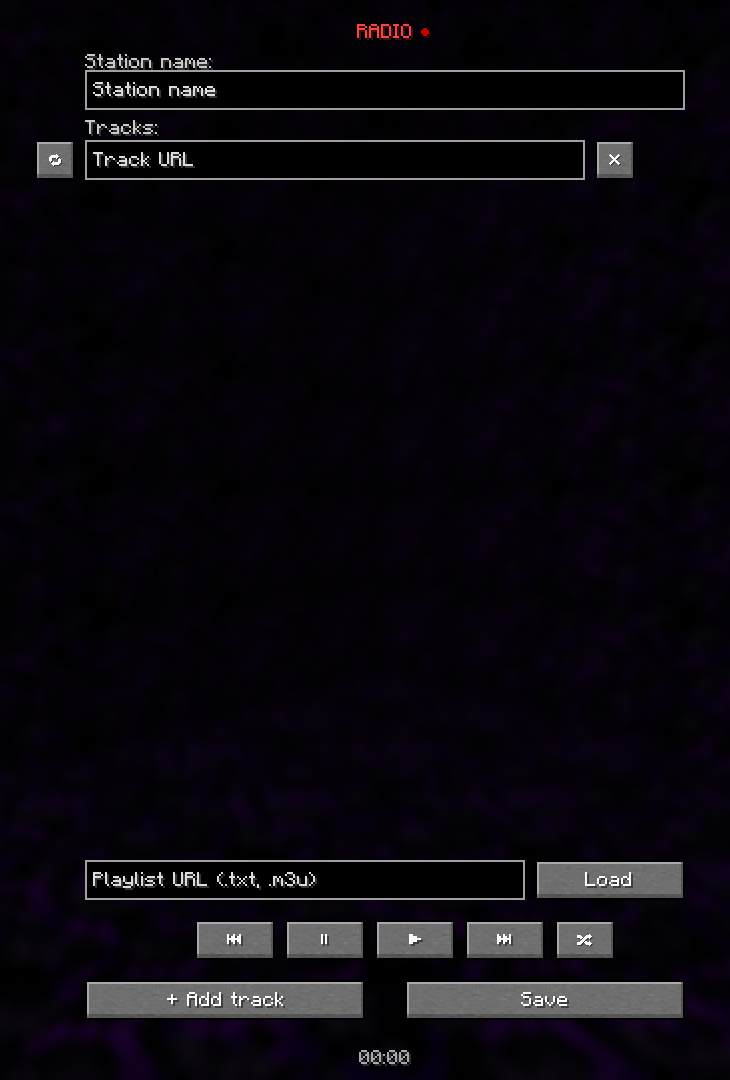 GUI menu
Versions
Files
Relations
Project Relations
More like this
Similar Mods
Suggestions use data such as tags, dependencies, dependents, descriptions, titles, and more to rank how much they overlap with this mod.
Stats
- Downloads
- 1k
- Used in
- 0 modpacks
- Followers
- 0
- In stacks
- 0
- Created
- Last synced
-
Oct 31, 2026 8:30 AM UTC
New file updates sync automatically.
When ModDex last fully re-synced this project from CurseForge or Modrinth. A new file release triggers a resync usually within minutes, and every project is also re-synced on a schedule. Edits that don't ship a file, such as a new description or screenshots, are checked every few hours and can appear before this date changes.
How syncing works
External Links

Stats
- Downloads
- 1k
- Used in
- 0 modpacks
- Followers
- 0
- In stacks
- 0
- Created
- Last synced
-
Oct 31, 2026 8:30 AM UTC
New file updates sync automatically.
When ModDex last fully re-synced this project from CurseForge or Modrinth. A new file release triggers a resync usually within minutes, and every project is also re-synced on a schedule. Edits that don't ship a file, such as a new description or screenshots, are checked every few hours and can appear before this date changes.
How syncing works