RandomMOTD
No reviews yet
Make your server pop from the multiplayer window with a randomized Message of the Day
Fabric is a mod loader for versions 1.14+ of Minecraft, particularly popular for client side and optimization mods.
Community voices
Reviews
Click once to include, again to exclude, again to clear
No reviews yet. Be the first to review this project!
Get it on
Available Platforms
 Modrinth
Compatibility
Supported Environments
About
Project Details
For authors
Embed Badge
If you're the author of this project, you can embed a live badge anywhere that supports HTML or Markdown. It updates automatically whenever ratings change.
Use HTML for any page that supports it, or Markdown for README files and Markdown-based descriptions.
Identifiers
Platform IDs
Resources
External Links
About
Description

RandomMOTD ~ Make your server pop from the multiplayer window!
Server Side Mod: Does not need installation on client; compatible with vanilla clients!
Minecraft Servers have a few precious options available to them to display information on the multiplayer screen--the most important of which are the Server icon and the MOTD, or 'Message of the Day', the two lines of text underneath the server's name giving a descriptor. The problem is, with the MOTD being static, a player may simply not care about what is being displayed as it's typically just the server's name plus a mediocre announcement.
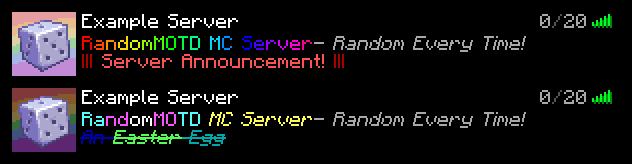
With RandomMOTD, a new MOTD picked randomly from a list can be sent to the player upon each refresh of the multiplayer screen. This can be used in a variety of ways: you could change the styling of the server's name on every refresh, add easter eggs below the server's name, or cycle through various server announcements. In the config MOTDs are a list of lists of strings: each MOTD sent to the client picks a random MOTD from each sublist and concatenates them together. This enables servers to include both static information and randomized information, such as having the server name on the top line and an easter egg on the bottom line.
In addition, RandomMOTD uses the PlaceholderAPI library by Patbox which allows better custom styling including custom color codes and gradients, and in a future update access to information on the server such as Player Count and TPS.
Finally, RandomMOTD also has one more optional feature: randomized server icons. These are off by default, but allow for multiple server icons that are updated with every refresh. These can be used to create variants of the server icon, or just full-on randomized pictures. There is no limit to the amount of MOTDs and icons one can add.
Config
The Config file, found in `./config/random_motd.json`, includes 4 options. The config can be reloaded by running the `/reload` command ingame. (Does not modify the vanilla `/reload` command, just hooks on to it).-
"motds": A list of lists of possible MOTDs. The mod will pick a random MOTD from every part of the list and concatenate them, producing a full MOTD. This feature is mainly so, if you would like to contain a static part of information independent from a random one, you can. -
"use_randomized_icons": A boolean either enabling or disabling the randomized icon feature. Defaults tofalse. -
"icons": A list of paths to server icons. Much like default server icons, they must be 64x64 PNG images. -
"log_when_loaded": A boolean telling whether or not to log for every reload. On by default. -
"CONFIG_VERSION_DO_NOT_TOUCH_PLS": Mod version--please do not touch it.
Example
Two refreshes of the server with a randomized MOTD and Server Icon
Originally created for my private SMP, but I figured more people may want to use it
Screenshots
Gallery
Versions
Files
Relations
Project Relations
More like this
Similar Mods
Suggestions use data such as tags, dependencies, dependents, descriptions, titles, and more to rank how much they overlap with this mod.
On ModDex
Community snapshot
By the numbers
Statistics

Want to reach Minecraft players?
We're looking for a server hosting partner to feature here and other parts of the site. Interested? Send us a message!
Get in touchGet it on
Available Platforms
On ModDex
Community snapshot
By the numbers
Statistics
Resources