
Community listing page, reviews here may not be monitored by the author.

Community voices
Reviews
No reviews yet. Be the first to review this project!
Get it on
Available Platforms
About
Project Details
For authors
Embed Badge
If you're the author of this project, you can embed a live badge anywhere that supports HTML or Markdown. It updates automatically whenever ratings change.
Use HTML for any page that supports it, or Markdown for README files and Markdown-based descriptions.
Identifiers
Platform IDs
Resources
External Links
About
Description
Rechanted is a mod that increases the depth of the minecraft enchanting system by making enchanting cost not only XP but also resources.
It motivates players to value resources and XP in any stage of the game. Enchantments are now divided into rarities, and the enchanting table creates a random book from the chosen tier that can apply directly to its respective gear. Rechanted is highly configurable, so you can tweak the loot pools and resource costs for obtaining enchantments to your liking.
It also introduces a plethora of new custom enchantments, special gem items, visual effects, and advancements for a full suite of engaging features to make enchanting an intersting grind!
Lets Begin!
We highly recommend you follow the advancements and explore the mod in game. If you want to learn more about the mod before jumping in, then please keep reading for a straight forward breakdown!
How To Enchant 101
Upon crafting and placing an enchanting table you will notice it looks lifeless. To get it to work, smack it with an emerald. Then, you must charge your enchanting table. Place a 3x3 grid of the resource block for the tier you are targeting. Next, ensure you fulfil the bookshelf requirments. Lastly, insert some lapiz then your table will spring to life!
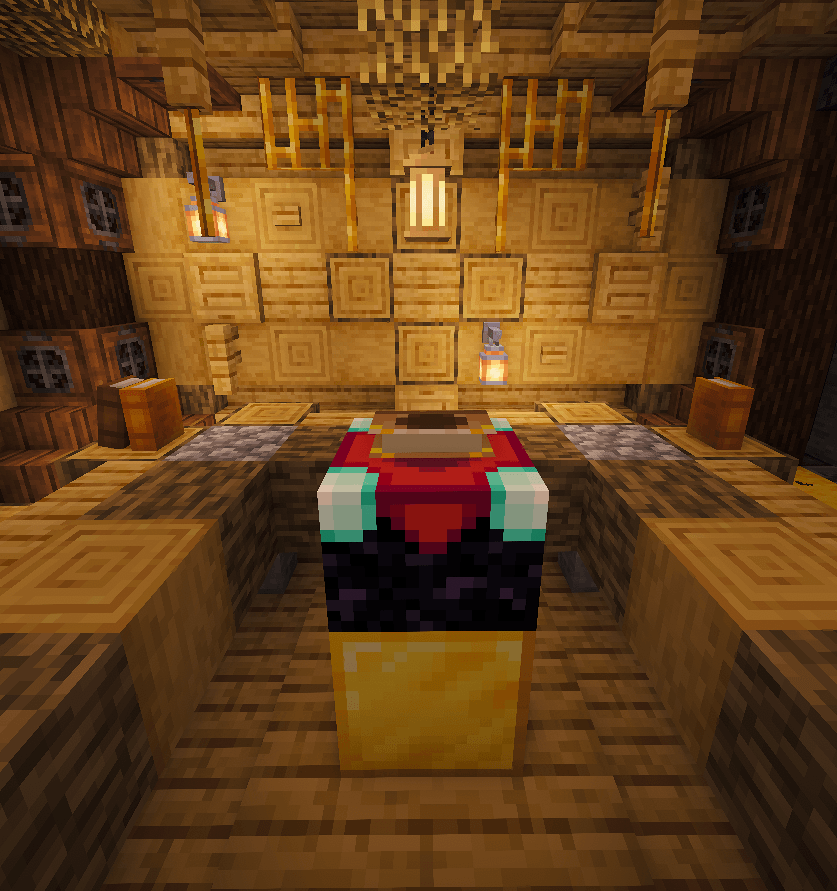
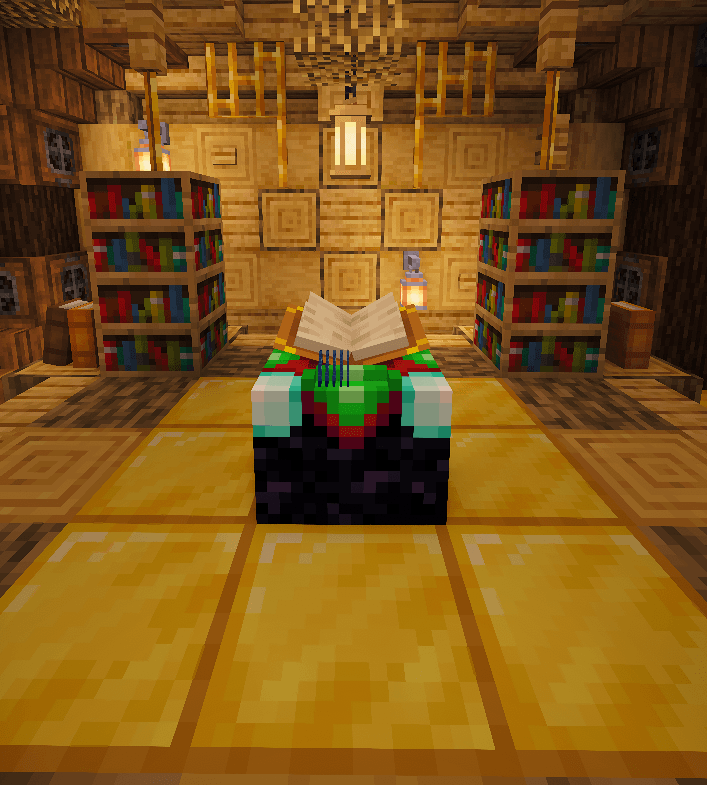
(Pro Tip: you may want to build multiple enchanting tables for each tier to avoid breaking and placing floor blocks over and over to swap tiers!)
Rechanted overhauls enchanting such that every enchanting table "hit" now directly generates an enchanted book that contains a random enchantment from the chosen rarity. Each hit costs experience, consumes lapis, and has a tiny chance to destroy the bookshelves or floor blocks currently charging the table. These costs increase with each rarity and are listed in the enchanting menu when hovering over a book. You can even view the full loot tables, the odds of getting each enchantment/level, as well as an enchantment descripiton!
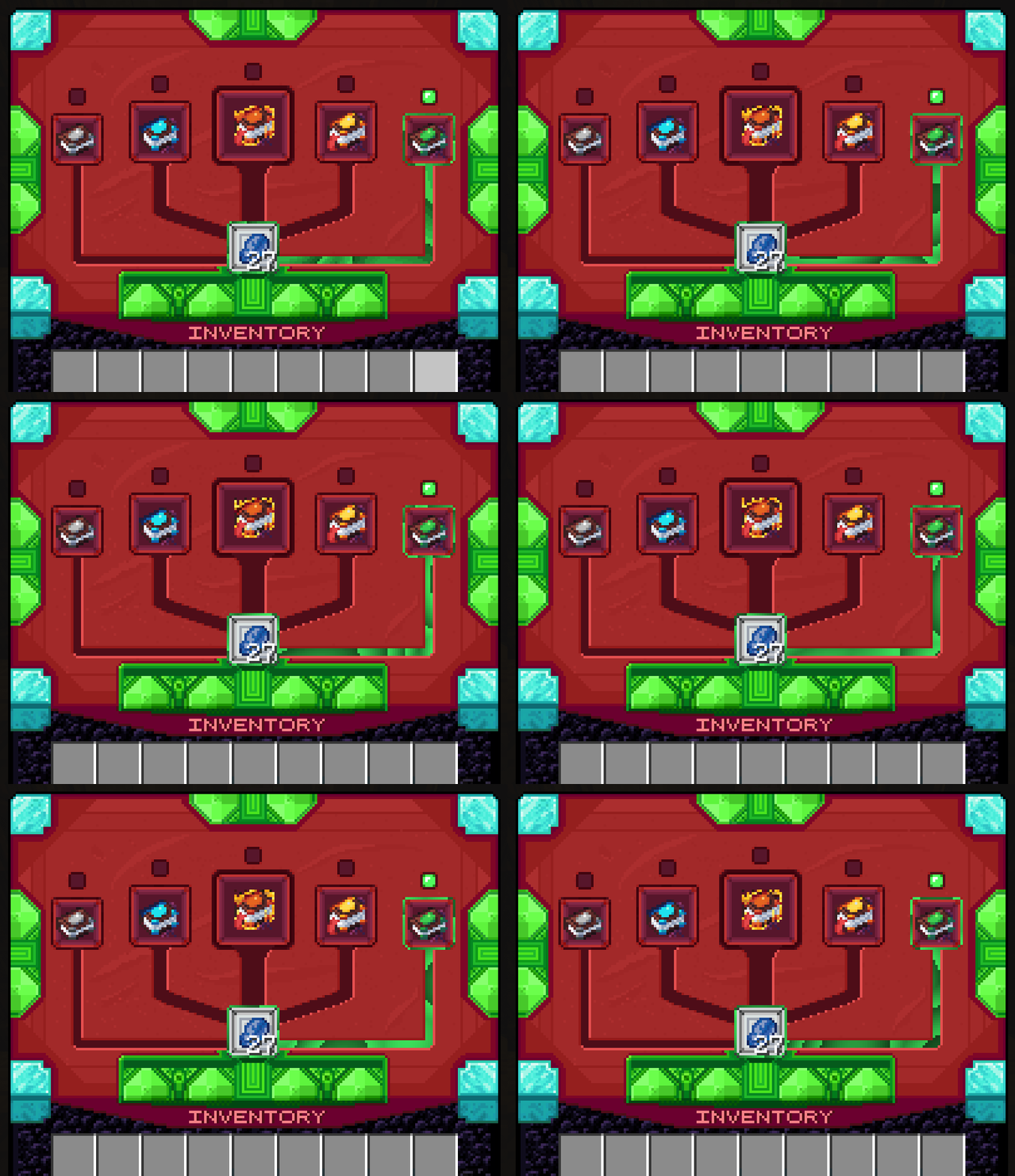
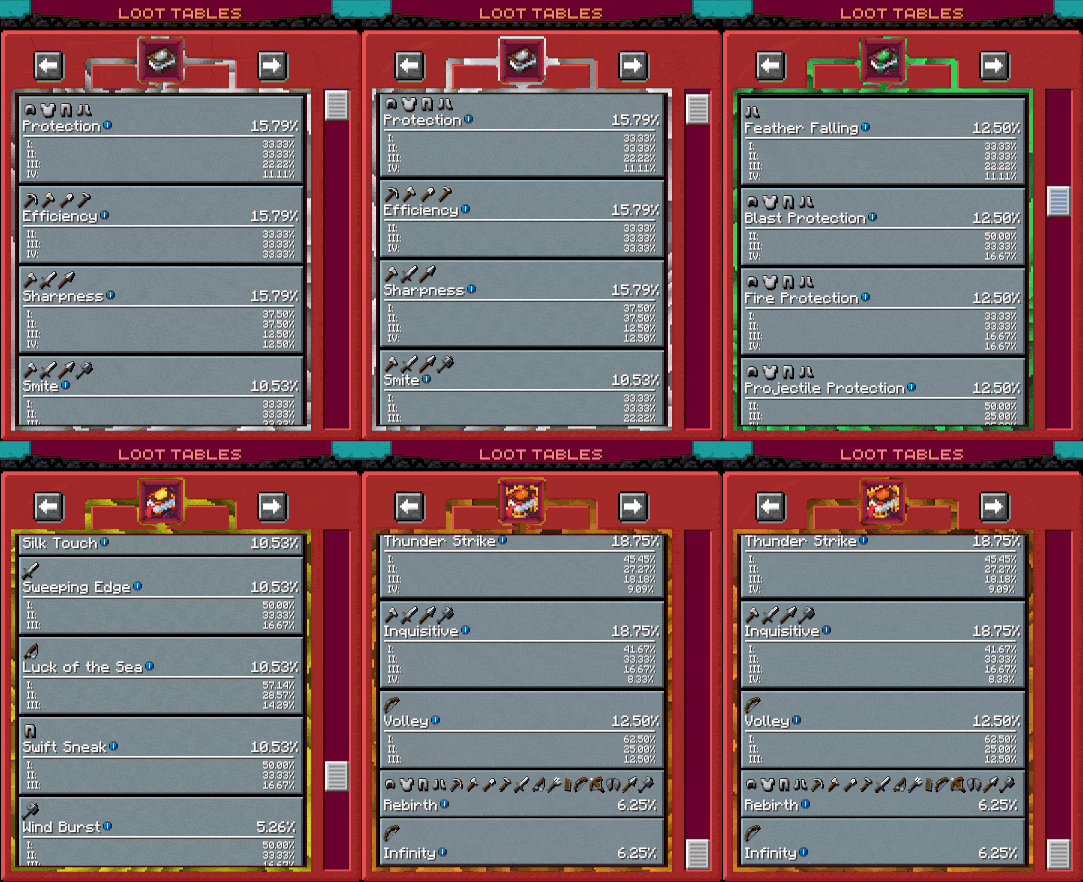
These new enchanted books can also spawn randomly from loot in the world, replacing all that mediocre enchanted gear you otherwise don't need. Yes, the loot from all structures, fishing, or anything is now more than likely a book you can actually use. This encourages world exploration and improves the potential usefulness of any random loot you find.
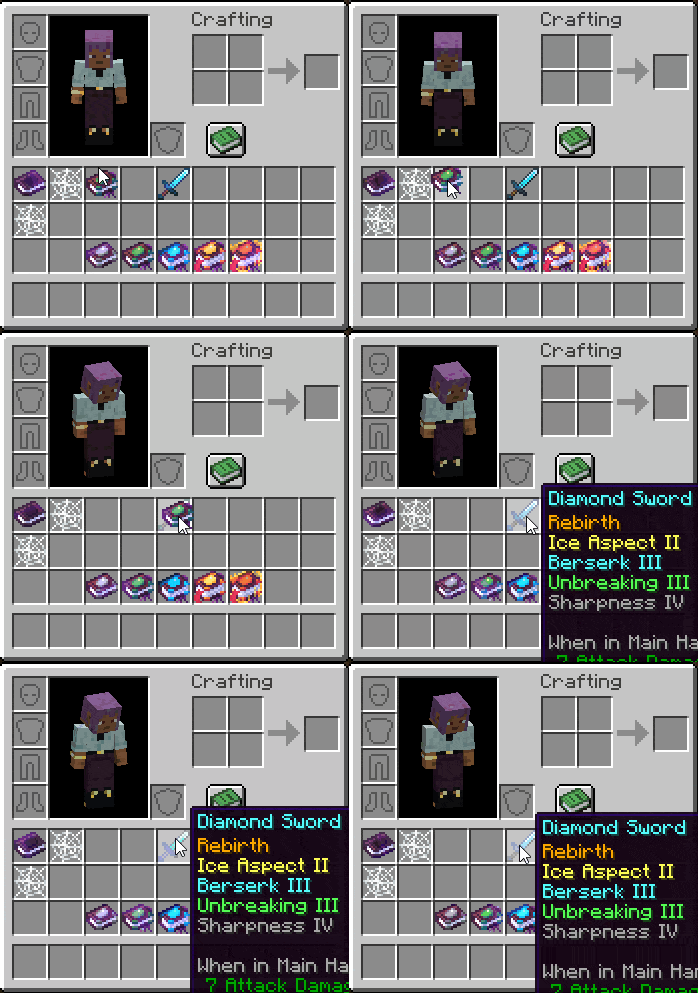
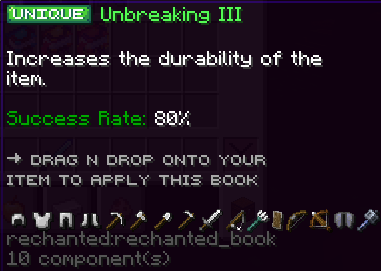
These books are also special in that you do not need to merge them onto gear with an anvil. Instead, you can directly apply the book onto the gear item of choice with no XP cost. You can also upgrade the level of enchantments on existing gear by applying the same enchantment of equal level to it (ex. Apply Sharpness III to a sword that already has Sharpness III and it will upgrade to Sharpness IV). Be careful, though! Each book comes with a random chance for whether or not it will actually apply. If that roll of the dice fails, then the book is lost forever!
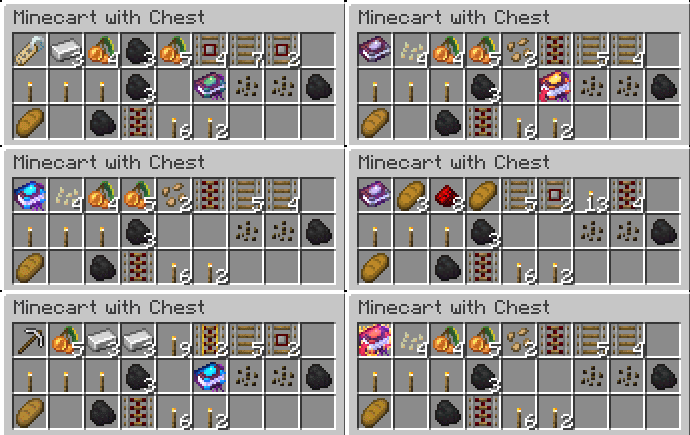
Finally, with a system like this, it's natural to find duplicates or otherwise unwanted books. These can be traded with friends of course, but if you don't have any, you can store them for later or place them into a grindstone to get back some resources you may have lost! Epic!!
Configuration
What makes this mod so great is that its highly configurable. We strongly encourage you to tweak settings if anything does not fit your playstyle or preferences. The default config leans more into randomness and grind such that XP and most minerals are always desired and valuable to obtain. This may not be your cup of tea, and that's okay!
Configurable properties include but are not limited to:
- Enchantments found in each rarity's loot pool. This can be used to, say, put Mending in Legendary tier (it is not in any tier in our default config). Enchantments from other mods can be added as well, which makes Rechanted perfect for modpacks!
- Amount of experience, number of bookshelves, and block type required for each enchantment rarity
- Chance of each individual bookshelf or floor block breaking after each enchantment (Either can be set to 0% to essentially disable the mechanic).
- Minimum and maximum % success rate that books of each rarity can spawn with (Setting both to 100% will essentially disable this mechanic).
- World drop spawn weight for each rarity. This applies when books replace enchanted gear/vanilla books in chests and other loot sources, and determines which book rarity is chosen
- Experience amount and items received from each book rarity when placing them into a grindstone
- Chance of receiving something shiny… Spin the table for yourself to eventually find out more!
- … and much more.
New Enchantments
Here's a list of the new enchantments we've added. Some of these are common ideas in mods that add enchantments, so make sure there's no conflicts if you config Rechanted with those!
- Bash - Knockback and damage attackers when blocking with a shield. Increases shield durability.
- Spring - Sneak for a short time to charge a powerful jump that consumes some hunger.
- Reach - Increases block interaction range with the applied tool.
- Berserk - When reaching low health, become enraged and deal extra damage for a short time.
- Hell's Fury - Greatly increase damage to mobs while in The Nether.
- Void's Bane - Greatly increase damage to mobs while in The End.
- Wisdom - Increases EXP dropped from mined ores.
- Courage - Gain a burst of speed upon blocking an attack. Increases shield durability
- Timber - Harvest many adjacent logs when mining wood.
- Vein Miner - Harvest entire veins of ore.
- Ice Aspect - Targets are slowed for a short time when attacked.
- Telekinesis - Item drops gravitate towards you.
- Blitz - Land many rapid hits to build an escalating combo of increasing damage.
- Overload - Increases maximum health.
- Thunder Strike - Chance to summon lightning when striking targets.
- Inquisitive - Increases EXP dropped from killed mobs.
- Volley - Chance to shoot multiple arrows when firing a bow. Does not consume extra arrows.
- Rebirth - Brings your item back from death with a reset to repair cost.
Finally, here's a guide for how to add enchantments from other mods or generally modify loot pools for a rarity. If you're familiar with making modpacks, configs, and resource packs, some of this may be redundant, but we'll be thorough just in case:
1.) Add/remove the enchantment in the desired tier in the config file "rechanted-common.toml" (this file doesn't generate until the mod is run for the first time; it will be in your modpack's config directory and not in a subfolder). Each echantment tier has its own set of similar config values. Look for "enchantments" list under the tier you want to modify.
2.) If adding an enchantment, make sure you correctly format it as: "enchantment-name|weight|level-range|level-weights". It must be enclosed in quotation marks, each of the named values should be separated by a | symbol, and the whole thing must have comma at the end (unless it's the last value in the list). The default config already defines all the loot pools this way, so you can use that as an example. Just in case, here is a clarification of all the required values
- Enchantment is the name the enchantment is registered with, in the format mod_id:enchantment_name (Ex. minecraft:sharpness or rechanted:rebirth)
- Weight is the rng value used to determine the drop rate of that enchantment within its rarity. The chance of that enchantment dropping once the game determines it will drop that rarity is weight / (sum of ALL enchantment weights in that rarity). If all weights are one, each enchantment is equally probable
- Level-range is the range of levels of that enchantment that can drop. This should be formatted as minimum-maximum. This range is fully inclusive, meaning the min, max and all values between will be obtainable. If the enchantment has no levels (ex. infinity or rebirth), set the value to 1.
- Level-weights are the rng values used for each individual level defined in level-range. You must define a comma separated value for ALL possible levels within the range you defined! Each weight works just like the regular weight value but only when that enchantment is dropped; the chance of a level dropping is level weight / (sum of all level weights for that enchantment). If all weights are 1, each level is equally probable.
3.) If you're adding/modifying pools using just enchantments from Rechanted or vanilla Minecraft up to 1.21.1, you are done. However, if you are adding enchantments from other mods, you should do one more step for each modded enchantment which will give it a description on the Loot Tables screen. This requires using a resource pack. Explaining how to make one is redundant since there are existing guides on how to do this. However, you DO need to know that you have to target assets/rechanted/lang/en_us.json in your resource pack to add a description. Then, you have to create an entry in the format: "enchantment.mod_id.enchantment_name.desc": "This is my custom enchantment description!", where mod_id is the registered id of the mod it's from, and enchantment_name is the registered enchantment name. (ex. Let's say I'm adding an enchantment called 'Speedy' from a mod called 'CoolEnchantments' or something. The registered enchantment name would likely be "cool_enchantments:speedy". So, the final definition for a custom description would be "enchantment.cool_enchantments.speedy.desc": "Increases the player's running speed."). Also, the "Incompatible with" list is automatically generated; you do not need to add that yourself!
Footnote: Given the current landscape of modding and software and that this is a make-or-break aspect for some, we figure it's worth mentioning that Rechanted was not created with the use of AI coding agents (A.K.A vibe coding). We promise this mod was made with care and is high quality! ❤
Screenshots
Gallery
Versions
Files
Relations
Project Relations
More like this
Similar Mods
Suggestions use data such as tags, dependencies, dependents, descriptions, titles, and more to rank how much they overlap with this mod.
On ModDex
Community snapshot
By the numbers
Statistics
Want to reach Minecraft players?
We're looking for a server hosting partner to feature here and other parts of the site. Interested? Send us a message!
Get in touchGet it on
Available Platforms
On ModDex
Community snapshot
By the numbers
Statistics
Resources