
Community listing page, reviews here may not be monitored by the author.

Community voices
Reviews
No reviews yet. Be the first to review this project!
Get it on
Available Platforms
Compatibility
Supported Environments
Required on the server. Installing it on the client adds functionality.
About
Project Details
For authors
Embed Badge
If you're the author of this project, you can embed a live badge anywhere that supports HTML or Markdown. It updates automatically whenever ratings change.
Use HTML for any page that supports it, or Markdown for README files and Markdown-based descriptions.
Identifiers
Platform IDs
Resources
External Links
About
Description
Recipe Helper
Recipe Helper is a Minecraft mod that adds the /recipe_helper command, allowing you to dynamically manage crafting recipes while the game is running.
All subcommands require permission level 2 (i.e., default OP privileges).
📖 New Version (>1.0)
The mod has been completely rewritten. Old recipes from versions ≤1.0 are not compatible with this new version. Recipes are now generated in standard JSON format instead of the old custom format.
Commands
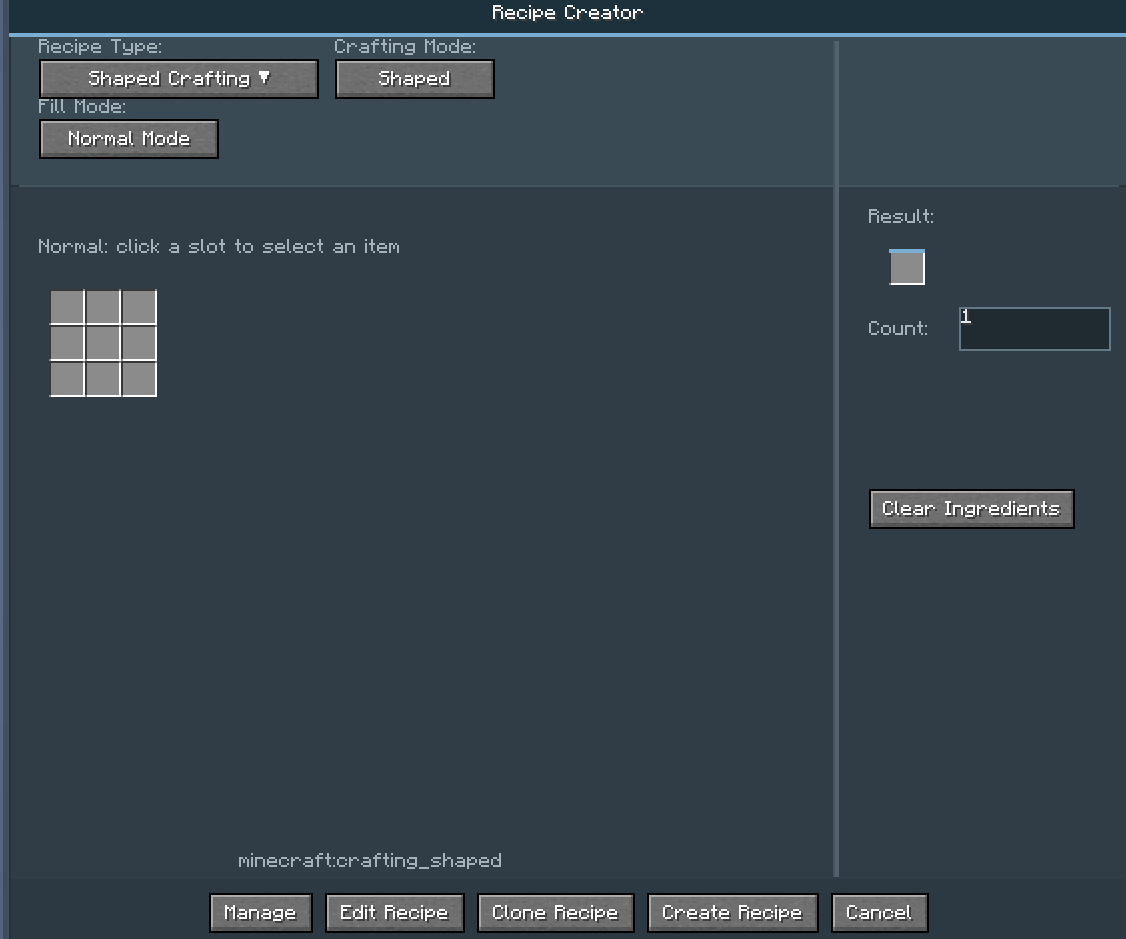
The command system has been greatly simplified. Use: /recipe_helper openGUI
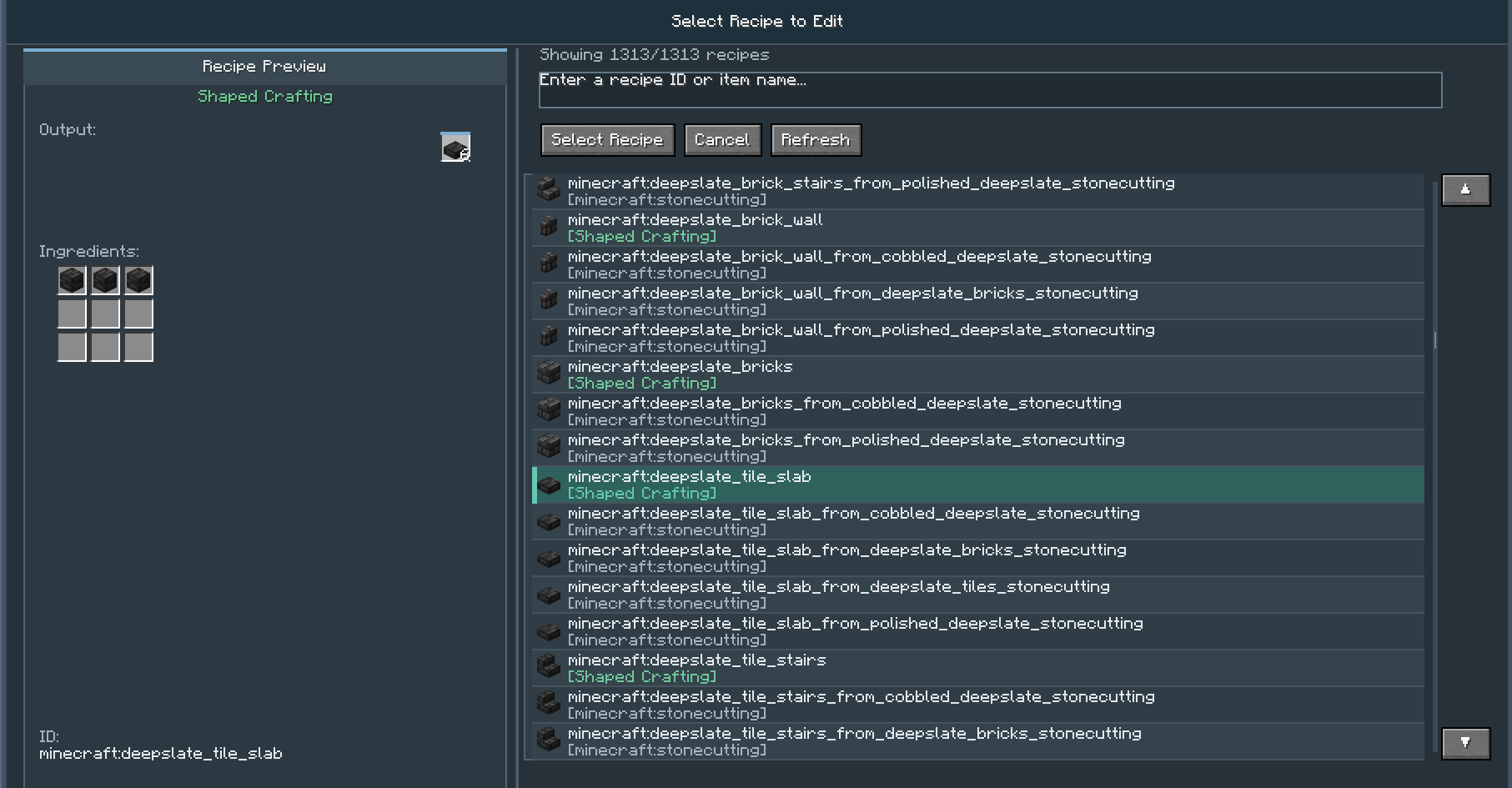
to open the graphical user interface. All recipe management (adding, editing, deleting) is now done through the GUI. The old command-based recipe creation and removal have been removed.
Recipe Storage
All created or modified recipes are stored in: config/registerhelper/recipes
Supported Mods
This mod supports recipe creation and modification for:
- Avaritia (Endless: Reborn)
- Eternis Starry Sky
- Mystical Agriculture
- Botania
- Farmer's Delight
- And more!
Export Support
Recipes can be exported as code for:
- KubeJS
- CraftTweaker
⚠️ Note: The following export commands are no longer maintained and may not work: /recipe_helper export kubejs single # Export all recipes to a single KubeJS file /recipe_helper export kubejs multiple # Export all recipes to multiple KubeJS files /recipe_helper export crafttweaker single # Export all recipes to a single CraftTweaker file /recipe_helper export crafttweaker multiple # Export all recipes to multiple CraftTweaker files
text
Reloading Recipes
When using the mod on a server:
- The
/reloadcommand must be executed from the server console (OP executing/reloadclient-side will not work). - OPs can use the following command to synchronize recipes: /recipe_helper reload
text
This fully reloads the datapack, equivalent to the server console /reload command.
NBT Handling
- Middle-click on an item with NBT data to completely ignore NBT.
- Shift + Middle-click to enter the exact matching interface, allowing you to configure which NBT tags to ignore.
- A default preset is available for Bamboo Mod (SlashBlade) swords.
- The configuration file also allows you to modify whether items carry NBT by default.
🛠️ Creating Recipe Processors via JSON
You can add custom recipe processors by placing JSON files in: config/registerhelper/processor
text
Example JSON:
{
  "processor": {
    "modid": "eternisstarrysky",
    "methods": {
      "isModLoaded": {
        "condition": {
          "type": "forge:mod_loaded",
          "modid": "eternisstarrysky"
        }
      },
      "getSupportedRecipeTypes": {
        "return": ["vanilla_workbench_s"]
      },
      "createRecipeJson": {
        "generator": "shapeless",
        "recipeType": "eternisstarrysky:vanilla_workbench_s"
      }
    }
  },
  "recipeType": {
    "type": "vanilla_workbench_s",
    "displayName": "Vanilla Special Workbench",
    "layout": "custom_layout_id"
  }
}
Place the JSON file in config/registerhelper/processor and restart the game. The processor will load automatically and appear in the GUI.
Built-in Layouts The mod includes the following built-in layout IDs:
rectangular_3x3, rectangular_9x9, rectangular_4x1, rectangular_1x1, rectangular_2x2, rectangular_5x5, rectangular_11x11, minecraft_brewing, stonecutting, smithing, runic_altar, arc_furnace, infusion, reprocessor, cutting, cooking, emptying, create_cutting, compacting, filling.
More mod integrations will be added in future updates.
🖼️ Gallery (Placeholder for screenshots)
📜 Legacy Version (≤1.0) Note: These commands are for older versions (≤1.0) and are kept here for reference only.
Commands text /recipe_helper gui Opens the graphical recipe management interface.
After modifying or adding recipes, use:
text /recipe_helper reload to reload the recipes.
Add Recipes Shaped:
text /recipe_helper add shaped : Output item
: Output quantity (1–64)
: Pattern string
Example:
text /recipe_helper add shaped minecraft:diamond 1 "###,# #,###;#:minecraft:iron_ingot" (Iron ingots in a ring shape craft a diamond)
Shapeless:
text /recipe_helper add shapeless : Output item
: Output quantity
: List of ingredients (separated by ;)
Example:
text /recipe_helper add shapeless minecraft:stick 4 "minecraft:planks;minecraft:planks" Smelting:
text /recipe_helper add smelting Example:
text /recipe_helper add smelting minecraft:iron_ore minecraft:iron_ingot Avaritia (Endless: Reborn):
text /recipe_helper add avaritia : Singularity Workbench tier (1–4)
Example:
text /recipe_helper add avaritia minecraft:nether_star 1 4 "###,###,###;#:minecraft:diamond_block" Other Legacy Commands text /recipe_helper register /recipe_helper reload from_json /recipe_helper delete recipe <recipe_id> /recipe_helper delete all confirm /recipe_helper delete list /recipe_helper clear /recipe_helper count /recipe_helper help Legacy Compatibility Notes Compatible with Avaritia: Endless Reborn (excluding compressor recipe modifications).
All recipes are stored in config/recipes.
⚠️ Important Notes Dynamically modifying recipes is an advanced feature and may affect the logic of other mods.
It is strongly recommended to use this mod only in a testing environment or on servers that require hot-reloading of recipes.
Be extremely cautious when performing bulk operations such as deleting all recipes.
📦 Requirements For version ≥1.6, JEI version must be ≥ 15.20.0.112 for brewing stand and anvil recipes to display correctly.
Screenshots
Gallery
Versions
Files
Relations
Project Relations
More like this
Similar Mods
Suggestions use data such as tags, dependencies, dependents, descriptions, titles, and more to rank how much they overlap with this mod.
On ModDex
Community snapshot
By the numbers
Statistics

Want to reach Minecraft players?
We're looking for a server hosting partner to feature here and other parts of the site. Interested? Send us a message!
Get in touchGet it on
Available Platforms
On ModDex
Community snapshot
By the numbers
Statistics
Resources