
Community listing page, reviews here may not be monitored by the author.
Recipe Modification library

No reviews yet
Allows you to automatically apply arbitrary modifications to all recipes at runtime in a simple way.

Community voices
Reviews
No reviews yet. Be the first to review this project!
Get it on
Available Platforms
 Modrinth
Compatibility
Supported Environments
Runs entirely on the server. Also works in singleplayer.
Must be installed on both the client and the server.
Varies by version.
About
Project Details
For authors
Embed Badge
If you're the author of this project, you can embed a live badge anywhere that supports HTML or Markdown. It updates automatically whenever ratings change.
Use HTML for any page that supports it, or Markdown for README files and Markdown-based descriptions.
Identifiers
Platform IDs
About
Description
Recipe Modification
What is this?
This mod on its own doesn't do anything, instead, it's a tool for mod pack creators, data pack creators, other mod developers or anyone who likes tinkering. It allows you to automatically apply arbitrary modifications to any type of recipe at runtime in a simple way, either by using JSON files in a datapack or using the Java API.
This means, instead of manually overriding multiple existing recipes, you define a set of recipe modifiers, which are applied when the game is starting. This means that modifications are applied to any recipes added by all other mods as well, without causing any incompatibilities or weird issues in case of multiple mods overriding the same recipe.
Some examples:
For example, if you wanted to make it so that all button recipes create 8 buttons instead of just 1 because you think the button recipe is a scam otherwise, you can easily do that in just a few lines of JSON!
{
  "target_recipes": "#minecraft:buttons",
  "modifiers": [
    {
      "type": "modify_result_item",
      "function": "set_count",
      "count": 8
    }
  ]
}
Other use cases would be, for example, if some mod's recipes are not properly compatible because they don't utilise tags correctly (or there are no standardised tags for the relevant items), you can easily make them compatible (without having to manually override every single recipe! yay!).
Say, for example, a mod named "mod_xyz" doesn't use the right tag for copper nuggets in their recipes, which makes these incompatible with copper nuggets from other mods. Using Recipe Modification, you can fix it like this:
{
  "target_recipes": {
    "type": "namespace_equals",
    "namespace": "mod_xyz"
  },
  "modifiers": [
    {
      "type": "add_alternative",
      "ingredients": "mod_xyz:copper_nugget",
      "alternative": {
        "tag": "c:copper_nuggets"
      }
    }
  ]
}
How can I use this?
Generally, the preferred way to interact with this mod is via JSON files, however, there is also a Java API available.
Check out the document about JSON Syntax for more information on how to write these JSON files and what you can do with this mod. There are also some (nonsensical, but working) test modifiers that you can take inspiration from.
For the Java API, just take a look at the api package, especially the methods in the main RecipeModification class.
More detailed instructions & usage information coming soon™.
If you have any questions or need help, always feel free to message me on discord or open a GitHub issue.
Recipe Modification
What is this?
This mod on its own doesn't do anything, instead, it's a tool for mod pack creators, data pack creators, other mod developers or anyone who likes tinkering. It allows you to automatically apply arbitrary modifications to any type of recipe at runtime in a simple way, either by using JSON files in a datapack or using the Java API.
This means, instead of manually overriding multiple existing recipes, you define a set of recipe modifiers, which are applied when the game is starting. This means that modifications are applied to any recipes added by all other mods as well, without causing any incompatibilities or weird issues in case of multiple mods overriding the same recipe.
Some examples:
For example, if you wanted to make it so that all button recipes create 8 buttons instead of just 1 because you think the button recipe is a scam otherwise, you can easily do that in just a few lines of JSON!
{
  "target_recipes": "#minecraft:buttons",
  "modifiers": [
    {
      "type": "modify_result_item",
      "function": "set_count",
      "count": 8
    }
  ]
}
Other use cases would be, for example, if some mod's recipes are not properly compatible because they don't utilise tags correctly (or there are no standardised tags for the relevant items), you can easily make them compatible (without having to manually override every single recipe! yay!).
Say, for example, a mod named "mod_xyz" doesn't use the right tag for copper nuggets in their recipes, which makes these incompatible with copper nuggets from other mods. Using Recipe Modification, you can fix it like this:
{
  "target_recipes": {
    "type": "namespace_equals",
    "namespace": "mod_xyz"
  },
  "modifiers": [
    {
      "type": "add_alternative",
      "ingredients": "mod_xyz:copper_nugget",
      "alternative": {
        "tag": "c:copper_nuggets"
      }
    }
  ]
}
How can I use this?
Generally, the preferred way to interact with this mod is via JSON files, however, there is also a Java API available.
Check out the document about JSON Syntax for more information on how to write these JSON files and what you can do with this mod. There are also some (nonsensical, but working) test modifiers that you can take inspiration from.
For the Java API, just take a look at the api package, especially the methods in the main RecipeModification class.
More detailed instructions & usage information coming soon™.
If you have any questions or need help, always feel free to message me on discord or open a GitHub issue.
Screenshots
Gallery
-
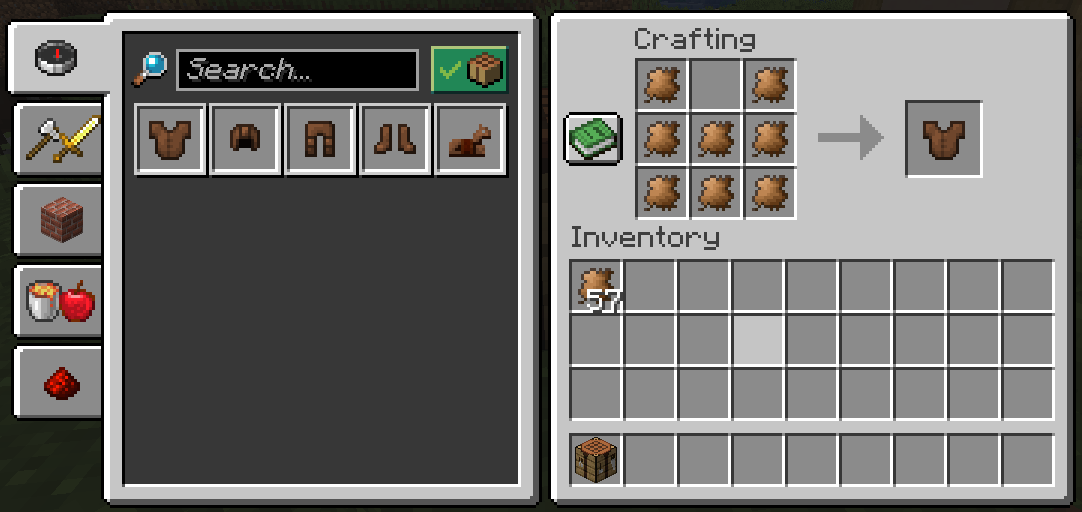 RecipeModification used in "VeganDelight" This enables the "Leather substitute" item from Vegan Delight to actually be used instead of leather in all (!) recipes, including recipes from any other mod.
 -
 Cursed recipe Example modifier that allows using dirt instead of stone for all (!) recipes.
Versions
Files
Relations
Project Relations
More like this
Similar Mods
Suggestions use data such as tags, dependencies, dependents, descriptions, titles, and more to rank how much they overlap with this mod.
On ModDex
Community snapshot
By the numbers
Statistics
 (opens in a new tab)
Get it on
Available Platforms
Modrinth
On ModDex
Community snapshot
By the numbers