

Red Discord Presence
No reviews yet
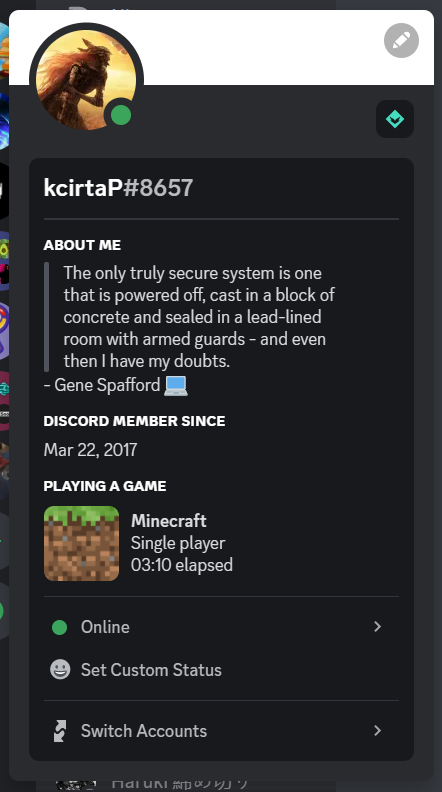
Show to your Discord friends your fancy Minecraft status!
Fabric is a mod loader for versions 1.14+ of Minecraft, particularly popular for client side and optimization mods.
Community voices
Reviews
Click once to include, again to exclude, again to clear
No reviews yet. Be the first to review this project!
Get it on
Available Platforms
 Modrinth
Compatibility
Supported Environments
About
Project Details
For authors
Embed Badge
If you're the author of this project, you can embed a live badge anywhere that supports HTML or Markdown. It updates automatically whenever ratings change.
Use HTML for any page that supports it, or Markdown for README files and Markdown-based descriptions.
Identifiers
Platform IDs
About
Description
Red Discord Presence
Show to your Discord friends your fancy Minecraft status!
Report Bug
·
Request Feature
Getting Started
Show to your Discord friends your fancy Minecraft status!

Usage
Simply install the mod like every other one, launch the game and here you go! Make sure that your game status is visible on Discord.
Configuration
To edit the configuration edit config/red_discord_presence.json
(In order to save uou don't have to restart the game, just enter and exit a world or a server)
Custom app name
Create a new application on Discord developer portal and edt clientId inside the configuration (See the paragraph above)
Custom image
Open Discord developer portal and select your application, go inside Rich Presence menu
and click on Art Assets, click Add Image and upload an image. Once you have done go back
to the configuration (See the paragraph above) and change singleplayerImage with the image that you chose
when you uploaded the iamge
Contributing
Contributions are what make the open source community such an amazing place to learn, inspire, and create. Any contributions you make are greatly appreciated.
If you have a suggestion that would make this better, please fork the repo and create a pull request. You can also simply open an issue with the tag "enhancement". Don't forget to give the project a star! Thanks again!
- Fork the Project
- Create your Feature Branch (
git checkout -b feature/AmazingFeature) - Commit your Changes (
git commit -m 'Add some AmazingFeature') - Push to the Branch (
git push origin feature/AmazingFeature) - Open a Pull Request
License
Distributed under the GPLv3 License. See LICENSE for more information.
Acknowledgments
- CDAGaming for creating a nice fork of DiscordIPC
Screenshots
Gallery
Versions
Files
Relations
Project Relations
More like this
Similar Mods
Suggestions use data such as tags, dependencies, dependents, descriptions, titles, and more to rank how much they overlap with this mod.
On ModDex
Community snapshot
By the numbers
Statistics

Want to reach Minecraft players?
We're looking for a server hosting partner to feature here and other parts of the site. Interested? Send us a message!
Get in touchGet it on
Available Platforms
On ModDex
Community snapshot
By the numbers