Community listing page, reviews may not be monitored by the author.
Redstone Debugger

No reviews yet
A Minecraft redstone troubleshooting tool that helps players understand why their machines fail.

Community voices
Reviews
No reviews yet. Be the first to review this project!
Get it on
Available Platforms
About
Project Details
For authors
Embed Badge
If you're the author of this project, you can embed a live badge anywhere that supports HTML or Markdown. It updates automatically whenever ratings change.
Use HTML for any page that supports it, or Markdown for README files and Markdown-based descriptions.
Identifiers
Platform IDs
Resources
External Links
About
Description
Redstone Debugger
Understand your circuits instead of rebuilding them. A lightweight Minecraft redstone debugging assistant for Minecraft Forge.
Install on both client and server. This is not client-only.
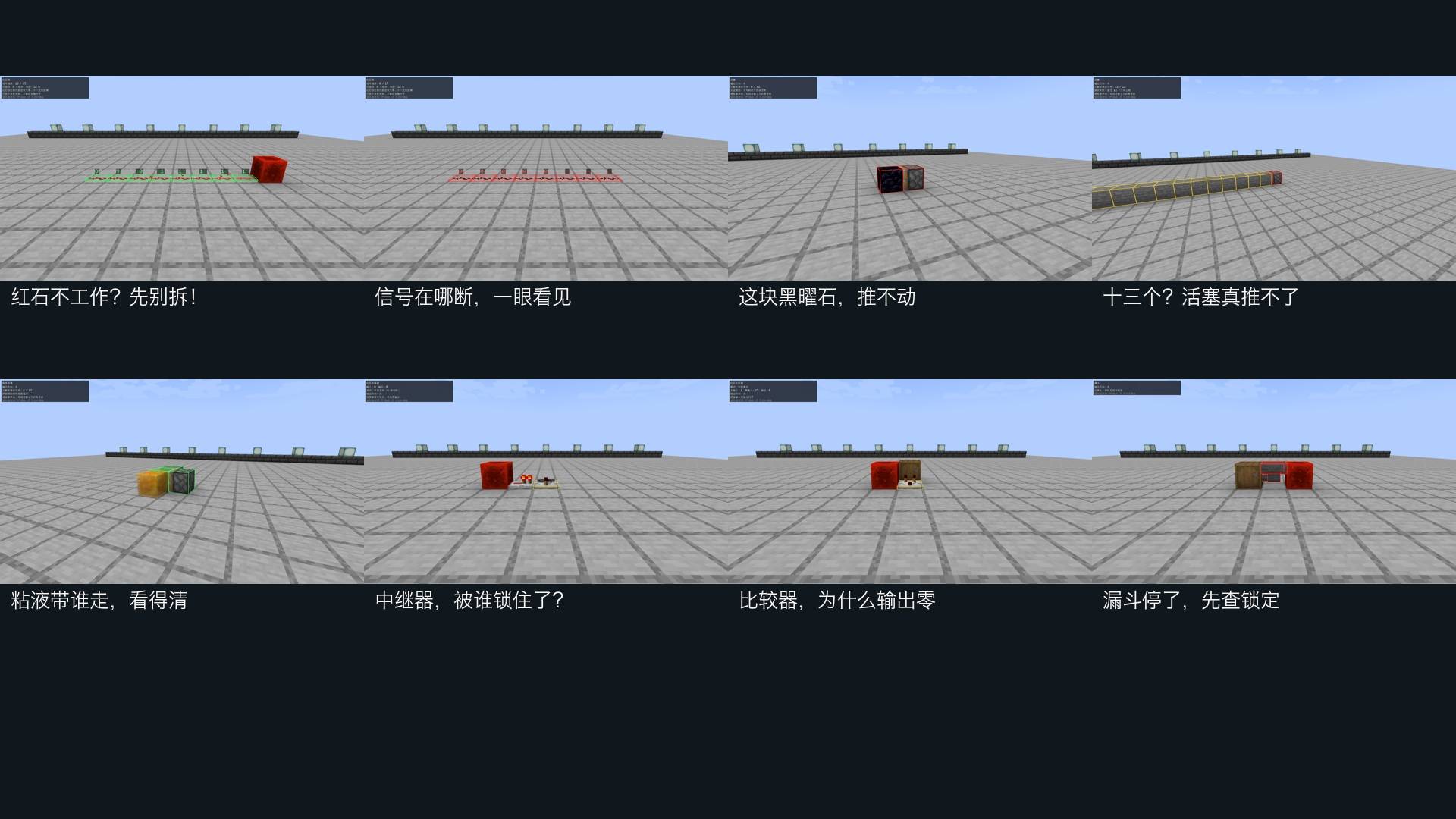
Look at the world, see the problem
- G toggles inspection mode; H inspects or refreshes your target.
- Redstone dust displays actual server signal strength, with green, yellow and red outlines.
- Normal and sticky pistons: immovable blocks, the 12-block push limit and vanilla slime/honey movement participants.
- Repeaters: input, output, delay, direction and side-lock state.
- Comparators: mode, main input, side input and real output.
- Hoppers: redstone locks, empty inventory and blocked or missing output inventories.
- J requests upstream topology hints within 32 blocks. K requests a nearby component snapshot.
Compact HUD and vanilla-style block outlines; no extra menus, items or blocks. Chinese and English supported.
Vanilla friendly
No automatic repair, building, redstone changes or background world scans. Server-calculated results go only to the requesting player. Markers expire after five seconds by default. Distance, scan budgets, duration, outlines, HUD and optional particles are configurable in TOML files.
Results are snapshots. Press H to refresh. Red dust means zero signal, which can be intentional. Tracing follows existing topology and does not fully simulate timing, quasi-connectivity or infer missing wire across arbitrary gaps. Extended pistons are reported as extended; retraction timing is not simulated.
MIT licensed. Rebind keys in the normal Controls screen if other mods also use G.
Versions and installation
Choose a Forge file matching your exact Minecraft version. Baseline: 1.20.1 (Forge 47.4.10+, Java 17). Separate ports: 26.3, 26.2, 26.1.2, 26.1.1, 26.1, 1.21.11, 1.21.10, 1.21.9, 1.21.8, 1.21.7, 1.21.6, 1.21.5, 1.21.4, 1.21.3, 1.21.1, 1.21, 1.20.6, 1.20.4, 1.20.3, 1.20.2, 1.20, 1.19.4, 1.19.3 and 1.19.2.
Java 17: the listed 1.19 versions and 1.20–1.20.4. Java 21: 1.20.6 and the listed 1.21 versions. Java 25: 26.x. Each file changelog lists its minimum Forge version. Put the matching JAR in mods/ on the client and server.
Each additional port passed 27 mod GameTests and two real client rounds (Fancy and Fabulous, ten scenes each). Multiplayer response isolation is tested with two independent ServerPlayer capture connections; two independent desktop clients have not been tested.
Screenshots
Gallery
-
 å®æºå±ç¤ºåé.jpg å®æºå±ç¤ºåé.jpg
Versions
Files
Relations
Project Relations
More like this
Similar Mods
Suggestions use data such as tags, dependencies, dependents, descriptions, titles, and more to rank how much they overlap with this mod.
On ModDex
Community snapshot
By the numbers
Statistics

Get it on
Available Platforms
On ModDex
Community snapshot
By the numbers
Statistics
Resources