Community listing page, reviews here may not be monitored by the author.
Redstone Inspector


No reviews yet
Next-generation suite to inspect and debug your redstone!
Community voices
Reviews
No reviews yet. Be the first to review this project!
Get it on
Available Platforms
Compatibility
Supported Environments
Must be installed on both the client and the server.
About
Project Details
For authors
Embed Badge
If you're the author of this project, you can embed a live badge anywhere that supports HTML or Markdown. It updates automatically whenever ratings change.
Use HTML for any page that supports it, or Markdown for README files and Markdown-based descriptions.
Identifiers
Platform IDs
Resources
External Links
About
Description
Redstone Inspector is a debug tookit for redstone builders(but you'll find it convenient even if you don't do redstone much!)
The Redstone suite of features you never knew you wanted, but after you use them, you won't want it any other way.
Major Update incoming in less than a month.
40+ features and counting!
Highlights
- Signal Labeler - stick a label on any block.
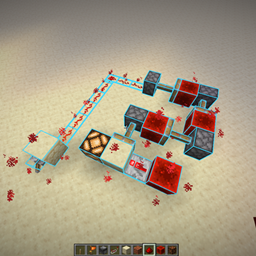
- Region Labeler - box off a volume, name it, color it. "Mob farm" and "T flip-flop bank" actually appear in-world.
- Flux Goggles - head-slot wearable. Night vision + powered-block overlay within 10 blocks. Required to see any label.
- X-Ray mode (
X) - Shift+scroll to peel up to 8 layers of solid blocks. Break and interact target the selected layer. - Linked Network highlight (
.) - look at a wire, hit one key, see every block on the same logical redstone network. - Region Replay - scrub block changes that happened inside a region, frame-by-frame or in slow motion.
- Block Budgets - attach an item-quota template to a region. Soft tally or hard limit on placements.
- Probe A / Probe B - mark two blocks, get notified on power changes plus latency (game + redstone ticks) between A and B.
- Hub screen (
J) - single place to toggle every overlay, rebind every key (with modifier support e.g. Shift+H). - Macros - 10 bindable slots, multi-command lists with per-step run, step-through runner that pairs with Tick Freeze.
Items
| Item | What it does |
|---|---|
| Flux Goggles | Equip in head slot. Grants night vision, paints powered redstone blocks within 10 with a soft overlay, reveals all Signal Tag labels and region brackets within 10. Required for X-Ray and region rendering. |
| Signal Labeler | Right-click a block → label editor. Sneak + right-click → remove. Labels render only while wearing Flux Goggles. |
| Region Labeler | Left-click corner A, right-click corner B → region edit screen (name + color). Right-click an existing region → re-edit. Sneak + left-click → clear selection. |
| Variable Power Block | Place anywhere. Right-click to step emitted power 0→15. Sneak + right-click decrements. Acts as a redstone source at the chosen level. |
Items live in the Creative tab Redstone Inspector. Admin-only tools (Region Locks) live in Redstone Inspector > Admin. |
All three live in the Creative tab Redstone Inspector.
Feature reference
Vision
- X-Ray (
X) - peels solid blocks layer-by-layer (Shift+scroll for depth). Break and right-click hit the selected layer via a server-side raycast. - Cycle X-Ray Mode (
M) - flip between Line (single column) and Radius (sphere, redstone-aware peel). - Ghost Mode (
G) - render peeled blocks as ghosts instead of hiding them. - Interact Through Peel (
N) - pass break / right-click through ghosted peel. - Global Ghost (
I) - sphere of fade around you. Hidden circuitry pops. - Keep Regions Solid (
O) - labeled regions stay opaque inside Global Ghost. - Flux Particles - toggle the redstone-power particle overlay from Flux Goggles.
- Visibility Filter (
P) - hide specific block ids or whole regions from the renderer. - Region Stats HUD - dimensions, non-air block count, and per-component counts for the region you're standing in.
Redstone
- Linked Network (
.) - highlight every block on the same logical network as your target. - Linked Network Mode - cycle the highlight filter (power / strength / level).
- Dust Decay - color redstone dust by current power level.
- Block-Change Flash - flash blocks that change state, so single-tick pulses are visible. On by default.
- Edit Signal Tag (
H) - open the label editor for the block under the crosshair, no item required. - Probe Mark A / B - mark two blocks; power changes notify with sound + pulse count. Latency between A's rising edge and B's state change is reported in game ticks + redstone ticks.
- Region Replay - open the replay scrubber for the region you're inside. Step back/forward one frame, toggle play, cycle playback speed, scrub via the slider, close.
- Tick Freeze - pause / step the world (server-side
/tick freezeintegration) so you can inspect pulses frame-by-frame.
Build & Edit
- Select Mode (
K) - rectangular selection with corner markers. Grab & Move follows your cursor and rotates with you; flood-fill picker (BFS, cap 1024); per-row clear / copy / paste. - Region Corners A / B - drop selection corners on whatever you're crosshairing without the Region Labeler item in hand.
- Rotate Mode (
Y) - left-click cycles a block'sfacinginstead of breaking it. - Replace Mode (
C) - right-click swaps the targeted block with what you're holding (coexists with Rotate Mode on left-click). - Air Placement - place blocks against air.
- Undo / Redo (
Z/Shift+Z) - server-side, covers vanilla place/break, Replace, Air Placement, Rotate, and Grab & Move. - Region Display (
R) + Regions List (L) - toggle all bboxes, or browse/rename/recolor/delete/teleport per row. - Copy / Paste BE State - clone hopper / comparator / piston NBT between matching blocks.
- Show / Swap Row (
B/V) - view a deeper inventory row as your hotbar, then swap it in. - Long Reach (
U) - +16 blocks reach. - Block Budget Templates - define an item quota, attach it to a region, watch the tally in the HUD. Toggle "Hard limit" to actually block placements that exceed cap.
Admin (op tab)
- Region Locks - lock a labeled region so non-owner players can't break or place blocks inside. Operator only.
Misc
- Hub (
J) - opens the keybind / toggle hub. - Settings - per-client preferences (macro caps, etc.).
- Coordinates HUD (
;), Bookmarks (') - teleport waypoints with name + dimension, Command History (\) - re-run any recent dispatched command. - Macros - open the macros screen. Per-macro: name, multi-line command list with per-row enable / reorder / run-single, slot binding (1–10, separately rebindable). Step-through runner displays the next command before sending and pairs naturally with Tick Freeze.
- No-Fall-Sneak - sneak doesn't slow you on the ground.
- Water Walk / No Water Push - solid water and no current shove.
Client only features available but best to install on Server as well.
Is this considered a cheat? Not really, it's a debug mod for Redstone. That being said, I recommend using this if the mod is installed on the server as well as you'll get all the benefits. In the case of single-player, that's whoever started the single player session, and for standalone multiplayer server, whoever is the server host. If you use it on a server you're not allowed to and get banned, that is your responsibility.
FOR FABRIC ONLY.
Redstone Inspector is a debug tookit for redstone builders(but you'll find it convenient even if you don't do redstone much!)
The Redstone suite of features you never knew you wanted, but after you use them, you won't want it any other way.
Major Update incoming in less than a month.
40+ features and counting!
Highlights
- Signal Labeler - stick a label on any block.
- Region Labeler - box off a volume, name it, color it. "Mob farm" and "T flip-flop bank" actually appear in-world.
- Flux Goggles - head-slot wearable. Night vision + powered-block overlay within 10 blocks. Required to see any label.
- X-Ray mode (
X) - Shift+scroll to peel up to 8 layers of solid blocks. Break and interact target the selected layer. - Linked Network highlight (
.) - look at a wire, hit one key, see every block on the same logical redstone network. - Region Replay - scrub block changes that happened inside a region, frame-by-frame or in slow motion.
- Block Budgets - attach an item-quota template to a region. Soft tally or hard limit on placements.
- Probe A / Probe B - mark two blocks, get notified on power changes plus latency (game + redstone ticks) between A and B.
- Hub screen (
J) - single place to toggle every overlay, rebind every key (with modifier support e.g. Shift+H). - Macros - 10 bindable slots, multi-command lists with per-step run, step-through runner that pairs with Tick Freeze.
Items
| Item | What it does |
|---|---|
| Flux Goggles | Equip in head slot. Grants night vision, paints powered redstone blocks within 10 with a soft overlay, reveals all Signal Tag labels and region brackets within 10. Required for X-Ray and region rendering. |
| Signal Labeler | Right-click a block → label editor. Sneak + right-click → remove. Labels render only while wearing Flux Goggles. |
| Region Labeler | Left-click corner A, right-click corner B → region edit screen (name + color). Right-click an existing region → re-edit. Sneak + left-click → clear selection. |
| Variable Power Block | Place anywhere. Right-click to step emitted power 0→15. Sneak + right-click decrements. Acts as a redstone source at the chosen level. |
Items live in the Creative tab Redstone Inspector. Admin-only tools (Region Locks) live in Redstone Inspector — Admin. |
All three live in the Creative tab Redstone Inspector.
Feature reference
Vision
- X-Ray (
X) - peels solid blocks layer-by-layer (Shift+scroll for depth). Break and right-click hit the selected layer via a server-side raycast. - Cycle X-Ray Mode (
M) - flip between Line (single column) and Radius (sphere, redstone-aware peel). - Ghost Mode (
G) - render peeled blocks as ghosts instead of hiding them. - Interact Through Peel (
N) - pass break / right-click through ghosted peel. - Global Ghost (
I) - sphere of fade around you. Hidden circuitry pops. - Keep Regions Solid (
O) - labeled regions stay opaque inside Global Ghost. - Flux Particles - toggle the redstone-power particle overlay from Flux Goggles.
- Visibility Filter (
P) - hide specific block ids or whole regions from the renderer. - Region Stats HUD - dimensions, non-air block count, and per-component counts for the region you're standing in.
Redstone
- Linked Network (
.) - highlight every block on the same logical network as your target. - Linked Network Mode - cycle the highlight filter (power / strength / level).
- Dust Decay - color redstone dust by current power level.
- Block-Change Flash - flash blocks that change state, so single-tick pulses are visible. On by default.
- Edit Signal Tag (
H) - open the label editor for the block under the crosshair, no item required. - Probe Mark A / B - mark two blocks; power changes notify with sound + pulse count. Latency between A's rising edge and B's state change is reported in game ticks + redstone ticks.
- Region Replay - open the replay scrubber for the region you're inside. Step back/forward one frame, toggle play, cycle playback speed, scrub via the slider, close.
- Tick Freeze - pause / step the world (server-side
/tick freezeintegration) so you can inspect pulses frame-by-frame.
Build & Edit
- Select Mode (
K) - rectangular selection with corner markers. Grab & Move follows your cursor and rotates with you; flood-fill picker (BFS, cap 1024); per-row clear / copy / paste. - Region Corners A / B - drop selection corners on whatever you're crosshairing without the Region Labeler item in hand.
- Rotate Mode (
Y) - left-click cycles a block'sfacinginstead of breaking it. - Replace Mode (
C) - right-click swaps the targeted block with what you're holding (coexists with Rotate Mode on left-click). - Air Placement - place blocks against air.
- Undo / Redo (
Z/Shift+Z) - server-side, covers vanilla place/break, Replace, Air Placement, Rotate, and Grab & Move. - Region Display (
R) + Regions List (L) - toggle all bboxes, or browse/rename/recolor/delete/teleport per row. - Copy / Paste BE State - clone hopper / comparator / piston NBT between matching blocks.
- Show / Swap Row (
B/V) - view a deeper inventory row as your hotbar, then swap it in. - Long Reach (
U) - +16 blocks reach. - Block Budget Templates - define an item quota, attach it to a region, watch the tally in the HUD. Toggle "Hard limit" to actually block placements that exceed cap.
Admin (op tab)
- Region Locks - lock a labeled region so non-owner players can't break or place blocks inside. Operator only.
Misc
- Hub (
J) - opens the keybind / toggle hub. - Settings - per-client preferences (macro caps, etc.).
- Coordinates HUD (
;), Bookmarks (') - teleport waypoints with name + dimension, Command History (\) - re-run any recent dispatched command. - Macros - open the macros screen. Per-macro: name, multi-line command list with per-row enable / reorder / run-single, slot binding (1–10, separately rebindable). Step-through runner displays the next command before sending and pairs naturally with Tick Freeze.
- No-Fall-Sneak - sneak doesn't slow you on the ground.
- Water Walk / No Water Push - solid water and no current shove.
Client only features available but best to install on Server as well.
Is this considered a cheat? Not really, it's a debug mod for Redstone. That being said, I recommend using this if the mod is installed on the server as well as you'll get all the benefits. In the case of single-player, that's whoever started the single player session, and for standalone multiplayer server, whoever is the server host. If you use it on a server you're not allowed to and get banned, that is your responsibility.
FOR FABRIC ONLY.
Screenshots
Gallery
Versions
Files
Relations
Project Relations
More like this
Similar Mods
Suggestions use data such as tags, dependencies, dependents, descriptions, titles, and more to rank how much they overlap with this mod.
On ModDex
Community snapshot
By the numbers
Statistics
Want to reach Minecraft players?
We're looking for a server hosting partner to feature here and other parts of the site. Interested? Send us a message!
Get in touchGet it on
Available Platforms
On ModDex
Community snapshot
By the numbers
Statistics
Resources