
Community listing page, reviews may not be monitored by the author.
RegionCast

No reviews yet
Pull region files from another server's world into this one, picked off a map. Shows which regions changed since the last copy, and the last few updates stay undoable.

Community voices
Reviews
No reviews yet. Be the first to review this project!
Get it on
Available Platforms
Compatibility
Supported Environments
Required on the server. Installing it on the client adds functionality.
About
Project Details
For authors
Embed Badge
If you're the author of this project, you can embed a live badge anywhere that supports HTML or Markdown. It updates automatically whenever ratings change.
Use HTML for any page that supports it, or Markdown for README files and Markdown-based descriptions.
Identifiers
Platform IDs
About
Description
Keep a mirror server up to date by copying only the regions that changed, picked on a map.
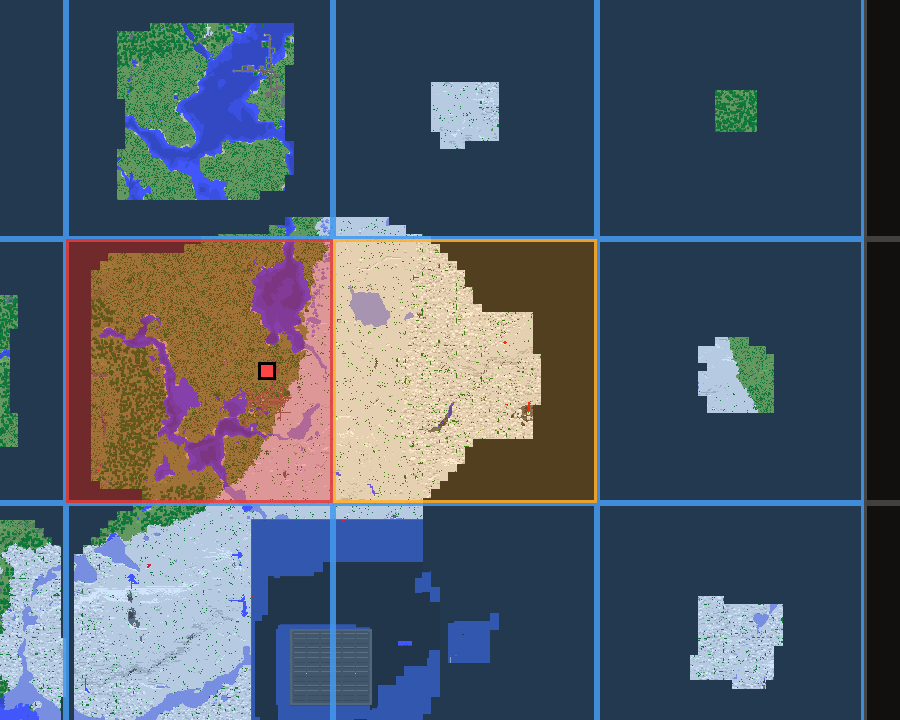
- A map of the world where each tile is one region file: red changed since the last copy, blue never copied, gold queued. Zoom in to pick single chunks.
- Click what you want, press Update, and the server restarts with the new terrain, points of interest and entities.
- The last 3 updates can be undone.
- Copies a few hundred MB instead of the whole world: on a real server only 59 of 1812 regions (407 MB of 8 GB) changed in a day.
Useful for creative copies, test worlds, render worlds, or a place to show a base without letting people into the real server.
Installation
- Minecraft 1.21 / 1.21.1 or 26.3, Fabric and Fabric API. Java 21 for 1.21; Java 25 and Fabric Loader 0.19.5+ for 26.3.
- The jar goes on the destination server (the mirror). On your client it is optional and adds the
map; without it everything works through
/rc. - The destination server must be able to read the source world's files (a VPS or a dedicated machine; shared hosts like Aternos do not allow it). Mount it read only.
- Recommended: RCON on the source server, and something that restarts the mirror after it stops (an MCDReforged plugin is included).
Start the server once to create config/regioncast.properties, then set source_world and the
source's RCON. Full setup in Setup in detail.
Usage
/rc                  open the map, or print the status if you cannot open one
/rc map              open the map (needs the client mod)
/rc status           what is out of date, what is queued, what backups exist
/rc here             queue the region you are standing in
/rc here chunk       queue only the chunk you are standing in
/rc add <dim> <x> <z>  queue one by index, dimension -1, 0 or 1
/rc scan             re-read the source
/rc list             what is queued
/rc clear            empty the queue
/rc run              copy it all, then restart
/rc backups          list the updates that can be taken back
/rc restore [n]      put one back, then restart
On the map: left click queues or unqueues, right click drag pans, scroll zooms. The queue survives a restart.
Full documentation, configuration and technical details: README on GitHub.
Screenshots
Gallery
-
 The region map Red changed since the last copy, gold is queued, blue was never copied. Click to queue.
Versions
Files
Relations
Project Relations
More like this
Similar Mods
Suggestions use data such as tags, dependencies, dependents, descriptions, titles, and more to rank how much they overlap with this mod.
On ModDex
Community snapshot
By the numbers
Statistics


Get it on
Available Platforms
On ModDex
Community snapshot
By the numbers