
Remember Url Hashes
No reviews yet
A client-side mod for avoiding re-downloading server resource packs with no hash code present from the server. The mod remembers past hashes based on the URL.
Fabric is a mod loader for versions 1.14+ of Minecraft, particularly popular for client side and optimization mods.
Community voices
Reviews
Click once to include, again to exclude, again to clear
No reviews yet. Be the first to review this project!
Get it on
Available Platforms
 Modrinth
Compatibility
Supported Environments
About
Project Details
For authors
Embed Badge
If you're the author of this project, you can embed a live badge anywhere that supports HTML or Markdown. It updates automatically whenever ratings change.
Use HTML for any page that supports it, or Markdown for README files and Markdown-based descriptions.
Identifiers
Platform IDs
About
Description
Remember Url Hashes
What It Does
This mod helps you avoid re-downloading server resource packs when you already have them.
Why Is This Mod Needed?
- Vanilla Minecraft tries to avoid re-downloading packs, but if the server doesn't provide a hash, it downloads the file every time. (Because it can't compare it with a cached copy)
- This mod remembers the last hash code of a resource pack based on its URL. (Because the URL is is obviously always present)
- If the file's URL differs between the pack updates, you won't miss any updates.
On servers with required resourcepacks with no hash code provided this can save you a lot of time when rejoining, because some packs are quite heavy.
Commands
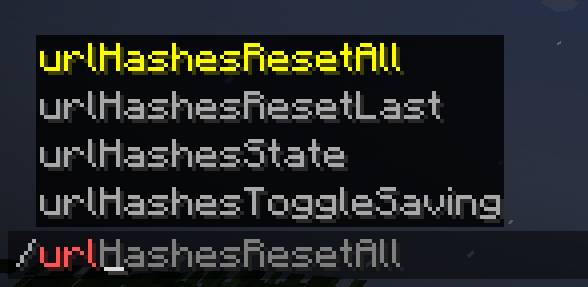
Alternatively, for cases, where the link stays the same between pack updates, or if you suppose that you have an outdated resource pack, you can simply use:
/urlHashesResetAllto reset all saved hashes/urlHashesResetLastto reset the hash for the last loaded pack.

Additionally, you can use:
/urlHashesToggleSavingto toggle saving the hashes between game sessions. It's off by default./urlHashesStateto see what's stored in the mod's "hash storage". Useful to figure out what's going on if you're confused.

If you have data saving disabled (by default), everything is stored within the same session, and if you have saving enabled, you'll have everything ready across multiple game sessions, fully minimizing the pack loading downtime.

Notes
Fortunately, Fabric allows to have mod working for multiple versions as the same file, so the mod supports the range of 1.21.1 - 1.21.8. You can always check the source code and try to update it yourself. I'll soon try to add a good guide for that in the Github "Readme", so you have a good chance of updating the mod or doing something like that. If something non-essential breaks, remove it :D
Alternative approach
You can have the same behaviour on your server where you are an an administrator.
For this, use my Paper server-side plugin: Provide Pack Hashes
Screenshots
Gallery
-
 Saved Hashes Use /urlHashesState to see this info
 -
 Resetting Hashes Use /urlHashesResetAll or /urlHashesResetLast to reset cached hashes
 -
 Enable or disable saving hashes across game sessions Use /urlHashesToggleSaving for that
 -
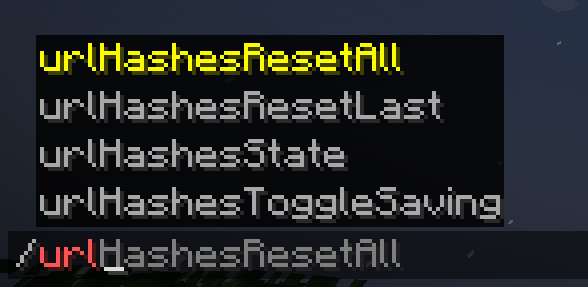 Commands available All the commands :D
Versions
Files
Relations
Project Relations
More like this
Similar Mods
Suggestions use data such as tags, dependencies, dependents, descriptions, titles, and more to rank how much they overlap with this mod.
On ModDex
Community snapshot
By the numbers
Statistics

Want to reach Minecraft players?
We're looking for a server hosting partner to feature here and other parts of the site. Interested? Send us a message!
Get in touchGet it on
Available Platforms
On ModDex
Community snapshot
By the numbers