
Community listing page, reviews here may not be monitored by the author.
Replace

No reviews yet
Mass Fill + New Z Menu – Select an area, fill or break it in bulk. All processed on the server, no lag. Clean interface and new integrated Z menu.
Community voices
Reviews
No reviews yet. Be the first to review this project!
Get it on
Available Platforms
About
Project Details
For authors
Embed Badge
If you're the author of this project, you can embed a live badge anywhere that supports HTML or Markdown. It updates automatically whenever ratings change.
Use HTML for any page that supports it, or Markdown for README files and Markdown-based descriptions.
Identifiers
Platform IDs
About
Description
Auto Replace

Select a region · mass-break · mass-fill — server-side, so blocks stay gone.
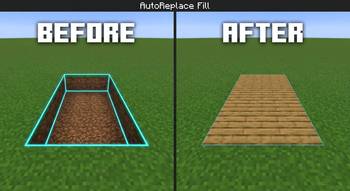
AutoReplace is a lightweight Fabric utility for Minecraft 26.2. Select a box like Litematica and break or fill the entire area in one action. Breaks and fills are executed on the server, so nothing reverts in singleplayer or multiplayer.
📋 Features
- Area selection — right-click two corners (cyan outline, Litematica-style)
- Mass break — break one block inside the selection → matching blocks in the box break server-side
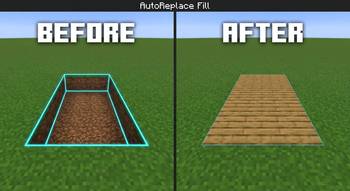
- Mass fill — pick a block from your hand or the world and fill the selection automatically
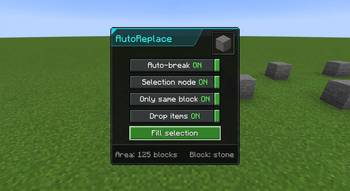
- Simple Z menu — clean panel with toggles, tooltips, and a fill block preview
- Server authority — no ghost blocks / no "blocks come back" failure
- Paper plugin (optional) — same-network support for Paper/Spigot multiplayer servers
- Safety caps — max 4096 blocks per action, range checks, unbreakable blocks ignored
🎮 How to Use
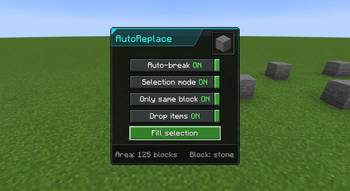
- Press Z to open the menu
- Enable Selection mode
- Right-click the first corner, then right-click the second corner
- Choose what you want:
🔨 Break
- Turn Auto-break on
- Mine one block inside the selection
- The server breaks the rest (same block type if "Same block only" is on)
🧱 Fill
- Hold a block → Use held block or Pick from world and right-click a block
- With Fill on select enabled, the selection fills automatically
- Or press ▶ Fill selection
⚙️ Menu Options
| Option | Description |
|---|---|
| Auto-break | Mass-break when you mine a block inside the selection |
| Selection mode | Right-click two corners to set the box |
| Same block only | Only break blocks matching the one you mined |
| Drop items | Survival drops (Creative never drops) |
| Use held block | Set fill material from the item you're holding |
| Pick from world | Right-click a world block to set fill material |
| Fill on select | Auto-fill after picking a block |
| Replace blocks | Fill existing blocks (not just air) |
| ▶ Fill selection | Place the chosen block throughout the area |
📦 Requirements
| Item | Specification |
|---|---|
| Minecraft | 26.2 |
| Loader | Fabric |
| Dependency | Fabric API |
| Java | 25+ (game requirement) |
🎮 Singleplayer
Only the mod + Fabric API in your mods folder.
🌐 Multiplayer (Paper / Spigot)
- Players install the mod + Fabric API on the client
- Put AutoReplacePlugin in the server
pluginsfolder - Restart the server
Without the plugin on Paper, mass break/fill will not persist.
⌨️ Controls
| Key | Action |
|---|---|
| Z | Open / close menu (rebindable in Controls → AutoReplace) |
⚠️ Notes
- Adventure / Spectator modes cannot break or fill
- Unbreakable blocks (e.g. bedrock) are ignored
- Survival fill consumes items from inventory; Creative does not
- Large selections are capped at 4096 blocks per action
🖼️ Gallery (optional screenshots)
- Cyan selection box in the world
- Z menu panel with toggles
- Before / after mass break
- Before / after mass fill
📄 License
CC0-1.0 (public domain dedication) — free to use, modify, and redistribute.
👏 Credits
Developed Black_br 26.2 with server-side networking so selections actually stay.
Screenshots
Gallery
-
 8f4c642ff4614020b3ee986a34bd7884ff5a600d_350.jpg 8f4c642ff4614020b3ee986a34bd7884ff5a600d_350.jpg
 -
 0abffeb5050232957bc6ba99d8514bc60b963b12_350.jpg 0abffeb5050232957bc6ba99d8514bc60b963b12_350.jpg
 -
 0568a71d0a220a8a705a57f68b2e2302f07f1553_350.jpg 0568a71d0a220a8a705a57f68b2e2302f07f1553_350.jpg
Versions
Files
Relations
Project Relations
More like this
Similar Mods
Suggestions use data such as tags, dependencies, dependents, descriptions, titles, and more to rank how much they overlap with this mod.
On ModDex
Community snapshot
By the numbers
Statistics
Want to reach Minecraft players?
We're looking for a server hosting partner to feature here and other parts of the site. Interested? Send us a message!
Get in touchGet it on
Available Platforms
On ModDex
Community snapshot
By the numbers