
Community listing page, reviews here may not be monitored by the author.
Resin Billiards

No reviews yet
A mod that adds billiard-related blocks and items.
Community voices
Reviews
No reviews yet. Be the first to review this project!
Get it on
Available Platforms
Compatibility
Supported Environments
Must be installed on both the client and the server.
About
Project Details
For authors
Embed Badge
If you're the author of this project, you can embed a live badge anywhere that supports HTML or Markdown. It updates automatically whenever ratings change.
Use HTML for any page that supports it, or Markdown for README files and Markdown-based descriptions.
Identifiers
Platform IDs
Resources
External Links
About
Description
Resin Billiards
Resin Billiards is a mod that adds billiard-related blocks and items. Players can create billiard minigames using sulfur cubes equipped with colourful resin blocks, which mimic real-life billiard balls made of phenolic resin.
Contents
Blocks
- Smooth Resin Block
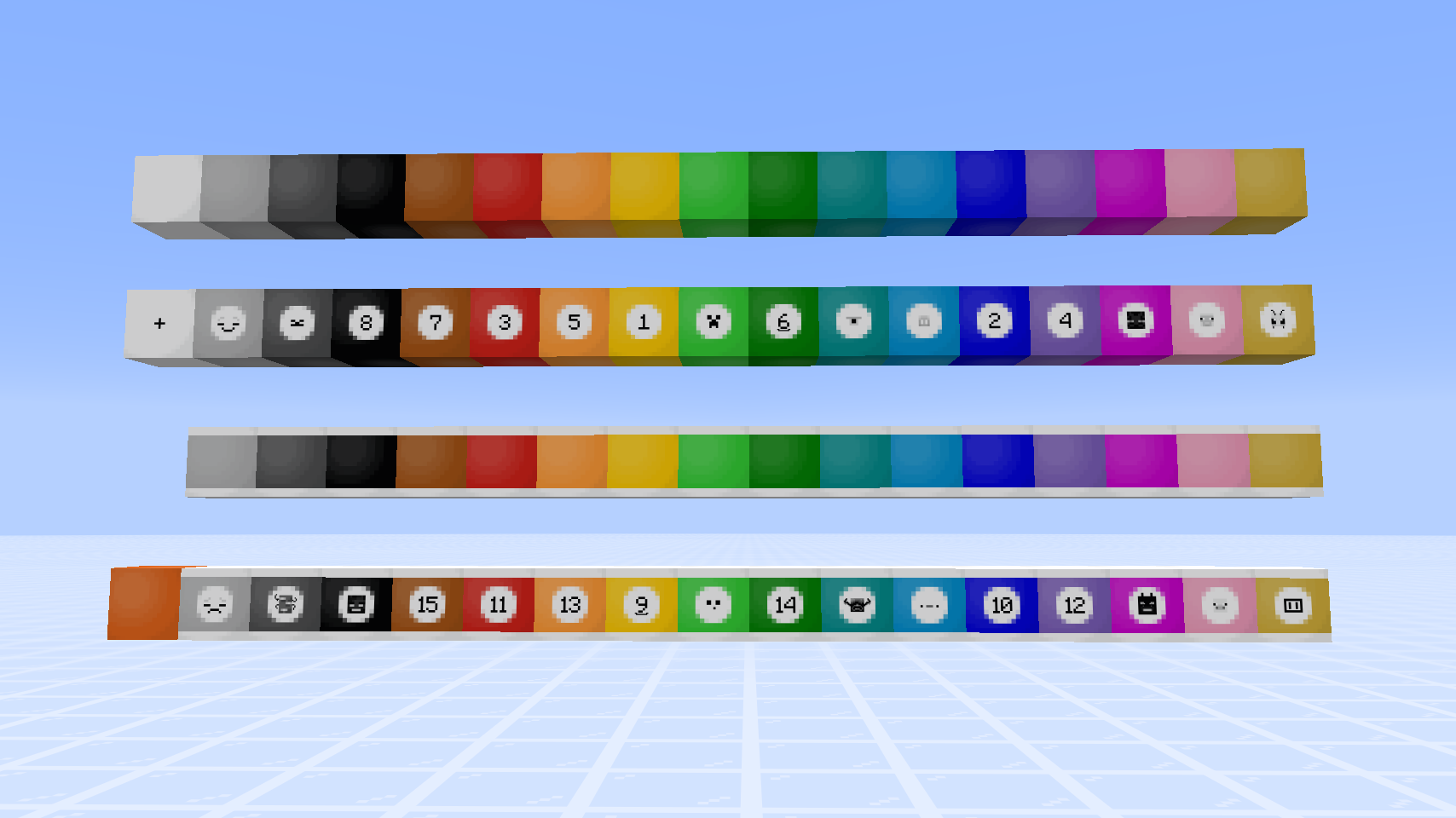
- Stained Smooth Resin Blocks (16 colored variants)
- Stained Smooth Resin Blocks, Labelled (16 colored variants)
- White-striped Stained Resin Blocks (15 colored variants, no white variant)
- White-striped Stained Resin Blocks, Labelled (15 colored variants, no white variant)
- Golden Smooth Resin Block (with labelled variant)
- White-striped Golden Resin Block (with labelled variant)
Check out the gallery for recipes!
Items
Rack
- A container storing multiple sulfur cubes (similar to bundles but for sulfur cubes) and allowing players to place them in specific arrangements.
- 4 craftable racks:
- Small Triangular Rack (Holds up to 6 sulfur cubes)
- Medium Triangular Rack (Holds up to 10 sulfur cubes)
- Large Triangular Rack (Holds up to 15 sulfur cubes)
- Diamond-shaped Rack (Holds up to 9 sulfur cubes)

Detailed Rack Features and Machanics
-
Bundle-like GUI and Tooltips: Players can see the sulfur cubes inside the rack, as well as the block item they have absorbed.
- If the sulfur cube has no block item absorbed, the sulfur cube spawn egg is shown.
- For the 4 craftable racks, the GUI follows the placement pattern.
-
Select a rack entry: Scroll the mouse wheel while the cursor is hovered over a rack item.
- For all the craftable racks, the scrolling order of the entries is from top to bottom row, then from left to right.
- The selected entry has the slot highlighted, with extra information of the sulfur cube shown.
- If the sulfur cube has a custom name, its custom name is shown. "Sulfur Cube" (name of the mob type) is shown otherwise.
- If the sulfur cube has absorbed an item, the item name is shown (similar to a bucket of sulfur cube).
-
Insert: Pick up a bucket of sulfur cube, hover the cursor over a rack and right-click.
- Without an entry selected, the sulfur cube will take the first non-empty slot in order.
- While an entry is selected, right-clicking with a bucket of sulfur cube swaps out the one in that entry. Sulfur cubes contained in other entries are unaffected.
-
Extract: Pick up an empty bucket, hover the cursor over a rack and right-click.
- Without an entry selected, the last sulfur cube in the order will be extracted
- While an entry is selected, right-clicking with an empty bucket extracts the sulfur cube in that slot. All sulfur cubes in later entries are shifted up by one slot in order.
-
Placing: Right-click on a block surface while holding a non-empty rack.
- Each type of rack has a defined pattern of sulfur cube placement.
- Placement depends on the player's facing direction, with the cube in the apex position being nearest to the player.
-
Dispensable: When the dispenser is activated with a rack inside, sulfur cubes inside the rack are placed in front of the dispenser.
- The placement depends on the direction the dispenser is facing
- Horizontal-facing (North, East, South, West): Similar to how players place down the rack contents;
- Vertical-facing (Up, down): Depending on the largest neighbouring redstone signal strength, the rack contents will be placed in one of the horizontal directions:
- 0, 4, 8, 12: North;
- 1, 5, 9, 13: East;
- 2, 6, 10, 14: South;
- 3, 7, 11, 15: West;
Game Mechanics
Undyeing Blocks via Cauldron
- Stained Smooth Resin Blocks (including labelled variants) -> Smooth Resin Block
- White-striped Stained Resin Blocks (including labelled variants) -> Smooth Resin Block
- Golden Smooth Resin Block, Labelled -> Golden Smooth Resin Block
- White-striped Golden Resin Block (including labelled variant) -> Golden Smooth Resin Block
Stripping Blocks via an Axe
- Golden Smooth Resin Block (including labelled variant) -> Smooth Resin Block
- White-striped Golden Resin Block (including labelled variant) -> Smooth Resin Block
Extra Sulfur Cube Archetypes
minecraft:resinbilliards_fast_flat_regular_friction:- Identical to the vanilla "Fast Flat" archetype, except the "Friction modifier" value is the same as the vanilla "Regular" archetype (0.3).
- Corresponding item tag:
resinbilliards:sulfur_cube_archetype/fast_flat_regular_friction. - All resin block items added by this mod are under this archetype by default.
minecraft:resinbilliards_fast_flat_extra_sliding:- Identical to the vanilla "Fast Flat" archetype, except the friction is slightly less than that of the vanilla "Fast Sliding" archetype (0.025).
- Corresponding item tag:
resinbilliards:sulfur_cube_archetype/fast_flat_extra_sliding.
Screenshots
Gallery
-
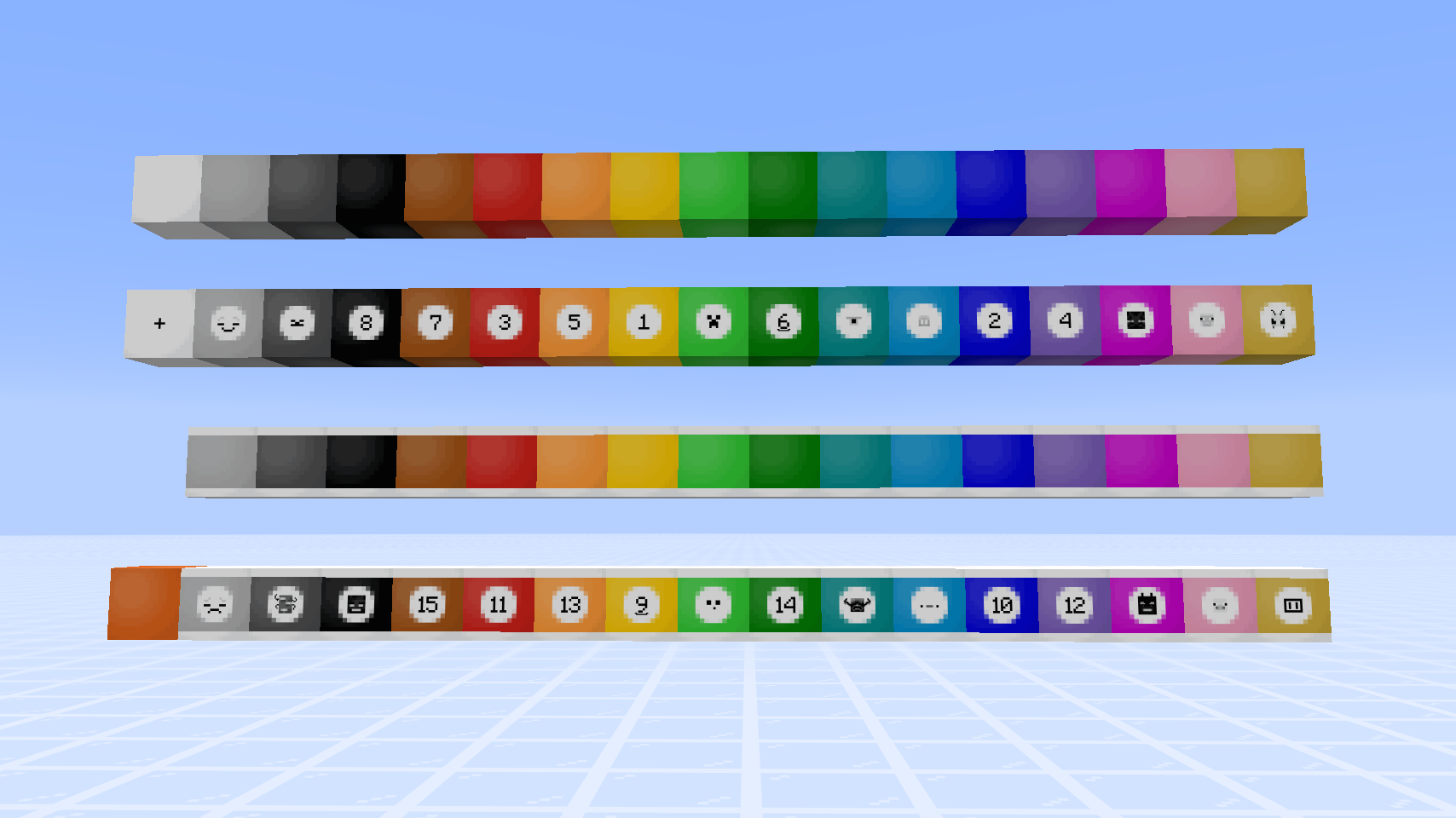 All the Blocks Resin blocks of all 16 colors and golden variant, along with their labelled counterpart. White-striped resin blocks do not contain the white variant. Smooth Resin Block at the bottom-left corner.
 -
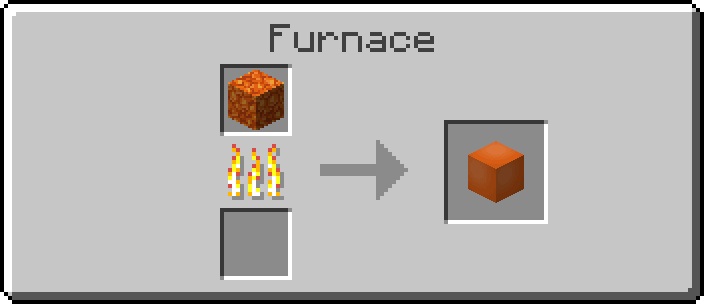 Smelting Recipe for Smooth Resin Block
 -
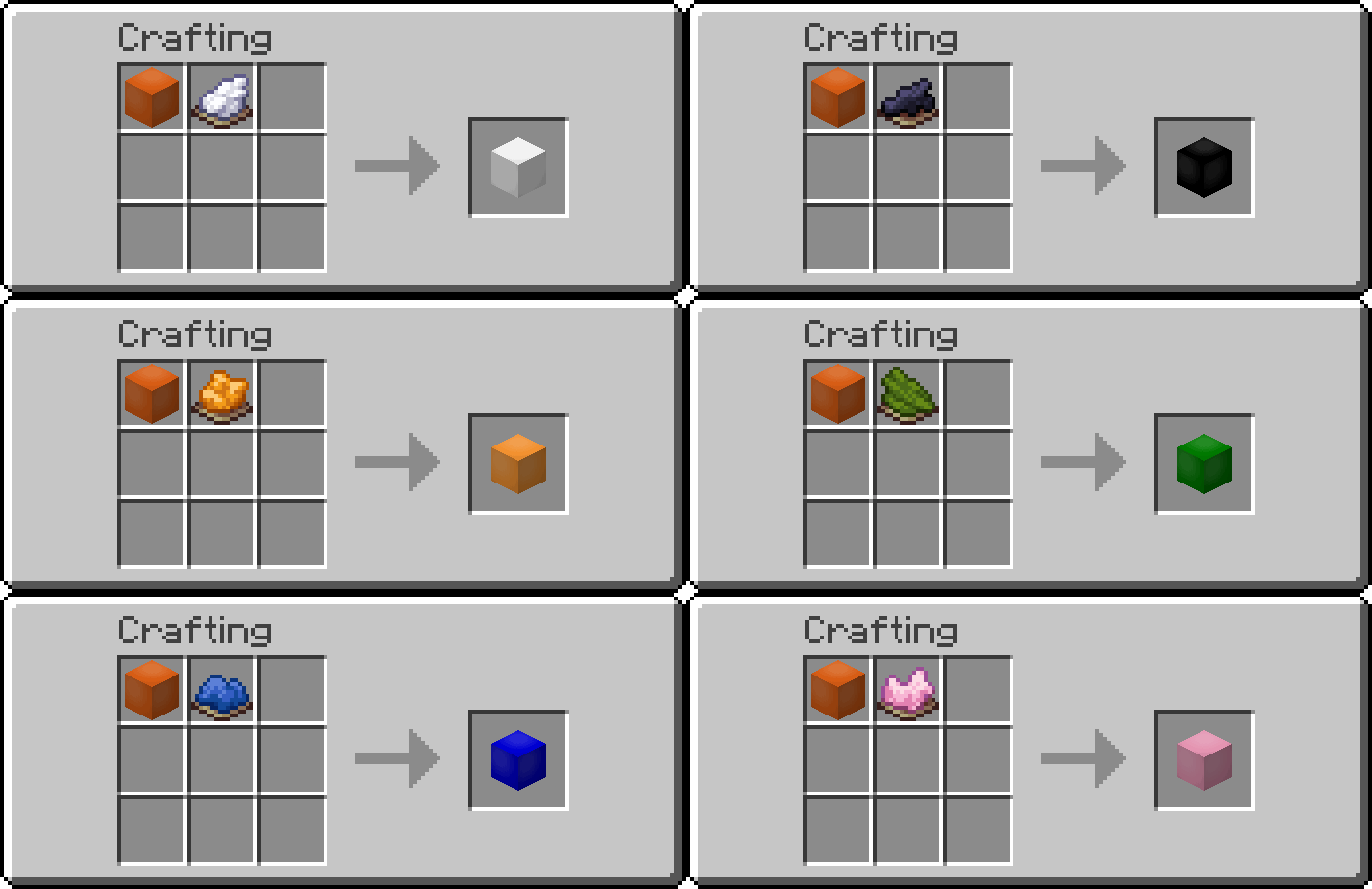 Crafting Recipe for Stained Smooth Resin Blocks Smooth Resin Block + Matching Dye
 -
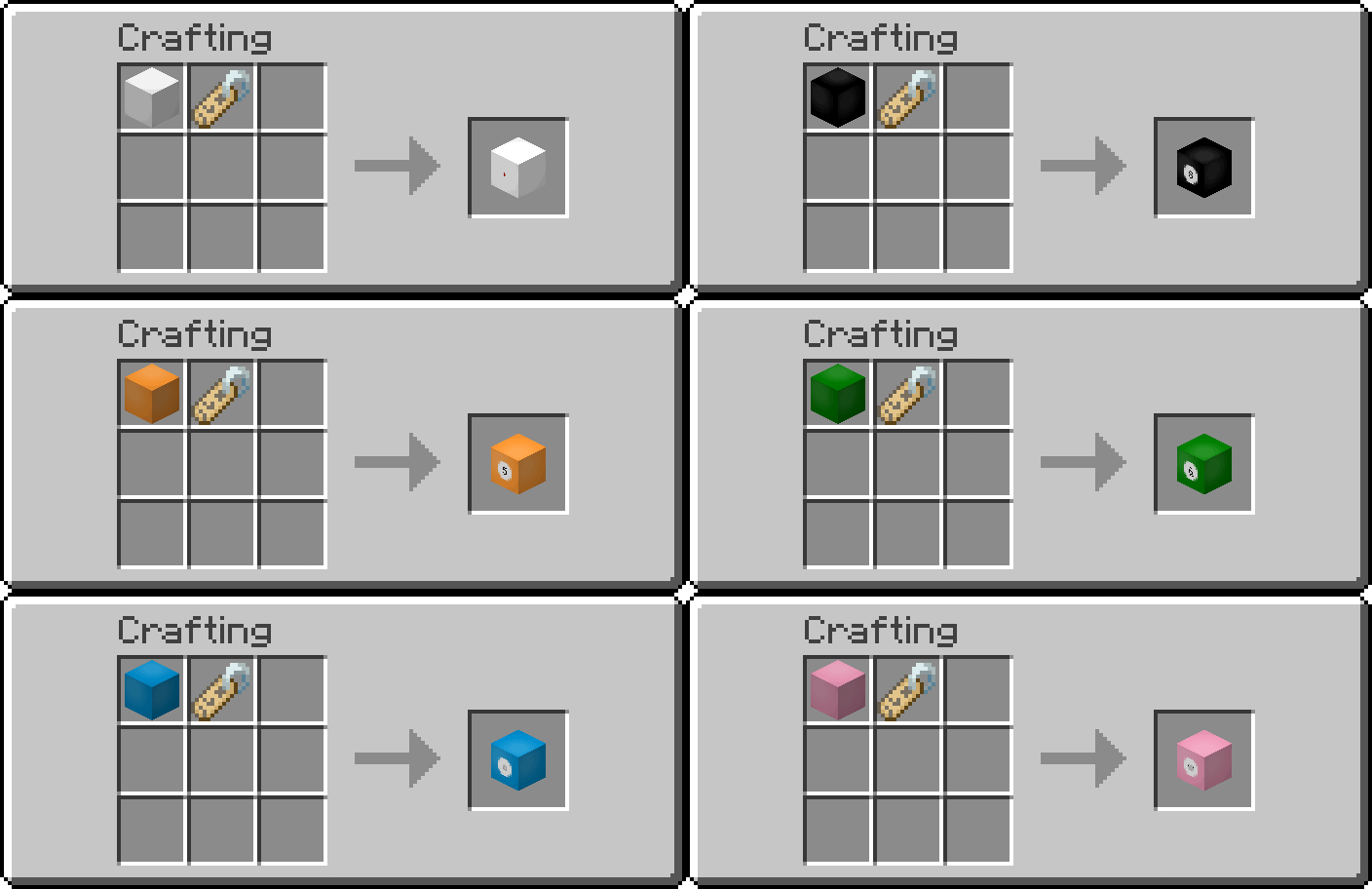 Crafting Recipe for Stained Smooth Resin Blocks, Labelled Matching Stained Smooth Resin Block + Name Tag
 -
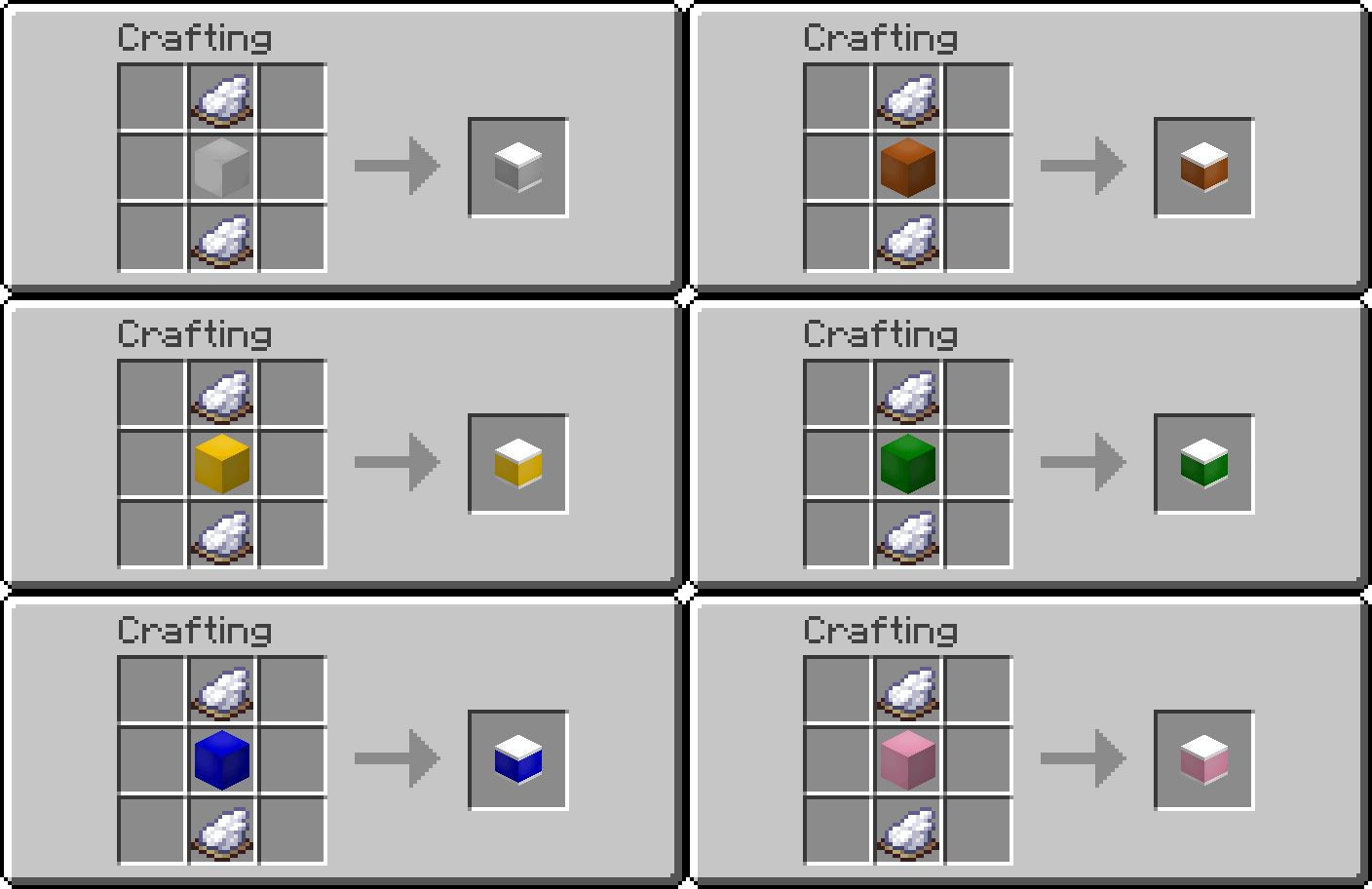 Crafting Recipe for White-striped Stained Smooth Resin Blocks Matching Stained Smooth Resin Block + 2 White Dyes
 -
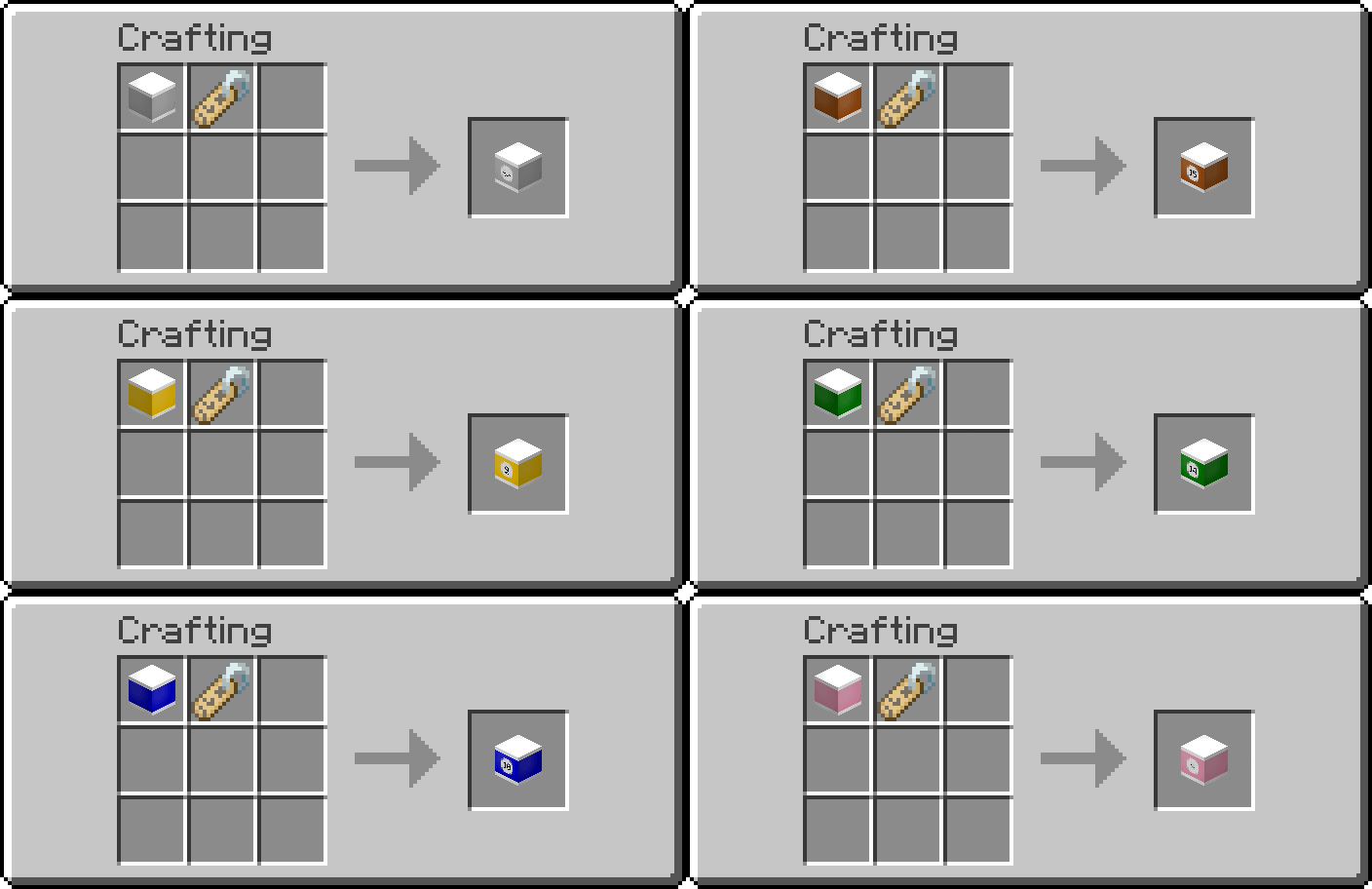 Recipe for White-striped Stained Smooth Resin Blocks, Labelled Matching White-striped Stained Smooth Resin Block + Name Tag
 -
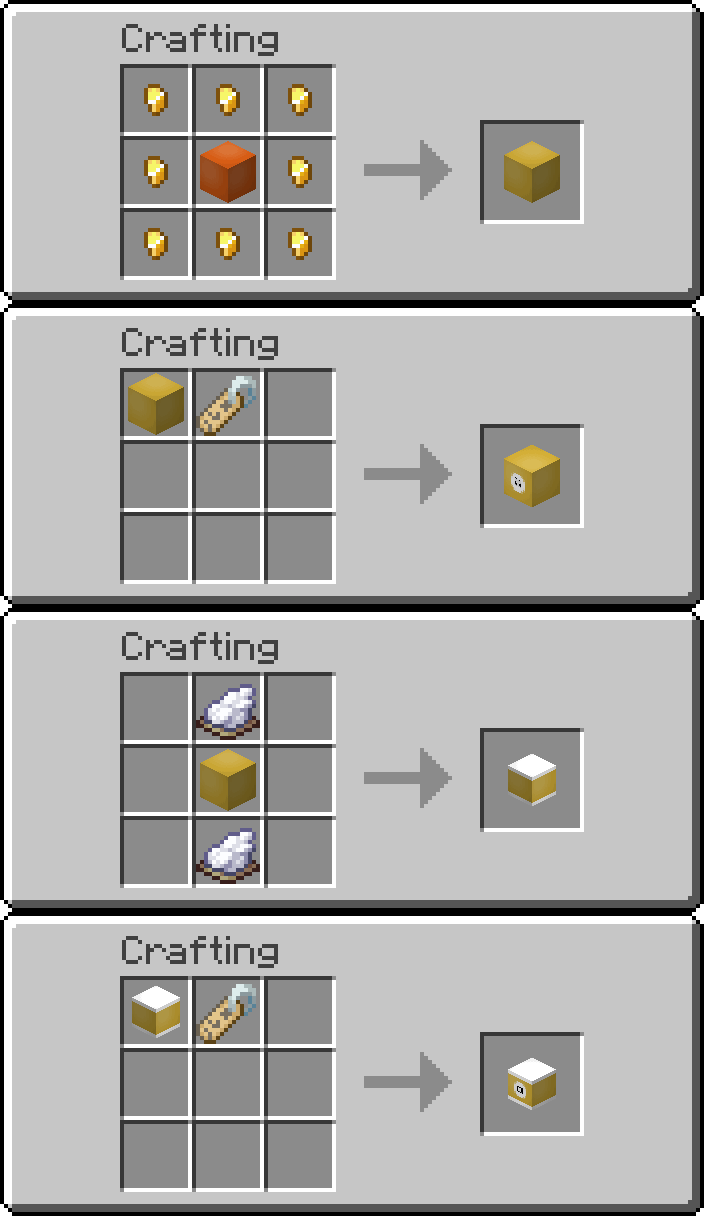 Crafting Recipes for Golden Resin Blocks
 -
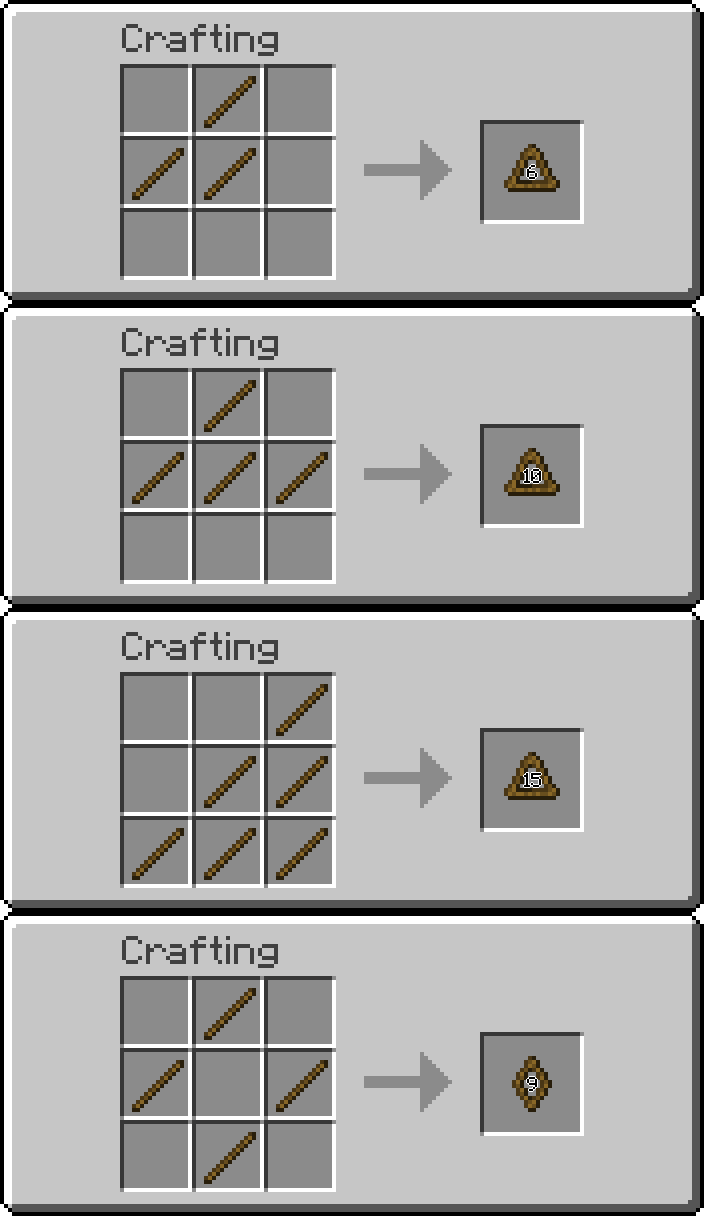 Crafting Recipe of all available Racks
 -
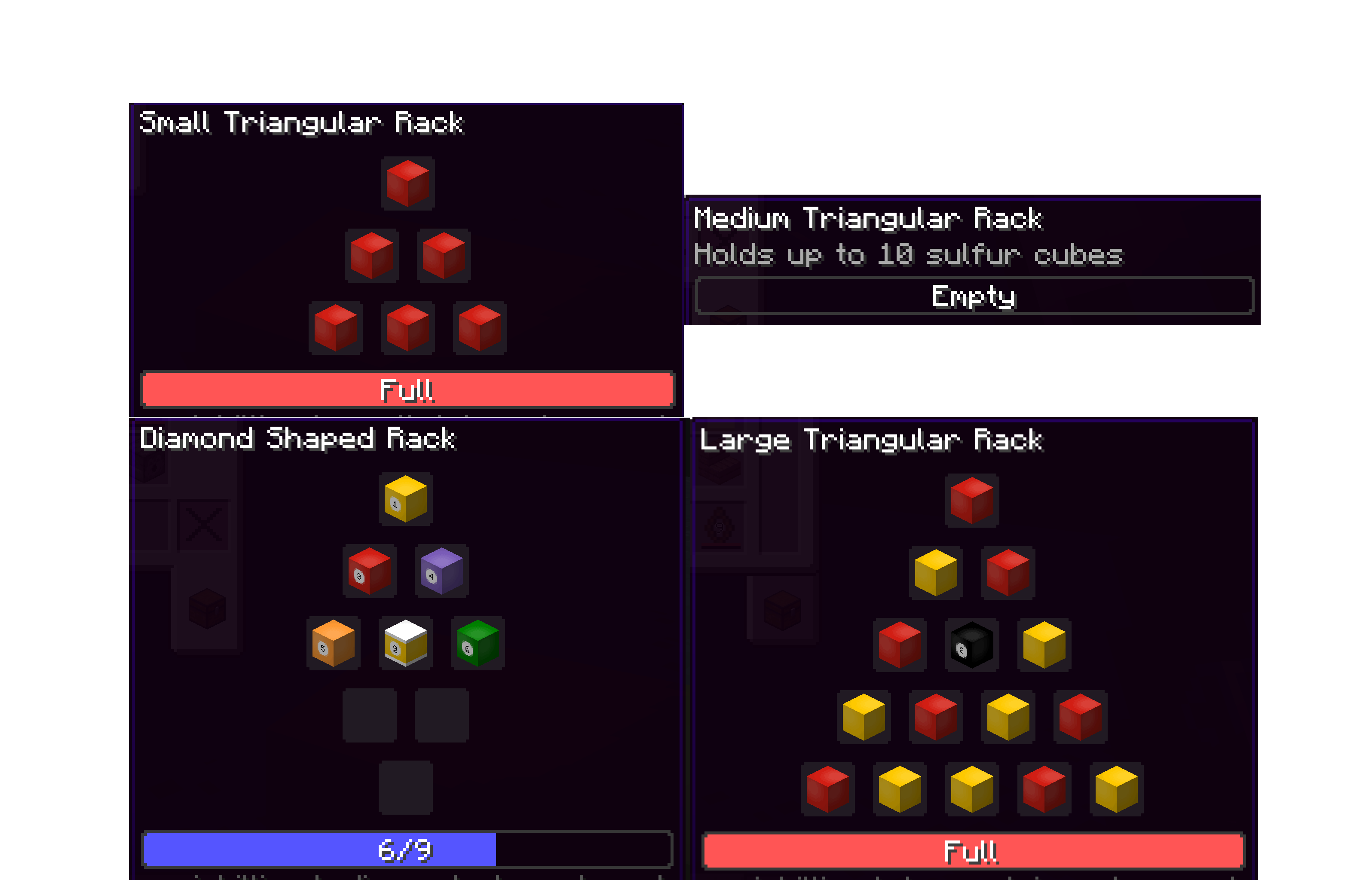 Rack Tooltip GUI See how the cubes are arranged inside of the rack!
 -
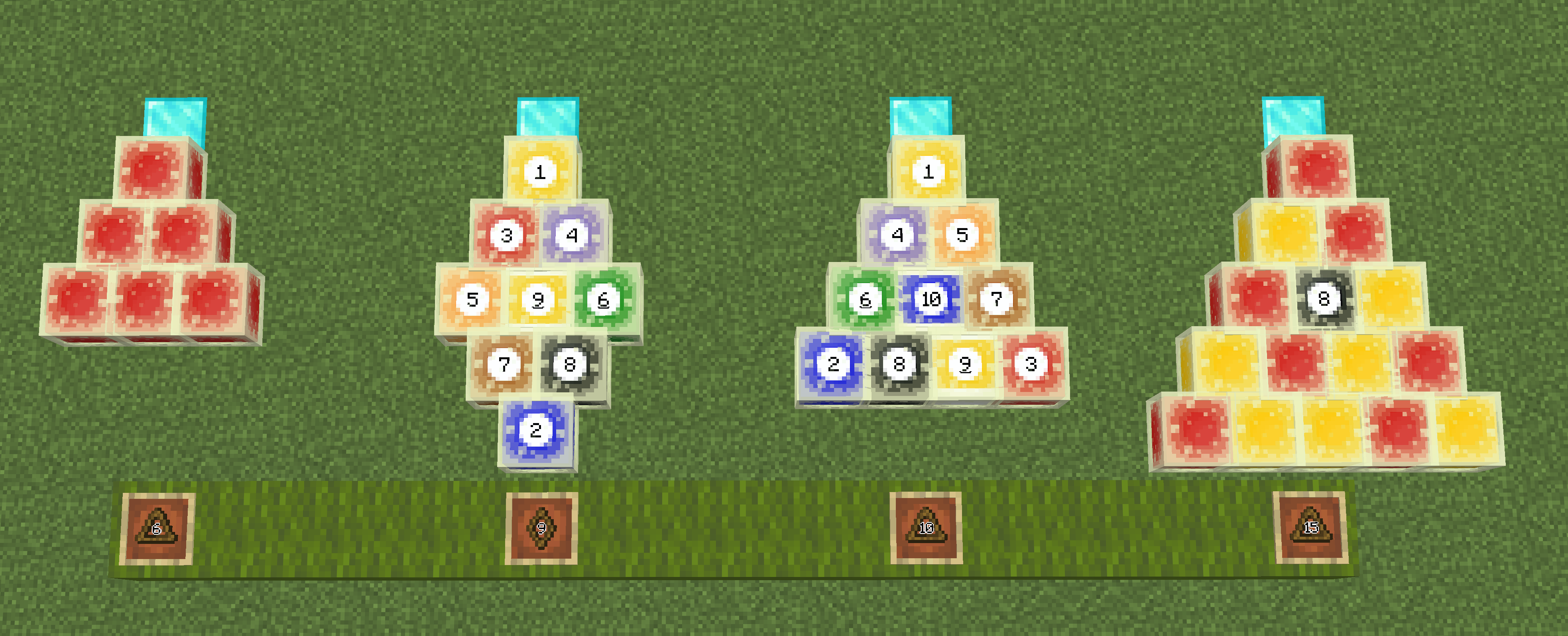 Rack Sulfur Cube Placements Stand on the position denoted by the diamond block and place the contents on the apex position.
Versions
Files
Relations
Project Relations
More like this
Similar Mods
Suggestions use data such as tags, dependencies, dependents, descriptions, titles, and more to rank how much they overlap with this mod.
On ModDex
Community snapshot
By the numbers
Statistics

Want to reach Minecraft players?
We're looking for a server hosting partner to feature here and other parts of the site. Interested? Send us a message!
Get in touchGet it on
Available Platforms
On ModDex
Community snapshot
By the numbers
Statistics
Resources